
@magicbeansai/magicvault
v0.9.3
Published
Secure credentials for AI agents via MCP, CLI, and TypeScript, with encrypted storage, private prompts, and just-in-time login.

Maintainers
 das_vicky
Readme
MagicVault



Secure credentials for AI agents via MCP, CLI, and TypeScript.
Encrypted storage, private prompts, and just-in-time login.
Use saved credentials for repeat tasks or enter one-time browser credentials when automation reaches an unfamiliar login. Enrollment is optional. A native daemon holds credentials, requests human approval and delivers them to an authorized recipient; MCP/CLI clients receive closed status, not credential values or raw recipient output.
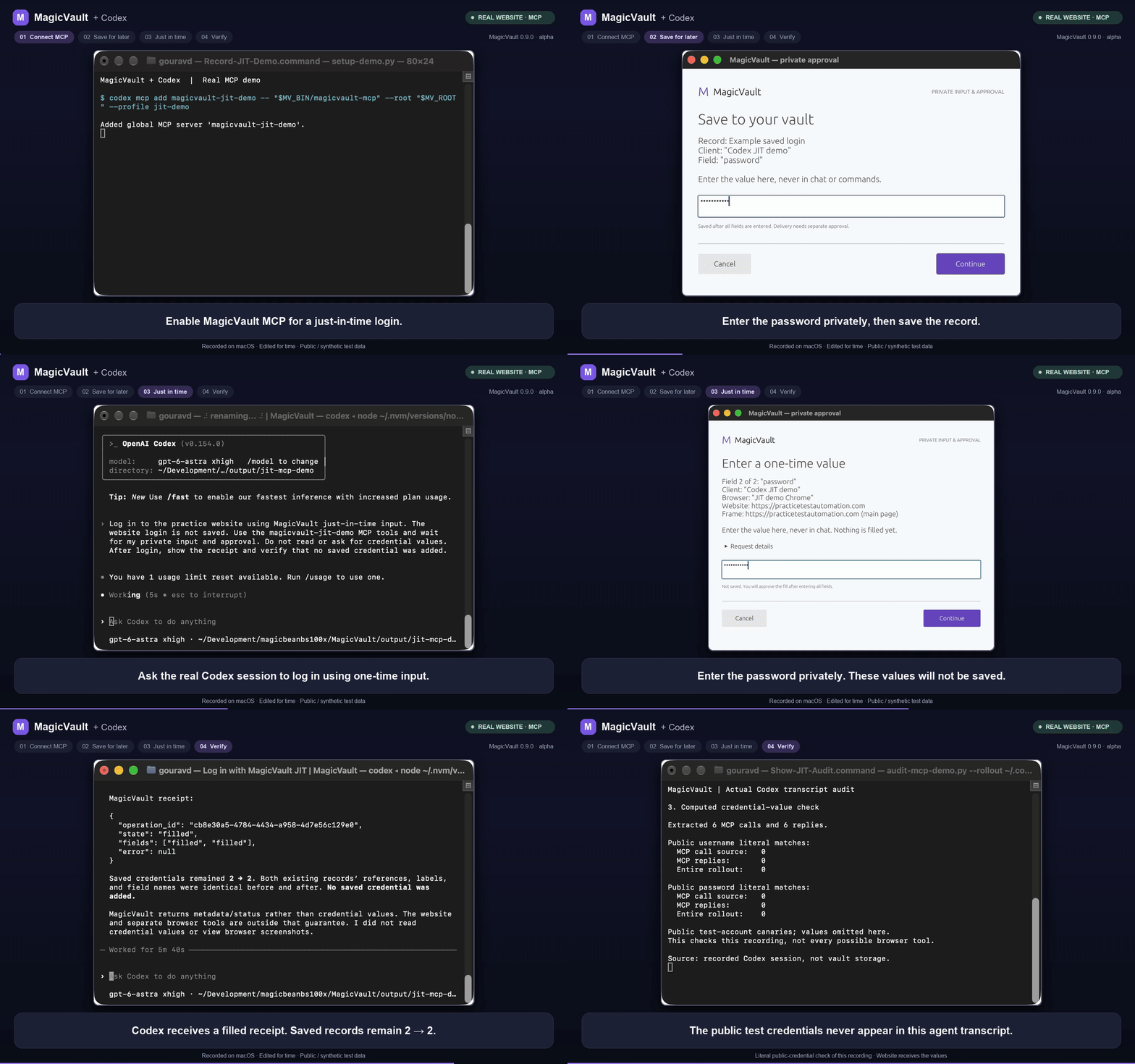
Real MCP demo (0.9.0), 1:33: enable MCP, glimpse optional login/card storage, then log in with just-in-time credentials entered in MagicVault's private window. Codex receives a receipt; no saved record is added. Click the GIF to watch with narration. Watch with audio · Recording and transcript audit.
Authorized recipients receive the secret; separate browser tools can still read it afterward. Security boundary.
Start with MCP for Codex, Claude Code or another local agent. The agent can
request one-time input with secure_prompt_fill, discover saved references,
request secure_fill, secure_new_process or
secure_new_http, and poll status. Use the CLI for shell-based agents/scripts;
the included Node/TypeScript SDK is for applications. The package launches native
binaries and exports a reference-only client with TypeScript declarations.
It does not expose raw credentials or provide a hosted MCP service.
Use in a Node or TypeScript project
Install the package into your project (Node 22+; npm's latest channel):
npm install @magicbeansai/magicvault
npx magicvault --profile agent setup
For MCP/CLI use outside a project:
npm install --global @magicbeansai/magicvault
magicvault --profile agent setup
magicvault --profile agent doctor
This single package bundles macOS, Linux and Windows binaries (x64/ARM64). The launcher selects your platform automatically. There are no native-package dependencies, install scripts or runtime downloads. Platform support remains alpha. Explicit setup opens the human approval flow.
For a connected browser, discover the intended page/frame and request one-time input. The selectors and field names below are metadata, not credential values:
import { MagicVault, createOperationId } from '@magicbeansai/magicvault';

const vault = new MagicVault({ profile: 'agent' });
// Select browser and target from listBrowsers()/browserTargets().
const operation_id = createOperationId();
await vault.securePromptFill({
  operation_id,
  browser_handle: browser.browser_handle,
  target_handle: target.target_handle,
  fields: [
    { field_name: 'username', css: '#username' },
    { field_name: 'password', css: '#password' },
  ],
});
const receipt = await vault.waitForFill(operation_id, { timeoutMs: 210_000 });
console.log(receipt.state);
MagicVault opens its own desktop window with masked input, a short destination summary and expandable request details. Enter the values there, then approve Use once. Values are not saved, and no remembered permission is created. Your browser tool submits the form after you inspect the receipt. One-time input · Prompt UI and trust boundary.
For recurring use, human enrollment can store login fields or a generic record of cardholder/number/expiry fields. Card storage does not authorize a payment. The SDK and MCP expose no enrollment or raw-secret getter.
For saved HTTP credentials, after human enrollment and destination setup:
import { MagicVault, createOperationId } from '@magicbeansai/magicvault';

const vault = new MagicVault({ profile: 'agent' });
const profiles = await vault.listDeliveryProfiles();
const profile = profiles.find(p => p.label === 'Demo API' && p.kind === 'http');
if (!profile) throw new Error('Register the Demo API destination first.');
const operation_id = createOperationId(); // Retain before sending; never auto-retry.
await vault.secureNewHttp({ profile_id: profile.profile_id, operation_id });
const receipt = await vault.waitForDelivery(operation_id);
console.log(receipt.state); // Inspect this: completion does not prove API success.
require('@magicbeansai/magicvault') also works. Browser fill, HTTP/process
delivery, discovery, status and cancellation pass only metadata or references. Native errors
are closed; interrupted calls retain their operation ID. Polling repeats status
reads only. No enrollment, approval-grant or raw-secret getter is exposed.
SDK guide.
This is early-access software. Use synthetic credentials first. Packaging does not certify secret isolation from unrestricted same-user software, recipient websites/processes, or another browser tool reading the page afterward.
Start with MCP
Requires Node 22+ and a logged-in desktop session. The published package bundles all six platform builds; the launcher selects the matching executable. Bundled builds cover macOS, Linux and Windows (x64/ARM64); platform prerequisites and validation differ. Windows supports browser and HTTP delivery; governed process delivery is unavailable. No Rust toolchain is needed for matching prebuilt packages. Package installation has no lifecycle hooks or native-package dependencies and does not start services or create a vault. All platform binaries are included in the download; there is no setup-time binary download. Unsupported OS/CPU combinations are refused by npm platform constraints and by the launcher.
magicvault --version
magicvault --profile agent setup
magicvault --profile agent doctor
One-time browser input needs no enrollment. Enter values only in native hidden prompts. Setup installs into a private,
stable app directory separate from the credential vault and prints an absolute-path
mcpServers configuration without capability tokens. Prefer that stable MCP
command over a cache-dependent npx command. magicvault-mcp is also provided.
Next, follow the Codex/Claude Code connection commands
and authorize your browser or fixed process/HTTP destination. Your MCP client
launches the stdio bridge; the installed daemon stays responsible for custody.
Ask the agent to check vault_status, discover references and use the secure
tools. One-time human setup and native approval for every delivery still apply;
MCP does not grant itself access, enroll credentials or remove those prompts.
For explicit shell calls instead, see CLI automation. Scripts use the same consent and receipt-only boundary, not unattended CI access. For embedding, see developer integrations.
To migrate from 0.9.0, update the main package with
npm install --global @magicbeansai/magicvault@latest (or omit --global for
a project), then run magicvault upgrade. The new package has no platform
dependencies; npm removes obsolete transitive dependencies during the update.
Old platform packages remain deprecated compatibility downloads for 0.9.0.
magicvault uninstall unloads owned integrations and archives app files while
preserving the vault, keychain and pairing files. npm uninstall is separate.
See the quick start, installation and signing details, destination coverage and security boundary. All three desktop platforms are alpha. See the linked platform-specific evidence and remaining acceptance work. Packages do not imply Apple signing/notarization or Windows code signing; verify the publisher and release evidence.