
@mahdialikhani/react-datatable
v1.1.24
Published
Mahdi alikhani datatable component for handle lists
Downloads
8

Maintainers
 mahdialikhani
Readme
ReactJs dataTable package
DataTable is a ReactJs component that makes it easier to work with lists. We are working to add new features to this component We would be happy if you could help us.
We are In this component used the following packages, and you can use the guide of these packages to make the best use of it.
- react-js-pagination
Installation
Install @mahdialikhani/react-datatable with npm:
npm i @mahdialikhani/react-datatable###Usage
This component is very easy to use.
#####Example:
import React from 'react';
import DataTable from '@mahdialikhani/react-datatable';

function Users() {

    let data = {
        columns: [
            {label: 'row', name: 'id'},
            {label: 'Name', name: 'name'},
            {label: 'LastName', name: 'last_name'},
            {label: 'Email', name: 'email'},
            {label: 'Actions', name: 'actions'},
        ],
        rows: [
            {
                id: 1,
                name: 'Connor Donnelly',
                last_name : 'Johns',
                email: '[email protected]'
            }
        ]
    };

    let styles = {
        countSelectorText: ['show'],
        searchText: ['search'],
    };

    const [state, setState] = useState({data: data});

    const buttons = (user) => {
        return (
            <div key={Math.random()}>
                <button type="button" className="btn btn-warning btn-sm">
                    Edit
                </button>
                <button type="button" className="btn btn-danger btn-sm">
                    Delete
                </button>
            </div>
        );
    };

    return (
        <div className="container list-div">
            <DataTable data={state.data} buttons={buttons} styles={styles}/>
        </div>
    );
}

export default Users;
I must say that if you do not want to work for the appearance of the lists yourself, you can create a beautiful appearance by calling the file below. '@mahdialikhani/react-datatable/assets/Styles/styles.scss'
As you can see in the picture below, you can view your list of information on the page by calling the DataTable component
#####Example result:
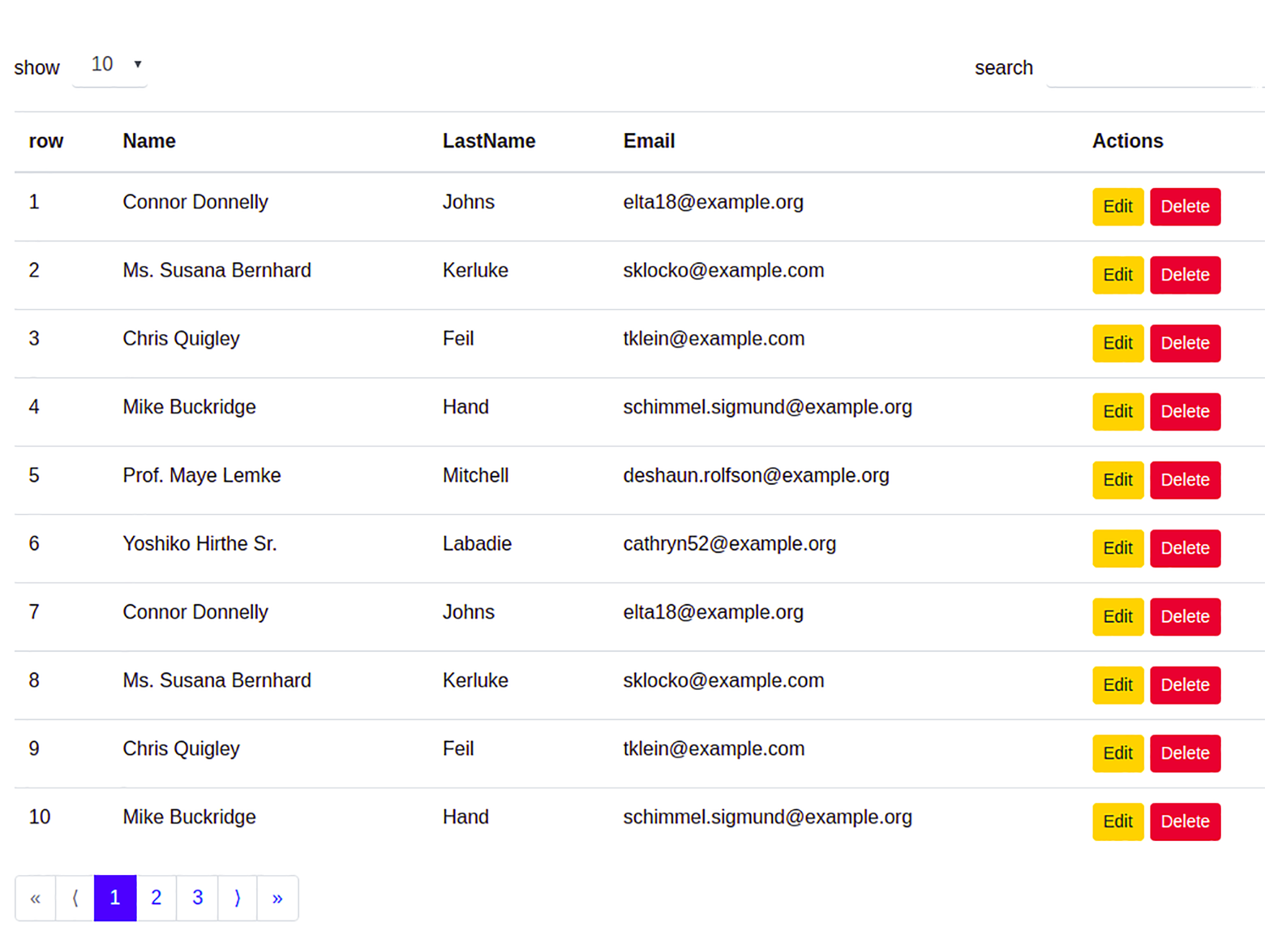
Yes, you can use this component as easily as you can see.
Params for Personalization
You can use the following parameters to customize this component.
1- countSelectorText: ['show'] : You can also add another text
to this array, which will be displayed after the count selector.
For example:
    let styles = {
        countSelectorText: ['show', 'entries']
    };
2- searchText: ['search'] : You can add another text to this
array to display it in the list search input.
For example:
    let styles = {
        countSelectorText: ['show', 'entries'],
        searchText: ['search', 'search...']
    };
3- ordering : This parameter accepts an array as a value, which is used
to move items above the list (the same as the number selector
and search input).
If you want the number selector to be on the right and the
search input to be on the left, you need to arrange the two
numbers as the first and second items and the first number is
larger than the second.
For example:
    let styles = {
        countSelectorText: ['show', 'entries'],
        searchText: ['search', 'search...'],
        ordering: [2, 1],
    };
Or
    let styles = {
        countSelectorText: ['show', 'entries'],
        searchText: ['search', 'search...'],
        ordering: [1, 2], /*Default*/
    };
4- paginateClass : This parameter can be a Css or Bootstrap
class that can move the list of your page numbers below
the list to the left or right.
For example:
    let styles = {
        countSelectorText: ['show', 'entries'],
        searchText: ['search', 'search...'],
        ordering: [1, 2],
        paginateClass: 'pull-left',
    };
Or
    let styles = {
        countSelectorText: ['show', 'entries'],
        searchText: ['search', 'search...'],
        ordering: [1, 2],
        paginateClass: 'pull-right',
    };
5- pagination : This parameter is an array that accepts an
object as the first item. In this item, you can customize the
specifications of the buttons previous and next pages.
You can also change the status of the quick transfer buttons to the first or last pages.
For example:
    let styles = {
        countSelectorText: ['show', 'entries'],
        searchText: ['search', 'search...'],
        ordering: [1, 2],
        paginateClass: 'pull-left',
        pagination: [
            {
                prevPageText: '<',
                nextPageText: '>',
                hideFirstLastPages: false
            }
        ]
    };
Or
    let styles = {
        countSelectorText: ['show', 'entries'],
        searchText: ['search', 'search...'],
        ordering: [1, 2],
        paginateClass: 'pull-left',
        pagination: [
            {
                prevPageText: 'prev',
                nextPageText: 'Next',
                hideFirstLastPages: true
            }
        ]
    };