
@maindala/telemetry
v0.1.6
Published
Free, zero-setup live telemetry for AI agents — metadata-only tool-call events, streamed live with `npx maindala tail`
Downloads
68

Maintainers
 maindala
Readme
@maindala/telemetry

Free, zero-setup live telemetry for AI agents. See exactly what your agent's tool calls are doing, in real time, with one command — no account, no org, no config.
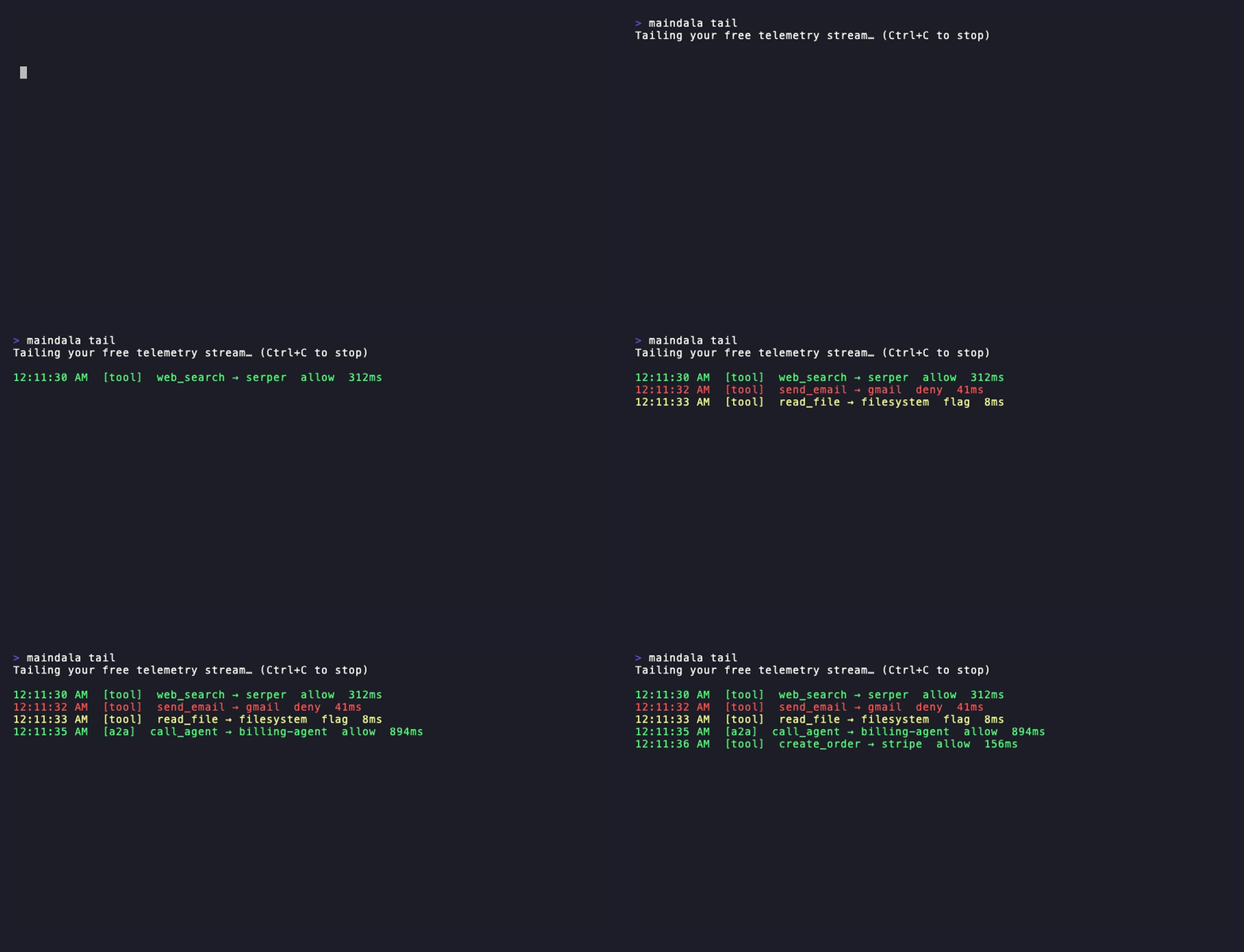
npx maindala tail --signup [email protected]That mints a free token and starts a live tail immediately. Wire your agent up to send events with this package:
npm install @maindala/telemetryimport { pushToolCallTelemetry } from '@maindala/telemetry';
await pushToolCallTelemetry(process.env.MAINDALA_TELEMETRY_TOKEN!, {
kind: 'tool_call',
toolName: 'send_email',
target: 'gmail',
latencyMs: 240,
});Run maindala tail again (no arguments — it remembers your saved token) and
watch it show up live.
The metadata-only guarantee
This package never sends, and the event shape has no field for, your
prompts, tool arguments, or tool results. Only what ran (toolName), where
(target), how long it took (latencyMs), and — if you're also using mAIndala's
governance layer — the policy decision (decision) and finding class names
only (e.g. "secret_egress", never the matched content). If you need to see
inside the payloads themselves, that's a different, explicitly opt-in concern —
this package will never grow that capability.
Events are also ephemeral: the free tier keeps the last 500 events / 1 hour (whichever comes first), then they're gone. Short-lived by design, both a feature and a cost/privacy control.
See DATA.md for the full, verified account of what's stored,
where, for how long, what's provably never sent, and how to point this at
your own self-hosted sink instead of mAIndala's hosted gateway.
Framework quickstarts
The API is one plain async function — call it right after any tool call completes, in whatever hook your framework gives you.
Plain MCP client
const result = await mcpClient.callTool({ name: 'search', arguments: { q } });
await pushToolCallTelemetry(token, { kind: 'tool_call', toolName: 'search', target: 'my-mcp-server', latencyMs: Date.now() - start });
LangGraph (tool node)
const toolNode = new ToolNode(tools, {
  handleToolErrors: true,
}).bind({
  // wrap each tool's invoke() — or call pushToolCallTelemetry from within a
  // custom tool's own implementation, right after it returns.
});
class ObservedTool extends Tool {
async _call(input: string) {
const start = Date.now();
const result = await super._call(input);
await pushToolCallTelemetry(token, { kind: 'tool_call', toolName: this.name, target: this.name, latencyMs: Date.now() - start });
return result;
}
}CrewAI (Python agents calling a Node telemetry sidecar)
If your agent runtime is Python, run a tiny Node sidecar (or a serverless
function) that calls pushToolCallTelemetry and have your CrewAI tool wrapper
POST to it after each tool call — or POST directly to the ingest endpoint from
Python:
import requests
requests.post('https://mcp.maindala.com/telemetry/ingest',
    headers={'Authorization': f'Bearer {token}'},
    json={'kind': 'tool_call', 'toolName': tool_name, 'target': target, 'latencyMs': latency_ms})
OpenAI Agents SDK (tool call hook)
const tool = { ...myTool, async invoke(args) {
  const start = Date.now();
  const result = await myTool.invoke(args);
  await pushToolCallTelemetry(token, { kind: 'tool_call', toolName: myTool.name, target: myTool.name, latencyMs: Date.now() - start });
  return result;
}};
A2A delegations
Delegating to another agent? Use kind: 'a2a_call' and set target to the
callee agent's name/slug instead of a tool target — it renders in maindala
tail with an [a2a] label instead of [tool].
Options
pushToolCallTelemetry(token, event, gatewayUrl?) — the third argument
overrides the mAIndala gateway URL (default https://mcp.maindala.com), useful
if you're pointed at a self-hosted or staging instance.
Beyond the free tier
This package is intentionally thin — telemetry only. If you also want inline
policy enforcement (allow/deny/redact tool calls before they run) and DLP
redaction against your org's rules, see
@maindala/agent-guard,
which implements the same telemetry contract plus that enforcement layer.
Re-rendering the demo GIF
The README demo is generated from a checked-in vhs tape, not a manual screen recording. To regenerate it after a CLI/output change:
export MAINDALA_API_KEY=mt_<a throwaway token, from `maindala tail --signup <email>`>
vhs assets/demo.tape
The token is read from the environment only — it's never typed or shown in the recording, and must never
be a real project's token. See assets/demo.tape for the full capture script and assets/emit-demo-events.mjs
for the real events it streams in (via the live ingest endpoint — not faked terminal output).
Releasing
See RELEASING.md — publishing runs through a GitHub Release +
trusted-publishing CI workflow with a required-reviewer approval gate, not a local
npm publish.
License
MIT