
@makdosdev/form-ui
v0.1.24
Published
A shadcn-style CLI for adding form components to your React project
Downloads
1,714


Readme
Makdos Form UI
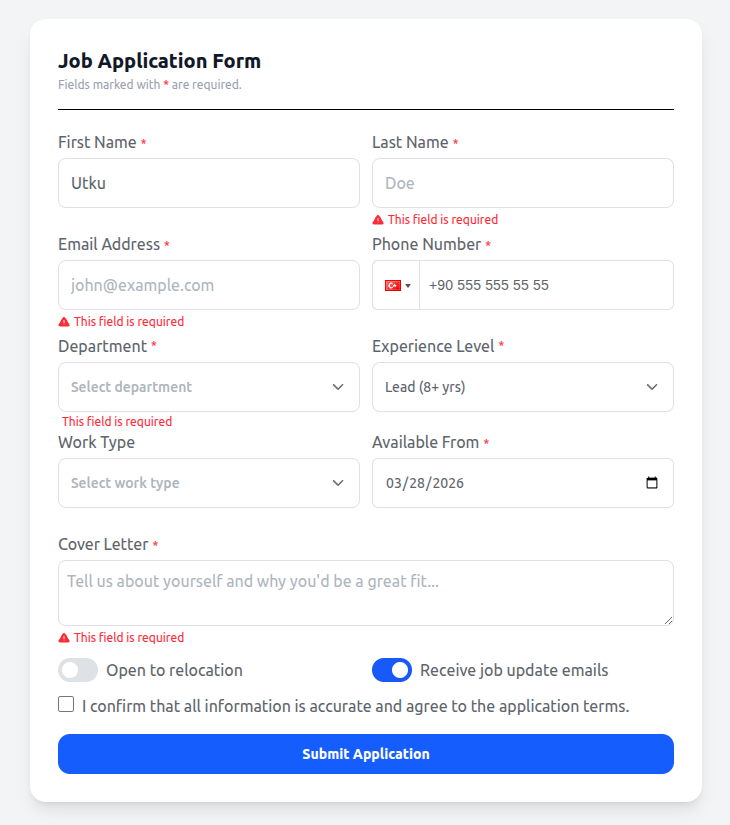
A CLI-first React form component library built on React Hook Form + Tailwind CSS. Add components directly to your project — own the code, customize freely.
Built by Makdos — software products crafted for modern teams.
Getting Started
1. Initialize
Run the init command in your project root. This sets up Tailwind CSS (if not already installed), creates makdos-theme.css, and generates makdos.config.json.
npx @makdosdev/form-ui initWhat it does automatically:
- Next.js — installs
tailwindcss @tailwindcss/postcss postcssand createspostcss.config.mjs - Vite — installs
tailwindcss @tailwindcss/viteand shows the config step - Both — creates
makdos-theme.cssandmakdos.config.jsonin your project root
2. Import the theme in your global CSS
Next.js (app/globals.css):
@import "tailwindcss";
@import "./makdos-theme.css";
Vite (src/index.css):
@import "tailwindcss";
@import "./makdos-theme.css";
3. Vite only — add the plugin to vite.config.ts
import tailwindcss from "@tailwindcss/vite"

export default defineConfig({
  plugins: [react(), tailwindcss()],
})
Next.js users can skip this step —
postcss.config.mjswas created automatically.
4. Add components
npx @makdosdev/form-ui add FormTextInput
npx @makdosdev/form-ui add FormTextInput FormSelectBox FormCheckBox
Components are copied into src/components/FormElements/ by default. Change the destination in makdos.config.json:
{
  "path": "src/components/FormElements"
}
Or override it once with the --path flag:
npx @makdosdev/form-ui add FormTextInput --path src/components/formsOther commands
npx @makdosdev/form-ui list # List all available componentsAvailable Components
Form Components
Use these inside a <Form> wrapper. They integrate with React Hook Form automatically — validation, error display, and submit handling included.
| Component | Standalone Base | Description |
|-----------|----------------|-------------|
| FormTextInput | TextInput | Text, password, search, domain input |
| FormSelectBox | SelectBox | Single & multi-select dropdown |
| FormCheckBox | CheckBox | Checkbox |
| FormTextArea | TextArea | Textarea |
| FormToggle | Toggle | Toggle / switch |
| FormNumeric | Numeric | Number input with min/max |
| FormDateTime | DateTime | Date & datetime picker |
| FormTime | Time | Time picker |
| FormPhoneInput | PhoneInput | Phone input with country code |
Standalone Components
Use these directly with useState — no form required. Great for filters, search bars, and UI-only interactions.
| Component | Description |
|-----------|-------------|
| TextInput | Text input with icon support |
| SelectBox | Dropdown with search & multi-select |
| CheckBox | Checkbox |
| TextArea | Textarea |
| Toggle | Toggle / switch |
| Numeric | Number input |
| DateTime | Date picker |
| DatePicketBig | Full calendar date picker |
| Time | Time picker |
| PhoneInput | Phone input with country code |
| RadioButton | Radio button group |
| SelectBoxGroup | Grouped dropdown with search |
| ListBox | Dual-list selection (available / selected) |
| Button | Button with 5 variants (primary, secondary, tertiary, bordered, error) |
| TextEditor | Rich text editor |
Hooks
| Hook | Description |
|------|-------------|
| useSelectbox | Converts API data to SelectBox format |
| useMultipleSelectbox | Same as above with checked state for multi-select |
| useSelectboxGroup | Groups items by a field for SelectBoxGroup |
| useOutSideClick | Detects clicks outside an element |
| useWindowSize | Returns current window width & height |
Theming
All components are styled using CSS custom properties. This means you can change every color — inputs, buttons, toggles, focus states — by editing a single file.
Setup
makdos-theme.css is created automatically when you run init or add your first component. Import it in your global CSS file:
@import "tailwindcss";
@import "./makdos-theme.css";
Customizing Colors
Open makdos-theme.css and change any variable:
@theme {
  /* Change the primary color across all components */
  --color-focus-border:        #e74c3c;
  --color-toggle-checked:      #e74c3c;
  --color-primary-button-bg:   #e74c3c;
}
Color Variables Reference
| Variable | Default | Used In |
|----------|---------|---------|
| --color-label | #5D646B | All input labels |
| --color-text | #5D646B | Input text, dropdown text |
| --color-placeholder | #ADB5BD | Input placeholders |
| --color-border | #DEE2E6 | Input borders |
| --color-background-form | #FFFFFF | Input background |
| --color-error | #FC2B36 | Error messages, error borders |
| --color-icon | #ADB5BD | Input icons (default state) |
| --color-focus-border | #1958F9 | Input border on focus |
| --color-focus-placeholder | #5D646B | Input placeholder on focus |
| --color-focus-icon | #5D646B | Input icon on focus |
| --color-disable-text | #CAD0DC | Disabled input text |
| --color-disable-background | #DEE2E6 | Disabled input background |
| --color-toggle-checked | #1958F9 | Toggle ON state |
| --color-toggle-unchecked | #DEE2E6 | Toggle OFF state |
| --color-selectbox-hover-item | #DEE2E6 | Dropdown item hover |
| --color-primary-button-bg | #1958F9 | Primary button background |
| --color-primary-button-text | #FFFFFF | Primary button text |
| --color-primary-button-hover-bg | #0F599A | Primary button hover |
| --color-secondary-button-bg | #E8EFFF | Secondary button background |
| --color-tertiary-button-bg | #FFFFFF | Tertiary button background |
| --color-bordered-button-border | #1958F9 | Bordered button border |
| --color-error-button-bg | #FF4D56 | Error button background |
Example: Red Theme
@theme {
  --color-focus-border:              #e74c3c;
  --color-toggle-checked:            #e74c3c;
  --color-primary-button-bg:         #e74c3c;
  --color-primary-button-hover-bg:   #c0392b;
  --color-secondary-button-text:     #e74c3c;
  --color-bordered-button-text:      #e74c3c;
  --color-bordered-button-border:    #e74c3c;
  --color-bordered-button-hover-bg:  #c0392b;
}
Two Ways to Use
Every component can be used in two ways:
- With
<Form>— integrated with React Hook Form, validation, submit handling - Standalone — directly with
useState, no form needed (useful for filters, search bars, etc.)
Form
The <Form> wrapper creates a React Hook Form context. All Form* components inside it automatically register, validate, and submit.
Props
| Prop | Type | Required | Description |
|------|------|----------|-------------|
| onSubmit | (data: T, isCtrlS: boolean) => void | Yes | Submit handler. isCtrlS is true when triggered via Ctrl+S keyboard shortcut. |
| children | ReactNode | Yes | Form content — place all form fields here |
| defaultValues | DefaultValues<T> | No | Initial values for all fields |
| methods | UseFormReturn<T> | No | Pass external RHF methods. If omitted, Form creates them internally. |
| onMethods | (methods: UseFormReturn<T>) => void | No | Callback to receive the internal form methods (useful for manual reset, setValue, etc.) |
| resettable | boolean | No | If true, resets all fields to defaultValues after a successful submit |
import Form, { SubmitFunction } from '@/components/FormElements/Form'

const handleSubmit: SubmitFunction = async (data, isCtrlS) => {
  console.log(data)
}

<Form onSubmit={handleSubmit} defaultValues={{ email: '' }} resettable>
  {/* form fields */}
</Form>
TextInput / FormTextInput
Props
| Prop | Type | Required | Description |
|------|------|----------|-------------|
| name | string | Yes (Form) | Field name — must match the form data key |
| label | string | No | Label shown above the input |
| placeholder | string | No | Placeholder text |
| type | "text" \| "password" \| "number" \| "domain" \| "search" | No | Input type. Default: "text". "password" adds a show/hide toggle. "search" adds a clear button. "domain" prefixes https://. |
| value | string | No | Controlled value (standalone use) |
| defaultValue | string | No | Initial uncontrolled value |
| onChange | (value: string) => void | No | Called on every keystroke (standalone use) |
| leftIcon | ReactNode | No | Icon displayed on the left inside the input |
| required | boolean | No | Shows a * indicator next to the label |
| disabled | boolean | No | Disables the input |
| min | number | No | Min value for type="number" |
| max | number | No | Max value for type="number" |
| style | string | No | Extra Tailwind classes on the outer wrapper div |
| inputStyle | string | No | Extra Tailwind classes on the <input> element |
| customIcon | string | No | CSS class for a custom right-side icon |
| error | string | No | Error message shown below the input |
| onKeyUp | React.KeyboardEventHandler<HTMLInputElement> | No | Key up event handler |
| rules | RegisterOptions | No | (FormTextInput only) React Hook Form validation rules |
| resetValue | unknown | No | (FormTextInput only) Value the field resets to when the form resets |
With Form:
import FormTextInput from '@/components/FormElements/FormTextInput'
import { IconMail, IconLock } from '@tabler/icons-react'

<FormTextInput
  name="email"
  label="Email"
  placeholder="[email protected]"
  leftIcon={<IconMail />}
  rules={{ required: { value: true, message: 'This field is required.' } }}
/>

<FormTextInput
  name="password"
  label="Password"
  placeholder="••••••••••"
  type="password"
  leftIcon={<IconLock />}
  rules={{ required: { value: true, message: 'This field is required.' } }}
/>
Standalone (search / filter):
import TextInput from '@/components/FormElements/components/TextInput'

const [search, setSearch] = useState('')

<TextInput
  name="search"
  value={search}
  onChange={setSearch}
  placeholder="Search..."
  type="search"
/>
TextArea / FormTextArea
Props
| Prop | Type | Required | Description |
|------|------|----------|-------------|
| name | string | Yes (Form) | Field name |
| label | string | No | Label shown above the textarea |
| placeholder | string | No | Placeholder text |
| value | string | No | Controlled value (standalone use) |
| defaultValue | string | No | Initial uncontrolled value |
| onChange | (value: string) => void | No | Called on every change (standalone use) |
| rows | number | No | Number of visible text rows. Default: browser default |
| required | boolean | No | Shows a * indicator next to the label |
| disabled | boolean | No | Disables the textarea |
| style | string | No | Extra Tailwind classes on the outer wrapper div |
| inputStyle | string | No | Extra Tailwind classes on the <textarea> element |
| error | string | No | Error message shown below the textarea |
| rules | RegisterOptions | No | (FormTextArea only) React Hook Form validation rules |
| resetValue | unknown | No | (FormTextArea only) Value the field resets to |
With Form:
import FormTextArea from '@/components/FormElements/FormTextArea'

<FormTextArea
  name="note"
  label="Note"
  placeholder="Write something..."
  rows={4}
/>
Standalone:
import TextArea from '@/components/FormElements/components/TextArea'

const [note, setNote] = useState('')

<TextArea
  name="note"
  label="Note"
  placeholder="Write something..."
  rows={4}
  value={note}
  onChange={setNote}
/>
SelectBox / FormSelectBox
Props
| Prop | Type | Required | Description |
|------|------|----------|-------------|
| name | string | Yes (Form) | Field name |
| label | string | No | Label shown above the dropdown |
| placeholder | string | No | Placeholder text when nothing is selected |
| items | SelectBoxItem[] | No | List of options. Each item: { value, text, checked?, icon?, otherInfo? } |
| setItems | (data, valueKey, textKey, checkedKey?) => void | No | Converts raw API data into SelectBoxItem[] format (use with useSelectbox hook) |
| selectedItems | SelectBoxItem \| SelectBoxItem[] \| null | No | Currently selected item(s) |
| setSelectedItems | (item?) => void | No | Called when selection changes |
| multiSelect | boolean | No | Enables multi-select mode |
| search | boolean | No | Adds a search input inside the dropdown |
| searchAndAdd | (val: string) => void | No | Called when the user types in search — useful for creating new options |
| defaultSelect | SelectBoxItem | No | Pre-selected item on first render |
| formDefaultValue | string \| number | No | (FormSelectBox only) Pre-selects the item whose value matches this |
| formDefaultTriggerFunction | (item: SelectBoxItem) => void | No | Called once when formDefaultValue is applied |
| formClickTriggerFunction | (item: SelectBoxItem) => void | No | Called every time the user selects an item |
| onChange | (item: SelectBoxItem) => void | No | Called when selection changes |
| required | boolean | No | Shows a * indicator next to the label |
| disabled | boolean | No | Disables the dropdown |
| paginate | boolean | No | Enables virtual/paginated rendering for large lists |
| price | boolean | No | Formats item values as price |
| style | string | No | Extra Tailwind classes on the wrapper |
| error | FieldError | No | React Hook Form field error object |
| rules | RegisterOptions | No | (FormSelectBox only) Validation rules |
| resetValue | unknown | No | (FormSelectBox only) Value the field resets to |
With Form:
import FormSelectBox from '@/components/FormElements/FormSelectBox'

<FormSelectBox
  name="role"
  label="Role"
  placeholder="Select a role"
  items={[
    { value: 1, text: 'Admin' },
    { value: 2, text: 'Editor' },
    { value: 3, text: 'Viewer' },
  ]}
  search
  required
  rules={{ required: { value: true, message: 'This field is required.' } }}
/>
Standalone (filter bar) — with useSelectbox hook:
import SelectBox from '@/components/FormElements/components/SelectBox'
import { useSelectbox } from '@/components/FormElements/hooks'

const [companyList, setCompanyList] = useSelectbox()
const [selectedCompany, setSelectedCompany] = useState(null)

// Convert API data
useEffect(() => {
  fetchCompanies().then((res) => setCompanyList(res, 'id', 'name'))
}, [])

<SelectBox
  items={companyList}
  setItems={setCompanyList}
  selectedItems={selectedCompany}
  setSelectedItems={setSelectedCompany}
  formClickTriggerFunction={(item) => onFilter({ company_id: item?.value })}
  style="w-[200px]"
/>
CheckBox / FormCheckBox
Props
| Prop | Type | Required | Description |
|------|------|----------|-------------|
| name | string | Yes (Form) | Field name |
| id | string | No | HTML id attribute |
| label | string | No | Text label |
| labelJSX | JSX.Element | No | JSX label — use instead of label for custom markup (links, bold text, etc.) |
| labelLeft | boolean | No | Places the label to the left of the checkbox |
| labelRight | boolean | No | Places the label to the right of the checkbox |
| labelStyle | string | No | Extra Tailwind classes on the label |
| description | string | No | Small helper text shown below the label |
| checked | boolean | No | Controlled checked state (standalone use) |
| defaultValue | boolean | No | Initial uncontrolled checked state |
| onChange | (checked: boolean) => void | No | Called when checked state changes |
| required | boolean | No | — |
| disabled | boolean | No | Disables the checkbox |
| style | string | No | Extra Tailwind classes on the wrapper |
| error | FieldError | No | Error object — shows message below the checkbox |
| rules | RegisterOptions | No | (FormCheckBox only) Validation rules |
| resetValue | unknown | No | (FormCheckBox only) Value the field resets to |
With Form:
import FormCheckBox from '@/components/FormElements/FormCheckBox'

<FormCheckBox
  name="acceptTerms"
  label="I accept the terms"
  labelRight
  onChange={(checked) => console.log(checked)}
/>
Standalone:
import CheckBox from '@/components/FormElements/components/CheckBox'

const [checked, setChecked] = useState(false)

<CheckBox
  id="remember"
  label="Remember me"
  labelRight
  checked={checked}
  onChange={(val) => setChecked(val)}
/>
Toggle / FormToggle
Props
| Prop | Type | Required | Description |
|------|------|----------|-------------|
| id | string | Yes | HTML id — required to link the label to the input |
| name | string | No | Field name (required when used with Form) |
| label | string | No | Text label |
| labelRight | boolean | No | Places the label to the right of the toggle |
| labelStyle | string | No | Extra Tailwind classes on the label |
| isCheck | boolean | No | Controlled checked state (standalone use) |
| setIsCheck | React.Dispatch<React.SetStateAction<boolean>> | No | State setter for controlled use |
| triggerFunction | (value: boolean) => void | No | Called after every toggle change with the new value |
| checkColor | string | No | Custom Tailwind color class for the toggle when ON |
| disabled | boolean | No | Disables the toggle |
| style | string | No | Extra Tailwind classes on the wrapper |
| error | FieldError | No | Error object — shows message below the toggle |
| rules | RegisterOptions | No | (FormToggle only) Validation rules |
| resetValue | unknown | No | (FormToggle only) Value the field resets to |
With Form:
import FormToggle from '@/components/FormElements/FormToogle'

<FormToggle
  id="is_active"
  name="is_active"
  label="Active"
  labelRight
  style="mb-2"
/>
Standalone:
import FormToggle from '@/components/FormElements/FormToogle'

const [isDeposit, setIsDeposit] = useState(false)

<FormToggle
  id="is_deposit"
  name="is_deposit"
  label="Deposit"
  labelRight
  isCheck={isDeposit}
  setIsCheck={setIsDeposit}
  style="mb-2"
/>
Numeric / FormNumeric
Props
| Prop | Type | Required | Description |
|------|------|----------|-------------|
| name | string | Yes (Form) | Field name |
| id | string | No | HTML id attribute |
| label | string | No | Label shown above the input |
| placeholder | string | No | Placeholder text |
| value | number | No | Controlled value (standalone use) |
| defaultValue | number | No | Initial uncontrolled value |
| onChange | (value: number) => void | No | Called when value changes (debounced) |
| min | number | No | Minimum allowed value — clamps on blur |
| max | number | No | Maximum allowed value — clamps on blur |
| required | boolean | No | Shows a * indicator next to the label |
| disabled | boolean | No | Disables the input |
| style | string | No | Extra Tailwind classes on the wrapper |
| error | string | No | Error message shown below the input |
| rules | RegisterOptions | No | (FormNumeric only) Validation rules |
| resetValue | unknown | No | (FormNumeric only) Value the field resets to |
With Form:
import FormNumeric from '@/components/FormElements/FormNumeric'

<FormNumeric
  name="balance"
  label="Balance"
  placeholder="Enter balance"
  required
  rules={{
    required: { value: true, message: 'This field is required.' },
    min: { value: 0.01, message: 'Balance must be greater than 0.' },
  }}
/>
Standalone:
import Numeric from '@/components/FormElements/components/Numeric'

const [quantity, setQuantity] = useState(1)

<Numeric
  name="quantity"
  label="Quantity"
  value={quantity}
  onChange={setQuantity}
  min={1}
  max={100}
/>
DateTime / FormDateTime
Props
| Prop | Type | Required | Description |
|------|------|----------|-------------|
| name | string | Yes (Form) | Field name |
| id | string | No | HTML id attribute |
| label | string | No | Label shown above the input |
| type | "date" \| "datetime-local" | No | Input type. Default: "date" |
| value | string | No | Controlled value — ISO date string (standalone use) |
| onChange | (value: string) => void | No | Called when value changes |
| required | boolean | No | Shows a * indicator next to the label |
| disabled | boolean | No | Disables the input |
| style | string | No | Extra Tailwind classes on the wrapper |
| inputStyle | string | No | Extra Tailwind classes on the <input> element |
| error | string | No | Error message shown below the input |
| rules | RegisterOptions | No | (FormDateTime only) Validation rules |
| resetValue | unknown | No | (FormDateTime only) Value the field resets to |
With Form:
import FormDateTime from '@/components/FormElements/FormDateTime'

<FormDateTime
  name="start_date"
  label="Start Date"
  required
  rules={{ required: { value: true, message: 'Start date is required.' } }}
  style="col-span-2 lg:col-span-1"
/>
Standalone (date filter) — full calendar picker:
import DatePicketBig from '@/components/FormElements/components/DatePicketBig'

const [date, setDate] = useState(null)

<DatePicketBig
  placeholder="Select Date"
  value={date}
  onChange={setDate}
  onChangeDateTime={(val) => onFilter({ date: val })}
/>
DatePicketBig Props
| Prop | Type | Required | Description |
|------|------|----------|-------------|
| placeholder | string | Yes | Placeholder text shown when no date is selected |
| value | any | Yes | Currently selected date value |
| onChange | (value: any) => void | Yes | Called when the date changes |
| onChangeDateTime | (date: any) => void | Yes | Called with the formatted date — use this for side effects like filtering |
| style | string | No | Extra Tailwind classes on the wrapper |
Time / FormTime
Props
| Prop | Type | Required | Description |
|------|------|----------|-------------|
| name | string | Yes (Form) | Field name |
| id | string | No | HTML id attribute |
| label | string | No | Label shown above the input |
| value | string | No | Controlled value — "HH:mm" format (standalone use) |
| onChange | (value: string) => void | No | Called when value changes |
| step | string | No | Time step interval in seconds (e.g. "900" = 15 min steps) |
| required | boolean | No | Shows a * indicator next to the label |
| disabled | boolean | No | Disables the input |
| style | string | No | Extra Tailwind classes on the wrapper |
| error | string | No | Error message shown below the input |
| rules | RegisterOptions | No | (FormTime only) Validation rules |
| resetValue | unknown | No | (FormTime only) Value the field resets to |
With Form:
import FormTime from '@/components/FormElements/FormTime'

<FormTime
  name="meeting_time"
  label="Meeting Time"
  rules={{ required: { value: true, message: 'This field is required.' } }}
/>
Standalone:
import Time from '@/components/FormElements/components/Time'

const [time, setTime] = useState('')

<Time
  name="meeting_time"
  label="Meeting Time"
  value={time}
  onChange={setTime}
  step="900"
/>
PhoneInput / FormPhoneInput
Props
| Prop | Type | Required | Description |
|------|------|----------|-------------|
| name | string | Yes (Form) | Field name |
| id | string | No | HTML id attribute |
| label | string | No | Label shown above the input |
| placeholder | string | No | Placeholder text |
| value | string | No | Controlled phone number value including country code (standalone use) |
| setValue | (value: string) => void | No | Called when the number changes (standalone use) |
| search | boolean | No | Adds a search field inside the country code dropdown |
| required | boolean | No | Shows a * indicator next to the label |
| disabled | boolean | No | Disables the input |
| style | string | No | Extra Tailwind classes on the wrapper |
| error | string | No | Error message shown below the input |
| rules | RegisterOptions | No | (FormPhoneInput only) Validation rules |
| resetValue | unknown | No | (FormPhoneInput only) Value the field resets to |
With Form:
import FormPhoneInput from '@/components/FormElements/FormPhoneInput'

<FormPhoneInput
  id="phone"
  name="phone"
  label="Phone"
  placeholder="Phone number"
  rules={{
    required: { value: true, message: 'This field is required.' },
    minLength: { value: 12, message: 'Please enter a valid phone number.' },
  }}
/>
Standalone:
import PhoneInput from '@/components/FormElements/components/PhoneInput'

const [phone, setPhone] = useState('')

<PhoneInput
  id="phone"
  label="Phone"
  placeholder="Phone number"
  value={phone}
  setValue={setPhone}
  search
/>
Button
Props
| Prop | Type | Required | Description |
|------|------|----------|-------------|
| text | string | No | Button label text |
| buttonType | "primary" \| "secondary" \| "tertiary" \| "bordered" \| "error" | No | Visual style variant. Default: "primary" |
| type | "button" \| "submit" \| "reset" | No | HTML button type. Default: "submit" |
| size | "small" \| "medium" \| "large" | No | Button size. Default: "medium" |
| iconLeft | ReactNode | No | Icon displayed to the left of the text |
| iconRight | ReactNode | No | Icon displayed to the right of the text |
| onClick | () => void | No | Click handler |
| disabled | boolean | No | Disables the button |
| isLoading | boolean | No | Shows a spinner and disables the button |
| style | string | No | Extra Tailwind classes |
import Button from '@/components/FormElements/components/Button'
import { IconDownload, IconCircleCheck } from '@tabler/icons-react'

// Default submit button
<Button text="Save" size="medium" />

// Bordered with icon
<Button
  text="Download PDF"
  buttonType="bordered"
  iconLeft={<IconDownload />}
  type="button"
  onClick={handleDownload}
/>

// Primary submit
<Button
  text="Submit"
  buttonType="primary"
  iconLeft={<IconCircleCheck />}
  type="submit"
/>

// Loading state
<Button text="Saving..." buttonType="primary" isLoading />
RadioButton
Props
| Prop | Type | Required | Description |
|------|------|----------|-------------|
| name | string | Yes | HTML name attribute — groups the radio buttons |
| items | { id: string; text: string }[] | Yes | List of options. id is the value, text is the label. |
| selected | string | Yes | The id of the currently selected option |
| onChange | (value: string) => void | Yes | Called with the id of the newly selected option |
| style | string | No | Extra Tailwind classes on the wrapper |
import RadioButton from '@/components/FormElements/components/RadioButton'

const [selected, setSelected] = useState('income')

<RadioButton
  name="transaction_type"
  items={[
    { id: 'income', text: 'Income' },
    { id: 'expense', text: 'Expense' },
  ]}
  selected={selected}
  onChange={(value) => setSelected(value)}
/>
TextEditor
Props
| Prop | Type | Required | Description |
|------|------|----------|-------------|
| editorData | any | Yes | Current editor content (HTML string or editor state) |
| onEditorChange | (state: any) => void | Yes | Called whenever the content changes |
import TextEditor from '@/components/FormElements/components/TextEditor'

const [editorData, setEditorData] = useState()

<TextEditor
  editorData={editorData}
  onEditorChange={(state) => setEditorData(state)}
/>
ListBox
A dual-panel component for moving items between an "available" list and a "selected" list.
Props
| Prop | Type | Required | Description |
|------|------|----------|-------------|
| type | string | Yes | Layout type — use "double" for the standard two-panel layout |
| label | string | Yes | Header label for the left (available) panel |
| items | any[] | Yes | Array of available items. Each item must have id and text. |
| setItems | any | Yes | State setter for items |
| selectedItems | any[] | Yes | Array of selected items |
| setSelectedItems | any | Yes | State setter for selectedItems |
| labelType | string | No | Header label for the right (selected) panel. Default: "Selected" |
| height | string | No | Tailwind height class for both panels (e.g. "h-[300px]") |
| width | string | No | Tailwind width class for both panels (e.g. "w-[400px]") |
| autocomplete | boolean | No | Enables a search/filter input on the available panel |
import ListBox from '@/components/FormElements/components/ListBox'

const [items, setItems] = useState([
  { id: 1, text: 'Item 1' },
  { id: 2, text: 'Item 2' },
])
const [selected, setSelected] = useState([])

<ListBox
  type="double"
  label="Available"
  labelType="Selected"
  items={items}
  setItems={setItems}
  selectedItems={selected}
  setSelectedItems={setSelected}
  height="h-[300px]"
  width="w-[400px]"
/>
SelectBoxGroup
A grouped dropdown where options are organized under category headers.
Props
| Prop | Type | Required | Description |
|------|------|----------|-------------|
| name | string | No | Field name |
| label | string | No | Label shown above the dropdown |
| placeholder | string | No | Placeholder text when nothing is selected |
| type | "checkbox" \| "radio" | No | Selection mode. "checkbox" for multi-select, "radio" for single. |
| items | any | No | Grouped items — use useSelectboxGroup hook to format API data |
| setItems | any | No | Setter function from useSelectboxGroup |
| selectedItems | any | No | Currently selected item(s) |
| setSelectedItems | any | No | State setter for selected items |
| search | boolean | No | Adds a search input inside the dropdown |
| defaultSelect | any | No | Pre-selected item on first render |
| formDefaultValue | any | No | Pre-selects by value match |
| formDefaultTriggerFunction | any | No | Called once when formDefaultValue is applied |
| formClickTriggerFunction | any | No | Called every time the user selects an item |
| onChange | any | No | Called when selection changes |
| required | boolean | No | Shows a * indicator next to the label |
| disabled | boolean | No | Disables the dropdown |
| paginate | boolean | No | Enables paginated rendering for large lists |
| style | string | No | Extra Tailwind classes on the wrapper |
| error | any | No | Error message or object |
import SelectBoxGroup from '@/components/FormElements/components/SelectBoxGroup'
import { useSelectboxGroup } from '@/components/FormElements/hooks'

const [groupItems, setGroupItems] = useSelectboxGroup()
const [selected, setSelected] = useState([])

useEffect(() => {
  fetchCategories().then((res) => setGroupItems(res, 'id', 'name', 'group'))
}, [])

<SelectBoxGroup
  name="category"
  label="Category"
  type="checkbox"
  items={groupItems}
  selectedItems={selected}
  setSelectedItems={setSelected}
  search
  placeholder="Select..."
/>
Hooks
import {
  useSelectbox,
  useMultipleSelectbox,
  useSelectboxGroup,
  useOutSideClick,
  useWindowSize
} from '@/components/FormElements/hooks'
useSelectbox
Converts raw API data into SelectBoxItem[] format for SelectBox.
const [items, setItems] = useSelectbox()
setItems(apiData, 'id', 'name')
// output: [{ value: id, text: name, otherInfo: { ...all fields } }]
| Parameter | Type | Description |
|-----------|------|-------------|
| data | any[] | Raw API response array |
| valueKey | string | Field name to use as value |
| textKey | string | Field name to use as text |
useMultipleSelectbox
Same as useSelectbox but also maps a checked boolean field — use for pre-selected multi-select lists.
const [items, setItems] = useMultipleSelectbox()
setItems(apiData, 'id', 'name', 'is_selected')
| Parameter | Type | Description |
|-----------|------|-------------|
| data | any[] | Raw API response array |
| valueKey | string | Field name to use as value |
| textKey | string | Field name to use as text |
| checkedKey | string \| boolean | Field name (or literal true/false) to use as checked |
useSelectboxGroup
Converts raw API data into grouped format for SelectBoxGroup.
const [groupItems, setGroupItems] = useSelectboxGroup()
setGroupItems(apiData, 'id', 'name', 'group_name')
| Parameter | Type | Description |
|-----------|------|-------------|
| data | any[] | Raw API response array |
| valueKey | string | Field name to use as value |
| textKey | string | Field name to use as text |
| groupName | string | Field name to group items by |
useOutSideClick
Detects clicks outside a referenced element — useful for closing dropdowns and modals.
const [wrapperRef] = useOutSideClick(() => setIsOpen(false))

<div ref={wrapperRef}>
  {/* dropdown content */}
</div>
useWindowSize
Returns the current window dimensions, updated on resize.
const { width, height } = useWindowSize()Full Form Example
import Form, { SubmitFunction } from '@/components/FormElements/Form'
import FormTextInput from '@/components/FormElements/FormTextInput'
import FormSelectBox from '@/components/FormElements/FormSelectBox'
import FormNumeric from '@/components/FormElements/FormNumeric'
import FormPhoneInput from '@/components/FormElements/FormPhoneInput'
import FormTextArea from '@/components/FormElements/FormTextArea'
import Button from '@/components/FormElements/components/Button'
import { useSelectbox } from '@/components/FormElements/hooks'
import { IconMail } from '@tabler/icons-react'

function ContactForm() {
  const [subjectList, setSubjectList] = useSelectbox()

  useEffect(() => {
    fetchSubjects().then((res) => setSubjectList(res, 'id', 'name'))
  }, [])

  const handleSubmit: SubmitFunction = async (data) => {
    console.log(data)
  }

  return (
    <Form onSubmit={handleSubmit}>
      <FormTextInput
        name="email"
        label="Email"
        placeholder="[email protected]"
        leftIcon={<IconMail />}
        rules={{ required: { value: true, message: 'This field is required.' } }}
      />
      <FormPhoneInput
        id="phone"
        name="phone"
        label="Phone"
        placeholder="Phone number"
        rules={{ required: { value: true, message: 'This field is required.' } }}
      />
      <FormSelectBox
        name="subject"
        label="Subject"
        placeholder="Select subject"
        items={subjectList}
        rules={{ required: { value: true, message: 'This field is required.' } }}
      />
      <FormNumeric
        name="amount"
        label="Amount"
        placeholder="Enter amount"
        rules={{
          required: { value: true, message: 'This field is required.' },
          min: { value: 1, message: 'Must be greater than 0.' },
        }}
      />
      <FormTextArea
        name="message"
        label="Message"
        placeholder="Your message..."
        rows={5}
      />
      <Button text="Send" buttonType="primary" type="submit" />
    </Form>
  )
}
Authors
- Utku Sezici — @utkusezici
- Berke Özenses — @berkeozenses
Made at Makdos
License
MIT