
@manik02/vue3-timepicker
v1.1.0
Published
Vue 3 time picker component with multiple formats, range selection, min/max constraints, disabled times, validation, custom styling, TypeScript support and more.
Downloads
347

Maintainers
 manik02
Readme
Vue 3 Time Picker



A Vue 3 time picker component with TypeScript support, multiple display formats, range selection, min/max constraints, disabled times, validation events, and full CSS variable theming.
- Live docs: Interactive Playground
- Package page: npm package
- Issues: GitHub issues
If this project helps you, a GitHub star helps a lot.
| Demo | Default | Dark |
| --- | --- | --- |
| 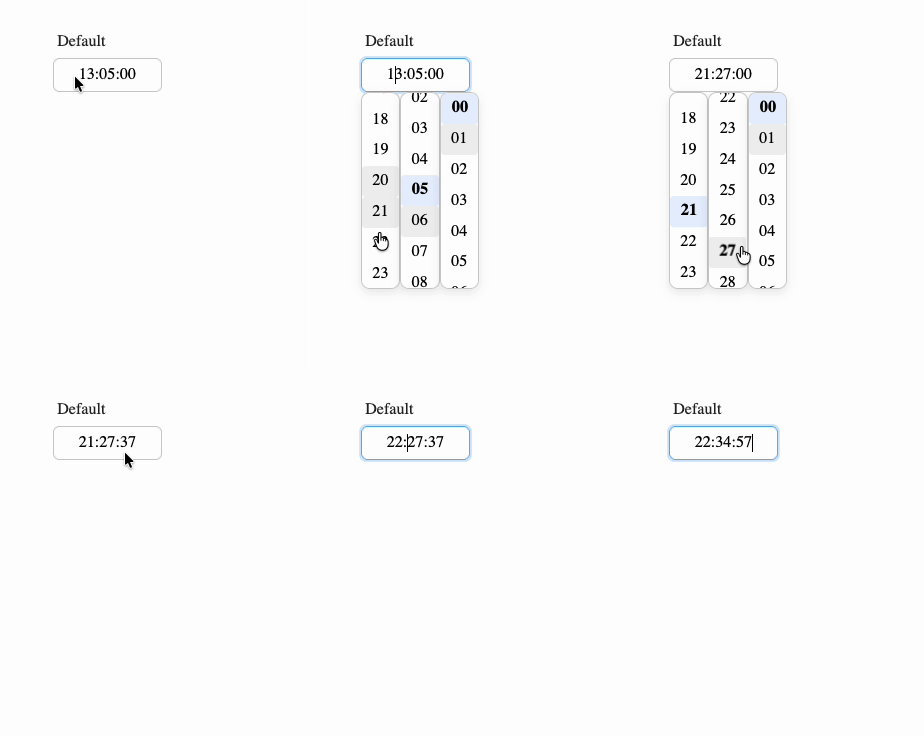 |
| 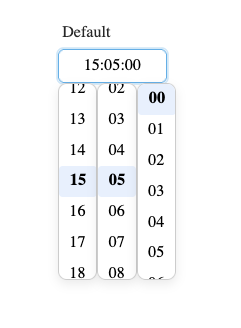 |
| 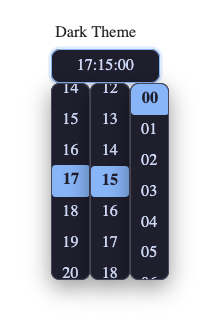 |
|
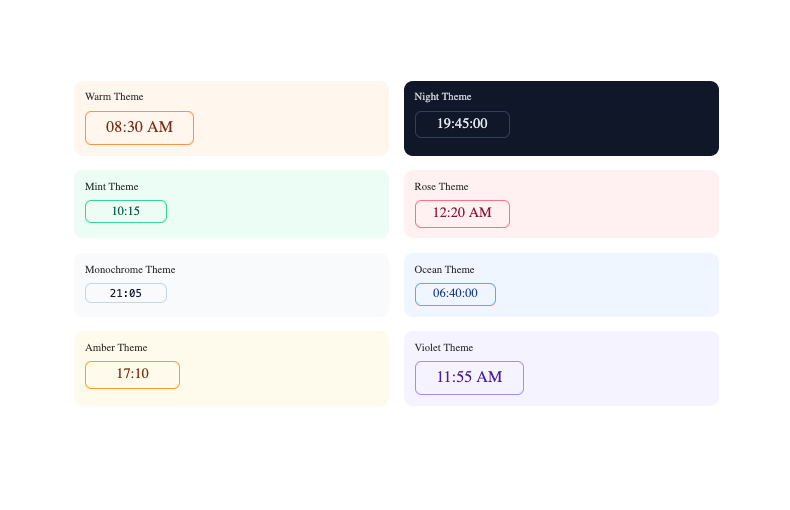
Features
- Single and range time selection
- 24-hour, 12-hour, and
k/kk1-24 hour display formats - Optional seconds
- Typing support with an overwrite-only masked input
- Step intervals for hours, minutes, and seconds
minTime,maxTime,disabledTimes, and callback-based disable rules- Validation and error events for form workflows
- Size presets, width control, custom classes, and CSS variable theming
- TypeScript types exported with the package
Installation
npm install @manik02/vue3-timepickerThis package expects Vue 3 as a peer dependency.
Quick Start
<script setup lang="ts">
import { ref } from "vue";
import { TimePicker } from "@manik02/vue3-timepicker";
import "@manik02/vue3-timepicker/style.css";

const time = ref("14:30:00");
</script>

<template>
  <TimePicker v-model="time" format="HH:mm" />
</template>
Important Value Behavior
formatonly changes how the value is displayed and edited.- The bound
v-modelvalue is always normalized asHH:mm:sswhen present. - In single mode, use
string | null | undefined. - In range mode, use
[string, string] | null | undefined.
Example: with format="HH:mm", the UI may show 14:30, but v-model still contains 14:30:00.
Playground
Run Storybook locally:
npm run storybookBuild the static docs site:
npm run build-storybookThe repo includes a GitHub Pages workflow for publishing Storybook from .github/workflows/storybook.yml.
Examples
Unless noted otherwise, the examples below assume this shared setup:
<script setup lang="ts">
import { computed, ref } from "vue";
import { TimePicker } from "@manik02/vue3-timepicker";
import "@manik02/vue3-timepicker/style.css";
</script>
Basic Single Picker
<script setup lang="ts">
import { ref } from "vue";

const time = ref("09:30:00");
</script>

<template>
  <TimePicker v-model="time" format="HH:mm" />
</template>
24-Hour Format with Seconds
<script setup lang="ts">
import { ref } from "vue";

const time = ref("14:30:45");
</script>

<template>
  <TimePicker v-model="time" format="HH:mm:ss" />
</template>
12-Hour Format
<script setup lang="ts">
import { ref } from "vue";

const time = ref("14:30:00");
</script>

<template>
  <TimePicker v-model="time" format="hh:mm A" />
</template>
While the input is focused, press a or p to toggle AM/PM.
Lowercase am/pm
<template>
  <TimePicker v-model="time" format="hh:mm a" />
</template>
k Format (1-24 Hours)
<script setup lang="ts">
import { ref } from "vue";

const time = ref("23:00:00");
</script>

<template>
  <TimePicker v-model="time" format="kk:mm" />
</template>
Start Empty and Clear Programmatically
<script setup lang="ts">
import { ref } from "vue";

const time = ref<string | null>(null);

function clearTime() {
  time.value = null;
}
</script>

<template>
  <TimePicker v-model="time" format="HH:mm" placeholder="Select a time" />
  <button type="button" @click="clearTime">Clear</button>
  <pre>{{ time }}</pre>
</template>
Range Picker
<script setup lang="ts">
import { ref } from "vue";

const range = ref<[string, string]>(["09:00:00", "17:00:00"]);
</script>

<template>
  <TimePicker v-model="range" :range="true" format="HH:mm" />
</template>
Range Picker with 30-Minute Intervals
<script setup lang="ts">
import { ref } from "vue";

const range = ref<[string, string]>(["09:00:00", "17:00:00"]);
</script>

<template>
  <TimePicker
    v-model="range"
    :range="true"
    format="HH:mm"
    :minute-step="30"
  />
</template>
Typing-Only Input
<script setup lang="ts">
import { ref } from "vue";

const time = ref("13:45:00");
</script>

<template>
  <TimePicker
    v-model="time"
    format="HH:mm:ss"
    :hide-dropdown="true"
    placeholder="Type time (e.g. 13:45:00)"
  />
</template>
Step Intervals
<script setup lang="ts">
import { ref } from "vue";

const time = ref("10:00:00");
</script>

<template>
  <TimePicker
    v-model="time"
    format="HH:mm:ss"
    :hour-step="2"
    :minute-step="15"
    :second-step="10"
  />
</template>
Working-Hours Bounds
<script setup lang="ts">
import { ref } from "vue";

const time = ref("08:00:00");
</script>

<template>
  <TimePicker
    v-model="time"
    format="HH:mm"
    min-time="09:00:00"
    max-time="18:00:00"
  />
</template>
If the user enters a value outside the allowed bounds, the component clamps it and emits out-of-range validation.
Disable Specific Times and Ranges
<script setup lang="ts">
import { ref } from "vue";

const time = ref("09:00:00");
</script>

<template>
  <TimePicker
    v-model="time"
    format="HH:mm"
    :disabled-times="[
      '10:30:00',
      ['12:00:00', '13:00:00'],
      ['15:15:00', '15:45:00']
    ]"
  />
</template>
Disable Times with a Callback
<script setup lang="ts">
import { ref } from "vue";

const time = ref("09:15:00");

function isTimeDisabled(value: { h: number; m: number; s: number }) {
  return value.m === 45 || (value.h >= 11 && value.h <= 12);
}
</script>

<template>
  <TimePicker
    v-model="time"
    format="HH:mm"
    :is-time-disabled="isTimeDisabled"
  />
</template>
React to Validation State
<script setup lang="ts">
import { computed, ref } from "vue";

const time = ref("08:00:00");
const validationState = ref<"valid" | "invalid" | "out-of-range">("valid");

const message = computed(() => {
  if (validationState.value === "out-of-range") {
    return "Adjusted to the nearest allowed time";
  }
  if (validationState.value === "invalid") {
    return "Please enter a valid time";
  }
  return "Looks good";
});
</script>

<template>
  <TimePicker
    v-model="time"
    v-model:validationState="validationState"
    format="HH:mm"
    min-time="09:00:00"
    max-time="17:00:00"
  />

  <small>{{ message }}</small>
</template>
Listen to Validation and Error Events
<script setup lang="ts">
import { ref } from "vue";
import type { ValidationReason, ValidationState } from "@manik02/vue3-timepicker";

const time = ref("12:00:00");
const validationState = ref<ValidationState>("valid");

function onValidate(payload: {
  target: "first" | "second";
  state: ValidationState;
  reason?: ValidationReason;
  value: string | null;
}) {
  console.log("validate", payload);
}

function onError(payload: { code: ValidationReason; message: string }) {
  console.log("error", payload);
}
</script>

<template>
  <TimePicker
    v-model="time"
    v-model:validationState="validationState"
    format="HH:mm"
    min-time="09:00:00"
    max-time="18:00:00"
    @validate="onValidate"
    @error="onError"
  />
</template>
Range Validation Example
<script setup lang="ts">
import { ref } from "vue";
import type { ValidationState } from "@manik02/vue3-timepicker";

const range = ref<[string, string]>(["09:00:00", "17:00:00"]);
const validationState = ref<ValidationState>("valid");
</script>

<template>
  <TimePicker
    v-model="range"
    :range="true"
    format="HH:mm"
    :disabled-times="[['12:00:00', '13:00:00']]"
    v-model:validationState="validationState"
  />

  <small>Validation: {{ validationState }}</small>
</template>
Form-Friendly Attributes
<script setup lang="ts">
import { ref } from "vue";

const time = ref("09:30:00");
</script>

<template>
  <form>
    <label for="meeting-time">Meeting time</label>
    <TimePicker
      v-model="time"
      id="meeting-time"
      name="meetingTime"
      autocomplete="off"
      format="HH:mm"
    />
  </form>
</template>
In range mode, the second input automatically uses ${id}-end and ${name}-end.
Custom Input Class
<script setup lang="ts">
import { ref } from "vue";

const time = ref("11:20:00");
</script>

<template>
  <TimePicker
    v-model="time"
    format="HH:mm"
    input-class="my-time-input"
  />
</template>

<style>
.my-time-input {
  letter-spacing: 0.04em;
  font-variant-numeric: tabular-nums;
}
</style>
Width Control
<script setup lang="ts">
import { ref } from "vue";

const time = ref("11:20:00");
</script>

<template>
  <TimePicker
    v-model="time"
    format="hh:mm A"
    :input-width="220"
    min-input-width="12ch"
    max-input-width="320px"
    component-width="100%"
  />
</template>
Width precedence for each input field:
inputWidthprop--vtp-input-widthCSS variable- Built-in width heuristic based on
formatandplaceholder
Size Presets
<script setup lang="ts">
import { ref } from "vue";

const time = ref("09:30:00");
</script>

<template>
  <div class="sizes">
    <TimePicker v-model="time" format="HH:mm" size="xs" />
    <TimePicker v-model="time" format="HH:mm" size="sm" />
    <TimePicker v-model="time" format="HH:mm" size="md" />
    <TimePicker v-model="time" format="HH:mm" size="lg" />
    <TimePicker v-model="time" format="HH:mm" size="xl" />
  </div>
</template>

<style>
.sizes {
  display: grid;
  gap: 0.75rem;
}
</style>
CSS Variables Theme Example
<script setup lang="ts">
import { ref } from "vue";

const time = ref("19:45:00");
</script>

<template>
  <div class="night-theme">
    <TimePicker v-model="time" format="HH:mm:ss" />
  </div>
</template>

<style>
.night-theme .timepicker-shell {
  --vtp-bg: #0f172a;
  --vtp-color: #e2e8f0;
  --vtp-border: #334155;
  --vtp-border-radius: 10px;
  --vtp-focus-border: #38bdf8;
  --vtp-focus-ring: 0 0 0 3px rgba(56, 189, 248, 0.2);
  --vtp-separator-color: #94a3b8;
  --vtp-dropdown-bg: #0b1220;
  --vtp-dropdown-border: #1e293b;
  --vtp-dropdown-shadow: 0 10px 30px rgba(2, 6, 23, 0.45);
  --vtp-option-hover-bg: #1e293b;
  --vtp-option-active-bg: #38bdf8;
  --vtp-option-active-color: #082f49;
}
</style>
Rounded Minimal Theme Example
<script setup lang="ts">
import { ref } from "vue";

const time = ref("08:15:00");
</script>

<template>
  <div class="rounded-theme">
    <TimePicker v-model="time" format="hh:mm A" />
  </div>
</template>

<style>
.rounded-theme .timepicker-shell {
  --vtp-font-family: Georgia, serif;
  --vtp-border: #a78bfa;
  --vtp-border-radius: 999px;
  --vtp-padding: 0.5rem 1.25rem;
  --vtp-focus-border: #7c3aed;
  --vtp-focus-ring: 0 0 0 3px rgba(124, 58, 237, 0.2);
  --vtp-dropdown-radius: 16px;
  --vtp-option-radius: 12px;
  --vtp-option-active-bg: #ede9fe;
  --vtp-option-active-color: #5b21b6;
}
</style>
Props
| Prop | Type | Default | Description |
| --- | --- | --- | --- |
| modelValue | string \| [string, string] \| null | undefined | Current value. In range mode use a two-item tuple. |
| format | TimeFormat | "HH:mm" | Display and input format. |
| placeholder | string | "Select time" | Placeholder text for empty input(s). |
| id | string | undefined | Input id. In range mode the second input uses ${id}-end. |
| name | string | undefined | Input name. In range mode the second input uses ${name}-end. |
| tabindex | number | 0 | Tab index for input field(s). |
| autocomplete | string | "off" | Native HTML autocomplete value. |
| inputClass | string \| string[] \| Record<string, boolean> | undefined | Extra class or classes applied to each input. |
| inputWidth | string \| number | undefined | Explicit width for each input. Numeric values are treated as px. |
| minInputWidth | string \| number | undefined | Minimum width for each input. Numeric values are treated as px. |
| maxInputWidth | string \| number | undefined | Maximum width for each input. Numeric values are treated as px. |
| componentWidth | string \| number | undefined | Width for the outer shell. Numeric values are treated as px. |
| range | boolean | false | Enables two inputs for a time range. |
| disabled | boolean | false | Disables typing and dropdown interaction. |
| hideDropdown | boolean | false | Hides the column picker and keeps the input typing-only. |
| hourStep | number | 1 | Hour interval in the dropdown. |
| minuteStep | number | 1 | Minute interval in the dropdown. |
| secondStep | number | 1 | Second interval in the dropdown. |
| minTime | string | undefined | Minimum allowed time in HH:mm or HH:mm:ss. |
| maxTime | string | undefined | Maximum allowed time in HH:mm or HH:mm:ss. |
| disabledTimes | (string \| [string, string])[] | undefined | Disabled time points or ranges. |
| isTimeDisabled | (time: InternalFormat) => boolean | undefined | Callback for custom disabled-time rules. Return true to block a time. |
| size | "xs" \| "sm" \| "md" \| "lg" \| "xl" | "md" | Size preset mapped to CSS variables. |
Autocomplete Notes
autocompleteis forwarded directly to the native<input>element.- In range mode, both inputs receive the same
autocompletevalue. - Browser autofill behavior also depends on the surrounding form,
id, andnameattributes.
Events
| Event | Payload | Description |
| --- | --- | --- |
| update:modelValue | string \| [string, string] \| null | Emitted when the value changes. |
| update:validationState | "valid" \| "invalid" \| "out-of-range" | Emitted whenever the aggregated validation state changes. |
| validate | { target, state, reason?, value } | Emitted after validation runs for one input. |
| error | { code, message } | Emitted when invalid or disabled input is encountered. |
validate Payload
{
  target: "first" | "second";
  state: "valid" | "invalid" | "out-of-range";
  reason?: "BAD_TIME" | "OUT_OF_RANGE" | "DISABLED";
  value: string | null;
}valueis always normalized toHH:mm:sswhen present.targetis always included, even in single-input mode.
Validation States
valid: the value is accepted.invalid: the value is incomplete, malformed, or blocked by disable rules.out-of-range: the value was outsideminTime/maxTimeand was clamped.
Format Tokens
| Token | Output | Description |
| --- | --- | --- |
| HH | 00-23 | 24-hour, zero-padded |
| H | 0-23 | 24-hour |
| hh | 01-12 | 12-hour, zero-padded |
| h | 1-12 | 12-hour |
| kk | 01-24 | 1-24 hour, zero-padded |
| k | 1-24 | 1-24 hour |
| mm | 00-59 | Minutes, zero-padded |
| m | 0-59 | Minutes |
| ss | 00-59 | Seconds, zero-padded |
| s | 0-59 | Seconds |
| A / P | AM / PM | Uppercase AM/PM |
| a / p | am / pm | Lowercase am/pm |
Examples:
HH:mmHH:mm:sshh:mm Ahh:mm:ss akk:mm
Keyboard Behavior
- Typing is overwrite-only rather than free-form insertion.
- The mask auto-inserts
:separators. - In 12-hour mode, press
aorpwhile focused to toggle AM/PM. Backspacemoves the cursor left without clearing the entire value.Escapecloses the dropdown columns.
Styling
The component exposes CSS custom properties on .timepicker-shell, so you can theme it from any parent container.
.my-theme .timepicker-shell {
  --vtp-font-family: Inter, sans-serif;
  --vtp-font-size: 14px;
  --vtp-bg: #ffffff;
  --vtp-color: #111827;
  --vtp-border: #d1d5db;
  --vtp-border-radius: 8px;
  --vtp-padding: 0.5rem 0.75rem;
  --vtp-focus-border: #2563eb;
  --vtp-focus-ring: 0 0 0 3px rgba(37, 99, 235, 0.18);
  --vtp-error-border: #ef4444;
  --vtp-error-ring: 0 0 0 3px rgba(239, 68, 68, 0.15);
  --vtp-component-width: auto;
  --vtp-input-width: 12ch;
  --vtp-input-min-width: 0;
  --vtp-input-max-width: none;
  --vtp-separator-color: #9ca3af;
  --vtp-dropdown-bg: #ffffff;
  --vtp-dropdown-border: #e5e7eb;
  --vtp-dropdown-shadow: 0 4px 12px rgba(0, 0, 0, 0.1);
  --vtp-dropdown-radius: 8px;
  --vtp-dropdown-max-height: 240px;
  --vtp-option-padding: 0.375rem 0.75rem;
  --vtp-option-radius: 6px;
  --vtp-option-hover-bg: #f3f4f6;
  --vtp-option-active-bg: #dbeafe;
  --vtp-option-active-color: #1e40af;
  --vtp-option-active-weight: 600;
  --vtp-columns-gap: 0.5rem;
}
Common styling variables:
| Variable | Purpose |
| --- | --- |
| --vtp-bg | Input background |
| --vtp-color | Input text color |
| --vtp-border | Input border color |
| --vtp-focus-border | Focused border color |
| --vtp-focus-ring | Focus ring shadow |
| --vtp-dropdown-bg | Dropdown background |
| --vtp-dropdown-border | Dropdown border color |
| --vtp-option-hover-bg | Hovered option background |
| --vtp-option-active-bg | Active option background |
| --vtp-option-active-color | Active option text color |
| --vtp-input-width | Default input width |
| --vtp-component-width | Outer shell width |
TypeScript
The package exports these useful types:
import type {
  DisabledTimeInput,
  InternalFormat,
  TimeFormat,
  TimePickerProps,
  ValidationReason,
  ValidationState,
} from "@manik02/vue3-timepicker";
Development
npm run dev
npm run storybook
npm run test
npm run build
License
MIT