@markusylisiurunen/tau
v0.1.32
Published
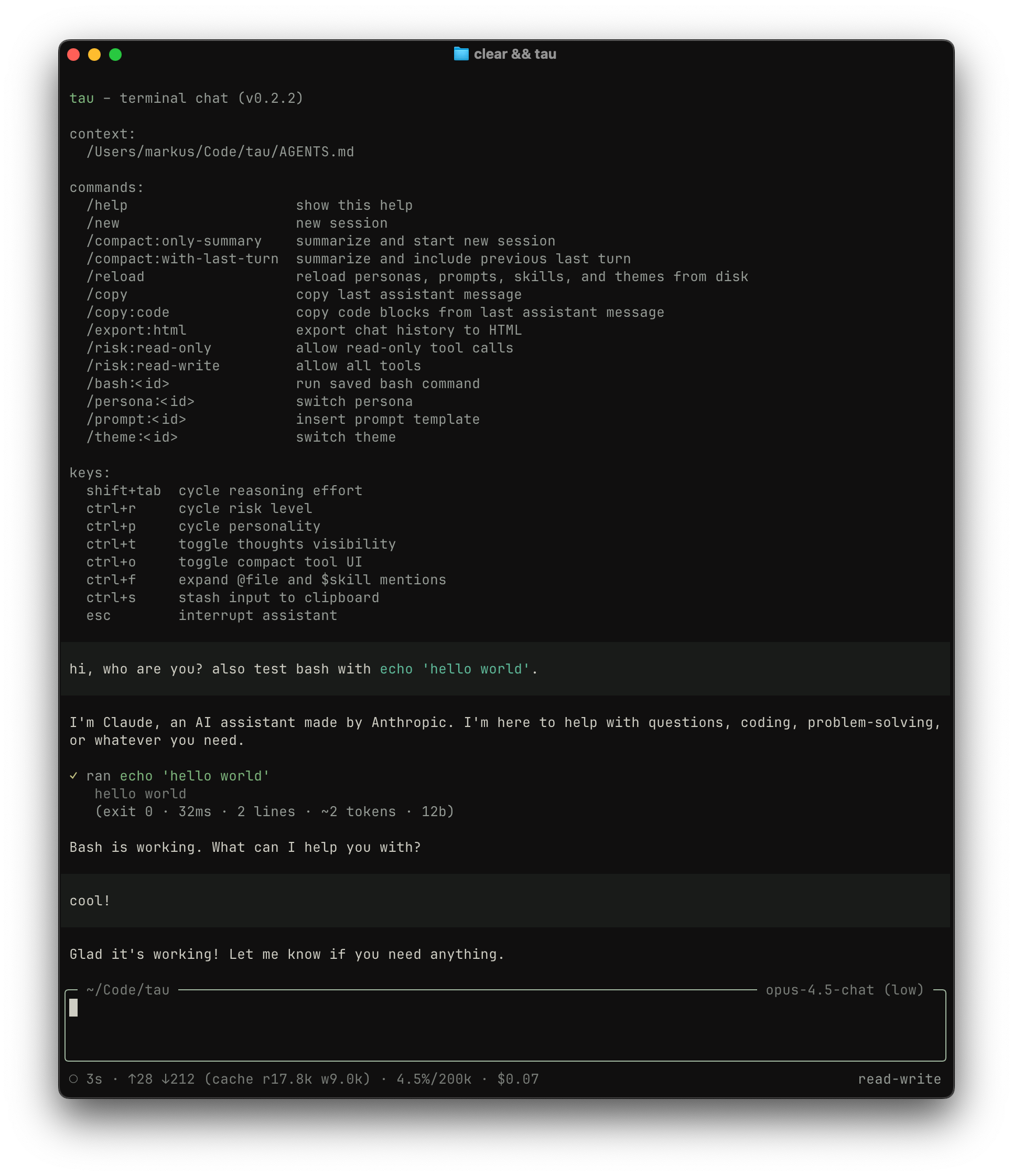
a terminal-based AI chat client for working with code. tau gives you access to Claude, GPT, and Gemini models, each equipped with tools to explore, write, and edit files in your project, plus optional sub-agents for deeper codebase investigation and web r
Readme
tau
a terminal-based AI chat client for working with code. tau gives you access to Claude, GPT, and Gemini models, each equipped with tools to explore, write, and edit files in your project, plus optional sub-agents for deeper codebase investigation and web research.

installation
npm install -g @markusylisiurunen/tau@latestyou'll need an API key from at least one provider. set it via environment variable:
export ANTHROPIC_API_KEY=sk-ant-...
# or OPENAI_API_KEY, or GOOGLE_API_KEYor store keys in ~/.config/tau/config.json:
{
"apiKeys": {
"anthropic": "sk-ant-...",
"openai": "sk-...",
"google": "...",
"parallel": "..."
}
}environment variables take precedence over the config file.
parallel is only needed for the web sub-agent tools (web_search/web_fetch).
security notice
the risk level system is a UX guardrail, not a hard security boundary. it helps prevent accidental writes and guides model behavior, but it has significant limitations:
- model trust: the bash tool relies on the model honestly declaring whether a command is a read or write. there's no runtime validation that the command actually matches the declared intent. a model could declare
safetyLevel="read"while runningrm -rf /. - no command analysis: the system doesn't inspect command content. it trusts the declared safety level without verifying what the command actually does.
- full system access: there is no sandboxing or directory restriction. the model can access any file on your system that your user account can read or write, not just the current working directory.
- user bypasses: the
!prefix executes shell commands directly, completely bypassing risk level checks. this is intentional for interactive use, but means risk levels only constrain the model, not the user.
note that there is no confirmation step before tool execution. the model runs commands immediately, and you can only observe the results after the fact.
getting started
tau requires Node.js 20+ and runs on macOS.
for development from source:
npm install
npm run build
npm startrisk levels
tau uses risk levels to control what the model can do. this lets you stay in control while working alongside AI.
- restricted: model can only use safe inspection tools (
read,grep,list) - read-only (default): model can run read-only tools (no file modifications)
- read-write: model can create, edit, and delete files
start with a specific risk level:
tau --risk read-writeor change it during a session with /risk:restricted, /risk:read-only, or /risk:read-write.
the default is read-only because it lets the model investigate your code and answer questions without risk of unintended changes. bump it to read-write when you're ready to let the model make edits.
personas
tau comes with several built-in personas across different models:
- Claude Opus 4.5 and Haiku 4.5 (Anthropic)
- GPT-5.2 (OpenAI)
- Gemini 3 Pro and Gemini 3 Flash (Google)
each model has two variants: a chat variant for general-purpose assistance, and a coder variant optimized for software engineering. both variants include the web sub-agent for web research, and coder variants also include the explore sub-agent for multi-turn codebase investigation.
switch personas at startup with --persona or mid-session with /persona:<id>:
tau --persona opus-4.5-codersub-agents
some personas can run isolated sub-agents via the internal task tool.
tau also supports an internal fork tool, which runs an autonomous fork of the current session using the full conversation history and returns the fork's final answer.
explore: read-only, multi-turn codebase investigationweb: high-threshold web research using Parallel Search/Extract (web_search/web_fetch)
to use the web sub-agent, set apiKeys.parallel in ~/.config/tau/config.json (see above). tau will only make web calls when needed or when you explicitly ask for web research.
trigger sensitivity
sub-agents and skills define when they should be activated via trigger sensitivity levels:
- eager: use proactively whenever the capability would help, even if not explicitly requested. example:
exploreis eager because multi-step codebase investigation is often valuable. - balanced: use when the request clearly matches the capability. this is the default if not specified. good for skills that solve specific problems but shouldn't be assumed.
- explicit: use only when the user specifically names or requests it. example:
webis explicit because web research should happen only when the user asks for current information.
when you write custom skills, you can specify trigger sensitivity in the skill description. if not specified, the default is balanced. the model respects these levels and won't trigger a skill or sub-agent inappropriately.
reasoning
some models support extended thinking, where they reason through problems before responding. cycle through reasoning levels with shift+tab, or set one at startup:
tau --persona opus-4.5-chat:hightoggle visibility of the model's thinking with ctrl+t.
working with files
reference files in your message by typing @ followed by the filename. autocomplete helps you find the right path. press ctrl+f to expand file contents into the conversation, letting the model see the actual code.
you can also pipe content directly:
cat src/app.ts | tau --persona opus-4.5-chatfor project-aware sessions, use --with-context to inject your AGENTS.md into the system prompt. tau searches for this file in the current directory and parent directories up to your home folder.
run tau --help to see all available options, or tau --debug to inspect loaded personas, prompts, skills, and the full system prompt for debugging configuration issues.
memory mode
prefix a message with # to update your project's AGENTS.md file. this is useful for capturing decisions, conventions, and context as you work.
# prefer explicit error messages with context about what operation failedtau will create or update AGENTS.md at your project root, integrating the new information into the existing structure. over time, this builds a knowledge base about your project. combine it with --with-context so future sessions understand your conventions without re-explaining them.
commands
tau supports slash commands for common actions:
| command | description |
| ---------------------- | ---------------------------------------------- |
| /help | show available commands |
| /new | clear the session and start fresh |
| /copy | copy the last assistant message |
| /copy:code | copy just the code blocks |
| /reload | reload personas, prompts, and skills from disk |
| /fork:only-summary | compress history and continue with a summary |
| /fork:with-last-turn | compress history but keep the last exchange |
| /persona:<id> | switch to a different persona |
| /prompt:<id> | insert a saved prompt template |
| /bash:<id> | run a saved shell command |
| /risk:<level> | change the risk level |
| !<cmd> | run a shell command directly |
the fork commands are useful when conversations get long. they compress everything into a summary so the model retains context without the overhead of a full history.
keyboard shortcuts
| key | action |
| ----------- | --------------------------- |
| shift+tab | cycle reasoning effort |
| ctrl+r | cycle risk level |
| ctrl+p | cycle personality |
| ctrl+t | toggle thinking visibility |
| ctrl+o | toggle compact tool display |
| ctrl+f | expand @file mentions |
| alt+up | pop queued message |
| esc | interrupt generation |
| ctrl+c | exit |
configuration
global config
store settings in ~/.config/tau/config.json:
{
"apiKeys": {
"anthropic": "sk-ant-...",
"openai": "sk-...",
"google": "...",
"parallel": "..."
},
"defaultPersona": "gpt-5.2-chat",
"defaultRisk": "read-write",
"toolDisplayMode": "compact",
"userPreferences": "prefer concise responses. use TypeScript for examples."
}the defaultPersona field specifies which persona to use when starting the app. the --persona flag overrides this setting.
the defaultRisk field sets the initial risk level (restricted, read-only, or read-write). the --risk flag overrides this setting. if not specified, defaults to read-only.
the userPreferences field lets you set guidance that applies to every conversation: preferred languages, response style, or domain context.
toolDisplayMode controls how tool calls appear: "compact" (default) shows one-line summaries, "full" shows detailed blocks.
project bash commands
define shortcuts for common shell commands in .tau/config.json at your project root (or ~/.tau/config.json globally):
{
"bash": [
{ "id": "check", "description": "lint + typecheck", "cmd": "npm run check" },
{ "id": "test", "cmd": "npm test" }
]
}run them with /bash:check or /bash:test.
custom personas
create your own personas by adding markdown files to ~/.config/tau/personas/ (user-level) or .tau/personas/ (project-level):
---
id: my-assistant
provider: anthropic
model: claude-opus-4-5
---
you are a helpful assistant specialized in my workflow.
focus on clarity and efficiency.the frontmatter defines the persona's id, provider, and model. the markdown body becomes the system prompt.
you can also set model parameters via optional frontmatter fields:
reasoning: one ofnone,minimal,low,medium,high,xhighallowedReasoningLevels: list of reasoning levels shown in the uiskills: list of enabled skill names (matched bynamein skill frontmatter), or"*"to enable all discovered skillssubagents: enable sub-agents (explorefor multi-turn codebase investigation,webfor web research). you can specify as a list (subagents: [explore],subagents: [web], orsubagents: [explore, web]) to use the main persona's model, or as an object to customize each sub-agent's model and reasoning. example:subagents: explore: provider: anthropic model: claude-haiku-4-5 reasoning: medium
use it with --persona my-assistant or /persona:my-assistant. if a project persona id conflicts with a user or built-in persona, the project persona wins.
custom prompts
save reusable prompt templates in ~/.config/tau/prompts/ (user-level) or .tau/prompts/ (project-level):
---
id: review
---
review this code for bugs, edge cases, and style issues.
suggest specific improvements with code examples.insert them with /prompt:review. if a project prompt id conflicts with a user or built-in prompt, the project prompt wins.
skills
skills are optional directories discovered at $XDG_CONFIG_HOME/tau/skills/ (defaults to ~/.config/tau/skills/) and .tau/skills/. each skill is a directory containing SKILL.md. tau follows the agent skills spec.
SKILL.md must start with yaml frontmatter:
name: 1-64 chars,a-z0-9-, must match the directory namedescription: 1-1024 chars
optional fields: license, compatibility (<=500 chars), metadata (string map), allowed-tools (validated, currently ignored by tau).
enable skills per persona with the skills frontmatter field. you can list specific skill names (matched by name in skill frontmatter), or use "*" to enable all discovered skills. all built-in personas have skills: "*" by default. if a project skill conflicts with a user skill by name, the project skill wins. tau injects an index of enabled skills into the system prompt containing only each skill's name, description, and absolute file path.
use /reload to pick up changes to personas, prompts, and skills without restarting.
how it works
tau connects your terminal to large language models, giving them tools to interact with your filesystem. when you ask the model to explore code or make changes, it decides which tools to use and executes them with your permission (based on risk level).
the model sees your messages, any file contents you've shared, and the results of tool calls. it doesn't have ambient access to your filesystem; it only sees what you show it or what it explicitly requests through tools.
tool calls are displayed in the UI so you can see exactly what the model is doing. use ctrl+o to toggle between compact and detailed views.
creating a release
publishing to npm happens automatically via github actions when a github release is published.
release steps:
- run checks and build:
npm run check
npm run build- bump the version (creates a git tag):
npm version patch- push the commit and tag:
git push --follow-tags- create a github release (this triggers the publish workflow):
gh release create v$(node -p "require('./package.json').version") --generate-notes