
@matrixages/ai-sdk-panel
v0.1.5
Published
The config panel for ai sdk.
Downloads
29

Maintainers
 matrixages
Readme
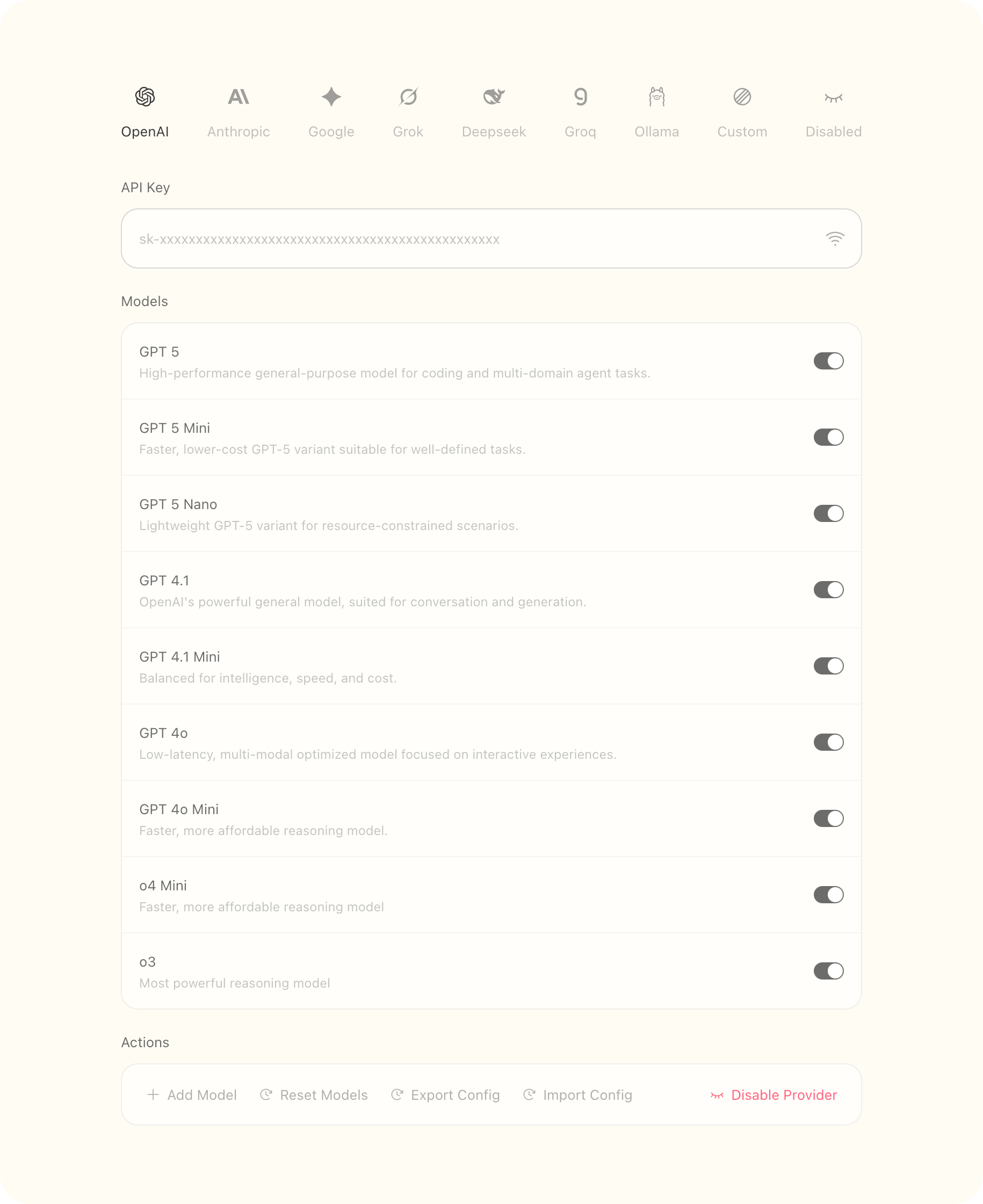
Why ai-sdk-panel
We're in the middle of an AI application explosion, and every single one needs an LLM provider editor. Having built several AI apps and constantly reinventing the wheel, I'm tired of rewriting an LLM provider editor for each one. That's why I created ai-sdk-panel - it'll be the last "LLM provider editor" I ever need.
The @matrixages/ai-sdk-panel library provides a production-ready configuration panel for applications that integrate with AI SDK providers. It enables end-users to configure, test, and manage multiple AI providers (OpenAI, Anthropic, Google Gemini, etc.) and their models through a graphical interface, eliminating the need to build custom configuration UIs.
Install
pnpm i @matrixages/ai-sdk-panelHow to use
You can know ai-sdk-panel in Deepwiki.
ai-sdk-panel provides two built-in providers, you can pick one from @matrixages/ai-sdk-panel:
import { all_providers, preset_providers } from '@matrixages/ai-sdk-panel'Also, you can extend the providers yourself according to your needs. Inside the component, the configuration will be deep merged.
const Page = () => {
	const props_providers: IPropsProviders = {
		config: { providers: preset_providers },
		tab: 'between',
		width: 690,
		onChange: useMemoizedFn(v => {
			console.log(v)
		}),
		onTest: useMemoizedFn(async () => {
			await sleep(500)

			return true
		})
	}

	return (
		<div
			className='
				flex justify-center
				w-screen min-h-screen
				py-20
				bg-amber-100/20
				dark:bg-amber-100/6
			'
		>
			<Providers {...props_providers} />
		</div>
	)
}
Features
- 🌙 Dark mode
- 📥 Import and export config
- ✏️ Edit model and provider
- ⚙️ Custom providers
- 🌍 Custom locales
- ✨ Custom icons
- 🧩 Custom fields support
- 📐 Variant layout
Props
export interface IPropsProviders {
	/* Provider config */
	config: {
		providers: Array<ConfigProvider>
		custom_providers?: Array<Provider>
	}
	/* Tab layout */
	tab: 'between' | 'scroll'
	/* Component width */
	width?: number | string
	/* I18n locales */
	locales?: Partial<ProvidersLocales>
	/* Custom provider icons, ExoticComponent is react fc component */
	icons?: Record<string, ExoticComponent>
	/* Trigger when config updated */
	onChange: (v: Config) => void
	/* Trigger when click API Key test button */
	onTest?: (provider: PresetProvider | SpecialProvider) => Promise<boolean>
}
export interface Provider {
/* Provider name */
name: string
/* API key */
api_key: string
/* Request base url */
base_url: string
/* Enable provider, default is true */
enabled: boolean
/* Provider models */
models: Array<Model>
/* Custom request headers */
headers?: string
}
/* Two provider: PresetProvider or SpecialProvider */
export type ConfigProvider = PresetProvider | SpecialProvider
/* No base_url, provider supported by ai-sdk */
export interface PresetProvider extends Omit<Provider, 'base_url'> {
api_key: string
base_url?: string
}
/* Provider with custom fields */
export interface SpecialProvider extends Partial<Omit<Provider, 'name' | 'enabled'>> {
name: string
enabled: boolean
custom_fields?: Record<string, string>
}
export interface Model {
/* Model name */
name: string
/* Model unique id */
id: string
/* Enable model, default is true */
enabled: boolean
/* Model description */
desc?: string
/* Model features */
features?: Features
/* Model fee, input fee and output fee */
fee?: { output?: number; input?: number }
}
export interface Features {
/* Reasoning Model */
reasoning?: boolean
/* Vision model */
vision?: boolean
/* Voice(transcription) model */
voice?: boolean
/* Embedding Model */
embedding?: boolean
/* Reranking Model */
reranking?: boolean
/* Support switch reasoning */
reasoning_optional?: boolean
/* Support function calling */
function_calling?: boolean
/* Support structured output */
structured_output?: boolean
/* Support web search */
web_search?: boolean
/* Support input image */
image_input?: boolean
/* Support output image */
image_output?: boolean
}Test as usage
Clone this repo, run commands:
pnpm ipnpm run test:ui
All test case will be show in the test ui.
Providers
Preset Providers
OpenAIAnthropicGoogle GeminiXaiDeepseekGroqOllama
All Providers
OpenAIAnthropicGoogle GeminiXaiDeepseekOpenRouterOllamaCerebrasCohereDeepinfraFireworksGroqLMStudioMistralPerplexitySiliconFlowTogetherVercelZhipuAliyun BailianTencent HunyuanVolcengineAzure OpenaiAmazon Bedrock
Development and Testing
Running Tests
The library includes a comprehensive test suite using Vitest and Playwright:
# Run all tests
pnpm test

# Run tests with UI
pnpm run test:ui
Building from Source
# Install dependencies
pnpm i

# Build the library
pnpm run build

# Watch mode for development
pnpm run dev
License
ai-sdk-panel using MIT license.