
@matterailab/orbcode
v7.0.5
Published
OrbCode CLI — agentic coding in your terminal, by MatterAI

Maintainers
 matterailab
Readme
OrbCode CLI







Agentic coding in your terminal — by MatterAI
📖 Full documentation: https://docs.matterai.so/orbcode-cli/overview
OrbCode CLI is a standalone terminal port of the Orbital extension: the same Axon models, the same native tool schemas, the same MatterAI auth backend — rebuilt from scratch as an interactive TUI with streaming chat, live thinking display, tool activity rows, edit/command approvals, and todo tracking.
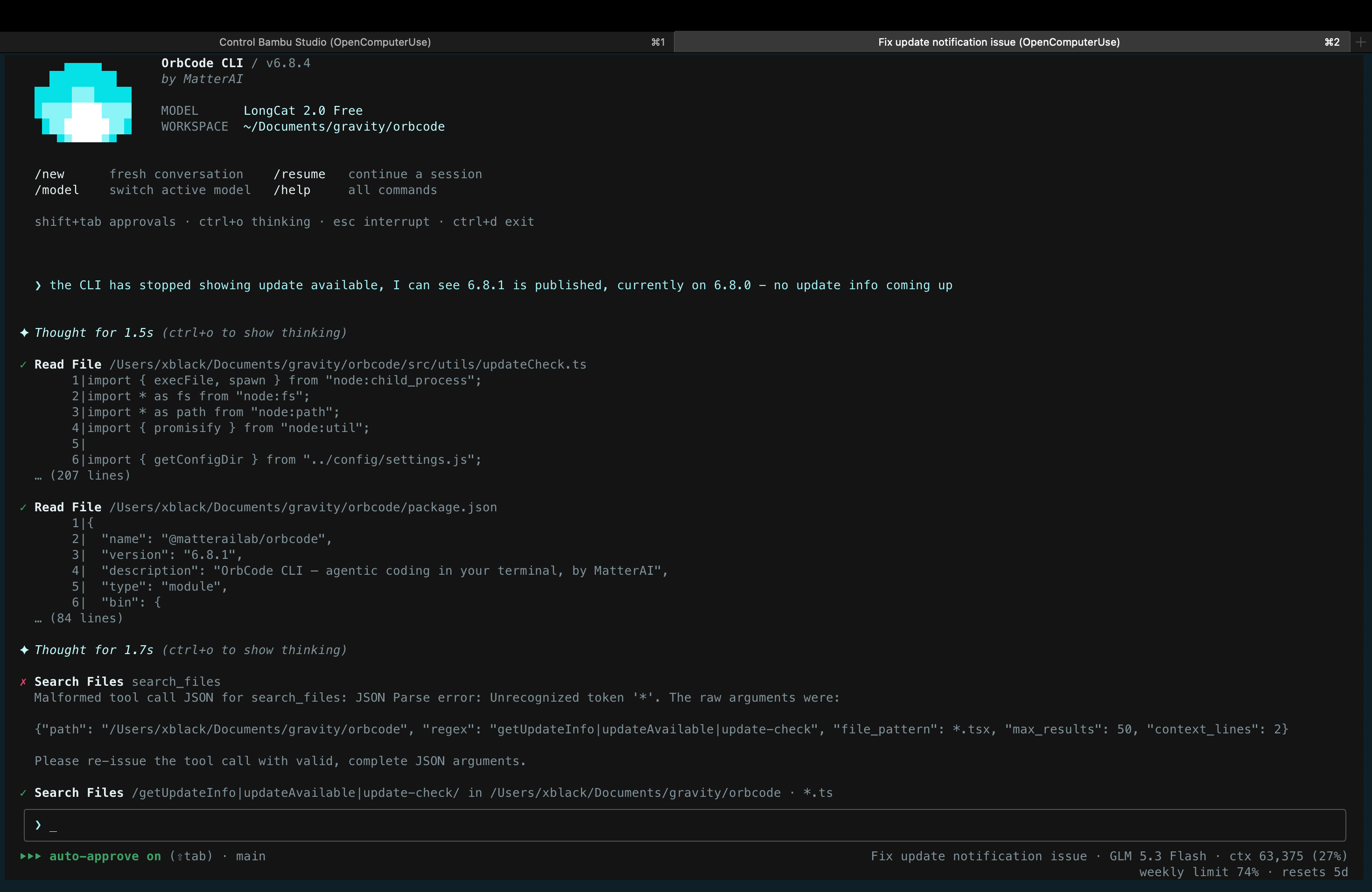
Table of contents
- Quick start
- Install
- Updating / relinking
- Usage
- Authentication
- Models
- The TUI
- Slash commands
- Keyboard shortcuts
- Approvals & safety
- Headless mode
- Configuration
- Hooks
- MCP servers
- Skills
- AGENTS.md memory
- Architecture
- Tools
- Agent loop
- Development
- Tests
- Troubleshooting
- Documentation
- Contributing
- License
Quick start
npm install -g @matterailab/orbcode   # install the CLI (needs Node.js >= 20)
orbcode login                          # sign in once via your browser
cd your-project && orbcode             # start coding
That's it — you're in an interactive agent session. Ask it to read, edit, run commands, or fix bugs. New here? Skim the docs or jump to Usage.
Prefer not to install globally? Run it on the fly:
npx @matterailab/orbcodeInstall
Requires Node.js >= 20. The package carries the compatible Bun runtime used by its native TUI, so a separate Bun installation is not required.
npm install -g @matterailab/orbcodeThen, from any project directory:
orbcodeUpdates install in the background: a new release (once it has been public for
15 min) is downloaded into ~/.orbcode/versions/, verified, and used from your
next launch — the banner just says to restart. If a new version fails to start,
OrbCode falls back to the previous one. To opt out, set
ORBCODE_DISABLE_AUTOUPDATE=1 or "autoUpdates": false in
~/.orbcode/settings.json; you can always update manually with
orbcode update or npm update -g @matterailab/orbcode.
From source (development)
git clone https://github.com/MatterAIOrg/OrbCode.git
cd OrbCode
npm install
npm run build
npm link        # exposes the global `orbcode` command
Updating / relinking
npm link creates a symlink to this repo, so after pulling changes you only
need to rebuild — no relink required:
npm run build # the linked `orbcode` command picks this up immediatelyRelink only when the package name or bin entry changes (e.g. the package was
renamed orbitalcode → orbcode):
npm unlink -g orbitalcode   # remove a stale link under the old name (once)
npm link
The version reported by orbcode --version is read from package.json at
runtime — bumping the version there is all that's needed.
Usage
orbcode                 start an interactive session in the current directory
orbcode "<prompt>"      start an interactive session with an initial prompt
orbcode login           sign in to MatterAI (browser device flow)
orbcode usage           show plan usage windows and per-model usage
orbcode -p "<prompt>"   run a single prompt non-interactively, print only the final response
orbcode -p "…" --yolo   non-interactive with edits/commands auto-approved
orbcode --model <id>    use a specific model for this run (also -m)
orbcode --resume <id>   resume a previous session by id (also -r)
orbcode --version       print version
orbcode --help          show help
The TUI always takes over the full terminal screen on launch (prior shell output stays in scrollback).
The directory you launch from becomes the workspace directory: the default target for file operations and commands, and the file listing the model sees in its environment details.
Authentication
Browser-based device flow with polling (no copy/paste needed):
orbcode login(or/loginin the TUI) callsPOST /orbcode/auth/starton the MatterAI backend, which issues a one-time 48-hex device code (10-minute lifetime, stored in redis).- The CLI opens
https://app.matterai.so/orbital?loginType=orbcode&devicecode=<code>in your browser:- Already signed in → the webapp shows the Authorize OrbCode CLI dialog immediately.
- Not signed in → you're redirected to sign-in first. The
devicecodequery param is preserved through the OAuth state (Google/Microsoft) and the email/password path, so the authorize dialog appears right after sign-in.
- Clicking Authorize binds your session token to the device code
(
POST /orbcode/auth/authorize). - Meanwhile the CLI polls
GET /orbcode/auth/poll?devicecode=…(every 3s by default, bounded by the code's lifetime). The token is handed out exactly once — the redis key is deleted on first successful poll. - The CLI verifies the token against the profile endpoint and saves it.
Fallbacks & overrides:
- settings.json key: set
apiKeyin~/.orbcode/settings.json(or a project's.orbcode/settings.json) to skip login. The login screen itself is browser-redirect only. - Env token: set
MATTERAI_TOKENto skip login entirely (takes precedence over everything). - Dev endpoints:
MATTERAI_BACKEND_URL(defaulthttps://api.matterai.so) andMATTERAI_APP_URL(defaulthttps://app.matterai.so) override where the device flow points — useful against a local backend/webapp. - Tokens are MatterAI JWTs. A token whose payload has
env: "development"automatically routes API calls tohttp://localhost:3000, matching the extension's behavior.
Sign out with /logout (removes the saved token).
Models
The built-in models are listed below; /model opens a scroll-and-select
picker (/model <id> still selects directly). The live catalog is fetched
from the backend at startup and kept in sync while the session runs — the
table below is the offline fallback. Additional models can be declared via
customModels in settings.json. The choice persists across sessions.
| id | context | max output | pricing |
| --------------------------------- | ------- | ---------- | ------------------------ |
| zai/glm-5.3-flash | 232k | 64k | $0.15/M in · $0.5/M out |
| zai/glm-5.3 | 232k | 64k | $1.4/M in · $4.4/M out |
| deepseek/deepseek-v4-flash-0731 | 232k | 64k | $0.14/M in · $0.28/M out |
| meta/muse-spark-1.3-contributor | 232k | 64k | $0.1/M in · $0.2/M out |
| gpt-5.6-luna | 232k | 64k | $0.2/M in · $1.2/M out |
| gpt-5.6-sol | 232k | 64k | $5/M in · $30/M out |
| gemini-3.8-flash | 232k | 64k | $0.75/M in · $3.75/M out |
zai/glm-5.3-flash is the default. Every model is available on every plan,
supports native JSON tool calls and image input, and is served through the
MatterAI gateway. Cost comes from the API's usage chunks (is_byok-aware)
and is shown in the status bar.
Other providers (Anthropic, OpenAI-compatible)
The built-in models go through the MatterAI gateway as before. A customModels
entry that sets a provider is instead served through the
Vercel AI SDK, reusing the same agent loop, tools, and
approvals — auth is the provider's own key (env var or apiKey), not the
MatterAI login.
{
  "model": "claude-opus-4-8",
  "customModels": [
    {
      "id": "claude-opus-4-8",
      "name": "Claude Opus 4.8",
      "provider": "anthropic",
      "contextWindow": 1000000,
      "maxOutputTokens": 64000,
      "inputPrice": 0.000005,
      "outputPrice": 0.000025,
      "effort": "high"
    },
    {
      "id": "some-model",
      "provider": "openai-compatible",
      "baseUrl": "https://api.other-host.com/v1"
    }
  ]
}
provider: "anthropic"→ native/v1/messages(@ai-sdk/anthropic). Key fromANTHROPIC_API_KEY(orapiKeyon the entry). Adaptive thinking + reasoning streaming are on by default;effort(low…max) tunes depth; prompt caching breakpoints are set on the system prompt and conversation prefix automatically. Thinking blocks are preserved across turns (stored with the session and replayed with their signatures), so interleaved thinking with tool use round-trips correctly. Set"reasoning": falseto disable thinking (e.g. for models that don't supporteffort).provider: "openai-compatible"→ any OpenAI-compatible endpoint; requiresbaseUrl. Key fromapiKeyon the entry.
Note: Third-party models are not shown in the TUI's
/modelpicker. They're still available headlessly viaorbcode -p "..." --model <id>(orMATTERAI_MODEL=<id>); in an interactive session,/model claude-opus-4-8prints the exact command to run.
Anything without a provider (or provider: "matterai") keeps using the
MatterAI gateway untouched.
The TUI
  ___         _       ____             _
 / _ \  _ __ | |__   / ___|  ___    __| |  ___
| | | || '__|| '_ \ | |     / _ \  / _` | / _ \
| |_| || |   | |_) || |___ | (_) || (_| ||  __/
\___/ |_| |_.__/ \____| \___/ \__,_| \___|- Native OpenTUI surface with OrbCode-owned dark/light palettes, retained
full-screen rendering, mouse input, and truly opaque panels.
Use
/themeto choose dark or light. OrbCode saves the choice and paints every terminal cell itself, so terminal theme detection cannot override it. - Streaming responses rendered as markdown (headers, lists, code fences, inline code, links) with native styled text nodes.
- Thinking: reasoning streams live under
✦ Thinking…(last few lines, dimmed) and collapses to✦ Thought for Nswhen done.ctrl+otoggles expanded thinking for subsequent turns. Reasoning arrives from the API asreasoning/reasoning_contentdeltas or inline<think>…</think>blocks — all are routed to the thinking display. - Tool rows: each tool call shows a formatted name ("Read File", "Execute
Command"…), one-line summary (file path, command, query…), live "running"
state, then
✓/✗with a short result preview. - Edit diffs: file-modifying tools render a real diff — stats header ("Added 2 lines, removed 1 line"), line-number gutter, red/green backgrounds — both in the approval prompt (before anything is written) and in the finished tool row.
- Tasks: the model maintains a checklist via
update_todo_list; it renders as a compact Tasks panel (□pending /◧in progress /■done). - @-references: type
@in the input to fuzzy-search workspace files; ↑/↓ to choose, enter/tab inserts the top/selected match into the prompt. - Attachments: use
/attachorctrl+fto open the native file picker, copy and paste a file from the system file manager, or drag files onto the input box (the terminal pastes their paths). CSV, XLSX, DOCX, PDF, plain-text, JSON, Markdown, PNG, JPEG, and WebP are supported. Documents are extracted to bounded text before the model call; attached filenames stay visible in the composer, queue, transcript, and resumed session history. Backspace on an empty prompt removes the last file, and escape clears the composer. - Followup questions:
ask_followup_questionrenders a selectable menu (arrow keys, number quick-pick, or free-text answer). - Completion:
attempt_completionrenders a bordered "✔ Task completed" card with the result. - Status bar: approval mode (
⏵⏵ accept edits on, shift+tab to cycle), busy state, model name, context token usage, and session cost. - Input box: top/bottom rule borders with a
❯prompt, history (↑/↓), cursor movement (←/→, ctrl+a/e), kill line (ctrl+u), multi-char paste (a trailing newline submits), and a slash-command autocomplete menu when the line starts with/. Every menu in the CLI (slash commands, @-files, model picker, session picker, followups) is navigable with ↑/↓ and selectable with enter; a partial command like/mod+ enter runs the highlighted match.
Slash commands
| command | action |
| ----------------------------- | ----------------------------------------------------------------------------------------------------- |
| /help | list commands |
| /attach | open the native file picker and add one or more attachments |
| /model | scrollable model picker (/model pro / /model code / full id selects directly) |
| /theme | choose and persist OrbCode's dark or light theme (/theme dark and /theme light also work) |
| /clear | clear the screen only, like the terminal's clear — the conversation and context continue |
| /new | start a fresh conversation/session with a clean slate |
| /resume | pick a previous session for this directory and continue it (screen is cleared, conversation replayed) |
| /rewind | go back to an earlier message: restore the conversation and/or the files the agent edited since, with the message put back in the prompt to edit and resend (also Esc Esc on an empty prompt) |
| /analytics | open the MatterAI analytics dashboard (app.matterai.so/orbital) in the browser |
| /compact | summarize the conversation and replace history with the summary |
| /tasks | print the current task list |
| /status | version, model, account, gateway, context usage, cost, approval modes |
| /usage | fetch plan usage |
| /weekly-reset | reset weekly usage (Pro and above, once per monthly billing cycle) |
| /init | analyze the codebase and create/improve AGENTS.md in the repo's .orb/ directory |
| /create-skill <description> | create or update a repository skill under .orb/skills/<skill-name>/ from a plain-language prompt |
| /task | reference a previous session as context for the current task — opens a picker if no ID is given |
| /link | link other repos on your machine so changes here are checked against them (enter a folder path) |
| /mcp | manage MCP servers — enable, disable, reconnect, view status & tool counts |
| /login | start the browser sign-in flow |
| /logout | remove the saved token |
| /version | print the CLI version |
| /exit | quit |
Keyboard shortcuts
| key | action |
| ------------------- | ---------------------------------------------------------------------- |
| Esc | interrupt the running turn (or cancel login polling / close a menu) |
| Esc Esc | on an empty prompt, open /rewind |
| Ctrl+C | quit |
| Ctrl+O | toggle thinking display for the whole transcript (past turns included) |
| Shift+Tab | cycle approval mode: ask → accept edits → auto-approve |
| ↑ / ↓ | input history, or navigate any open menu |
| Ctrl+A / Ctrl+E | start / end of line |
| Ctrl+U | clear the input line |
| Ctrl+F | open the native file picker to add attachments |
Approvals & safety
Read-only tools (read/list/search/web/todos) run without prompting. Mutating tools prompt first:
- File edits (
file_edit,multi_file_edit,file_write) — prompt shows the target;yallow once,ndeny,aallow for the rest of the session. - Commands (
Bash) — prompt shows the exact command line. The model classifies commands with anisDangerousflag; dangerous commands (deletes, force-pushes, system changes…) can never be auto-approved — noaoption, and--yolo/session-approval don't apply.
A denial is reported back to the model as "The user denied this operation." so it can adjust course rather than fail.
Headless mode
orbcode -p "explain the build pipeline in this repo"
orbcode -p "fix the lint errors" --yolo
Prints only the final content to stdout (the completion result, or the last
assistant message) — no tool activity, no intermediate text. Errors go to
stderr. Without --yolo, edit/command approvals are auto-denied (read-only
analysis). Followup questions are auto-answered with "proceed with best
judgment".
Configuration
Two kinds of files under ~/.orbcode/:
config.json— state written by the app itself (login token, chosen model, theme, approval defaults). Created on first save, mode 0600.settings.json— user-managed configuration, Claude-Code style. Created automatically as an empty{}on first run so it's easy to find. A project-level.orbcode/settings.jsonin the working directory layers on top of the user-level file.
{
  "apiKey": "<token used instead of logging in>",
  "baseUrl": "https://my-gateway.example.com/v1",
  "model": "my-custom-model",
  "autoApproveEdits": false,
  "autoApproveSafeCommands": false,
  "customModels": [
    {
      "id": "my-custom-model",
      "name": "My Custom Model",
      "contextWindow": 128000,
      "maxOutputTokens": 32000,
      "inputPrice": 0.000001,
      "outputPrice": 0.000002
    }
  ],
  "env": { "MY_VAR": "value" }
}
All keys are optional. customModels entries appear in the /model picker
alongside the built-in models; baseUrl points the chat client at any
OpenAI-compatible gateway; env is applied to the process at startup; hooks
configures lifecycle hooks (see Hooks). Precedence: env vars > project
settings.json > user settings.json > config.json.
Sessions are stored in ~/.orbcode/sessions/<id>.json and power /resume
and --resume <id>.
/rewind works from a checkpoint recorded at the start of every message you
send. Before the agent first edits a file (file_write, file_edit,
multi_file_edit) after a checkpoint, a copy of the file is saved under
~/.orbcode/file-history/<session id>/, so rewinding can restore it, or delete
it if the agent created it. Pick a message and choose to restore the code and
conversation, the conversation only, or the code only. Files changed through
Bash (including by commands the agent ran) are not tracked and are never
restored. Compacting the conversation drops the checkpoints before it, and
sessions saved before /rewind existed have none.
| env var | effect |
| ---------------------- | ----------------------------------------------------------------- |
| MATTERAI_TOKEN | auth token (overrides everything) |
| MATTERAI_API_KEY | same as apiKey in settings.json |
| MATTERAI_BASE_URL | same as baseUrl in settings.json |
| MATTERAI_MODEL | model override (what --model sets internally) |
| MATTERAI_CONFIG_DIR | config directory (default ~/.orbcode) |
| MATTERAI_BACKEND_URL | device-auth backend (default https://api.matterai.so) |
| MATTERAI_APP_URL | webapp for the authorize page (default https://app.matterai.so) |
autoApproveEdits / autoApproveSafeCommands set the session defaults for the
approval prompts (dangerous commands still always prompt); shift+tab cycles
them at runtime.
Hooks
Hooks are shell commands OrbCode runs at fixed points in the agent loop — use
them to block dangerous actions, auto-approve trusted ones, rewrite
tool inputs, inject context into the model, format code after edits,
notify you, or keep the agent working until a condition is met. They use
the same contract as Claude Code's hooks, so scripts written for it work
here (just use $MATTERAI_PROJECT_DIR and OrbCode's tool names).
📖 This is the overview. The complete, example-driven reference — per-event input/output, a copy-paste cookbook, debugging, and security — is in docs/HOOKS.md.
Two-minute example
Make OrbCode block rm -rf and append the git branch to every prompt.
1. Drop a guard script at ~/.orbcode/hooks/guard.sh (and chmod +x it):
#!/usr/bin/env bash
input=$(cat)                                    # OrbCode sends JSON on stdin
cmd=$(printf '%s' "$input" | jq -r '.tool_input.command // empty')
if printf '%s' "$cmd" | grep -Eq 'rm -rf (/|~|\*)'; then
  echo "Refusing destructive command: $cmd" >&2 # stderr = the reason
  exit 2                                         # exit 2 = block the tool
fi
exit 0
2. Register it in ~/.orbcode/settings.json (user-level) or a project's
.orbcode/settings.json — both are merged, so projects can add hooks
without clobbering your global ones. (User hooks always run; project hooks are
disabled until you approve them in a one-time trust prompt, since they run
shell commands from a repo — see Security.)
{
  "hooks": {
    "PreToolUse": [
      {
        "matcher": "Bash",
        "hooks": [
          {
            "type": "command",
            "command": "~/.orbcode/hooks/guard.sh",
            "timeout": 30
          }
        ]
      }
    ],
    "UserPromptSubmit": [
      {
        "hooks": [
          {
            "type": "command",
            "command": "echo \"Git branch: $(git branch --show-current 2>/dev/null)\""
          }
        ]
      }
    ]
  }
}
Start OrbCode normally — that's all. Each event maps to a list of matchers; a
matcher has an optional matcher regex (omit, or use "*", to match
everything; the regex is auto-anchored so "Bash" matches exactly
that tool name) and a list of command hooks (timeout is per-command
seconds, default 10).
Events at a glance
| event | when it fires | matcher tests |
| ------------------ | --------------------------------------------- | ------------- |
| SessionStart | first turn of a session (or after --resume) | source |
| UserPromptSubmit | before each prompt is sent to the model | — |
| PreToolUse | before a tool runs (and before its approval) | tool name |
| PostToolUse | after a tool returns | tool name |
| Notification | when OrbCode needs permission or a follow-up | — |
| Stop | when the model is about to finish the turn | — |
| PreCompact | before /compact summarizes the conversation | trigger |
| SessionEnd | on quit, /logout, or end of a -p run | reason |
| SubagentStop | reserved; OrbCode has no subagents yet | — |
How a hook talks back
A hook receives a JSON payload on stdin (session_id, transcript_path,
cwd, hook_event_name, plus event fields like tool_name/tool_input,
prompt, …) and influences OrbCode via its exit code — 0 success
(stdout becomes context for UserPromptSubmit/SessionStart), 2 block
(stderr is the reason), other = non-blocking warning — and/or a JSON object
on stdout for fine control (decision, continue, systemMessage, and a
hookSpecificOutput with permissionDecision allow/deny/ask, updatedInput,
additionalContext). When several hooks match, they run in parallel, the most
restrictive permission wins (deny > ask > allow), and a failing/slow hook
is timed out and never crashes the agent. Hooks run with a redacted
environment (your API token and other credential-like vars are stripped) and
injected context is wrapped in <hook_context> tags the model treats as
untrusted.
→ Full reference with worked recipes for every event: docs/HOOKS.md.
MCP servers
OrbCode connects to external tools via the Model Context Protocol (MCP). MCP
servers expose tools that appear alongside the native tools as
mcp__<server>__<tool> and can be called by the model like any other tool.
Configuration
MCP servers are configured in three scopes (highest precedence last):
- User scope —
mcpServersin~/.orbcode/settings.json. Applies to every project on this machine. - Project scope —
.mcp.jsonin the project root (and parent directories, closer-to-cwd wins). This is the check-into-git, shared format, compatible with Claude Code's.mcp.json. - Local scope —
mcpServersin.orbcode/settings.json. Per-project, per-machine overrides (not checked in).
Adding servers from the command line
The orbcode mcp subcommand manages servers without editing JSON by hand —
like Claude Code's claude mcp add/remove/list:
# stdio (default transport): name + command + args
orbcode mcp add filesystem npx -y @modelcontextprotocol/server-filesystem /Users/me/projects

# http transport
orbcode mcp add --transport http linear-server https://mcp.linear.app/mcp

# sse transport with a header
orbcode mcp add -t sse --header "Authorization=Bearer ${TOKEN}" my-sse https://example.com/sse

# http with OAuth (auth from /mcp after adding)
orbcode mcp add --transport http --oauth notion https://mcp.notion.com/mcp
orbcode mcp add -t http --oauth --oauth-scope "read:issues" linear https://mcp.linear.app/mcp

# stdio with env vars, written to user scope (~/.orbcode/settings.json)
orbcode mcp add -s user -e API_KEY=secret -e DEBUG=true my-server node server.js

# list all configured servers (name, scope, transport detail)
orbcode mcp list

# remove a server (finds it in whichever scope it lives)
orbcode mcp remove filesystem
Flags go before the server name; everything after the name is the command +
args (so stdio servers can take their own flags like -y). Use -- to force
the split if needed. -s/--scope selects project (default, writes
.mcp.json), user (writes ~/.orbcode/settings.json), or local (writes
.orbcode/settings.json). Run orbcode mcp help for the full reference.
add and remove print the file they modified:
$ orbcode mcp add --transport http linear-server https://mcp.linear.app/mcp
Added HTTP MCP server linear-server
  URL: https://mcp.linear.app/mcp
  Scope: project
  File modified: /Users/me/my-project/.mcp.json
OAuth servers show needs-auth after adding — they don't auto-open a browser.
Open /mcp in the TUI, select the server, and press a (or 1) to
authenticate. OrbCode shows an auth screen:
  Authenticating with linear-server…

  ✽  A browser window will open for authentication

  If your browser doesn't open automatically, copy this URL manually (c to copy)
  https://mcp.linear.app/authorize?response_type=code&client_id=…

  If the redirect page shows a connection error, paste the URL from your browser's address bar:
  URL> █

  Return here after authenticating in your browser. Press Esc to go back.
The browser opens automatically to the server's OAuth authorize page (RFC 9728
discovery → PKCE → redirect to a loopback callback → token exchange). Press c
to copy the URL to the clipboard if the browser doesn't open. If the redirect
fails (e.g. wrong port), press enter and paste the redirect URL from the
browser's address bar — OrbCode extracts the code from it. Either path
(callback or paste) completes the flow. Tokens persist under
~/.orbcode/mcp-auth/<server>.json (mode 0600) for future sessions; refresh
happens automatically when they expire. For M2M grants (client_credentials,
private_key_jwt), there's no browser — the token exchange is direct.
.mcp.json format (project scope):
{
  "mcpServers": {
    "filesystem": {
      "command": "npx",
      "args": [
        "-y",
        "@modelcontextprotocol/server-filesystem",
        "/Users/me/projects"
      ]
    },
    "github": {
      "type": "http",
      "url": "https://api.githubcopilot.com/mcp/",
      "headers": { "Authorization": "Bearer ${GITHUB_TOKEN}" }
    }
  }
}
settings.json mcpServers (user/local scope) uses the same per-server shape.
Environment variables (${VAR}) are expanded from process.env.
Three server types are supported:
- stdio (default, omit
type): OrbCode spawnscommandwithargsand talks over stdin/stdout. Optionalenvandcwd. - http: Streamable HTTP transport.
url+ optionalheaders+ optionaloauth(see Authentication). - sse: Server-Sent Events (legacy remote).
url+ optionalheaders+ optionaloauth.
MCP authentication
Remote servers (http/sse) often require auth. OrbCode supports three ways:
1. Static headers (API keys, personal access tokens). Use headers with
${ENV_VAR} expansion — the token is read from the environment, never written
to disk:
{
  "github": {
    "type": "http",
    "url": "https://api.githubcopilot.com/mcp/",
    "headers": { "Authorization": "Bearer ${GITHUB_TOKEN}" }
  }
}
2. OAuth 2.0 flows (for servers that require user login: GitHub, Google
Drive, Slack, Notion, …). Set oauth: true (or { "scope": "..." }) on an
http/sse server. OrbCode runs the full authorization-code flow via the SDK:
RFC 9728 protected-resource discovery, RFC 8414 authorization-server metadata,
PKCE, dynamic client registration, and token refresh. A one-shot loopback HTTP
server receives the browser redirect. Tokens, client info, code verifiers, and
discovery state are persisted per-server under ~/.orbcode/mcp-auth/<server>.json
(mode 0600) so re-auth is only needed when a token expires or is revoked.
{
  "notion": {
    "type": "http",
    "url": "https://mcp.notion.com/mcp",
    "oauth": true
  },
  "google-drive": {
    "type": "http",
    "url": "https://mcp.google.com/drive",
    "oauth": { "scope": "https://www.googleapis.com/auth/drive.readonly" }
  }
}
3. Machine-to-machine OAuth (no browser). For service-to-service auth,
use client_credentials or private_key_jwt grants — these use the SDK's
built-in ClientCredentialsProvider / PrivateKeyJwtProvider:
{
  "internal-api": {
    "type": "http",
    "url": "https://internal.example.com/mcp",
    "oauth": {
      "grantType": "client_credentials",
      "clientId": "orbcode-client",
      "clientSecret": "${INTERNAL_CLIENT_SECRET}",
      "scope": "mcp:tools"
    }
  },
  "jwt-api": {
    "type": "http",
    "url": "https://jwt.example.com/mcp",
    "oauth": {
      "grantType": "private_key_jwt",
      "clientId": "orbcode-client",
      "privateKey": "${JWT_PRIVATE_KEY_PEM}",
      "algorithm": "RS256"
    }
  }
}
When a server needs auth, its status shows needs-auth in /mcp; press a
to re-authenticate (clears stored tokens and re-runs the flow). Secrets in
oauth blocks support ${ENV_VAR} expansion like headers, so client
secrets and private keys can be sourced from the environment rather than
committed to .mcp.json.
Enabling & disabling servers
- User/local-scope servers connect automatically on startup (you wrote them, so they're trusted).
- Project-scope servers (from
.mcp.json) require a one-time approval: on first launch in a project, OrbCode shows a checklist of detected servers. Select the ones you trust; the decision is persisted to.orbcode/settings.json(enabledMcpServers/disabledMcpServers) so they auto-connect on future sessions.
The /mcp command opens an interactive manager at any time:
- ↑/↓ to select a server. The selected server shows a detail panel with Status, Auth (authenticated / not authenticated / static headers), URL (or stdio command), Config location (the file path), and a numbered action list.
- enter or 2 toggles enable/disable. r or 3 reconnects. a
or 1 authenticates a
needs-authOAuth server (opens a browser for the authorization-code flow; M2M grants exchange directly). esc closes. - Each server shows a live status icon:
✓ connected,△ needs-auth,✗ failed,○ disabled,⋯ connecting, plus a tool count when connected. - Enable/disable choices are persisted per-project. OAuth tokens are persisted
per-server under
~/.orbcode/mcp-auth/.
Headless mode
In orbcode -p, there's no interactive approval, so project-scope servers are
only connected if they were previously approved (via an interactive /mcp
session). Unapproved project servers are skipped with a stderr note. User/local
servers connect as usual.
Plugins
Run /plugins to browse Anthropic's official Claude plugin marketplace, or
install directly from the shell:
orbcode plugin install clickhouse@claude-plugins-official
orbcode plugin list
orbcode plugin uninstall clickhouse
OrbCode installs the complete pinned bundle under .orb/plugins/<name>/, just
like a plugin cache rather than extracting individual SKILL.md files. Skills
and legacy command files are loaded with a <plugin>:<skill> namespace, and
bundled MCP servers appear as project-scoped servers that require the normal
one-time MCP approval. Supporting files such as rules and scripts stay beside
the skill so plugin-relative references continue to work. Restart OrbCode after
installing or uninstalling so every runtime component is reloaded.
Agent, hook, LSP, and other component files are retained in the installed bundle and shown in the plugin inventory. OrbCode currently activates the skill/command and MCP components; components that require a subagent, plugin hook, or LSP runtime remain installed for future runtime support.
/plugin and /skills are accepted as aliases for /plugins.
Skills
Skills are reusable instruction sets the model can load on demand. A skill is a
directory containing a SKILL.md file with optional YAML frontmatter and a
markdown body of specialized instructions.
Creating a skill
Place a directory under ~/.orbcode/skills/ (user, applies everywhere) or
.orb/skills/ (project, checked into the repo). The legacy project path
.orbcode/skills/ is still discovered:
~/.orbcode/skills/
  my-skill/
    SKILL.md
SKILL.md format:
---
description: Write concise, idiomatic Go code following project conventions
when_to_use: the task involves writing or reviewing Go code
---

# Go style skill

When writing Go in this project:

- Use `errors.Join` for multi-error aggregation
- Prefer table-driven tests
- ...description(frontmatter or first paragraph): shown in the skill catalog.when_to_use(frontmatter): a hint telling the model when to invoke this skill.${SKILL_DIR}in the body is replaced with the skill's absolute directory path, so you can reference bundled scripts.
How skills are used
The skill catalog (names + descriptions + when-to-use) is injected into the
system prompt. When a task matches a skill's when_to_use condition, the model
calls the use_skill tool with the skill's name, which loads the full
instructions into context. Project skills override user skills on name
collisions (closer-to-cwd wins).
The tool also accepts an explicit path to a skill directory or its SKILL.md
file. Paths may be absolute, relative to the current workspace, or start with
~/, so a prompt or AGENTS.md can point to a shared skill stored outside the
standard discovery directories.
AGENTS.md memory
AGENTS.md files provide project- and user-level instructions that are injected
into every system prompt — build commands, code style, architecture notes,
conventions. This is OrbCode's equivalent of Claude Code's CLAUDE.md, using
the open AGENTS.md filename so it works across tools.
Discovery
Files are loaded in this order (lowest precedence first; higher-precedence files appear later and get more weight):
- User memory:
~/.orbcode/AGENTS.md— personal global instructions. - Project memory:
AGENTS.mdand.orbcode/AGENTS.mdin the cwd and every parent directory (closer-to-cwd wins). Checked into the repo, shared with the team. - Local memory:
AGENTS.local.mdin the cwd and parents — private per-machine overrides (gitignore this).
@include directives
An AGENTS.md file can include other files with @path references:
# Project guide

See the detailed style guide: @./docs/style.md
And the global one: @~/orbcode-global.md
@path (relative to the including file), @./path, @~/path, and @/abs/path
are all supported. Includes are resolved recursively (up to 5 levels, with cycle
detection). Use /init to have OrbCode generate a starter AGENTS.md by
analyzing the codebase.
Architecture
Interactive sessions run on OpenTUI's native retained renderer with the React reconciler. The small Node launcher keeps management/headless commands cheap and starts the package's pinned Bun runtime only for the TUI; OpenTUI owns alternate screen setup, cell painting, input, resize, and terminal restoration. OrbCode selects and persists its own dark/light palette; terminal theme reports are intentionally ignored.
src/
  index.tsx          entry: arg parsing, interactive vs -p (headless) mode
  branding.ts        product name, logo, colors; VERSION read from package.json
  headless.ts        non-interactive -p runner
  config/settings.ts load/save ~/.orbcode/config.json
  auth/auth.ts       device flow (start/poll), JWT→backend-URL mapping,
                     profile/balance fetch, token verification
  api/
    models.ts        the two Axon models (ported from the extension registry)
    client.ts        OpenAI-compatible streaming client → api2.matterai.so/v1/web
    stream.ts        chunk model: text / reasoning / native_tool_calls / usage
    headers.ts       X-AxonCode-Version, X-AxonCode-TaskId, X-AXON-REPO, …
  prompts/system.ts  system prompt: agent roleDefinition + tool guide (ported
                     verbatim from the extension) + CLI system-info section +
                     AGENTS.md memory + skills catalog injection
  tools/
    schemas/         native-tools JSON schemas, copied verbatim from the extension
    executors/       CLI implementations (fs, child_process, search, web, skills)
    index.ts         dispatch, approval classification, call summaries, MCP routing
  core/
    agent.ts         the agent loop (see below); owns the McpManager
    events.ts        AgentEvent model consumed by the UI
    hooks.ts         lifecycle hooks engine, Claude-Code compatible (see Hooks)
  mcp/
    types.ts         MCP server config + connection state types
    config.ts        .mcp.json + settings.json mcpServers loader (3-scope merge)
    client.ts        SDK transport (stdio/http/sse) + tool enum + tool call
    manager.ts       McpManager: connection lifecycle, enable/disable, tool routing
  skills/
    types.ts         Skill + frontmatter types
    loader.ts        standalone + installed-plugin skill discovery
  plugins/
    types.ts         marketplace and installed-plugin metadata types
    manager.ts       official catalog fetch, pinned git install, inventory
  memory/
    types.ts         MemoryFile type
    loader.ts        AGENTS.md discovery (user/project/local) + @include resolution
  ui/
    App.tsx          main OpenTUI React app: transcript, composer, overlays
    primitives.tsx   OpenTUI box/text/input primitives used by the UI
    theme.tsx        OrbCode-owned dark and light palettes
    LoginView.tsx    device-flow login screen with paste fallback
    components/      Header, InputBox, rows, ApprovalPrompt, FollowupPrompt,
                     HookTrustPrompt, McpApprovalPrompt, McpPicker, ModelPicker,
                     SessionPicker, Spinner, StatusBar
    markdown.tsx     markdown → native styled text nodes
MCP integration: the McpManager (owned by the agent) loads the merged
config on start(), connects to approved servers in parallel, and exposes
their tools as mcp__<server>__<tool> definitions alongside the native tools.
The agent routes any mcp__* tool call to the manager, which dispatches it to
the right SDK client. Project-scope servers (from .mcp.json) require a
one-time approval; the TUI shows a checklist at startup and /mcp manages them
at runtime. Connections are torn down on session end.
Skills & memory: on agent construction, loadMemoryFiles() walks the
AGENTS.md discovery chain (user → project → local, with @include resolution)
and loadSkills() walks the skills directories. Both are injected into the
system prompt so the model sees project instructions and the skill catalog on
every turn. The use_skill tool loads a skill's full body on demand.
Streaming faithfully ports the extension's handler quirks: cumulative
content dedup (some backends re-send full content), <think> blocks routed to
reasoning, both reasoning and reasoning_content delta fields, tool-call
fragments accumulated by index (id/name in the first delta, argument chunks in
the rest), and cost taken from the final usage chunk.
Requests carry the extension-compatible headers (X-Title,
X-AxonCode-Version, User-Agent: orbcode-cli/<version>, per-task
X-AxonCode-TaskId, and X-AXON-REPO set from the git remote or folder name).
Task titles: after the first turn, the backend-generated task title is
fetched once per task from /axoncode/meta/<taskId> (with retries, like the
extension). It shows in the status bar, is written into the session file (so
/resume lists real titles), and becomes the terminal window title:
<title> (orbcode).
Usage data: /status and /usage fetch /axoncode/profile and show the
plan, usage percentage (used/remaining), remaining reviews, and the credits
reset date — the same data as the extension's profile view. Eligible paid users
can run /weekly-reset once per monthly billing cycle.
Tools
Active in the CLI (aligned with the extension's native tools, with CLI-specific limits where noted):
| tool | executor notes |
| -------------------------- | -------------------------------------------------------------------------------------------- |
| read_file | line-numbered output (LINE\|content, 6-char pad), 1000-line cap, offset/limit |
| file_edit | single replacement; unique-match enforcement; replace_all; empty old_string = whole file |
| multi_file_edit | batched edits grouped per file, per-edit OK/FAILED results |
| file_write | creates parent dirs, full-content writes |
| Bash | user's shell, 120s timeout, 30k output cap; also used for search/listing (rg, find, ls) — read-only commands skip approval |
| web_search / web_fetch | proxied through the MatterAI backend with your token |
| update_todo_list | drives the TUI todo panel |
| use_skill | loads standalone or namespaced plugin skill instructions |
| ask_followup_question | interactive menu in the TUI |
| attempt_completion | ends the turn with a completion card |
| mcp__<server>__<tool> | any tool exposed by a connected MCP server (see MCP servers) |
Present in tools/schemas/ but inactive (need IDE services): codebase_search,
lsp, list_code_definition_names, check_past_chat_memories,
browser_action, generate_image, new_task, switch_mode,
fetch_instructions, run_slash_command.
Agent loop
Per user message (core/agent.ts):
- The first message is prefixed with
<environment_details>(workspace file listing, git branch/status, time); every user message is wrapped in<user_query>tags, matching the extension's prompt contract. - Stream a completion (system prompt + history + tool schemas, temperature 0.2). Text/reasoning deltas are forwarded to the UI as they arrive; tool-call fragments are accumulated.
- If the model made tool calls: each one is summarized, approval is requested
when required, the executor runs, and the result is appended as a
role: "tool"message.ask_followup_questionblocks on the user's answer;attempt_completionends the turn. - Repeat (max 50 steps per turn) until a plain text response or completion.
Esc aborts the in-flight request via AbortController; the interruption is
recorded in the conversation as a <system_reminder> so the model knows.
Development
npm run dev         # run from source with the bundled Bun runtime
npm run build       # compile to dist/
npm run typecheck   # tsc --noEmit
Source-of-truth rule: behavior is ported from the Orbital extension repo
(tool schemas under src/core/prompts/tools/native-tools, prompts in
src/core/prompts/, models in src/api/providers/kilocode-models.ts) — keep
schemas byte-identical rather than editing them here.
Backend/web pieces of the device-auth flow live in:
gravity-console-backend→src/controller/orbcodeAuthController.ts(+ OAuth state inrouter.ts, callbacks inauthController.ts)gravity-console-webapp→ authorize dialog insrc/App.js, sign-in q-p preservation insrc/layouts/authentication/sign-up/index.js
Tests
npm run test:attachments   # attachment path detection and safe extraction limits
npm run test:mcp           # MCP result bounding and tool dispatch
npm run test:plugins       # marketplace plugin install/load flow
npm run typecheck          # OpenTUI React and application types
Troubleshooting
orbcode: command not found— runnpm linkin this repo; checknpm prefix -g's bin dir is on your PATH.--versionshows an old version — rebuild (npm run build); the linked command runsdist/, and the version is read frompackage.jsonat runtime.- Stale link after the rename —
npm unlink -g orbitalcode && npm link. - Login times out — the device code lives 10 minutes; press Enter to retry,
or paste a token manually. Against a local stack, set
MATTERAI_BACKEND_URLandMATTERAI_APP_URL. - 401 on chat — token expired:
/logoutthen/login. - Keyboard input does nothing — OrbCode needs a real TTY (raw mode); it
won't accept piped stdin. Use
-pfor non-interactive runs. EPERM: operation not permittedopeningbin/orbcode.json macOS — the repo lives in a protected folder (Documents, Desktop, Downloads) and the terminal app hasn't been granted access to it. Allow it in System Settings → Privacy & Security → Files and Folders (or Full Disk Access) for that terminal, then restart it. Terminals that already prompted for access (e.g. iTerm) keep working. A normal global install (npm install -g @matterailab/orbcode) is unaffected because it lives outside protected folders.
Documentation
The README covers the essentials. For the complete, kept-up-to-date reference (guides, configuration, hooks cookbook, troubleshooting), visit the docs site:
👉 https://docs.matterai.so/orbcode-cli/overview
Contributing
Contributions are welcome! See CONTRIBUTING.md for how to set up a development environment, run the tests, and submit a pull request. Bug reports and feature requests go to GitHub Issues.
License
MIT © MatterAI