
@matthewjacobson/bcd
v0.3.0
Published
Boustrophedon cellular decomposition of polygons (with holes), by a straight sweep line at any angle or a radial sweep expanding from a point.

Maintainers
 matthewjacobson
Readme
bcd


Boustrophedon cellular decomposition of a 2D polygon (with or without holes), by a straight sweep line at any angle or by a radial sweep expanding from a point.
The boustrophedon decomposition is the standard building block for coverage path planning — it carves a region into cells that can each be covered with a simple back-and-forth ("boustrophedon", as the ox plows) motion, plus a graph describing how the cells connect so you can plan an order to visit them.
- No runtime dependencies.
- Handles concave polygons and holes.
decomposesweeps a line at any angle; cells are straight-sided.decomposeRadialsweeps a circle outward from a point; cells are discs, annuli and annular sectors, and are reported with their arcs exactly.- Ships ESM + CJS builds with TypeScript types, plus a browser global build
for CDN
<script>usage.
Demo
▶ Try it live — no install needed.
The interactive demo (source in demo/) lets you pick a polygon from the
Interesting Polygon Archive,
drag the sweep-angle slider, and toggle visualization of the cells, the
connectivity graph, the original outline and the sweep lines.
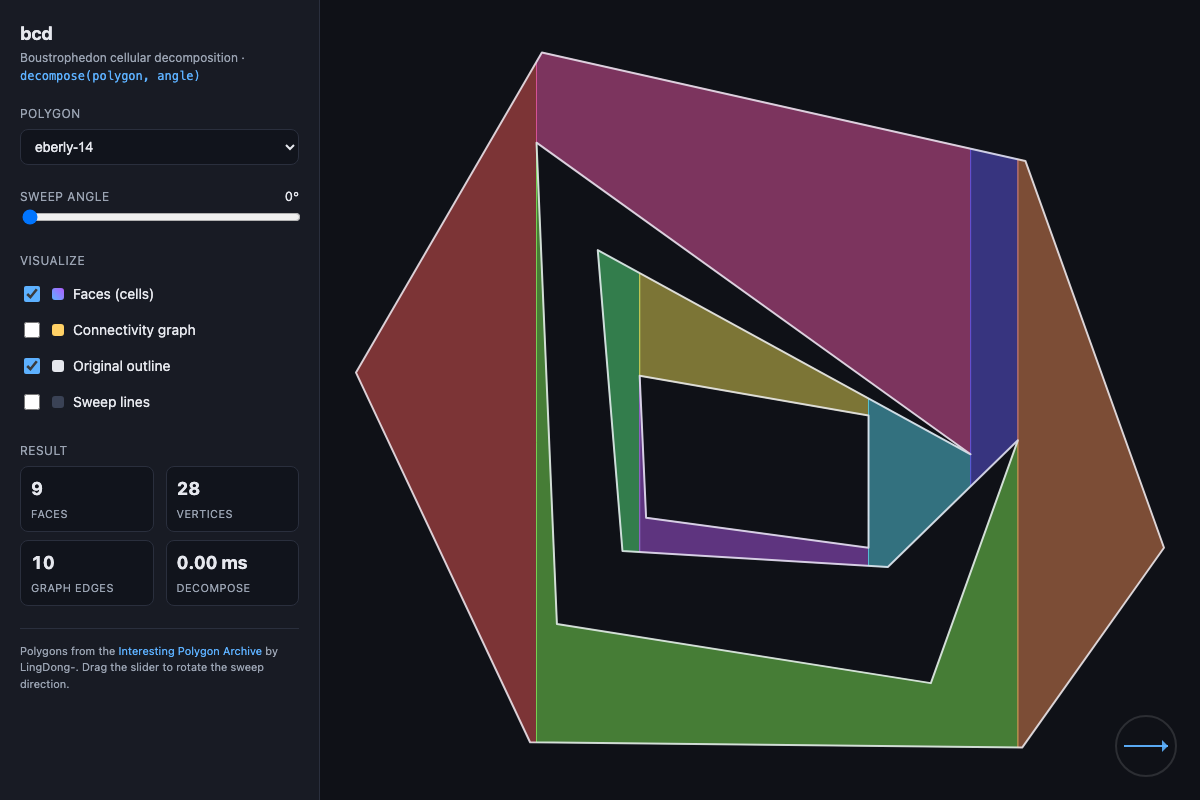
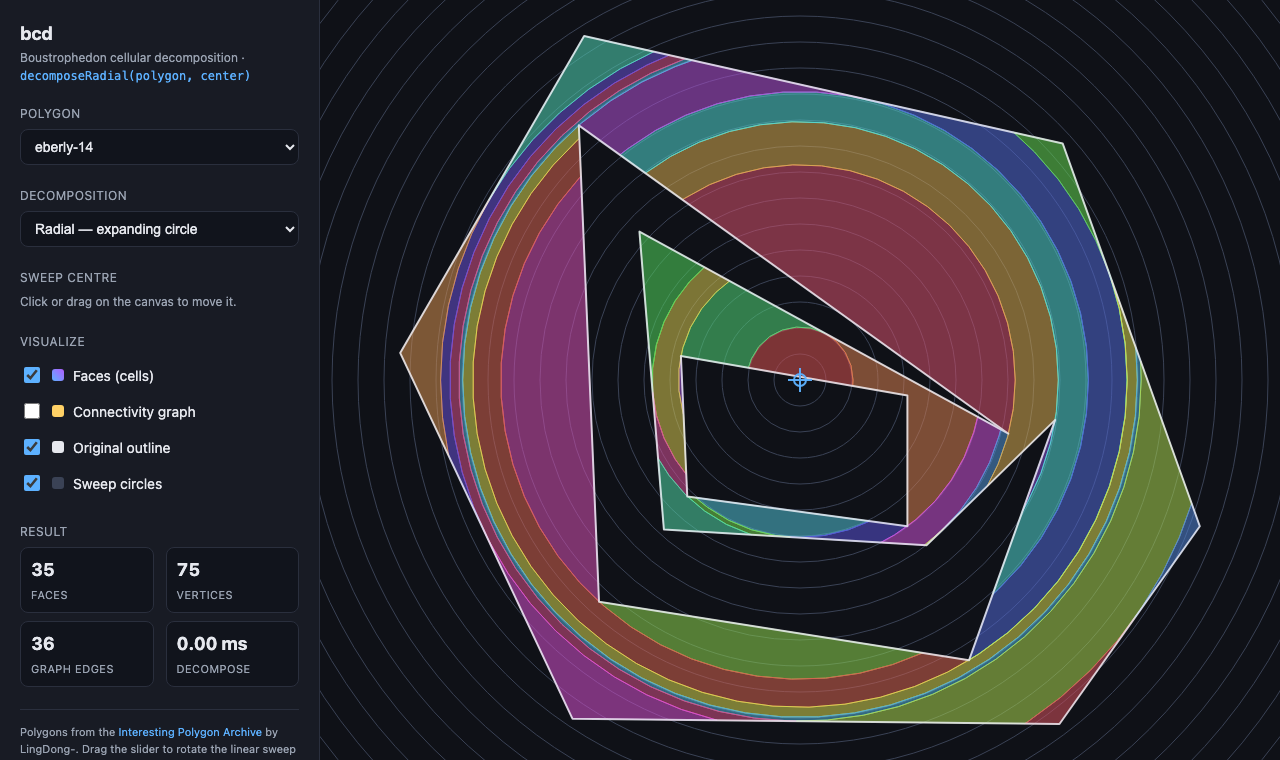
Switch Decomposition to Radial and the sweep line becomes a circle growing out of a centre you drag around the canvas. The same shape, same region, cells bounded by arcs instead of straight cuts:
Run it from the repo root with any static file server, e.g.:
npm run demo            # builds, then serves on http://localhost:8123
# then open http://localhost:8123/demo/
The view is deep-linkable — the current polygon, mode, angle or centre, and
toggles are encoded in the URL query string (e.g. ?polygon=held-1&angle=35&graph=1,
or ?polygon=eberly-14&mode=radial&cx=180&cy=140).
The dropdown also has an "Edge-case demos" group of hand-built shapes that put several critical points on the same sweep line (see below). Pick one and watch the "Faces" / "Graph edges" stats change as you nudge the slider off its target angle — at the degenerate angle the aligned holes share a band, just off it you get the generic-position decomposition, and the graph stays connected either way:
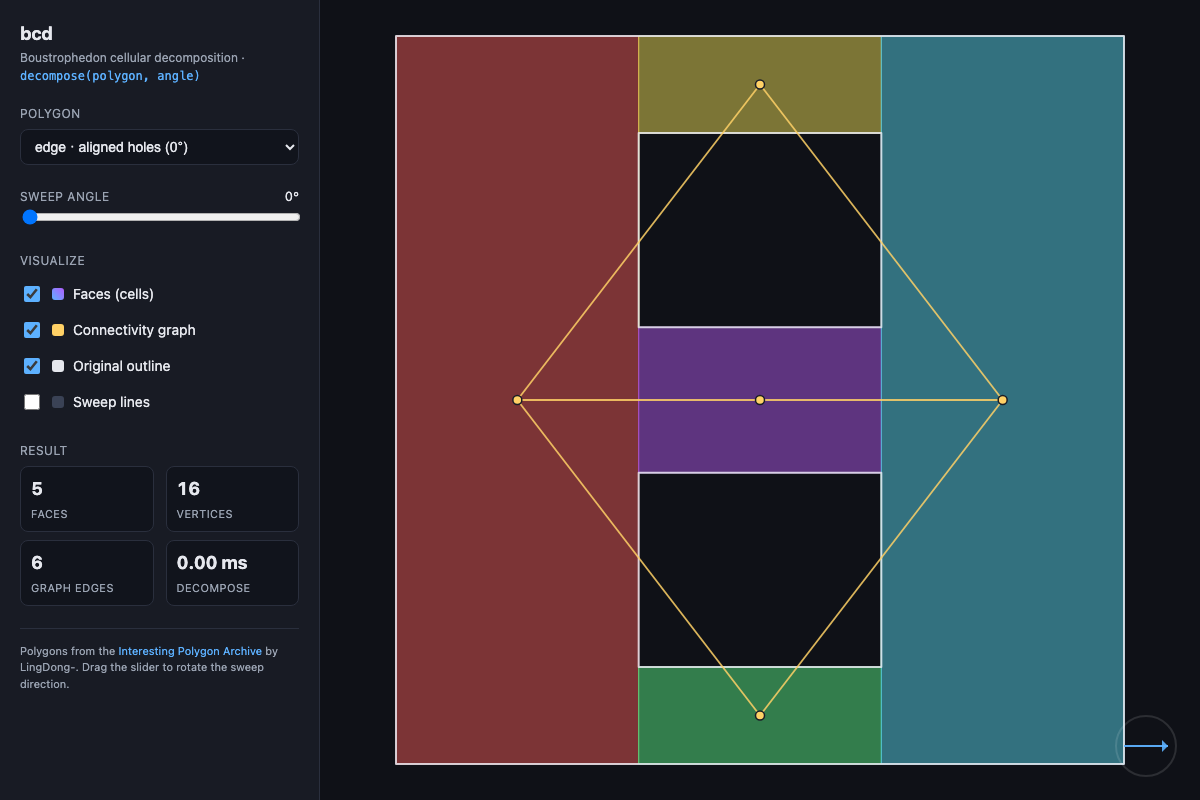
The grid shape (edge · hole grid 4×4) at 0° is the worst case — every column
of holes piles critical points onto one sweep line — and still decomposes into a
fully connected graph.
There is also a DCEL explorer
(demo/dcel.html) for the DCEL output: hover a face to walk its
half-edge cycle via next, hover an edge to see the twin pair (each offset
toward its own face), and hover a vertex to orbit it via twin→next. Boundary
cycles of the unbounded face — the outer boundary plus one per hole — are drawn
dashed, and highlights are deep-linkable (e.g. ?hover=face:1).
Install
npm install @matthewjacobson/bcdOr use it directly in a browser from a CDN — either as an ES module:
<script type="module">
  import { decompose } from "https://esm.sh/@matthewjacobson/bcd";
</script>
or as a classic script that defines a bcd global:
<script src="https://cdn.jsdelivr.net/npm/@matthewjacobson/bcd"></script>
<script>
  const result = bcd.decompose(polygon, angle);
</script>
(unpkg works too: https://unpkg.com/@matthewjacobson/bcd. Pin a version in
production, e.g. @matthewjacobson/[email protected].)
Usage
import { decompose } from "@matthewjacobson/bcd";

const result = decompose(
  {
    outer: [
      { x: 0, y: 0 },
      { x: 10, y: 0 },
      { x: 10, y: 10 },
      { x: 0, y: 10 },
    ],
    holes: [
      [
        { x: 4, y: 4 },
        { x: 6, y: 4 },
        { x: 6, y: 6 },
        { x: 4, y: 6 },
      ],
    ],
  },
  Math.PI / 6, // sweep direction in radians
);

result.vertices; // Point[]            — unique vertices, original coordinate frame
result.faces; // number[][]           — each face is a CCW loop of vertex indices
result.graph.adjacency; // number[][] — adjacency[i] = faces adjacent to face i
result.graph.edges; // [number, number][] — undirected adjacency pairs, i < j
To sweep a circle outward from a point instead of a line across the polygon, swap the angle for a centre:
import { decomposeRadial, tessellateRadialFace } from "@matthewjacobson/bcd";

const result = decomposeRadial(polygon, { x: 5, y: 5 });

result.faces[0].ring; // number[]    — outer loop, CCW
result.faces[0].holes; // number[][] — inner loops, only for annular cells
result.arcs; // RadialArc[]          — which loop edges are circular, exactly
result.graph; // same shape as decompose()'s

// Loop edges listed in `arcs` are arcs, not chords. To get plain polygons:
const loops = tessellateRadialFace(result, 0, 0.01); // Point[][], within 0.01
API
decompose(polygon, angle, options?): DecompositionResult
| Parameter | Type | Description |
| --------- | ------------------ | --------------------------------------------------------------------------------------------- |
| polygon | Polygon | { outer: Point[]; holes?: Point[][] }. Rings may be given in any winding order. |
| angle | number | Sweep direction in radians, CCW from the +x axis. Cells are sliced perpendicular to it. |
| options | DecomposeOptions | Optional. { dcel: true } also builds a doubly connected edge list. |
interface Point {
  x: number;
  y: number;
}

interface Polygon {
  outer: Point[]; // outer ring, ≥ 3 points
  holes?: Point[][]; // optional inner rings, each ≥ 3 points
}

interface DecompositionResult {
  vertices: Point[];
  faces: number[][]; // CCW loops of indices into `vertices`
  graph: {
    adjacency: number[][]; // adjacency[i] = sorted neighbour face indices
    edges: Array<[number, number]>; // [i, j] with i < j, each pair once
  };
}
Rings are re-oriented internally (outer counter-clockwise, holes clockwise) and do not need their first point repeated at the end. A repeated closing point and consecutive duplicate points are stripped before decomposing. Output faces are always counter-clockwise.
Two faces are adjacent when they share a vertical cut produced at a critical point of the sweep — a split (one cell divides into two) or a merge (two cells fuse into one). START/END events open and close cells without creating adjacency, so a simple convex polygon yields a single face with an empty graph.
DCEL output
Pass { dcel: true } to also get a doubly connected edge list — a full
topological description of the planar subdivision, useful when you need to walk
seams, orbit vertices, or hand the decomposition to downstream geometry code:
const result = decompose(polygon, angle, { dcel: true });
const dcel = result.dcel!;

dcel.halfEdges; // { origin, twin, next, prev, face }[] — face -1 is the unbounded face
dcel.faceEdge; // one half-edge index per face (its CCW cycle)
dcel.vertexEdge; // one outgoing half-edge index per vertex
dcel.boundaryCycles; // one half-edge per boundary cycle: outer boundary + one per hole
Every undirected edge is represented by two directed twins, each with its face
on the left. Interior faces cycle counter-clockwise via next; edges on the
polygon's boundary have a twin with face === -1, and those twins form one
cycle around the outer boundary plus one around each hole (boundaryCycles).
The orbit h -> halfEdges[halfEdges[h].twin].next walks the edges leaving a
vertex.
Raw boustrophedon cells do not share their cut edges exactly (a cell closed at
a split carries the full cut as one edge, while its neighbours subdivide it at
the event vertex), so with dcel: true the face loops are first normalised:
T-junction vertices are inserted into the loops they are missing from. The
faces are geometrically identical but may contain collinear vertices along
shared cuts; vertices and graph are unchanged.
decomposeRadial(polygon, center, options?): RadialDecompositionResult
| Parameter | Type | Description |
| --------- | ---------------- | ---------------------------------------------------------------------------------------------------- |
| polygon | Polygon | Same as above. |
| center | Point | The point the sweep circle expands from. May be inside the polygon, inside a hole, or outside it — but not on an edge. |
| options | RadialOptions | Optional. { dcel?, branchAngle?, arcTolerance? }. |
interface RadialDecompositionResult {
  center: Point; // the centre it was computed about
  branchAngle: number; // bookkeeping only — see below
  vertices: Point[];
  faces: RadialFace[];
  arcs: RadialArc[];
  graph: FaceGraph; // same as decompose()
  dcel?: Dcel;
}

interface RadialFace {
  ring: number[]; // outer loop, CCW
  holes?: number[][]; // inner loops, CW — only for annular cells
}

interface RadialArc {
  face: number; // index into `faces`
  hole: number; // -1 for that face's `ring`, else the index into its `holes`
  index: number; // position in the loop of the vertex the arc leaves
  count: number; // how many consecutive loop edges it spans (normally 1)
  radius: number;
  startAngle: number; // radians CCW from +x, in (-π, π]
  sweep: number; // signed, CCW positive; ±2π for a full circle
}
Cells are bounded by arcs
A radial cut is a circular arc, so a cell is not a polygon. faces gives
the loops, and arcs says which of their edges bulge: the edge leaving position
index of the named loop is an arc about center, and every edge not listed is
an ordinary straight segment. Nothing is approximated — the arcs are exact.
Use tessellateRadialFace(result, faceIndex, tolerance?) to flatten a cell into
plain Point[] loops (outer first, then holes) with every arc replaced by a
polyline no further than tolerance from the true circle. Sample angles come
from a grid fixed by the radius, so two cells sharing a cut flatten it to
exactly the same points and the flattened cells still tile the region.
Discs and annuli
A cell that wraps the whole way around the centre is a full circle, and its loop
is a single vertex with an arc of ±2π closing on itself:
- a disc (the cell containing the centre) is one such loop;
- an annulus is two — a counter-clockwise outer circle in
ring, and a clockwise inner circle inholes[0]. This is the only caseholesappears.
A cell may also touch itself at a point where the sweep circle runs tangent to
an edge, in which case that vertex appears twice in the loop. Unlike
decompose, radial loops are therefore not guaranteed to have distinct
vertices.
The branch angle
The polar frame is a cylinder, and it has to be cut along some ray to be swept.
The sweep handles the cut internally, so branchAngle does not affect the
decomposition — same cells, same graph, same areas, whatever it is set to. It
is reported for reproducibility and can be pinned for determinism; a value that
would land on a vertex or a tangency is nudged aside automatically. By default a
ray that misses the polygon entirely is chosen when one exists.
How it works
The linear sweep
After rotating the polygon so that angle aligns with +x, a vertical line
sweeps left to right. Each vertex is classified by its two incident edges and
the interior turn direction:
| Event | Incident edges | Turn | Effect | | ----------- | --------------------- | ------- | ------------------------------- | | START | both to the right | convex | open one cell | | SPLIT | both to the right | reflex | close one cell, open two | | END | both to the left | convex | close one cell | | MERGE | both to the left | reflex | close two cells, open one | | REGULAR | one left, one right | — | extend a cell's floor / ceiling |
Cells are the maximal regions between consecutive critical points, which is
exactly the boustrophedon decomposition. Events are processed in lexicographic
(x, y) order, which removes the ambiguity of perfectly vertical edges (e.g.
axis-aligned input at angle = 0) without perturbing coordinates.
Multiple critical points on one sweep line
When several critical points share the same sweep position — for example two
holes whose left edges line up vertically, or any axis-aligned input at
angle = 0 — a cell can be opened and closed at the same x, producing a
zero-width "pass-through" cell. These are filtered out of the face list (they
have no area), but the connections that ran through them are preserved by
contracting them in the graph: the cells on the left of a dropped cell are
linked directly to the cells on its right. The result stays a correct, fully
connected decomposition with exact coordinates (no perturbation). This is
covered by tests, including a fully axis-aligned grid of holes at angle = 0.
The radial sweep
decomposeRadial is the same algorithm read in polar coordinates. Mapping
(x, y) to (r, θ) about center turns the expanding circle into a straight
sweep line advancing in +r, and the boustrophedon construction — the same
event classification, the same balanced status tree — applies unchanged. Two
things are genuinely different.
Edges have an interior critical point. x is monotone along a straight
edge, but r is not: it falls to a minimum at the foot of the perpendicular
from center and rises again. Every edge is therefore split there first, which
both restores the monotonicity the sweep relies on and exposes a critical point
with no linear analogue — the radius at which the growing circle runs tangent
to an edge and the cross-section changes shape. It is the radial counterpart of
a reflex vertex, and it is what turns the central disc into the C-shaped cell
around it.
The frame is a cylinder, not a plane. θ and θ + 2π are the same place,
so the cross-section at a radius is a set of arcs around a circle: the cell
above the topmost boundary edge is the cell below the bottommost. The sweep
handles this directly rather than cutting the cylinder open and stitching it
back up — cutting first would let a cell on one side of the cut outlive its
counterpart on the other, and the answer would depend on where you cut. It
costs three things:
| | |
| --- | --- |
| Wrapping cells | A cell may run the long way round through the cut. Its ceiling then sorts below its floor, so each cell carries 2π shifts that lift its two boundaries into one continuous frame. |
| A full cell | With no boundary edge active, the cross-section is the whole circle and the cell is a disc or annulus with no bounding edges at all. It is born at the centre, or when a merge closes a wrapping cell onto itself, and dies at the first tangency that breaks the circle open. |
| Wrap events | Edges are cut where they cross the branch ray so none straddles the ordering's seam. Each cut is a non-event geometrically: the edge leaves the top of the status tree, re-enters at the bottom, and the cell it bounds carries on. |
The result is that branchAngle is invisible in the output — a property the
tests assert directly, over cell counts, graph edges and areas.
Notes & limitations
- Coordinates are exact (no perturbation). Zero-area cells (from coincident
critical points, see above) are dropped below an area threshold relative to
the input's bounding box (
10⁻¹² · diagonal²), but their adjacencies are preserved. Note that at an exactly degenerate angle the cell count reflects the simultaneous interpretation (e.g. two aligned holes give one shared band), whereas any other angle gives the generic-position count; both are valid, area-conserving decompositions. - The polygon is centred on its bounding box internally and all tolerances scale with the box diagonal, so results are independent of the units used and stable for inputs far from the origin (e.g. projected geographic coordinates).
- Input rings are assumed simple (non-self-intersecting). Self-intersections and overlapping holes are not validated.
- Runs in
O(n log n)fornvertices: events are sorted once, and the active edges are kept in a balanced AVL status tree, so each event doesO(log n)work. ~25k vertices decomposes in well under 100 ms.decomposeRadialhas the same bound and comparable constants, at roughly twice the vertex count (each edge gains its closest-approach split).
Radial specifics
centermust not lie on the boundary, within the same quantum vertices are merged at (10⁻⁹ · scale, wherescalecovers both the bounding box and the largest radius). Closer than that, the angle of a nearby boundary point is meaningless, sodecomposeRadialthrows rather than return nonsense.- Cell loops are exact but are not polygons: edges listed in
arcsare circular. Anything expecting straight sides should go throughtessellateRadialFace, and its area then approaches the true area as the tolerance tightens rather than matching it outright. - A loop may repeat a vertex where a cell pinches against a tangency, and an
annular cell has an inner loop. Code written against
decompose'sfaces: number[][]needs adjusting on both counts. - With
{ dcel: true }the arcs are tessellated into the loops first — a DCEL needs a mesh of straight edges — sofacesandarcsdescribe the flattened cells (RadialArc.countthen spans several loop edges). Sampling is shared between neighbours, so no T-junctions arise and no normalisation is needed. An annular cell's inner cycle appears indcel.faceInnerEdges.
Releasing
Releases are automated. Pushing a vX.Y.Z tag triggers the
publish workflow, which runs the tests and
then publishes to npm via Trusted Publishing
(OIDC — no token needed) with build provenance attached.
To cut a release:
# 1. Bump the version (this edits package.json and updates the lockfile).
#    Use "patch", "minor", or "major" — or an explicit version like 0.2.0.
npm version patch --no-git-tag-version

# 2. Commit the bump and push to main (CI runs typecheck + tests).
git add package.json package-lock.json
git commit -m "Release v$(node -p "require('./package.json').version")"
git push origin main

# 3. Tag the release and push the tag — this kicks off the publish workflow.
git tag "v$(node -p "require('./package.json').version")"
git push origin --tags
Then watch it and confirm it landed:
gh run watch                          # follow the "Publish to npm" run
npm view @matthewjacobson/bcd version # should show the new version
Optionally add release notes: gh release create vX.Y.Z --title vX.Y.Z --notes "...".
Notes:
- The tag must match the
versioninpackage.json, or the publish step fails on purpose (a guard against mismatched releases). - The npm trusted publisher (repo
matthewjacobson/bcd, workflowpublish.yml) is already configured, so noNPM_TOKENsecret is involved. npm versionwithout--no-git-tag-versionwould also create the tag for you, but it tags before the push to main; the steps above keep the commit and tag ordering explicit.
License
MIT