
@max1997/dsh-notebook
v0.1.2
Published
Per-session notepad for the dsh web GUI: a header button opens a dropdown panel where you collect AI answers/copy as notes, edit them, sync to the composer or send directly. Selecting text in the chat shows an "Add to notebook" affordance. Notes are store


Readme
dsh-notebook
会话级记事本 —— DSH Web GUI 头部的一个「记事本」按钮,点开是下拉面板。 随手把 AI 对话的回答/文案收集进记事本,统一整理,再一键发送到输入框或直接发送。
A per-session notepad for the dsh web GUI. A header button drops a panel where you collect chat answers/copy as notes, edit them, sync them into the composer or send them directly. Select text in the chat to surface an "Add to notebook" button.
预览 / Previews
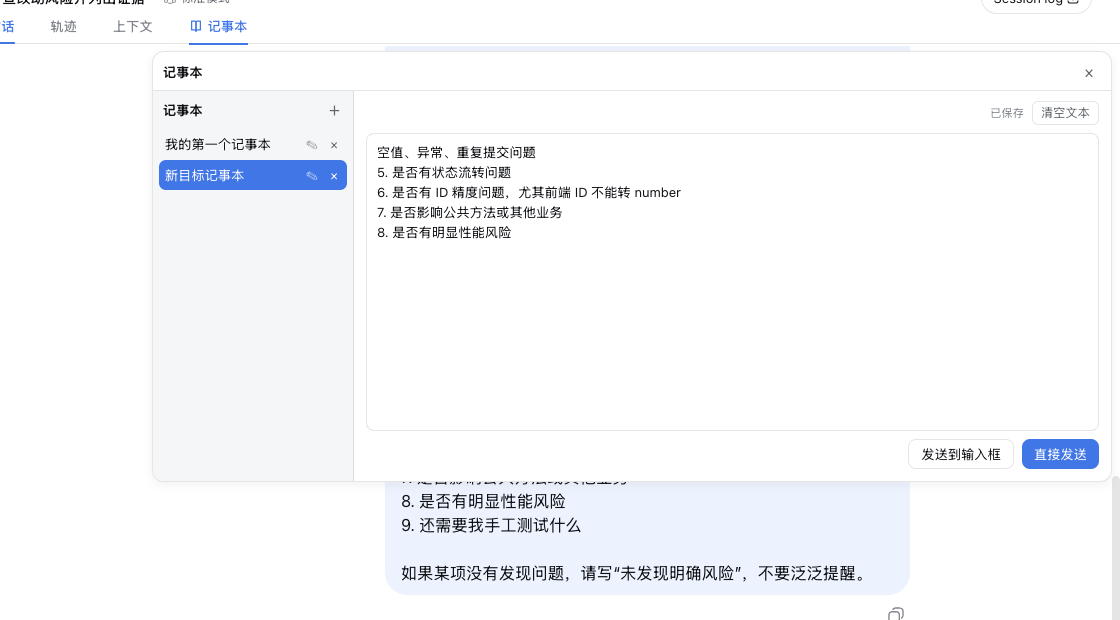
在会话标签栏右侧的「📖 记事本」标签点开面板:左侧列表、右侧编辑(自动保存)、底部「发送到输入框 / 直接发送」。
Click the "Notebook" tab next to the session tabs to drop the panel: note list on the left, auto-saved editor on the right, and send/sync actions at the bottom.
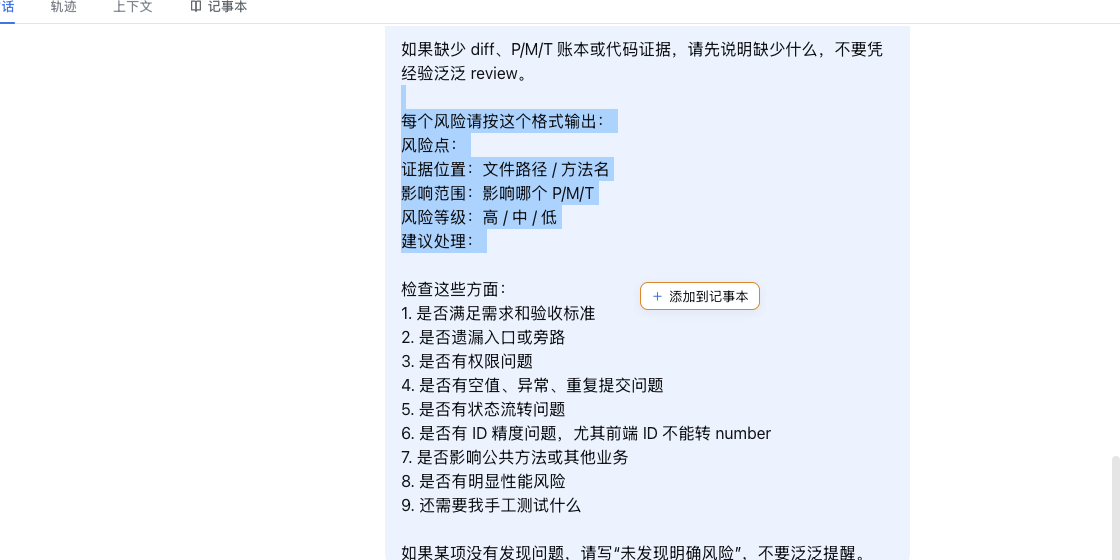
在聊天内容中选中文本,会在鼠标旁出现橙色描边的「+ 添加到记事本」按钮。
Select chat text and an orange "Add to notebook" button appears next to the cursor.
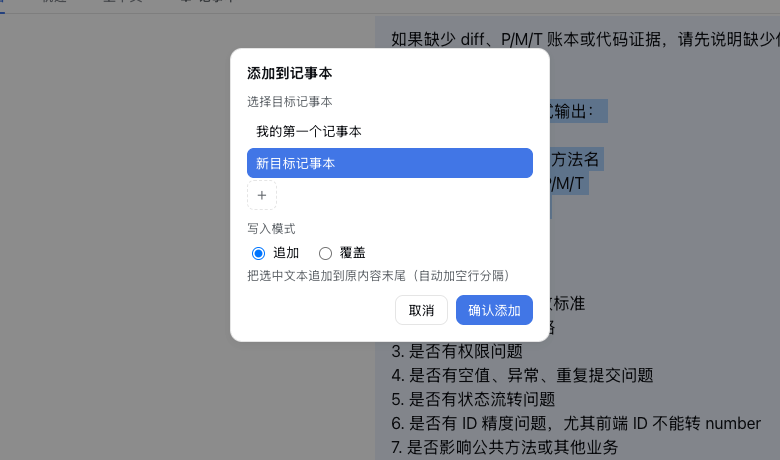
点击后弹出目标选择:选已有记事本,或点「+」新建——新建的记事本自动作为目标;写入模式支持追加(默认,自动加空行分隔)/ 覆盖。
Pick an existing note or create a new one with "+" (the target switches to it automatically); choose Append (default, blank-line separated) or Overwrite.
功能 / Features
- 每个会话独立一份记事本:数据按
sessionId隔离,互不影响;重开/刷新同一会话内容还在(除非自己删除)。新会话首次打开时是空白状态。 - 下拉面板:点击头部「记事本」按钮像帘子一样展开;右上角「×」或点击面板外任意处收起,不用切换页面。
- 左侧列表:新增 / 重命名 / 删除(二次确认)/ 当前选中高亮 / 空状态引导。
- 右侧编辑:直接编辑,内容自动保存(防抖 600ms,切换/关闭/失焦时立即落盘)。
- 直接发送:把当前记事本内容作为消息发送到当前会话(生成中自动排队);发送到输入框:同步到 composer(追加/覆盖可选),不自动发送。
- 添加到记事本:在聊天内容中选中文本 → 出现「添加到记事本」按钮 → 选择目标记事本 + 写入模式(追加/覆盖,默认追加,追加自动加空行分隔)。
- 内容存在官方 settings 文档(
notebooknamespace,host 由dsh-settings-file落盘),清浏览器缓存不丢失。
安装 / Install
# 方式一:本地目录(开发)
dsh plugin --profile web add /Users/kc/Documents/project/dsh-notebook

# 方式二:npm(发布后)
dsh plugin --profile web add @max1997/dsh-notebook安装后重启 dsh 进程(host 半区注册 settings section),再刷新 Web GUI 页面。
升级:dsh plugin --profile web update @max1997/dsh-notebook,然后重启 dsh + 刷新页面。
数据 / Data
保存在 settings namespace notebook(schema 驱动):
{
  "sessions": [
    {
      "sessionId": "…",
      "notes": [
        { "id": "…", "name": "标题", "content": "内容", "createdAt": 0, "updatedAt": 0 }
      ],
      "activeNoteId": "…"
    }
  ]
}
开发 / Development
pnpm build      # tsc 类型检查 + lib 构建
pnpm watch      # 增量构建 lib/client.js
结构:
src/index.ts— host 半区:注册notebooksettings namespacesrc/client/— 浏览器半区:conversation.session.header.actionsslotNotebookButton.tsx— 头部按钮 + 下拉面板开关 + 选中文本监听NotebookPanel.tsx— 左右分栏面板(列表 / 编辑 / 发送 / 同步到输入框)AddToNotebookPopup.tsx— 添加到记事本弹窗(选择 + 追加/覆盖)note-store.ts— 按会话隔离的数据层(内存镜像 + 防抖持久化)selection.ts— document 级选中文本监听与浮层定位
License
MIT