
@meganetaaan/mouse-follower
v1.2.0
Published
TypeScript library for creating animated sprites that smoothly follow mouse cursor or other targets using physics-based movement

Maintainers
 meganetaaan
Readme
@meganetaaan/mouse-follower




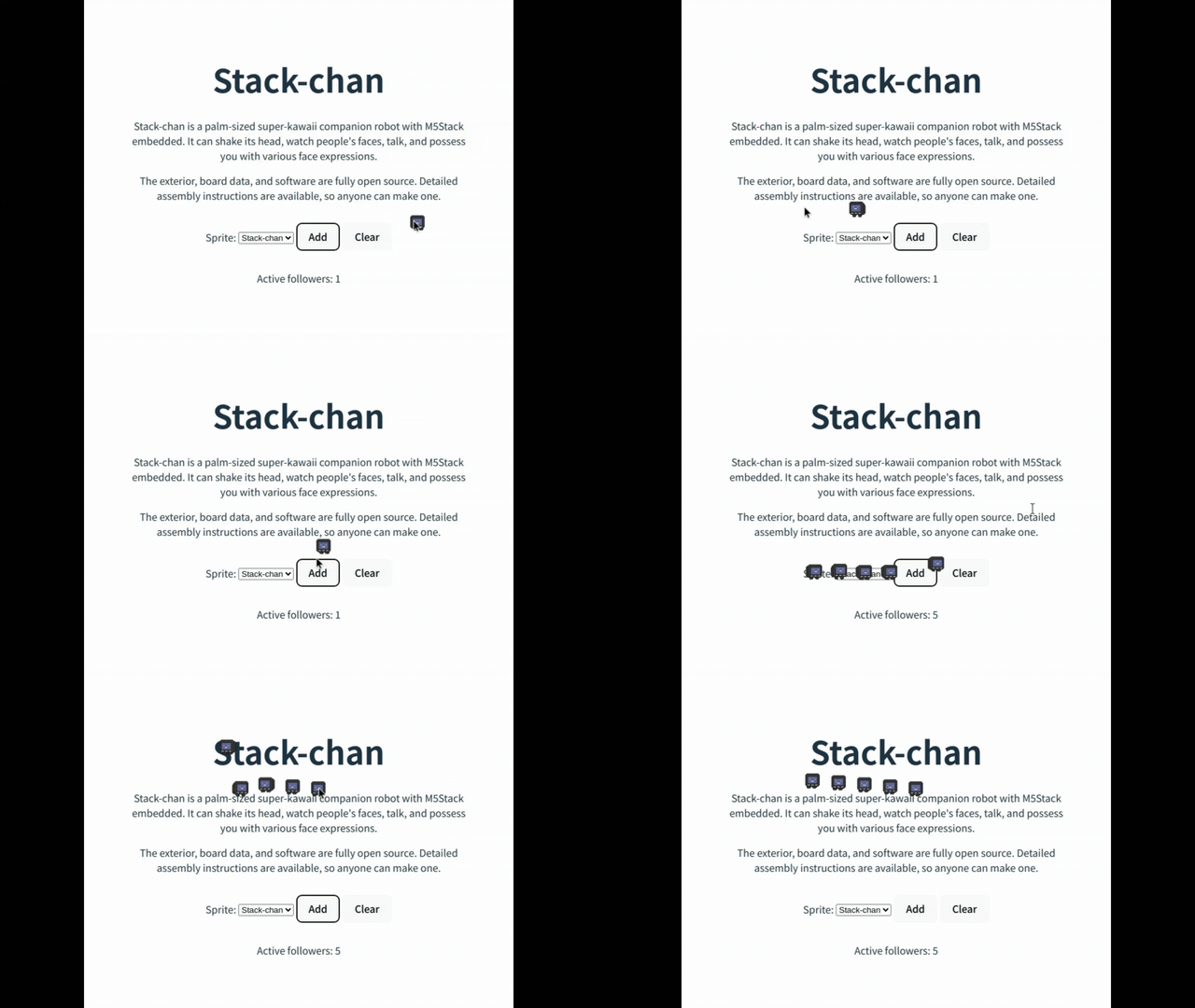
A TypeScript library for creating animated sprites that smoothly follow the mouse cursor using physics-based movement.
🚀 Live Demo
Try the interactive demo to see the library in action!
Features
- 🎯 Smooth physics-based following animation
- 🎨 Canvas-based sprite rendering with transparency support
- 🔗 Chain multiple followers in formation
- ⚡ High-performance animation with requestAnimationFrame
- 🎮 Customizable physics parameters (velocity, acceleration, braking)
- 📱 Works on both desktop and mobile devices
- 🎭 Named animations with event-driven control
- 🖼️ Built-in sprite presets (Stack-chan)
Installation
NPM
npm install @meganetaaan/mouse-followerYarn
yarn add @meganetaaan/mouse-followerpnpm
pnpm add @meganetaaan/mouse-followerCDN
<script type="module">
  import { follower } from 'https://cdn.jsdelivr.net/npm/@meganetaaan/mouse-follower/dist/index.js';

  document.addEventListener("DOMContentLoaded", async () => {
    await follower().start();
  });
</script>
Quick Start
import { follower } from '@meganetaaan/mouse-follower';

// Create a follower with default settings
const myFollower = follower();

// Start following the mouse
await myFollower.start();
API Reference
follower(options?: FollowerOptions): Follower
Creates a new follower instance.
Options
interface FollowerOptions {
  target?: FollowTarget;        // Target to follow
  bindTo?: HTMLElement;         // Parent element (default: document.body)
  sprite?: SpriteConfig;        // Sprite configuration
  physics?: PhysicsConfig;      // Physics configuration
}
target
The target for the follower to track. Can be:
mouseTarget()- Follows mouse cursor (default){ x: number, y: number }- Static or dynamic position- Another
Followerinstance - Creates follower chains offsetTarget(target, offsetX, offsetY)- Target with offset
sprite
Sprite rendering configuration:
interface SpriteConfig {
  url: string;                  // Sprite sheet URL
  width: number;                // Sprite width in pixels
  height: number;               // Sprite height in pixels
  frames: number;               // Number of frames in sprite sheet
  transparentColor?: string;    // Color for transparency (default: 'rgb(0, 255, 0)')
  animation?: {                 // Simple animation config
    interval: number;           // Frame interval in ms
  };
  animations?: {                // Named animations
    [name: string]: {
      start: [number, number];  // [x, y] position in sprite sheet
      numFrames: number;        // Number of frames
      repeat?: boolean;         // Loop animation (default: true)
      interval?: number;        // Frame interval in ms
    };
  };
}
physics
Movement physics configuration:
interface PhysicsConfig {
  velocity: number;             // Max speed in px/s (default: 400)
  accel: number;               // Acceleration in px/s² (default: 2000)
  braking: {
    stopDistance: number;      // Stop threshold in px (default: 30)
    distance: number;          // Start braking distance in px (default: 200)
    strength: number;          // Braking multiplier (default: 8.0)
    minVelocity: number;       // Min velocity before stop (default: 50)
  };
}
Methods
| Method | Description |
|--------|-------------|
| start(): Promise<void> | Start following animation |
| stop(): void | Stop following animation |
| setTarget(target: FollowTarget): void | Change follow target |
| destroy(): void | Remove follower and clean up resources |
| playAnimation(name: string): void | Play a named animation |
| pauseAnimation(): void | Pause current animation |
| addEventListener(type, listener): void | Add event listener |
| removeEventListener(type, listener): void | Remove event listener |
Properties
| Property | Type | Description |
|----------|------|-------------|
| x | number | Current x position |
| y | number | Current y position |
Events
The follower dispatches custom events:
// Movement started
follower.addEventListener('start', (e: FollowerStartEvent) => {
  e.detail.follower.playAnimation('walk');
});

// Movement stopped
follower.addEventListener('stop', (e: FollowerStopEvent) => {
  e.detail.follower.playAnimation('idle');
});
Helper Functions
mouseTarget(): MouseTarget
Creates a singleton target that tracks mouse position.
import { follower, mouseTarget } from '@meganetaaan/mouse-follower';

const myFollower = follower({
  target: mouseTarget()  // Explicitly set mouse as target
});
offsetTarget(target, offsetX, offsetY): OffsetTarget
Creates a target with an offset from another target.
import { follower, offsetTarget } from '@meganetaaan/mouse-follower';

const leader = follower();
const follower2 = follower({
  target: offsetTarget(leader, -40, 0)  // 40px to the left
});
Presets
SPRITE_PRESET_STACK_CHAN
Built-in sprite configuration for Stack-chan character.
import { follower, SPRITE_PRESET_STACK_CHAN } from '@meganetaaan/mouse-follower';

const stackChan = follower({
  sprite: SPRITE_PRESET_STACK_CHAN
});
Examples
Basic Mouse Follower
import { follower } from '@meganetaaan/mouse-follower';

const myFollower = follower();
await myFollower.start();
Custom Sprite
const customFollower = follower({
  sprite: {
    url: '/path/to/sprite.png',
    width: 64,
    height: 64,
    frames: 8,
    animation: {
      interval: 100  // 100ms per frame
    }
  }
});

await customFollower.start();
Follower Chain
import { follower, offsetTarget } from '@meganetaaan/mouse-follower';

// Create a chain of followers
const leader = follower();
const middle = follower({
  target: offsetTarget(leader, -50, 0)
});
const tail = follower({
  target: offsetTarget(middle, -50, 0)
});

// Start all followers
await Promise.all([
  leader.start(),
  middle.start(),
  tail.start()
]);
Named Animations with Events
const animatedFollower = follower({
  sprite: {
    url: './sprites/character.png',
    width: 32,
    height: 64,
    animations: {
      idle: { start: [0, 0], numFrames: 2, repeat: true },
      walk: { start: [0, 32], numFrames: 4, repeat: true },
      jump: { start: [0, 64], numFrames: 3, repeat: false }
    }
  }
});

// Play different animations based on movement
animatedFollower.addEventListener('start', (e) => {
  e.detail.follower.playAnimation('walk');
});

animatedFollower.addEventListener('stop', (e) => {
  e.detail.follower.playAnimation('idle');
});

await animatedFollower.start();
Custom Physics
const slowFollower = follower({
  physics: {
    velocity: 200,      // Slower max speed
    accel: 1000,       // Slower acceleration
    braking: {
      stopDistance: 50,  // Stop when 50px from target
      distance: 150,     // Start braking at 150px
      strength: 10.0,    // Stronger braking
      minVelocity: 30    // Lower minimum velocity
    }
  }
});

await slowFollower.start();
Multiple Followers with Different Behaviors
// Fast follower
const fast = follower({
  physics: { velocity: 800, accel: 4000 }
});

// Slow follower with larger stop distance
const slow = follower({
  physics: {
    velocity: 200,
    braking: { stopDistance: 100 }
  }
});

// Start both
await Promise.all([fast.start(), slow.start()]);
Browser Support
- Chrome/Edge 88+
- Firefox 78+
- Safari 14+
- Mobile browsers with touch support
TypeScript Support
This library is written in TypeScript and includes full type definitions. All types are exported for use in your TypeScript projects.
import type {
  Follower,
  FollowerOptions,
  FollowTarget,
  PhysicsConfig,
  SpriteConfig
} from '@meganetaaan/mouse-follower';
Performance
The library is optimized for performance:
- Uses
requestAnimationFramefor smooth 60fps animations - Efficient canvas rendering with sprite caching
- Automatic cleanup of resources when followers are destroyed
- Minimal DOM manipulation
License
MIT © meganetaaan