
@melissa-data/ui
v18.1.8
Published
A Melissa-themed React component library that makes online data quality experiences (address). It ships with accessible UI, a consistent theme, and a tiny API client wrapper.


Readme
Melissa UI
A Melissa-themed React component library that makes online data quality experiences (address). It ships with accessible UI, a consistent theme, and a tiny API client wrapper.
Bundles: ESM + CJS only. UMD/IIFE (script tag) is not supported yet. Use a modern bundler (Vite, Webpack 5+, Next.js, etc.).
What’s inside
@melissa/ui– React components, the Melissa theme helper, and a provider@melissa/api-client– lightweight fetch client used internally by the components (installed for you)
Requirements
- React
v18.0.0 - react-dom
v18.0.0 - @mui/material
v5.0.0 - @emotion/react
v11.0.0, @emotion/styledv11.0.0 - A bundler that supports ESM/CJS (Vite, Webpack 5+, Next.js, Remix, CRA 5+)
These are peerDependencies so your app supplies the versions it already uses (avoids duplicate React and keeps bundles small).
Installation (pick based on your environment needs)
# npm
npm i @melissa/ui @mui/material @emotion/react @emotion/styled react react-dom
# yarn
yarn add @melissa/ui @mui/material @emotion/react @emotion/styled react react-dom# pnpm
pnpm add @melissa/ui @mui/material @emotion/react @emotion/styled react react-domQuick start
Wrap your app (or a subtree) with MelissaProvider. Pass a Melissa licenseKey (NOTE: it is recommended to use a Melissa Authentication Token for security. See below for more details) via the provider or per component.
// main.tsx / App.tsx
import * as React from "react";
import { createRoot } from "react-dom/client";
import {
  MelissaProvider,
  createMelissaTheme,
  AddressAutoFill,
} from "@melissa/ui";

const theme = createMelissaTheme(); // Melissa look & feel (extends MUI)
const licenseKey = import.meta.env.VITE_MELISSA_ID;

createRoot(document.getElementById("root")!).render(
  <MelissaProvider theme={theme} licenseKey={licenseKey} country="US">
    <AddressAutoFill showVerified onChange={(v) => console.log(v)} />
  </MelissaProvider>
);
Implementation using Melissa Tokens
import * as React from "react";
import Container from "@mui/material/Container";
import Paper from "@mui/material/Paper";
import CssBaseline from "@mui/material/CssBaseline";
import Typography from "@mui/material/Typography";

import {
  MelissaProvider,
  createMelissaTheme,
  AddressAutoFill,
} from "@melissa/ui";

const TOKEN_ENDPOINT =
  "https://token.melissadata.net/v3/web/Service.svc/RequestToken";

const BASE_ID = import.meta.env.VITE_MELISSA_ID as string | undefined;
const TOKEN_PRODUCT =
  (import.meta.env.VITE_MELISSA_TOKEN_PRODUCT as string | undefined) ??
  "pkgExpressEntry";
const TOKEN_TTL =
  (import.meta.env.VITE_MELISSA_TOKEN_TTL as string | undefined) ?? "0015"; // mm as zero-padded
const TOKEN_IP = import.meta.env.VITE_MELISSA_IP as string | undefined; // optional

async function requestToken(opts: {
  baseId: string;
  product: string;
  ttl: string; // e.g., '0015'
  ip?: string;
}): Promise<string> {
  const url = new URL(TOKEN_ENDPOINT);
  url.searchParams.set("L", opts.baseId);
  url.searchParams.set("p", opts.product);
  if (opts.ip) url.searchParams.set("IP", opts.ip);
  if (opts.ttl) url.searchParams.set("TS", opts.ttl);

  const res = await fetch(url.toString(), { method: "GET" });
  if (!res.ok) {
    throw new Error(`Token service ${res.status} ${res.statusText}`);
  }

  // The service returns XML with <Token>...</Token>
  const text = await res.text();
  const doc = new DOMParser().parseFromString(text, "text/xml");
  const token = doc.querySelector("Token")?.textContent?.trim();
  if (!token) throw new Error("Token not found in response");
  return token;
}

export default function App() {
  const theme = createMelissaTheme();

  const [token, setToken] = React.useState<string | null>(null);
  const [tokenStatus, setTokenStatus] = React.useState<
    "idle" | "loading" | "ready" | "error"
  >("idle");

  React.useEffect(() => {
    if (!BASE_ID) {
      setTokenStatus("error");
      return;
    }

    let refreshTimer: number | undefined;

    const fetchAndSchedule = async () => {
      try {
        setTokenStatus("loading");
        const t = await requestToken({
          baseId: BASE_ID,
          product: TOKEN_PRODUCT,
          ttl: TOKEN_TTL,
          ip: TOKEN_IP,
        });
        setToken(t);
        setTokenStatus("ready");

        // Refresh slightly before expiry (e.g., 1 minute early)
        const minutes = Math.max(parseInt(TOKEN_TTL, 10) || 15, 1);
        const refreshMs = Math.max((minutes - 1) * 60_000, 30_000);
        refreshTimer = window.setTimeout(fetchAndSchedule, refreshMs);
      } catch (err) {
        console.error("Token fetch failed:", err);
        setTokenStatus("error");
        setToken(null); // fall back to BASE_ID below
      }
    };

    fetchAndSchedule();

    return () => {
      if (refreshTimer) window.clearTimeout(refreshTimer);
    };
  }, []);

  // Use token if we have one, otherwise fall back to the base license
  const licenseForProvider = token ?? BASE_ID;

  return (
    <>
      <CssBaseline />
      <MelissaProvider
        theme={theme}
        licenseKey={licenseForProvider}
        country="US"
      >
        <Container maxWidth="md" sx={{ py: 6 }}>
          <Typography variant="h5" gutterBottom>
            Melissa UI – Person + Address Demo
          </Typography>

          {tokenStatus === "loading" && (
            <Typography variant="body2" sx={{ mb: 2, color: "text.secondary" }}>
              Requesting Melissa token…
            </Typography>
          )}

          {tokenStatus === "error" && (
            <Typography variant="body2" sx={{ mb: 2, color: "text.secondary" }}>
              Using base license key (token not available). Check CORS/network
              or your env vars.
            </Typography>
          )}

          <Paper variant="outlined" sx={{ p: 3 }}>
            <AddressAutoFill
              width="100%"
              showVerified
              onChange={(v) => console.log("Form value", v)}
            />
          </Paper>

          {!BASE_ID && (
            <Typography variant="body2" sx={{ mt: 2, color: "text.secondary" }}>
              No <code>VITE_MELISSA_ID</code> set — please add your base license
              to request tokens.
            </Typography>
          )}
        </Container>
      </MelissaProvider>
    </>
  );
}
If you omit
theme,MelissaProvidersafely falls back to the default Melissa theme.
MelissaProvider & theming
MelissaProvider composes:
API configuration context for components
type ApiConfig = {
  licenseKey?: string; // Melissa ID or token used client-side
  country?: string; // default 'US'
  // (components may accept per-call overrides via props)
};
MUI ThemeProvider for consistent Melissa styling.
Theme options
- Use ours:
createMelissaTheme()returns the Melissa-branded MUI theme. - Bring your own: Pass any MUI
Theme. - Skip it: Omit
themeand the provider will use the Melissa default.
Security & keys
- Components can call Melissa directly from the browser using a publishable license ID.
- Server side scripting with a short time window is preferred for license keys/tokens.
- It is Not Recommended to put secrets in client code. If you need non-public scopes, place credentials behind a backend proxy and used short-lived tokens from Melissa found at https://docs.melissa.com/cloud-api/global-express-entry/global-express-entry-reference-guide.html#using-the-token-server .
- When using client keys, restrict by referrer/host, add quotas, and avoid sensitive scopes.
Components
AddressAutoComplete
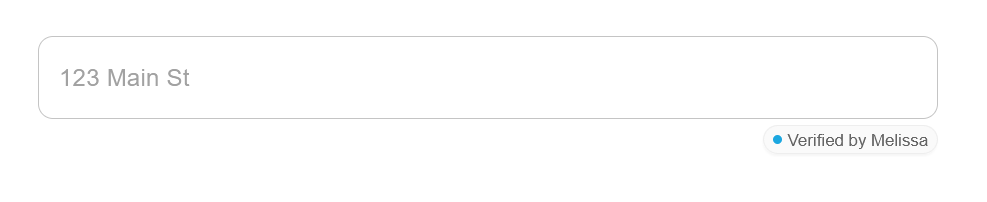
A text field that queries Melissa and displays address suggestions. Emits a single formatted string (e.g., "123 Main St, San Diego, CA 92101").
import { AddressAutoComplete } from "@melissa/ui";

<AddressAutoComplete
  placeholder="Start typing an address..."
  maxResults={10}
  width={600}
  showVerified
  onSelect={(address) => console.log("Selected", address)}
/>;
Key props
onSelect(address: string)– requiredplaceholder?: string(default:"Start typing an address...")maxResults?: number(default:10)width?: number | string– convenience sizingshowVerified?: boolean(default:true) – subtle “Verified by Melissa” badgeverifiedSize?: 'sm' | 'md'(default:'sm')licenseKey?: string– overrides providercountry?: string– overrides provider
No license key provided? The component falls back to local demo suggestions so Storybook/sandboxes still render.
AddressAutoFill


Collects first/last name and address fields. Uses AddressAutoComplete and splits the selected suggestion into individual fields.
import { AddressAutoFill } from "@melissa/ui";

<AddressAutoFill
  width={720}
  showVerified
  onChange={(value) => console.log(value)}
/>;
Emitted value
type AddressAutoFillValue = {
  firstName: string;
  lastName: string;
  address1: string;
  address2: string;
  city: string;
  state: string;
  postalCode: string;
};
Selected props
value?: Partial<AddressAutoFillValue>– controlled mode (optional)onChange?(next: AddressAutoFillValue)– fires on any changewidth?: number | stringshowVerified?: booleanverifiedSize?: 'sm' | 'md'licenseKey?: string– overrides providercountry?: string– overrides provider
Environment variables (examples)
MELISSA_KEY="your-publishable-id"The only sensitive variable used will be your Melissa License Key if you opted not to use Melissa Tokens (NOTE: Melissa Tokens are highly recommended).
Read these in your app and pass to MelissaProvider (or component props).
Implementation details
- Build formats:
module(ESM) andmain(CJS).
UMD/IIFE is not supported (no direct<script>usage). - Tree-shaking: named exports +
"sideEffects": false; avoid deep imports. - TypeScript: bundled
*.d.tstypes. - A11y: keyboard/focus/ARIA follow MUI patterns.
- Styling: built on MUI v5 + Emotion; use
sx/classNamewhere exposed.
Compatibility
- ✅ Vite, Webpack 5+, Next.js, Remix, CRA 5
- ❌ UMD/IIFE (script tag)
SSR works with the standard MUI SSR setup.
Docs & Storybook
- Storybook is used for live examples and docs.
In this repo you can run:
You can host the static build on your preferred web server.npm run -w @melissa/ui storybook # dev server npm run -w @melissa/ui build-storybook # static docs in packages/ui/storybook-static
FAQs
Where do suggestions come from?
Components call Melissa Express Entry (GlobalExpressEntry) via @melissa/api-client.
Do I have to pass licenseKey everywhere?
No—set it once on MelissaProvider. Component props always override.
Why are MUI/Emotion/React peer deps?
So your app reuses its own versions—smaller bundles and no duplicate React instances.
Contact Us
For free technical support, please call us at 800-MELISSA ext. 4 (800-635-4772 ext. 4) or email us at [email protected].
To purchase this product, contact the Melissa sales department at 800-MELISSA ext. 3 (800-635-4772 ext. 3).