
@michengai/dsh-btw
v0.1.13
Published
DSH 一次性只读旁问插件:基于当前上下文回答,独立气泡,不执行工具 · One-shot read-only side-ask plugin: answers from current context in an independent bubble, no tool execution


Readme
DSH BTW
在 DeepSeek Harness 当前会话中随手旁问,只回答,不执行
English · 界面预览 · 安装 · 使用 · 更新日志 · Apache-2.0



DSH BTW 是社区维护的 DeepSeek Harness 插件,并非 DeepSeek AI 官方产品。在当前会话中输入
/btw 问题,即可基于已有上下文获得独立气泡回答,不打断主任务。支持 DSH Web 及集成 DSH Web 的桌面应用。
功能概览
- 上下文旁问:根据当前会话内容解释概念、回顾结论或回答临时问题。
- 只回答,不执行:不会读取新文件、联网、运行命令或修改代码。
- 独立答案气泡:支持 Markdown、复制、折叠、展开和关闭,可同时查看多条旁问。
- 不打断主任务:旁问单独作答,答案不会写入主会话。
- 随时取消:关闭正在回答的气泡即可取消该旁问。
- 主题与国际化:跟随 DSH 浅色、深色主题,界面支持中文和英文切换。
界面预览
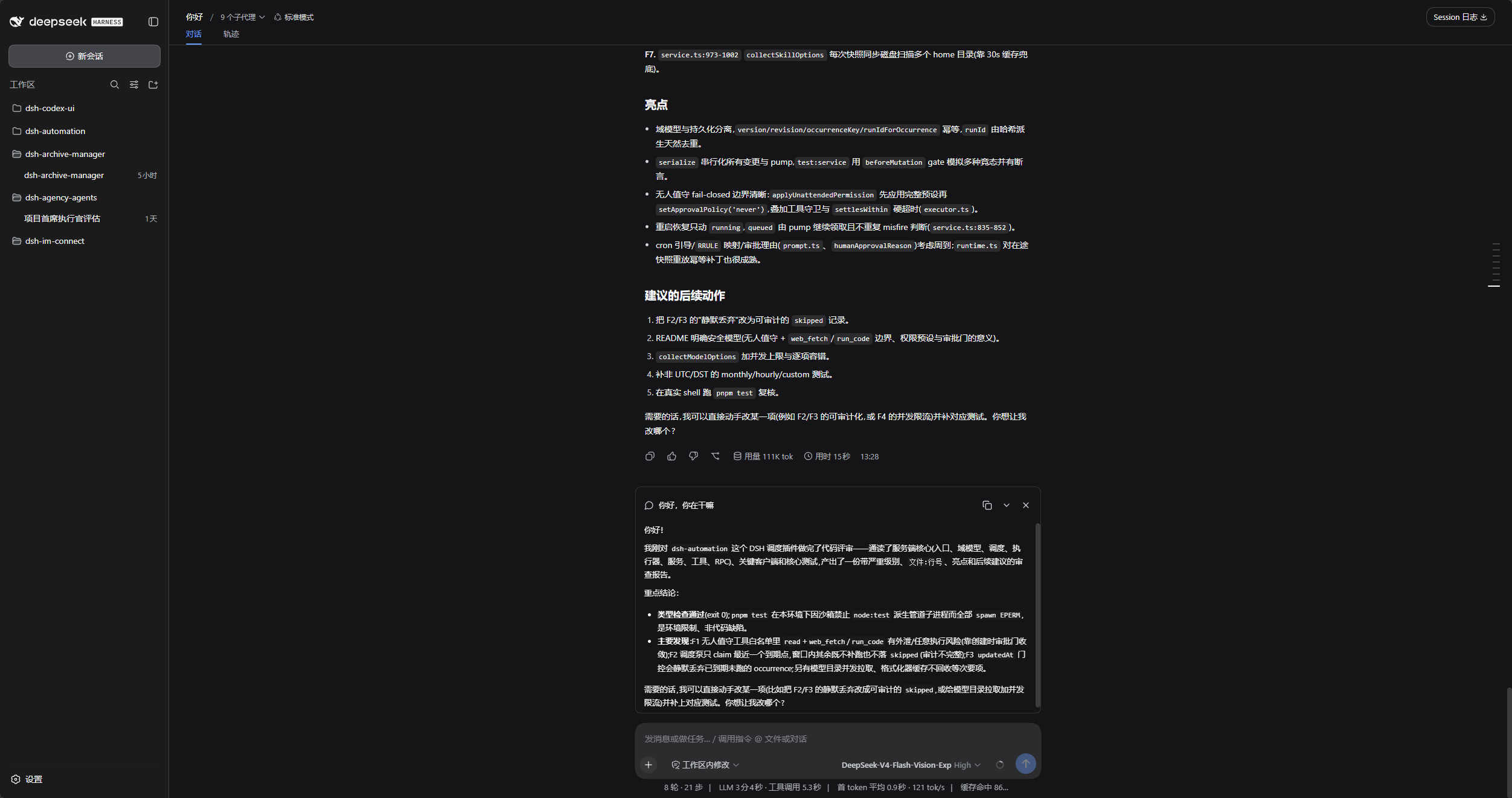
原生 DSH 中的旁问
主会话保留在原来的位置,旁问答案位于输入框上方。
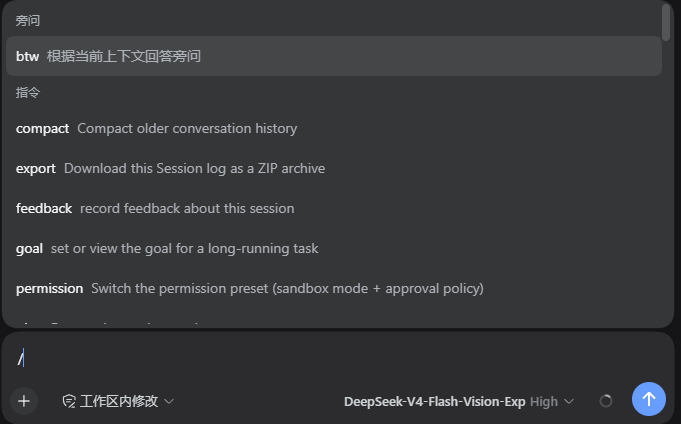
命令入口
输入 / 后,可在「指令」中选择 btw,也可以直接输入 /btw 问题。
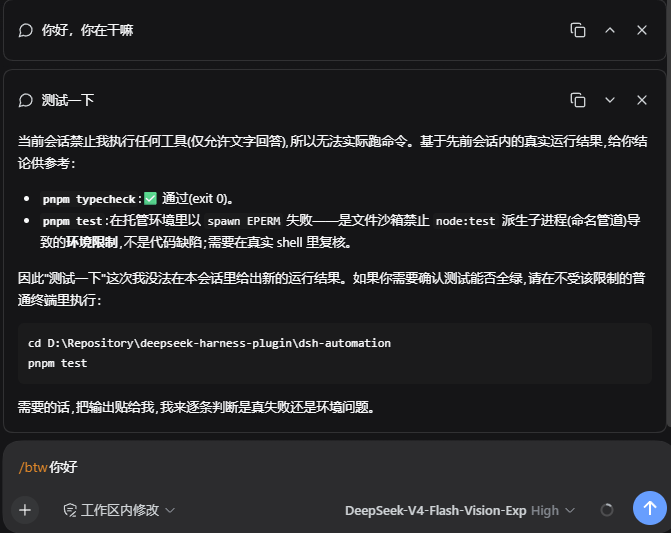
独立答案气泡
每条旁问单独展示,右上角提供复制、折叠或展开、关闭操作。
DSH 产品生态
想使用桌面工作台,可下载 DSH Codex Desktop;已有 DeepSeek Harness 环境,可按各项目 README 按需安装。以下列出 11 个自研插件;桌面端实际随附范围以对应版本的发行说明和内置清单为准。
| 插件 | 你可以用它做什么 |
| --- | --- |
| Codex UI | 整理项目与会话、搜索任务、跳转对话轮次 |
| Agency Agents | 按任务选择并召唤专业角色 |
| Skills Manager | 统一查找、启停、创建和导入本机技能 |
| Archive Manager | 搜索、恢复或清理已归档会话 |
| IM Connect | 从消息平台下任务、收回复 |
| Automation | 按计划执行任务,查看每次运行的结果 |
| BTW | 在当前上下文中临时旁问,不打断主任务 |
| Simplify | 用 /simplify 整理 Git 改动范围内的代码 |
| PUA | 引导 Agent 在失败时换方法、查原因,并在完成前验证结果 |
| Code Review | 用 /review 发起独立 Agent 代码审查,在当前会话接收报告 |
| Codex Pet | 通过桌面宠物查看会话提醒、处理工具审批和问题回答 |
前置条件
- 已安装 DeepSeek Harness。
- 宿主 peer 依赖精确声明为
0.1.0-rc.8 || 0.1.1-rc.2 || 0.1.2-rc.1 || 0.1.5-rc.1 || 0.1.5-rc.2 || 0.1.7-rc.1 || 0.1.7-rc.2。 - Node.js 22+,可在终端执行
dsh。
安装
以下命令使用 web profile,请按实际环境替换。安装前停用其他提供 /btw 命令的插件。
让 Agent 帮你安装(推荐)
把下面这段话发给任意能够执行本机终端命令的 Agent。将 web 替换为实际使用的 profile;安装完成后,在 DSH 中使用本插件。
请将 DSH 插件 @michengai/dsh-btw 安装到本机 web profile,执行:dsh plugin --profile web add @michengai/dsh-btw@latest --registry=https://registry.npmjs.org/。安装后执行 dsh --profile web --dump-config,确认配置包含 michengai-btw,并告诉我如何重新加载 DSH 和开始使用。手动从 npm 安装
[Console]::OutputEncoding = [System.Text.Encoding]::UTF8
$OutputEncoding = [System.Text.Encoding]::UTF8

dsh plugin --profile web add @michengai/dsh-btw@latest --registry=https://registry.npmjs.org/
重新加载
请在当前任务结束后安装或更新,桌面应用可能自动重载。若未生效,使用桌面应用的“重新加载”,或重启 dsh web 服务;仅刷新浏览器不够。
使用
划词旁问
在会话单条正文中选中文字,在选区上方的横条选择「旁问」,输入问题后按 Enter 发送,或点击「解释一下」。Shift+Enter 换行,Esc 取消。回答仍显示在独立 BTW 气泡中,引用原文可展开查看。
- 支持普通段落、列表和代码块文字;一次引用最多 8000 个 UTF-16 代码单元(包括空白),超限会提示,不会截断。
- 引用在划词时固定,正文继续生成不会改变它;其他背景使用发送时主会话已完成的内容。
- 不占用或清空主输入框草稿;跨消息选区、输入框和工具输出不提供该菜单。
- 横条还提供「添加到对话」,将引用追加到已有草稿并聚焦输入框,不自动发送;消息提交期间暂停添加。右键保留浏览器原有菜单。
- 支持焦点位于正文元素内的键盘选区,释放 Shift 后聚焦横条。不支持 Popover API 的浏览器使用 fixed 浮层降级,可能受到宿主布局裁切。
- 与
dsh-better-sidebar分区域处理:BTW 仅处理会话正文,文件预览与编辑器保留侧边栏插件原有「添加到对话」选项,不重复弹出工具条。 - 新入口依赖宿主正文 DOM 标记,已在 DSH
0.1.5-rc.2+ Edge 验证正文划词横条、添加引用、提问及真实模型回答;无法识别的布局保留原有右键行为,仍可使用/btw。
命令旁问
在已有上下文的会话中输入:
/btw 用一句话总结刚才的方案| 目标 | 操作 |
| --- | --- |
| 提一个旁问 | 输入 /btw 问题 并提交,或从 / 菜单选择 btw。 |
| 查看答案 | 等待输入框上方的独立气泡返回回答。 |
| 复制答案 | 点击气泡右上角的复制图标。 |
| 收起或展开 | 点击气泡右上角的折叠或展开图标。 |
| 取消旁问 | 在回答过程中关闭对应气泡,不取消主任务。 |
| 移除答案 | 关闭已完成的气泡。 |
| 继续提问 | 再次输入 /btw 问题;每次都是独立旁问。 |
若需要执行命令、修改代码或继续主任务,请通过普通会话提交。BTW 只能依据已有上下文作答。
BTW 只接受文字。输入框中附带图片或普通文件时会拒绝旁问,并保留输入和附件,请移除附件后重试。
使用说明
- 每次旁问相互独立,参考的是提问时主会话已完成的内容,不包含正在生成的回答或之前的旁问。
- 刷新页面后气泡不会保留,需要保存的答案请先复制。
卸载
[Console]::OutputEncoding = [System.Text.Encoding]::UTF8
$OutputEncoding = [System.Text.Encoding]::UTF8

dsh plugin --profile web remove @michengai/dsh-btw
重新加载 DSH 后生效。停用或升级不会删除主会话记录。
本地开发
[Console]::OutputEncoding = [System.Text.Encoding]::UTF8
$OutputEncoding = [System.Text.Encoding]::UTF8
npm ci --ignore-scripts
npm run check
npm run check 执行类型检查、测试和构建。
开发与构建基线为 0.1.7-rc.2。npm run test:compat 用该基线编译,再在七个隔离宿主版本中分别运行测试集,模型使用测试适配器。DOM 组件测试不替代真实浏览器验收。
此前在 0.1.5-rc.1 上完成真实 Edge 与 DeepSeek 模型的手工端到端验收,旁问、附件拒绝、复制、折叠/展开、取消和父会话继续均通过。这不属于 npm run test:compat;随后在 0.1.5-rc.2 验证了划词横条、添加引用、侧边栏共存及真实模型旁问回答;该版本与旧三版的完整端到端用例仍未全部验收。
从源码安装时,在项目目录执行 dsh plugin --profile web add . --ignore-scripts,然后重新加载 DSH。
许可证
Apache-2.0 © 2026 MichengAI。