
@mihairo/svgmap
v1.0.0
Published
Modern, headless-first React 19 SVG map component

Maintainers
 mihairo
Readme
@mihairo/svgmap
Modern, headless-first React 19 SVG map component. Zero runtime dependencies.
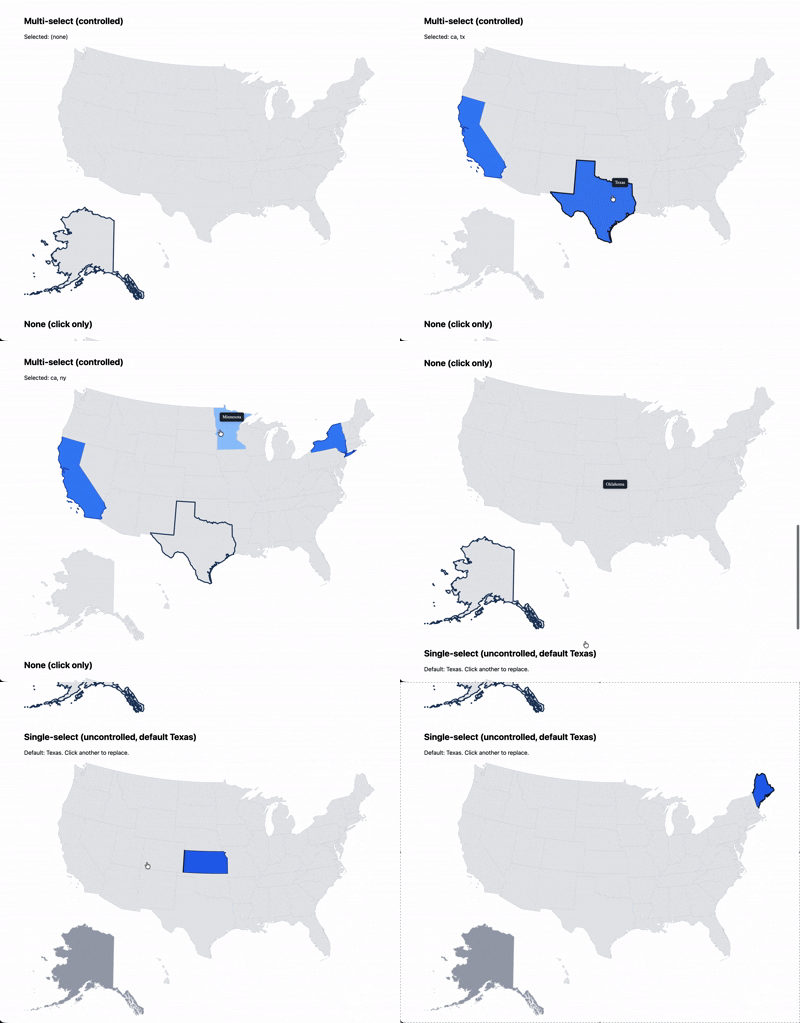
Install
npm install @mihairo/svgmap
# or
pnpm add @mihairo/svgmap
You'll also need map data. This library consumes @svg-maps/* format:
npm install @svg-maps/usa
# or any other @svg-maps/* package
Quick Start
import { SVGMap } from '@mihairo/svgmap';
import usa from '@svg-maps/usa';

function App() {
  return (
    <SVGMap
      map={usa}
      selectionMode="single"
      defaultValue="ca"
      onChange={(value) => console.log('Selected:', value)}
    />
  );
}
Props
| Prop | Type | Default | Description |
| -------------------- | ------------------------------------------------ | ------------ | ------------------------------------ |
| map | SVGMapData | required | Map data (label, viewBox, locations) |
| selectionMode | 'none' \| 'single' \| 'multiple' | 'none' | Selection behavior |
| value | string \| null (single), string[] (multiple) | — | Controlled value |
| defaultValue | string \| null (single), string[] (multiple) | — | Uncontrolled default |
| onChange | (value, meta) => void | — | Selection change callback |
| isLocationDisabled | (location) => boolean | — | Disable specific locations |
| locationClassName | string \| (location, state) => string | — | Custom class names |
| onLocationClick | (location, event) => void | — | Click handler per location |
| tooltip | (location, state) => ReactNode | — | Tooltip renderer |
| aria-label | string | map.label | Accessible label for SVG |
| className | string | — | CSS class on SVG |
| style | CSSProperties | — | Inline styles on SVG |
| ref | React.Ref<SVGSVGElement> | — | Ref forwarding |
Types narrow automatically by selectionMode: string | null for single, string[] for multiple.
Selection Modes
Single Select
<SVGMap
  map={usa}
  selectionMode="single"
  value={selectedState}
  onChange={(value) => setSelectedState(value)}
/>- Click selects a location
- Click again to deselect (returns
null) aria-selectedtoggles on paths- Container:
role="listbox", paths:role="option"
Multiple Select
<SVGMap
  map={usa}
  selectionMode="multiple"
  value={selectedStates}
  onChange={(value) => setSelectedStates(value)}
/>- Click toggles each location independently
aria-selectedtoggles on paths- Container:
role="listbox"witharia-multiselectable="true", paths:role="option"
None (Click Only)
<SVGMap
  map={usa}
  selectionMode="none"
  onLocationClick={(location, event) => {
    console.log('Clicked:', location.name);
  }}
/>- No selection state
- No ARIA role on container
- Paths get
role="button"only whenonLocationClickis provided; otherwise no interactive role
Styling
Using the Built-in Stylesheet
import '@mihairo/svgmap/style.css';This provides sensible defaults via data attributes:
| State | Attribute | Style |
| -------- | ------------------------ | ----------------------------------------- |
| Selected | [data-selected] | Blue fill + border (non-color affordance) |
| Hovered | [data-hovered] | Light blue fill |
| Focused | [data-focused] | Blue stroke |
| Disabled | [data-disabled] | Gray fill, not-allowed cursor |
| Tooltip | [data-svg-map-tooltip] | Dark background, white text |
Custom Styling
All states are exposed as data attributes:
path[data-selected] {
  fill: #10b981; /* Custom selected color */
}

path[data-focused] {
  stroke: #f59e0b;
  stroke-width: 3;
}

path[data-disabled] {
  fill: #9ca3af;
  cursor: not-allowed;
}
Or use the locationClassName prop:
<SVGMap
  map={usa}
  selectionMode="single"
  locationClassName={(location, state) => {
    if (state.disabled) return 'disabled';
    if (state.selected) return 'selected';
    return 'default';
  }}
/>
Disabled Locations
<SVGMap
  map={usa}
  selectionMode="single"
  isLocationDisabled={(location) => {
    // disable Alaska and Hawaii
    return ['ak', 'hi'].includes(location.id);
  }}
/>
Disabled locations:
- Get
aria-disabled="true",data-disabled,tabindex="-1" - Are skipped during keyboard navigation
- Cannot be selected via click or keyboard
Tooltip
<SVGMap
  map={usa}
  selectionMode="single"
  tooltip={(location, state) => (
    <div>
      <strong>{location.name}</strong>
      {state.selected && <span> ✓</span>}
      {state.disabled && <span> (disabled)</span>}
    </div>
  )}
/>
The tooltip:
- Follows the cursor on hover (scroll-safe via
position: fixed) - Appears above focused location during keyboard navigation
- Is positioned via portal (no SVG clipping)
- Has
role="tooltip"anddata-svg-map-tooltip - Is dismissible with
Escapewithout leaving the map (WCAG 1.4.13); keep content compact and non-obscuring
Keyboard Navigation
| Key | Action |
| -------------------------- | -------------------------------------------- |
| Tab | Enter/exit the map group |
| ArrowRight / ArrowDown | Move focus to next location |
| ArrowLeft / ArrowUp | Move focus to previous location |
| Home | Move focus to first location |
| End | Move focus to last location |
| Space / Enter | Toggle selection (single/multiple) |
| Escape | Dismiss the tooltip (focus stays on the map) |
Focus wraps around (last → first, first → last). Disabled locations are skipped
during arrow navigation but remain in the accessibility tree with aria-disabled.
Accessibility
- Semantic roles:
listbox/optionwitharia-selected(single and multiple) aria-multiselectable="true"on multiple-select containerrole="button"on paths in none mode whenonLocationClickis providedaria-disabledon disabled locationsaria-labelon all interactive elements- Roving tabindex for keyboard navigation (WAI-ARIA APG pattern)
- Focus visible via
data-focusedattribute (style with[data-focused]or:focus-visible) - Screen-reader announcements rendered as a real HTML live region outside the SVG
Headless Hook: useSVGMap
For custom rendering, use the hook directly:
import { useSVGMap } from '@mihairo/svgmap';

function CustomMap({ locations }) {
  const { selectedIds, isSelected, isDisabled, toggle, getSvgProps, getLocationProps } = useSVGMap({
    locations,
    selectionMode: 'single',
    onChange: (value) => console.log(value),
  });

  return (
    <svg {...getSvgProps()} aria-label="Custom map" viewBox="0 0 100 100">
      {locations.map((loc) => (
        <path
          {...getLocationProps(loc)}
          d={loc.path}
          onClick={() => toggle(loc.id)}
          style={{
            fill: isSelected(loc.id) ? 'blue' : 'gray',
            opacity: isDisabled(loc.id) ? 0.5 : 1,
          }}
        />
      ))}
    </svg>
  );
}
The hook returns complete keyboard navigation props via getSvgProps (onKeyDown, role) and
getLocationProps (tabIndex, onFocus, data-focused, ref for roving element registration).
useSVGMap Return Value
| Property | Type | Description |
| ------------------ | ---------------------------------------- | -------------------------------------------------------- |
| selectedIds | string[] | Currently selected location IDs |
| focusedId | string \| null | Currently focused location ID |
| isSelected | (id: string) => boolean | Check if location is selected |
| isDisabled | (id: string) => boolean | Check if location is disabled |
| toggle | (id: string) => void | Toggle selection |
| clear | () => void | Clear all selections (emits onChange) |
| setFocusedId | (id: string \| null) => void | Set focused location |
| getSvgProps | () => SVGProps<SVGSVGElement> | Props for container SVG (includes onKeyDown) |
| getLocationProps | (location) => SVGProps<SVGPathElement> | Props for location path (includes tabIndex, onFocus) |
useRovingFocus
For advanced custom renders, the underlying roving-tabindex hook is also exported:
import { useRovingFocus } from '@mihairo/svgmap';Migration from react-svg-map
If migrating from react-svg-map:
- import { RadioSVGMap } from 'react-svg-map';
- import { CheckboxSVGMap } from 'react-svg-map';
- import { SVGMap } from 'react-svg-map';
+ import { SVGMap } from '@mihairo/svgmap';

- <RadioSVGMap map={usa} />
- <CheckboxSVGMap map={usa} />
+ <SVGMap map={usa} selectionMode="single" />
+ <SVGMap map={usa} selectionMode="multiple" />

- <SVGMap map={usa} />
+ <SVGMap map={usa} selectionMode="none" />
Key differences:
- Single component with
selectionModeprop - React 19 (no
forwardRef) - Headless-first (data attributes, not CSS classes)
- Controlled/uncontrolled support
- Built-in tooltip helper
License
MIT