
@mingxy/opencode-quota
v3.10.7
Published
OpenCode quota & tokens usage with zero context window pollution. Supports GitHub Copilot, OpenAI (Plus/Pro), Qwen Code, Chutes AI, Synthetic, Google Antigravity, Z.ai coding plan and more.

Maintainers
 mingxy
Readme
Install
npx @slkiser/opencode-quota init[!IMPORTANT] OpenCode
>= 1.4.3and Node.js>= 20are required.
The installer adds missing plugin/config entries and keeps your unrelated settings. Re-running it updates only installer-owned Quota UI choices.
What the installer asks
| Question | Pick this when you want... | | --- | --- | | Install scope | This repo/worktree only, or your global OpenCode config. | | Quota UI | Sidebar panel, toasts, compact status line, no automatic UI surfaces, or a mix. The server plugin provides web/desktop slash commands in every mode; Sidebar or Compact status also installs the TUI plugin for local dialog commands. | | Provider mode | Auto-detect providers, or choose a provider list yourself. | | Quota reset periods | Show one reset period per provider, or all known reset periods. | | Quota percentage meaning | Show quota remaining, or quota already used. | | Session token details | Hide token counts for shorter output, or show them when available. | | Maintainer announcements | Keep bundled maintainer announcements enabled, or opt out. Yes is the default; Sidebar or Compact status installs the TUI plugin, where home notices can appear. |
After install
- Restart OpenCode.
- Run
/quotain OpenCode, or useopencode-quota showfrom your terminal. - If something looks wrong, run
/quota_statusin OpenCode oropencode-quota showfrom your terminal. - If you kept maintainer announcements enabled and installed the TUI plugin, the home screen can show
Notice: Maintainer announcement available. Run /quota_announcements.or the plural count form. Without the TUI plugin, the same count-only notice can appear once after the first visible quota toast. Run/quota_announcementsto read active notices. - If you enabled the Sidebar panel, open the session sidebar and look for
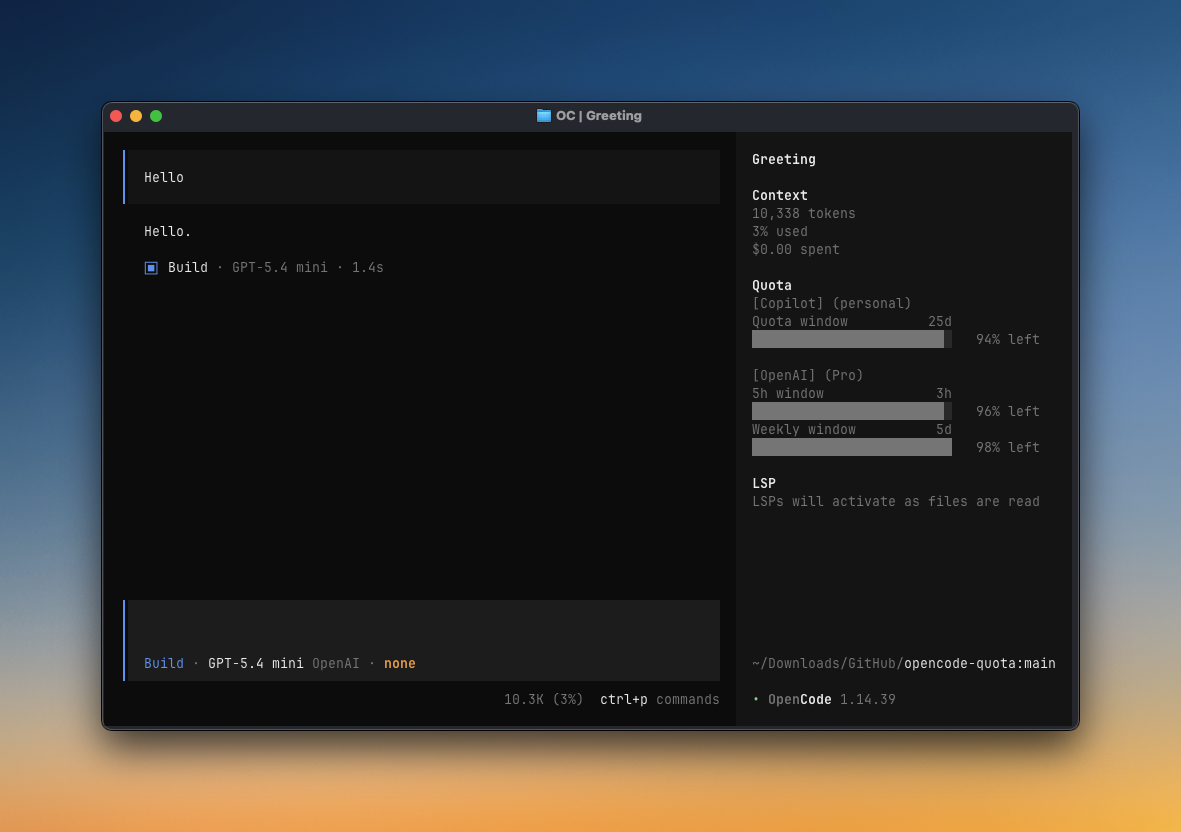
Quota. - If you enabled Compact status line, look for the home-bottom quota line and the chat/session prompt quota line.
Terminal-only check
Run without installing the binary first:
npx @slkiser/opencode-quota showOr, if opencode-quota is already on your PATH:
opencode-quota show --provider copilotWhat you get
- A
QuotaSidebar panel in the TUI - Popup quota toasts in OpenCode
- A Compact status line in the TUI
/quota,/quota_status, and/quota_announcementsslash commands in web/desktop, plus local TUI dialogs when the TUI plugin is installed- Token reports such as
/tokens_todayand/tokens_weeklyin web/desktop, plus local TUI dialogs when the TUI plugin is installed - Provider diagnostics for auth, quota sources, pricing, and bundled maintainer announcements
Manual setup
Use the installer when possible. For manual setup, use the same OpenCode config location you would pick in the installer:
- Project install: files live in your repo/worktree.
- Global install: files live in your OpenCode config directory, usually
~/.config/opencode. - If you set
OPENCODE_CONFIG_DIR, use that directory instead.
1. Add the server plugin (required)
This enables providers, terminal checks, popup toasts, web/desktop slash commands, and the tool.quota_status tool. Add this to opencode.json or opencode.jsonc:
{
  "$schema": "https://opencode.ai/config.json",
  "plugin": ["@slkiser/opencode-quota"],
}
2. Add the TUI plugin (for local dialogs and TUI surfaces)
Add this to tui.json or tui.jsonc for local /quota, /quota_status, /quota_announcements, /pricing_refresh, /tokens_* dialogs, the Sidebar panel, Compact status line, and maintainer announcement home notices:
{
  "$schema": "https://opencode.ai/tui.json",
  "plugin": ["@slkiser/opencode-quota"],
}
3. Add quota settings
Create or edit opencode-quota/quota-toast.json next to the opencode.json / tui.json file above. For a project install, that means:
<your-repo>/opencode-quota/quota-toast.jsonStart with this, then adjust the UI choices in the next section:
{
  "enabledProviders": "auto",
  "enableToast": true,
  "tuiSidebarPanel": {
    "enabled": true,
  },
  "tuiCompactStatus": {
    "enabled": false,
  },
  "maintainerAnnouncements": {
    "enabled": true,
    "home": true,
  },
}
[!TIP] Run
/quota_statusto see the exact config paths OpenCode Quota loaded.
Choose your UI surfaces
All UI surfaces use the same quota data. Put these settings in opencode-quota/quota-toast.json, not tui.json.
| UI surface | Config | Notes |
| --- | --- | --- |
| Sidebar panel | tuiSidebarPanel.enabled: true | Full Quota panel in OpenCode's session sidebar. Requires the TUI plugin entry above. |
| Toast | enableToast: true | Popup toast after idle/question/compact events. Requires the server plugin entry above. |
| Compact status line | tuiCompactStatus.enabled: true | Short text-only quota line at the home bottom and chat/session prompt locations, for example Copilot 94% | OpenAI Pro 5h 100%, 7d 100%. Requires the TUI plugin entry above. |
| Maintainer announcement notice | maintainerAnnouncements.enabled: true, maintainerAnnouncements.home: true | Prefers the TUI home notice when the quota TUI plugin is configured. Without the TUI plugin, shows the same count-only notice once after the first visible quota toast. |
| Web/desktop slash commands | Server plugin entry in opencode.json | /quota, /quota_status, /quota_announcements, /pricing_refresh, and /tokens_* show deterministic ignored/no-reply output without calling the model. |
| Dialog slash commands | TUI plugin entry in tui.json | The same commands open local TUI dialogs. They do not call the model and do not write command output to the OpenCode session transcript. |
| No automatic UI surfaces | enableToast: false, tuiSidebarPanel.enabled: false, tuiCompactStatus.enabled: false | Skips toast/sidebar/compact/TUI dialog surfaces while keeping server web/desktop slash commands and opencode-quota show available. Maintainer announcements use the separate installer question/config and can be opted out if desired. |
Selecting Compact status line in the installer enables both compact surfaces by default. To keep compact status home-only, set tuiCompactStatus.sessionPrompt: false.
In the sidebar panel, click the Quota header to switch between the compact summary (▶ Quota) and the detailed all-windows view (▼ Quota). OpenCode remembers the last sidebar state for the plugin.
For more examples, see Common configuration. For every option, see Full configuration reference.
Commands
Slash commands are deterministic and do not invoke a model. With the server plugin in opencode.json, OpenCode web/desktop commands display ignored/no-reply output in the session. With the TUI plugin in tui.json, the same commands open local dialogs instead of writing command output into the session transcript. Session-scoped token commands require an active session.
[!NOTE] Web/desktop commands intentionally stop OpenCode continuation after injecting deterministic output. Until upstream has a clean command-cancel API, this can produce harmless popup/log noise; see anomalyco/opencode#18554 and anomalyco/opencode#18559.
| Command | What it shows |
| --- | --- |
| opencode-quota show | Terminal quota-only quick glance |
| opencode-quota show --json | Machine-readable JSON output for external tools |
| opencode-quota show --json --threshold <pct> | Exit 1 if cached quota is below <pct>%; exit 2 if none can be compared |
| /quota | Detailed quota report |
| /quota_status | Config, provider, auth, pricing, enabled/home announcement config, source=bundled_only, network=false, and active/future/expired announcement counts |
| /quota_announcements | List active bundled maintainer notices |
| /pricing_refresh | Refresh local runtime pricing from models.dev |
| /tokens_today | Tokens used today |
| /tokens_daily | Tokens used in the last 24 hours |
| /tokens_weekly | Tokens used in the last 7 days |
| /tokens_monthly | Tokens used in the last 30 days, including pricing |
| /tokens_all | Tokens used across all local history |
| /tokens_session | Tokens used in the current session |
| /tokens_session_all | Current session plus descendant sessions |
| /tokens_between | Tokens used between YYYY-MM-DD YYYY-MM-DD |
Providers
Most providers work automatically. If a provider has a “Needs setup” link, open that setup note only if you use that provider.
| Provider | Auth/setup | Source | Reports | | --- | --- | --- | --- | | Anthropic (Claude) | Needs setup | Local CLI/OAuth | Usage/quota | | GitHub Copilot | OpenCode OAuth or PAT | Remote API | Quota/usage | | OpenAI | Automatic | Remote API | Usage/quota | | Cursor | Needs setup | Local estimate | Estimated quota | | Qwen Code | Needs setup | Local estimate | Estimated quota | | Alibaba Coding Plan | OpenCode config | Local estimate | Estimated quota | | MiniMax Coding Plan | OpenCode config | Remote API | Usage/quota | | MiniMax Coding Plan (CN) | OpenCode config | Remote API | Usage/quota | | Kimi Code | OpenCode config | Remote API | Usage/quota | | Chutes AI | API key/config | Remote API | Usage/quota | | Synthetic | Automatic | Remote API | Quota | | Google Antigravity | Needs setup | Remote API | Usage/quota | | Google AGY | Needs setup | Remote API | Usage/quota | | Gemini CLI | Needs setup | Remote API | Usage/quota | | Z.ai Coding Plan | OpenCode config | Remote API | Usage/quota | | Zhipu Coding Plan | OpenCode config | Remote API | Usage/quota | | NanoGPT | API key/config | Remote APIs | Usage + balance | | DeepSeek | API key/config | Remote API | Balance/status | | Ollama Cloud | Needs setup | Dashboard scraping | Dashboard usage | | OpenCode Go | Needs setup | Dashboard scraping | Dashboard usage |
Common configuration
Customize these settings in opencode-quota/quota-toast.json, next to the OpenCode config for your install scope.
Common locations:
- Project install:
<your-repo>/opencode-quota/quota-toast.json - Global install: usually
~/.config/opencode/opencode-quota/quota-toast.json - Custom config dir:
$OPENCODE_CONFIG_DIR/opencode-quota/quota-toast.json
If you are unsure, run /quota_status or check the install-scope paths above.
Maintainer announcements and privacy
Announcements are bundled only: no remote fetches, announcement telemetry, or persisted dismiss state. Use /quota_announcements to read active notices and /quota_status for counts/diagnostics. See Configure maintainer announcements below for options.
{
  "enabledProviders": ["copilot", "openai", "google-gemini-cli"],
}
{
"formatStyle": "allWindows",
}{
"percentDisplayMode": "used",
}Keeps terminal checks, any enabled UI surfaces, and /quota//quota_status.
{
  "enableToast": false,
}
{
"maintainerAnnouncements": {
"enabled": true,
"home": true,
},
}Set enabled: false to disable automatic announcement surfaces. /quota_announcements lists active bundled notices while announcements are enabled.
Useful when you want Compact status line only, toasts only, or installed TUI dialogs without the Sidebar panel.
{
  "tuiSidebarPanel": {
    "enabled": false,
  },
}
Useful when you want the compact line on the home screen but not in the chat/session prompt area.
{
  "tuiCompactStatus": {
    "enabled": true,
    "homeBottom": true,
    "sessionPrompt": false,
  },
}
{
"requestTimeoutMs": 12000,
}Writes a JSON file after each TUI background refresh for consumption by external tools (tmux, scripts, CI). See External integration.
{
  "export": {
    "enabled": true,
  }
}
By default, the installer writes quota settings only to opencode-quota/quota-toast.json. If you also want it to write the legacy OpenCode block, run:
npx @slkiser/opencode-quota init --sync-legacy-configThis is only for users who intentionally want experimental.quotaToast mirrored into opencode.json / opencode.jsonc.
Full configuration reference
Settings go in the same opencode-quota/quota-toast.json sidecar described above.
Existing experimental.quotaToast settings still work when no sidecar file exists. Quota settings do not live in tui.json.
Core/shared settings
| Option | Default | Meaning |
| --- | --- | --- |
| enabled | true | Master switch for quota collection and handled slash commands. When false, /quota, /quota_status, /pricing_refresh, and /tokens_* are handled as no-ops. |
| enabledProviders | "auto" | Auto-detect providers, or set an explicit provider list. |
| minIntervalMs | 300000 | Minimum fetch interval between provider updates. |
| requestTimeoutMs | 5000 | Remote provider request timeout in milliseconds. |
| formatStyle | singleWindow | Shared quota reset-period display for popup toasts, the Sidebar panel, and Compact status line unless a TUI surface override is set: singleWindow shows one reset period per provider; allWindows shows all reset periods per provider. Legacy classic/grouped aliases are still accepted. |
| percentDisplayMode | remaining | Shared quota percentage meaning for popup toasts, the Sidebar panel, and /quota: remaining shows quota left; used shows quota consumed. |
| onlyCurrentModel | false | Filter quota rows to the current model/provider when that session selection can be resolved. |
| showSessionTokens | true | Show the Session input/output tokens section when session token data is available. When cached input is present, the section keeps the legacy in/out layout and appends cached input in parentheses next to the input amount. |
| pricingSnapshot.source | "auto" | Token pricing snapshot selection for /tokens_*: auto, bundled, or runtime. |
| pricingSnapshot.autoRefresh | 7 | Refresh stale local pricing data after this many days. |
Toast settings
| Option | Default | Meaning |
| --- | --- | --- |
| enableToast | true | Show popup toasts. Disabling this does not disable terminal checks, UI surfaces, or /quota. |
| toastDurationMs | 9000 | Toast duration in milliseconds. |
| showOnIdle | true | Show a toast on the idle trigger. |
| showOnQuestion | true | Show a toast after a question/assistant response. |
| showOnCompact | true | Show a toast after session compaction. |
| showOnBothFail | true | Show a fallback toast when providers attempted quota reads and all failed. |
| layout.maxWidth | 50 | Toast formatting width target. |
| layout.narrowAt | 42 | Toast compact-layout breakpoint. |
| layout.tinyAt | 32 | Toast tiny-layout breakpoint. |
| debug | false | Append toast debug context when troubleshooting. |
TUI settings
| Option | Default | Meaning |
| --- | --- | --- |
| tuiSidebarPanel.enabled | true | Show the Sidebar Quota panel when the TUI plugin is installed. Click the panel header to toggle between compact summary and detailed all-windows views; OpenCode remembers the last state. |
| tuiSidebarPanel.formatStyle | (root formatStyle) | Override formatStyle for the Sidebar panel only. Useful when you want allWindows detail in the sidebar but a different style elsewhere. |
| tuiCompactStatus.enabled | false | Opt in to Compact status line UI surfaces. |
| tuiCompactStatus.homeBottom | true | Show the Compact status line at the home bottom location. |
| tuiCompactStatus.sessionPrompt | true | Show the Compact status line by wrapping the TUI session prompt. Disable this if you only want the home-bottom line. |
| tuiCompactStatus.suppressWhenNativeProviderQuota | true | Hide the Compact status line when OpenCode exposes native provider-quota support. |
| tuiCompactStatus.maxWidth | 96 | Maximum Compact status line text width. |
| tuiCompactStatus.formatStyle | (root formatStyle) | Override formatStyle for the Compact status line only. Useful when you want singleWindow on the compact line while the sidebar shows allWindows. |
Maintainer announcement settings
| Option | Default | Meaning |
| --- | --- | --- |
| maintainerAnnouncements.enabled | true | Enable bundled maintainer announcements. |
| maintainerAnnouncements.home | true | Show the count-only notice on TUI home when the quota TUI plugin is configured, or as a one-shot toast fallback after a visible quota toast when it is not. |
Provider-specific settings
| Option | Default | Meaning |
| --- | --- | --- |
| anthropicBinaryPath | "claude" | Command/path used for local Claude CLI probing. |
| googleModels | ["CLAUDE"] | Google model keys to query: CLAUDE, G3PRO, G3FLASH, G3IMAGE, GPTOSS. |
| opencodeGoWindows | ["rolling", "weekly", "monthly"] | OpenCode Go usage windows to display. |
| alibabaCodingPlanTier | "lite" | Fallback Alibaba Coding Plan tier when auth does not include tier. |
| cursorPlan | "none" | Cursor included API budget preset: none, pro, pro-plus, ultra. |
| cursorIncludedApiUsd | unset | Override Cursor monthly included API budget in USD. |
| cursorBillingCycleStartDay | unset | Local billing-cycle anchor day 1..28; when unset, Cursor usage resets on the local calendar month. |
Export settings
| Option | Default | Meaning |
| --- | --- | --- |
| export.enabled | false | Write a JSON export file after each TUI background refresh. |
| export.path | "" | Export file path. Empty string uses the XDG default: $XDG_CACHE_HOME/opencode/quota-export.json. Supports ~/ expansion. |
External integration
Quota data is available to external tools via two surfaces that emit the same JSON schema. Both read from the per-provider disk cache — no extra network requests.
CLI: show --json
opencode-quota show --json [--threshold <pct>] [--provider <id>]| Flag | Behavior |
|---|---|
| --json | Emit JSON to stdout instead of human-readable text. Reads from the disk cache only — no network calls |
| --provider <id> | Include only one provider key, using the same provider IDs accepted by show |
| --threshold <pct> | With --json, exit 1 if any comparable cached percentage is below <pct>% remaining; exit 2 if there is no cached percentage to compare |
--json reads from the per-provider disk cache populated by normal quota refreshes. If no cached entry exists for a provider, that provider is reported as unavailable.
Export file (TUI background writer)
When enabled, the TUI writes a unified JSON file after each home-bottom background refresh (same 60 s interval). The export writer reads the existing provider cache and does not fetch quota itself.
// opencode-quota/quota-toast.json
{
  "export": {
    "enabled": true,
    "path": ""  // XDG cache default: $XDG_CACHE_HOME/opencode/quota-export.json
  }
}
The file is written atomically. Write errors are logged as a warning and never affect TUI rendering.
JSON schema
Both surfaces emit the same structure:
{
  "version": 1,
  "exportedAt": 1748736000,       // unix seconds
  "fromCache": true,
  "cacheAgeSeconds": 42,          // age of the oldest provider entry
  "providers": {
    "copilot": {
      "status": "ok",
      "fetchedAt": 1748735958,
      "entries": [
        {
          "name": "Premium Requests",
          "window": "Monthly",
          "percentRemaining": 62.3,
          "resetAt": 1748908800,
          "unlimited": false
        }
      ]
    },
    "opencode-go": {
      "status": "error",
      "fetchedAt": 1748735958,
      "error": "Request timeout after 5000ms"
    },
    "anthropic": {
      "status": "unavailable"     // no cached quota is available
    }
  }
}
Provider status values:
| Value | Meaning |
|---|---|
| ok | Cached fetch succeeded; entries is populated |
| error | Cached fetch was attempted but failed; error has the message |
| unavailable | No cached quota is available, such as missing credentials or no prior refresh |
Optional fields: window is present only when a provider row reports one, percentRemaining is absent for value-only rows, and resetAt is absent when the provider does not report a reset time.
Integration examples
CI gate — abort if quota is low:
npx @slkiser/opencode-quota show --json --threshold 5
# exits 1 if any comparable cached provider is below 5% remaining
# exits 2 if there is no cached percentage to compare
Shell script — branch on remaining quota:
PCT=$(opencode-quota show --json | jq '.providers["copilot"].entries[0].percentRemaining')
(( ${PCT%.*} < 10 )) && echo "Low quota, skipping." && exit 0
tmux status-right — reads export file (no subprocess per refresh):
# ~/.tmux.conf
set -g status-interval 30
set -g status-right '#(jq -r "[.providers|to_entries[]|select(.value.status==\"ok\")|(.value.entries[0].percentRemaining|floor|tostring)+\"%\"]|join(\" · \")" ~/.cache/opencode/quota-export.json 2>/dev/null)'
Starship prompt — reads cache directly (no TUI needed):
# starship.toml
[custom.quota]
command = "opencode-quota show --json 2>/dev/null | jq -r '[.providers|to_entries[]|select(.value.status==\"ok\")|(.value.entries[0].percentRemaining|floor|tostring)+\"%\"]|join(\" \")'"
when = "true"
interval = 60
File-watch push — event-driven, zero polling:
# macOS
fswatch -o ~/.cache/opencode/quota-export.json | xargs -I{} my-status-refresh

# Linux
inotifywait -m -e close_write ~/.cache/opencode/quota-export.json \
  | while read; do my-status-refresh; done
LLM proxy router — pick the provider with the most headroom:
import json, subprocess

data = json.loads(subprocess.check_output(
    ["opencode-quota", "show", "--json"], timeout=1
))
best = max(
    (k for k, v in data["providers"].items() if v["status"] == "ok"),
    key=lambda k: next(
        (e.get("percentRemaining", 0) for e in data["providers"][k]["entries"]), 0
    ),
    default=None,
)
Provider setup notes
Install Claude Code, authenticate it, and make sure claude is on your PATH:
claude auth login
claude auth status
If Claude lives at a custom path, set anthropicBinaryPath in opencode-quota/quota-toast.json.
Use companion plugin @playwo/opencode-cursor-oauth. Add it before @slkiser/opencode-quota in opencode.json, then authenticate once:
opencode auth login --provider cursorUse companion plugin opencode-qwencode-auth. Add it before @slkiser/opencode-quota in opencode.json.
Use companion plugin opencode-antigravity-auth. Add it before @slkiser/opencode-quota in opencode.json.
Use companion plugin @anthonyhaussman/opencode-agy-auth. Add it before @slkiser/opencode-quota in opencode.json, then authenticate Google once:
opencode auth login --provider google-agyIf you use manual provider selection, include google-agy in enabledProviders.
{
  "enabledProviders": ["google-agy"],
}
If the AGY auth entry does not include a project id, set OPENCODE_AGY_PROJECT_ID or provider.google-agy.options.projectId.
{
  "provider": {
    "google-agy": {
      "options": {
        "projectId": "your-google-cloud-project"
      }
    }
  }
}
Use companion plugin opencode-gemini-auth. Add it before @slkiser/opencode-quota in opencode.json, then authenticate Google once:
opencode auth login --provider googleIf you use manual provider selection, include google-gemini-cli in enabledProviders.
DeepSeek shows the current on-demand account balance from GET https://api.deepseek.com/user/balance.
Use one of these trusted API-key sources:
export DEEPSEEK_API_KEY="your-api-key"Or put the key in trusted user/global OpenCode config, not repo-local config:
{
  "provider": {
    "deepseek": {
      "options": { "apiKey": "{env:DEEPSEEK_API_KEY}" },
    },
  },
}
If you use manual provider selection, include deepseek in enabledProviders.
Ollama Cloud quota scrapes the Ollama Cloud settings page and needs a __Secure-session cookie:
export OLLAMA_USAGE_COOKIE="your-session-cookie-value"Or use one of these config files (cookie without the __Secure-session= prefix, or with — the plugin normalizes it):
~/.config/opencode/opencode-quota/ollama-cloud.json:{ "cookie": "..." }~/.config/ollama-usage/config.yaml:cookie: "..."
To find the cookie, open ollama.com/settings in your browser, open Developer Tools → Storage → Cookies, and copy the value of __Secure-session.
OpenCode Go quota scrapes the dashboard and needs a workspace ID plus an auth cookie:
export OPENCODE_GO_WORKSPACE_ID="your-workspace-id"
export OPENCODE_GO_AUTH_COOKIE="your-auth-cookie"
Use opencodeGoWindows to choose 5h, Weekly, and/or Monthly windows. Environment variables take precedence over the optional opencode-go.json file.
Troubleshooting
Start here when quota or token data looks wrong.
- Run
/quota_status, or start withopencode-quota showfor a terminal quota summary. - Confirm the expected provider appears in the detected provider list.
- Confirm companion auth plugins are before
@slkiser/opencode-quotainopencode.json. - If token reports are empty, start OpenCode once so it creates
opencode.db, then run a session with model usage. - Use the provider-specific table below for the failing provider.
Common symptoms
| Symptom | Try this |
| --- | --- |
| /quota or other slash commands do not appear | For web/desktop commands, confirm opencode.json includes @slkiser/opencode-quota. For local TUI dialogs, confirm tui.json includes it. Restart OpenCode after changes. |
| /quota shows no providers | Run /quota_status, then check provider detection and auth. You can also use opencode-quota show for a terminal quota summary. |
| Sidebar panel does not appear | Confirm tui.json includes @slkiser/opencode-quota, restart OpenCode, and check tuiSidebarPanel.enabled. |
| Compact status line does not appear anywhere | Confirm tui.json includes @slkiser/opencode-quota, restart OpenCode, check tuiCompactStatus.enabled, and check whether tuiCompactStatus.suppressWhenNativeProviderQuota is hiding it because OpenCode exposes native provider-quota support. |
| Compact status appears on home but not in chat/session | Check tuiCompactStatus.sessionPrompt; set it to true to show the chat/session prompt line. |
| Popup toasts do not appear | Check enableToast, showOnIdle, showOnQuestion, and showOnCompact. |
| Announcement home notice does not appear | Confirm tui.json includes @slkiser/opencode-quota, restart OpenCode, then check maintainerAnnouncements.enabled, maintainerAnnouncements.home, and the active count in the maintainer_announcements section of /quota_status. |
| Token reports are empty | Start OpenCode once so opencode.db exists, then run a session with model usage. |
| Pricing looks stale | Run /pricing_refresh. |
| /tokens_between needs dates | Run /tokens_between YYYY-MM-DD YYYY-MM-DD; if your OpenCode build does not pass slash arguments to TUI commands, the dialog shows the expected format. |
Provider troubleshooting
Run /quota_status and check the Anthropic section.
| Symptom | Fix |
| --- | --- |
| claude not found | Install Claude Code and make sure claude is on your PATH. |
| Claude is installed at a custom path | Set anthropicBinaryPath in opencode-quota/quota-toast.json. |
| Not authenticated | Run claude auth login, then confirm claude auth status works. |
| Auth works but no quota rows appear | Check quota_source and message in /quota_status; re-authenticate Claude if the OAuth credential fallback is missing or stale. |
| Provider not detected | Confirm OpenCode is configured to use the anthropic provider. |
Run /quota_status and check copilot_quota_auth, billing_mode, billing_scope, and quota_api.
| Symptom | Fix |
| --- | --- |
| Personal quota missing | Confirm OpenCode Copilot auth works. The plugin can read OpenCode's Copilot OAuth token. |
| Business or Enterprise quota missing | Add copilot-quota-token.json in the OpenCode runtime config directory shown by opencode debug paths. |
| PAT config exists but quota fails | Fix copilot-quota-token.json; when present, it takes precedence over OAuth and does not silently fall back. |
| Enterprise usage missing | Use a classic PAT with the required billing access. Fine-grained PATs and GitHub App tokens are not supported for Enterprise premium usage. |
Run /quota_status and check the OpenAI auth source and token status.
| Symptom | Fix |
| --- | --- |
| OpenAI quota missing | Confirm OpenCode native OpenAI OAuth is present in auth.json. |
| Token expired | Re-run OpenCode's OpenAI auth flow. |
| Provider not detected | Confirm your OpenCode config uses the openai provider or a compatible OpenAI auth entry. |
Run /quota_status and check the Cursor section.
| Symptom | Fix |
| --- | --- |
| Cursor not detected | Put @playwo/opencode-cursor-oauth before @slkiser/opencode-quota in opencode.json. |
| Cursor auth missing | Run opencode auth login --provider cursor. |
| Quota appears but no remaining percentage | Set cursorPlan or cursorIncludedApiUsd in opencode-quota/quota-toast.json. |
| Billing cycle looks wrong | Set cursorBillingCycleStartDay in opencode-quota/quota-toast.json to your local billing anchor day. |
| Unknown Cursor pricing | Run /pricing_refresh; if still unknown, check /quota_status for unknown model ids. |
Run /quota_status and check qwen_oauth_source, qwen_local_plan, and the qwen_code live probe section.
| Symptom | Fix |
| --- | --- |
| Qwen not detected | Put opencode-qwencode-auth before @slkiser/opencode-quota in opencode.json. |
| Auth missing | Complete the Qwen companion plugin auth flow. |
| Counters do not move | Confirm the current model is qwen-code/*; Qwen quota is local request estimation for matching model usage. |
| Usage looks stale | Check the local state file path shown by /quota_status. |
Run /quota_status and check the Alibaba auth, resolved tier, state-file path, and alibaba_coding_plan live probe section.
| Symptom | Fix |
| --- | --- |
| API key not detected | Use ALIBABA_CODING_PLAN_API_KEY, ALIBABA_API_KEY, trusted user/global OpenCode config, or OpenCode auth. Repo-local provider secrets are ignored. |
| Wrong tier | Set alibabaCodingPlanTier to lite or pro in opencode-quota/quota-toast.json. |
| Counters do not move | Confirm the current model is alibaba/* or alibaba-cn/*. |
| Quota seems stale | Check the state-file path shown in /quota_status. |
These providers use trusted env vars, trusted user/global OpenCode config, or native OpenCode auth. Run /quota_status and check the provider-specific API-key diagnostics.
| Provider | Useful checks |
| --- | --- |
| MiniMax Coding Plan | Use MINIMAX_CODING_PLAN_API_KEY or MINIMAX_API_KEY for the international endpoint. Runtime/config ids like minimax and minimax-coding-plan use this provider. Repo-local provider secrets are ignored. |
| MiniMax Coding Plan (CN) | Use MINIMAX_CHINA_CODING_PLAN_API_KEY or trusted user/global OpenCode config under minimax-china-coding-plan, minimax-cn-coding-plan, minimax-cn, or minimax-china. Runtime id minimax-cn-coding-plan uses this provider. |
| Kimi Code | Use KIMI_API_KEY or KIMI_CODE_API_KEY; repo-local provider secrets are ignored. |
| Chutes AI | Use CHUTES_API_KEY, trusted user/global config, or OpenCode auth. |
| Synthetic | Use SYNTHETIC_API_KEY, trusted user/global config, or OpenCode auth. |
| Z.ai Coding Plan | Use ZAI_API_KEY or ZAI_CODING_PLAN_API_KEY; malformed fallback auth is surfaced as an auth error. |
| Zhipu Coding Plan | Use ZHIPU_API_KEY or ZHIPU_CODING_PLAN_API_KEY; malformed fallback auth is surfaced as an auth error. |
| NanoGPT | Use NANOGPT_API_KEY, NANO_GPT_API_KEY, trusted user/global config, or OpenCode auth. |
| DeepSeek | Use DEEPSEEK_API_KEY, trusted user/global config under provider.deepseek.options.apiKey, or OpenCode auth. This provider shows balance only because DeepSeek does not expose a quota reset window. |
For security, repo-local opencode.json / opencode.jsonc is ignored for provider secrets in these integrations. Put secrets in environment variables or trusted user/global config. OpenCode auth fallbacks for API-key providers require { "type": "api", "key": "..." } entries.
Run /quota_status and check the google_antigravity section.
| Symptom | Fix |
| --- | --- |
| Companion missing | Put opencode-antigravity-auth before @slkiser/opencode-quota in opencode.json. |
| Accounts not found | Check the selected antigravity-accounts.json path shown by /quota_status. |
| Refresh tokens invalid | Re-authenticate with the companion plugin. |
| Provider returns no rows | Check live_probe, live_entry_*, and live_error_* in /quota_status. |
Run /quota_status and check the google_agy section.
| Symptom | Fix |
| --- | --- |
| Companion missing | Put @anthonyhaussman/opencode-agy-auth before @slkiser/opencode-quota in opencode.json. |
| Provider not enabled in manual mode | Include google-agy in enabledProviders in opencode-quota/quota-toast.json. |
| Auth missing | Run opencode auth login --provider google-agy. |
| Project missing | Set OPENCODE_AGY_PROJECT_ID or provider.google-agy.options.projectId. |
| Provider returns no rows | Check live_probe, live_entry_*, and live_error_* in /quota_status. |
Run /quota_status and check the Gemini CLI live probe rows.
| Symptom | Fix |
| --- | --- |
| Companion missing | Put opencode-gemini-auth before @slkiser/opencode-quota in opencode.json. |
| Provider not enabled in manual mode | Include google-gemini-cli in enabledProviders in opencode-quota/quota-toast.json. |
| Auth missing | Run opencode auth login --provider google. |
| Project missing | Set provider.google.options.projectId, OPENCODE_GEMINI_PROJECT_ID, GOOGLE_CLOUD_PROJECT, or GOOGLE_CLOUD_PROJECT_ID. |
Run /quota_status and check the opencode_go section.
| Symptom | Fix |
| --- | --- |
| Config not detected | Set both OPENCODE_GO_WORKSPACE_ID and OPENCODE_GO_AUTH_COOKIE, then rerun /quota_status. |
| Incomplete config | workspaceId and authCookie must come from the same source. |
| Scrape returns no data | Refresh the browser auth cookie from opencode.ai. |
| Selected window missing | Check /quota_status for selected_windows and live_fetch_error; remove unavailable windows from opencodeGoWindows in opencode-quota/quota-toast.json or refresh the dashboard cookie. |
| Dashboard format changed | This integration scrapes the dashboard, so it can break if the dashboard markup changes. |
Run /quota_status and check pricing snapshot health plus OpenCode database paths.
| Symptom | Fix |
| --- | --- |
| /tokens_* is empty | Start OpenCode once so it creates opencode.db, then run a session with model usage. |
| Pricing looks stale | Run /pricing_refresh. |
| Runtime pricing does not change output | Check pricingSnapshot.source in opencode-quota/quota-toast.json; bundled keeps packaged pricing active. |
| Cursor model has unknown pricing | Run /pricing_refresh; Cursor auto and composer* use bundled deterministic pricing. |
Contributors
Thanks to everyone who has contributed to OpenCode Quota.
License
MIT
Remarks
OpenCode Quota is not built by the OpenCode team and is not affiliated with OpenCode or any provider listed above.