
@miragon/value-chain-renderer
v0.7.1
Published
diagram-js based value chain modeler: renderer, viewer, modeler, import/export, CSS.

Maintainers
 alexander.praschek
Readme
@miragon/value-chain-renderer


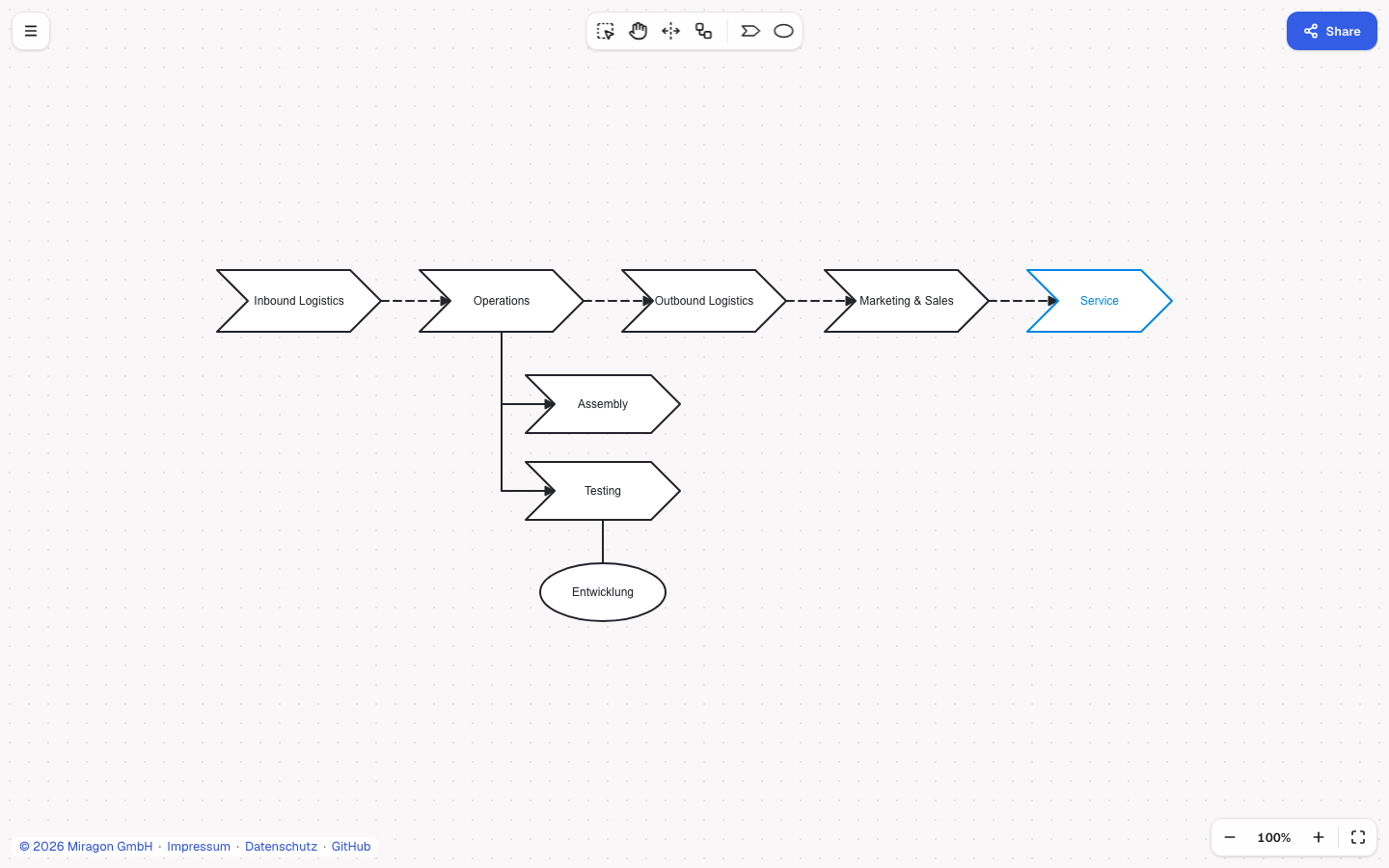
Viewer and editor for value chain diagrams (ARIS-style Wertschöpfungskettendiagramme), built on
diagram-js and styled by the Miragon design system.
Framework-agnostic: mount it into any element. The
Value Chain Modeler web app and VS Code extension
both wrap this package, and it implements the
@miragon/modeler-api contract for
collaborative hosts.
Install
npm install @miragon/value-chain-renderer @miragon/value-chain-schema-modelESM only, for browsers and bundlers. diagram-js (^15.28.0), didi, tiny-svg and zod are peer
dependencies: an app that already has them shares its copy with the renderer, since a second
diagram-js or Zod breaks the dependency injection and instanceof checks.
Quick start
import { Modeler } from '@miragon/value-chain-renderer';
import '@miragon/value-chain-renderer/assets/value-chain.css';
import { createEmptyDocument } from '@miragon/value-chain-schema-model';

const modeler = new Modeler({ container: document.querySelector('#canvas')! });
modeler.importDocument(createEmptyDocument('My value chain'));

modeler.on('commandStack.changed', () => {
  const doc = modeler.exportDocument(); // ValueChainDocument
});

const { svg } = modeler.saveSVG(); // standalone SVG
The stylesheet is required. It loads, in this order, the design-system tokens
(cd-tokens.generated.css, in a cascade layer, so a host page's own --cd-* tokens win),
diagram-js' own CSS and cd-canvas.css, which maps diagram-js' chrome onto the --cd-ui-* roles;
then it styles the canvas surround, the context pad, the label editor and the shortcuts dialog on
those roles only. The three design-system files are vendored unchanged from the
miragon-brand:modeler-tool-design skill (design system 1.13.0) into src/theme/. The diagram
itself is drawn with SVG presentation values in the light roles of those tokens, so SVG and PNG
exports stay light in every mode.
Labels are set in 'Geist Variable', 'Geist', ui-sans-serif, system-ui, sans-serif on every SVG
text node. The package does not ship the font: self-host it, for example with
@fontsource-variable/geist (import '@fontsource-variable/geist/wght.css'), or the labels fall
back to a system sans. Labels drawn before the font arrived are laid out again once it has. A host
chrome such as @miragon/modeler-shell
loads its own stylesheet after this one.
Entry points
| Class | Use it for |
| ----------------- | ------------------------------------------------------------------- |
| Viewer | Read-only rendering. |
| NavigatedViewer | Read-only plus zoom and pan. |
| Modeler | The full editor, plus undo() / redo() on top of the shared API. |
All three take { container?, width?, height?, additionalModules?, freeArea?, fitOnImport?, undoRedoKeys? }
and share importDocument, exportDocument, saveSVG, fitViewport, clear, attachTo,
detach, destroy, on/off and get (DI lookup). additionalModules extends the DI
container as in bpmn-js; the feature modules (vcDrawModule, vcRulesModule, vcPaletteModule,
…) are exported to build custom setups.
importDocument(document)validates the document before it touches the canvas (a rejected one throws and leaves the previous diagram, its ids and its undo history as they were), erases the undo history silently (nocommandStack.changed), and fits the view: the content centred at the largest zoom that shows all of it, never above 100 % (fitOnImport: falseleaves the view to a host that fits itself). A label being typed is taken down without committing and reopened afterwards on the element with the same id.- A label being typed stays open across every view change, a host's fit or restore as much as a wheel zoom, and moves along with its element; only Enter, leaving the text box or a click or drag on the canvas commits it.
exportDocument()writes back every key the schema does not define (vendor extensions on the document, its meta, its elements and connections).- New elements get random ids (
step_k3x9q2mf,org_…,sequence_…), so two people adding an element to one document at the same time never pick the same id. freeArea: the canvas area the host's chrome leaves free, as{ insets: () => FreeAreaInsets }(px from the container's edges) or{ center: () => Point | undefined }(diagram coordinates). Enter or Space on a creating palette entry places the element in its centre (default: the centre of the visible canvas), selected, with the canvas focused and its label editor open.freeRectCenteris the deprecated name offreeArea: { center }, accepted until the next minor release; given both,freeAreawins.undoRedoKeys: falseleaves Cmd/Ctrl+Z, Cmd/Ctrl+Shift+Z and Ctrl+Y unbound and unprevented, for a host that owns the history (the VS Code document).
Keyboard
On the focused canvas: L lasso, H hand, S create or remove space, C connect, E edit the label,
Cmd/Ctrl+A select all, the arrows move the selection (Shift: in large steps), Cmd/Ctrl + arrows move
the canvas, Delete/Backspace, copy, cut, paste and duplicate, and undo/redo unless undoRedoKeys is
false. diagramShortcuts() lists them for a dialog.
Edit lock
modeler.get('vcReadOnly').setReadOnly(true) locks every edit while the document behind the canvas
cannot be saved from it (an invalid file in an IDE): no create, move, resize, connect, waypoints,
delete, align, paste, context pad or label editor, and no space, connect or label keys. Selection,
lasso, hand, zoom, copy and export keep working.
Collaborative modeler (@miragon/modeler-api)
import {
  createCollaborativeModeler,
  createCollaborativeViewer,
} from '@miragon/value-chain-renderer';

const modeler = createCollaborativeModeler({ additionalModules: [] });
modeler.attachTo(host); // in the document, with a size
await modeler.importText(text); // silent, fitted; rejects when the text is no valid document
modeler.onContentChanged(() => save(modeler.exportText())); // canonical JSON
createCollaborativeModeler and createCollaborativeViewer implement the CollaborativeModeler
contract 1.3 (meta.notation "value-chain"): blank text opens as an empty diagram,
onContentChanged fires for every edit and undo/redo and never for an import, view state is the
diagram-js viewbox, a host's setViewState or fit never commits a label being typed, the
elements surface lists steps and organizational units (name = label) with reveal, selection and
bounds(id), the live box of a step or an organizational unit in diagram coordinates, and
contentBounds() is the live, tight box around every step, organizational unit and connection in
diagram coordinates (undefined while the diagram is empty): what a host that fits the view itself
fits to, as connectDiagramJs(shell, diagram, { modeler, isEmpty }) of @miragon/modeler-shell
does. Label text that overflows its shape is not part of the box, as in the SVG export. Both take
the contract's factory options freeArea, fitOnImport and undoRedoKeys (the viewer ignores
the two that need editing) and the deprecated freeRectCenter. The browser test suite runs the
contract's conformance kit on every law, with no case skipped and no advisory. diagram is the
wrapped Modeler or NavigatedViewer for host wiring.
Chrome content for hosts
What both apps show around the diagram, typed structurally like @miragon/modeler-shell (the
renderer never imports the shell): diagramMenu() (Export as PNG, then SVG, optionally JSON; Help
with "Keyboard shortcuts…"), createShortcutsDialog(shell) (a modal <dialog> in the chrome's
root, with the high-contrast and forced-colours rules of the design system; { fileKeys: true }
adds the web app's File keys, Cmd/Ctrl+O and Cmd/Ctrl+S), svgToPng() and
blobToBase64() for the PNG export, and vcBounds.isEmpty(), a cheap emptiness test for the
shell's empty-file hint.
Notation
- Step: right-pointing chevron.
- Organizational unit: ellipse, assigned to a step.
- is predecessor of (
sequence): dashed edge with an arrowhead. - is process-oriented superior (
hierarchy): solid edge with an arrowhead, routed as vertical drops for a row of sub-steps or as the ARIS rake for a column. - assignment: plain solid edge between an organizational unit and a step.
License
MIT. The inlined
Lucide icons are ISC (© Lucide Icons and Contributors); trash and x derive
from Feather, MIT (© Cole Bemis), as Lucide's LICENSE lists them. The bundle keeps both notices as a
legal comment.