
@mithril-inspector/webpack
v0.3.2
Published
The Webpack and Rspack integration for Mithril Inspector — a thin adapter over the shared transform, runtime and server packages (§4, §12.5).
Downloads
762

Maintainers
 erikvullings
Readme
@mithril-inspector/webpack
The webpack and Rspack integration for Mithril Inspector. A thin adapter over
the shared transform (@mithril-inspector/transform)
and runtime (@mithril-inspector/runtime) — same option shape and
instrumentation behaviour as @mithril-inspector/vite/rollup/esbuild,
reused via @mithril-inspector/adapter-kit rather than reimplemented
(ADR-004). One package, one plugin, works unmodified on both bundlers — verified
against real webpack() and rspack() compilations in
tests/integration/, not just documented as "should work".
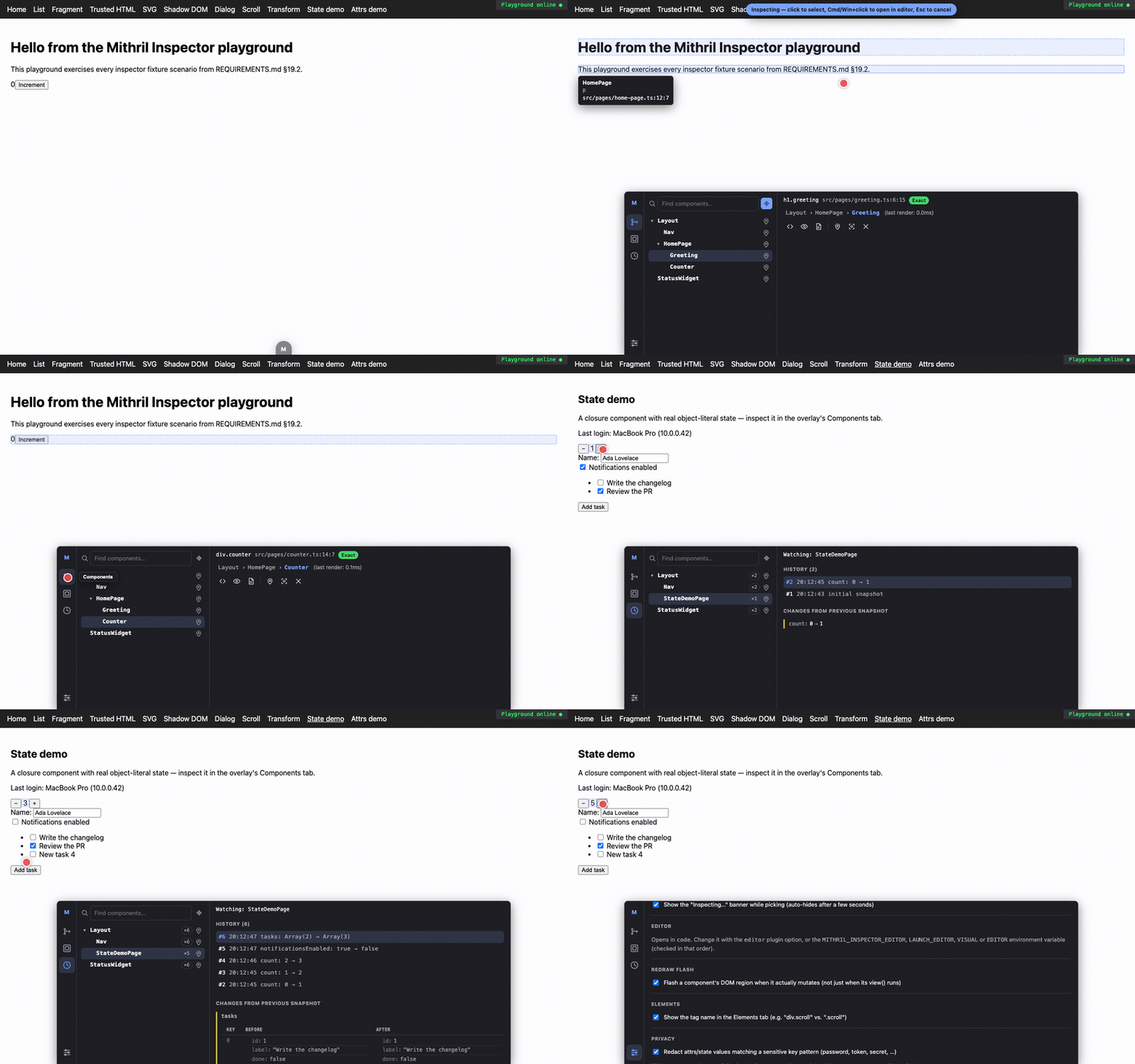
Usage
// webpack.config.js
import { mithrilInspector } from "@mithril-inspector/webpack"

export default {
  mode: "development",
  entry: "./src/main.ts",
  plugins: [mithrilInspector({ editor: "code" })],
}
Rspack is the same import, the same plugin, the same config shape:
// rspack.config.js
import { mithrilInspector } from "@mithril-inspector/webpack"

export default {
  mode: "development",
  entry: "./src/main.ts",
  plugins: [mithrilInspector({ editor: "code" })],
}
mithrilInspector(options?) returns a single plugin object ({ apply(compiler) })
built entirely from compiler.options mutation and compiler.webpack/
compiler.rspack back-references — it never imports webpack or @rspack/core
at runtime (both are optional peer dependencies; only type-only imports are
used), which is exactly why the same compiled code runs on either bundler.
What it does — and doesn't
This package covers:
- A loader for module transformation — auto-registered as an
enforce: "pre"rule (so it always runs first, directly on the original TypeScript/JSX source, before ts-loader/babel-loader lower it) and calls the sametransformMithrilModuleevery adapter uses. Its output source map is handed to whichever loader runs next as theirinputSourceMap— how webpack chains loader source maps. - A plugin for virtual/runtime entry injection — the overlay bootstrap is
injected into every entry via
EntryPlugin(see below), no application entry-file edit required; the runtime import instrumented modules use is wired throughresolve.alias. - Dev-server middleware for editor launching —
compiler.options.devServeris patched to mountcreateInspectorMiddlewareviasetupMiddlewares, composing with (never replacing) whatever you already configured there. Works withwebpack-dev-serverand Rspack's dev server — both accept the samesetupMiddlewares(middlewares, ctx) => middlewaresshape. - Watch mode / source maps — both bundlers re-run the loader for changed files automatically; the shared transform's own content-hash-keyed cache means a changed file simply produces a fresh cache entry.
It does not inject anything into an HTML page — that's html-webpack-plugin's
job, not this plugin's, and it's out of scope here the same way esbuild's
adapter leaves it to the application/build script.
Divergences from the Vite/Rollup/esbuild adapters
All forced by webpack's/Rspack's own architecture, not by choice:
- No in-memory virtual modules. Neither bundler has a
resolveId/loadoronResolve/onLoadequivalent (Rspack's Rust-side resolver hook can only redirect an existing request, not serve new in-memory content), so the runtime/overlay bootstrap source is written to real files under the project's ownnode_modules/.cache/mithril-inspectorand wired in viaresolve.alias. - A colon-free virtual specifier. Every other adapter's shared
virtual:mithril-inspector/runtimespecifier is unusable here: webpack (and Rspack, which follows the same convention) treats anyscheme:...-shaped request as a URI and rejects it withUnhandledSchemeErrorbeforeresolve.aliasever runs — confirmed empirically against a real build, not just from documentation. This adapter usesmithril-inspector/virtual-runtime/mithril-inspector/virtual-overlayinstead — relevant only if you use the manual-import escape hatch below; the auto-wired path never needs you to write the specifier yourself. EntryPlugin, notcompiler.options.entrymutation. Rspack's docs explicitly forbid mutatingentryonce the compiler is constructed (webpack itself has no such documented restriction, but the same mechanism works on both, so this adapter uses it universally rather than branching).resolveEntryNamesreads (never mutates) the configured entry to find which named entries to target; a dynamic (function) entry can't be auto-injected into — this is logged withconsole.warn, not silently dropped, and the manual-import fallback below still works.- Best-effort HMR only. The shared bootstrap's invalidation channel is
wired through Vite's
import.meta.hot, which webpack/Rspack never populate (module.hotis their own, differently-shaped API) — it safely evaluates to inactive rather than erroring, but stale-module invalidation on module replacement does not happen automatically here.
Dev-only guard
Active only when enabled (default: NODE_ENV !== "production") and
compiler.options.mode !== "production", unless includeInProduction is set
— mirroring the esbuild adapter's minify-as-production-signal, since both
webpack and Rspack expose mode directly:
mithrilInspector({
  includeInProduction: true, // force it into a production-mode build too
})
Mounting the overlay manually
The auto-injected entry (above) is enough for most setups. If you need to control exactly where the overlay mounts instead (or your entry is a dynamic function the plugin couldn't auto-inject into), import it yourself using the webpack-safe specifier from the divergences section:
if (process.env.NODE_ENV !== "production") {
  import("mithril-inspector/virtual-overlay")
}
Options
Same shape as @mithril-inspector/vite — see that package's README
for the full option reference (include/exclude, root/projectRoots,
editor, pathMappings, mode, ui, picker, componentTree, source,
mithrilImports/hyperscriptIdentifiers, debug, redact).
Pass editor explicitly, as in the examples above — leaving it unset falls
back to MITHRIL_INSPECTOR_EDITOR/LAUNCH_EDITOR/VISUAL/EDITOR from the
process's own environment before defaulting to "code", and it can't be a
terminal editor (vi, vim, nvim, emacs, nano) either way — see
@mithril-inspector/vite's README for why.