
@mjasnikovs/pi-task
v0.42.19
Published
Deterministic task planning and spec-orchestration for local models — crash-safe /task pipelines with verify/enforce gates, a real-time remote web view, and web/docs/fetch/worker subagent tools.
Downloads
16,210

Maintainers
 mjasnikovs
Readme
pi-task
Deterministic spec-orchestration for local models — with bundled web, docs, fetch, and worker sub-agent tools.





What it does
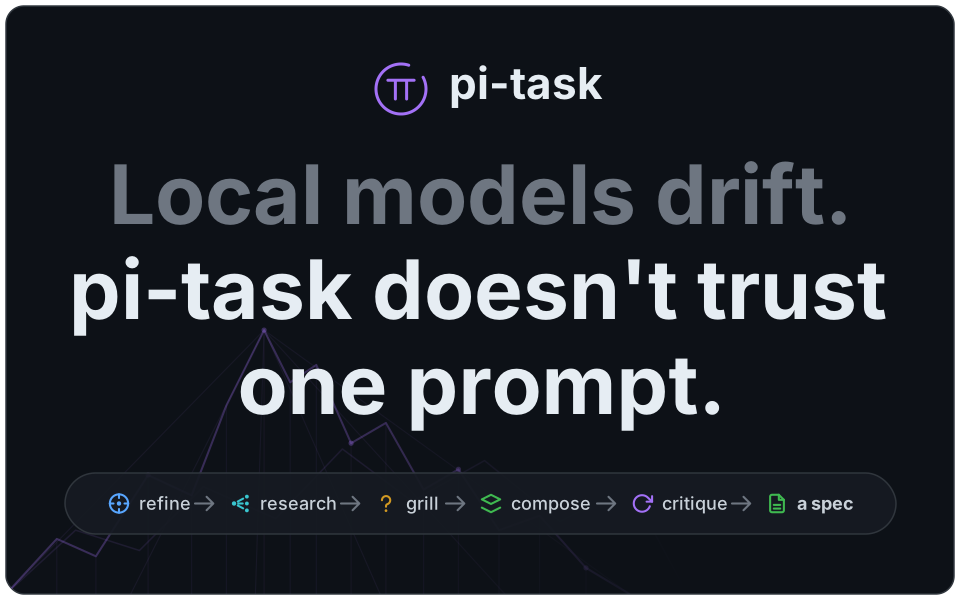
Local models drift. Ask one to plan a non-trivial change and it skips context, hallucinates APIs, and forgets what you actually asked. pi-task fixes this by not trusting a single prompt — it drives your request through a fixed, persisted pipeline of small, verifiable steps (shown above), then hands the main session a clean spec to execute.
Every phase boundary is written to .pi-tasks/TASK_NNNN.md, so a task survives a crash, a restart, or a /task-cancel — pick it back up with /task-resume.
Why it's different
- Deterministic by construction. The phase order is fixed code, not a model's free choice. The orchestrator loops over a config table; each phase has one job and one output section.
- Parallel research, focused output. The research phase fans out to isolated child agents — one indexing project files, others digging into APIs, context, and tooling — and verifies tooling claims before they reach the spec.
- Context stays clean. Noisy file/code spelunking, page fetches, and docs lookups run in throwaway child sessions. The parent only ever sees the distilled answer, never the raw page or the 4k-line file.
- Built for local LLMs. A loop detector and failure classifier catch the stalls, repetitions, and malformed output that smaller models produce, and retry with sharper emphasis instead of giving up.
- Crash-safe. State is a plain Markdown file you can read, diff, and edit by hand.
Install
pi install npm:@mjasnikovs/pi-taskRequires
pi(the Earendil coding agent) ≥ 0.87.
Quickstart
One change — /task runs it through the full pipeline and hands the finished spec back in the same chat:
/task add rate limiting to the /api/upload endpointOne change, but you want a say in HOW — /task-plan talks it through with you first, one question at a time, then hands the decisions to /task:
/task-plan add rate limiting to the /api/upload endpointA whole plan — /task-auto splits it into an ordered task list and runs each one through /task:
/task-auto Implement @MY_DETAILED_AND_LARGE_PLAN.md@-mentioning a file inlines its contents, so point it at the design doc you already wrote — no copy-paste.
Slash commands
| Command | What it does |
| --- | --- |
| /task <prompt> | Start a new task and run it through the full pipeline. |
| /task-plan <prompt> | Plan one task with the model — it asks, you answer, ask it something back, or proceed — then run it through /task. |
| /task-list | Show a table of tasks in .pi-tasks/ — id, state, phase, date, title — newest first, with a resume hint. |
| /task-resume [id] | Resume the most recent (or named) unfinished task. |
| /task-cancel | Stop the running task at the next safe checkpoint (still resumable). Mid-phase it kills the running child; during the implementation turn it lets the turn finish and stops before the gates. |
| /task-auto <feature> | Plan a feature into a task list and run each title through /task in order (resumable). |
| /task-auto-resume [--unattended] | Resume the active /task-auto run at the next unfinished task. --unattended is the boot-hook form: in-flight runs only. |
| /task-auto-cancel | Stop the /task-auto loop at the next safe checkpoint — the end of the current phase, research worker, implementation turn or gate, not the end of the task (still resumable). During planning it abandons the plan, which is not yet written. |
| /task-config | Toggle pi-task settings in an editor dialog: remote control, auto-commit, verify work, enforce guidelines, project tour, parallel research, research cache, search engine, command timeout, stuck reply retry, yolo mode, debug logs, one watch: toggle per live tool, and one ext: toggle per installed host extension. |
| /remote | Show the QR code & URLs for the web view (/remote stop to stop). Answer grill questions, start tasks, and watch progress from your phone. |
The pipeline
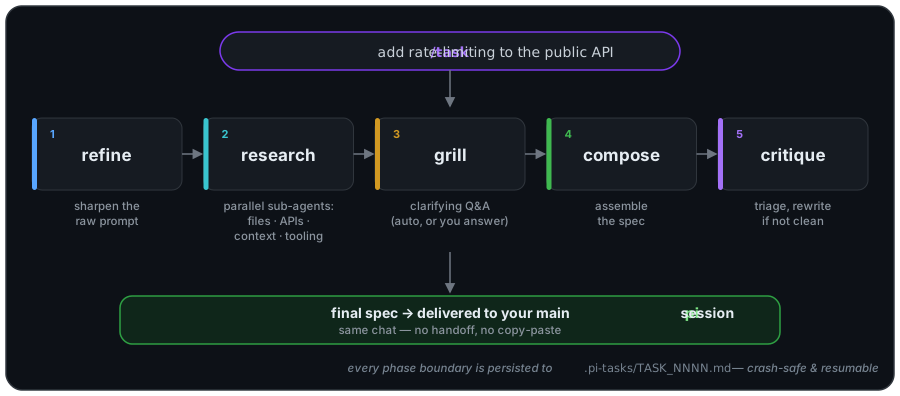
| Phase | Output section | What happens |
| --- | --- | --- |
| refine | refined prompt | Sharpens your raw ask into an unambiguous, self-contained statement. |
| research | research | Fans out to parallel sub-agents (project files · APIs · domain context · tooling), enriches any referenced packages/URLs/external services with fresh docs, then verifies tooling claims. |
| grill | grill Q&A | Generates the clarifying questions the spec can't be written without — auto-answered from context where possible, surfaced to you where not. |
| compose | spec | Assembles refined prompt + research + Q&A into a single implementation spec. |
| critique | spec | Triages the draft; if it isn't already clean, rewrites it. The triage pass skips the expensive rewrite when the draft already holds up. |
The finished spec is delivered to your main pi conversation via sendUserMessage, so you keep working in the same chat — no context handoff, no copy-paste.
Planning one task — /task-plan
/task decides most things for you: refine sharpens the ask, research gathers context, and grill only surfaces the questions its research could not settle. That is the right trade when you want the change done. When you want a say in how it gets done, /task-plan puts the conversation first.
/task-plan add rate limiting to the /api/upload endpointIt works like the clarify step you already know — one question at a time, each one shaped by your last answer — with a recommendation you can take with one keystroke. The difference is that three moves are on screen at every prompt, so the conversation is yours to steer:
| Move | What it does |
| --- | --- |
| Answer | Take the recommendation (or the B option), or type your own answer. Empty submit = accept the recommendation. |
| ❓ Ask the model a question | You ask, it answers — grounded in the repo, with the read tool. The answer is recorded as a note, and the same question you were being asked comes straight back. Notes do not decide anything; they are context, and they ride into the next question. |
| ▶ Proceed to execution | Stop planning and hand what you have to /task. Available from the very first prompt — you are never forced through a question you do not care about. |
When the model runs out of questions it says so and offers the same three moves rather than proceeding behind your back. Answering something new re-opens it: a decision you volunteer can make a fresh question worth asking.
Planning is read-only. Nothing in your project is created, edited, or deleted while you plan — the planning model runs with a one-tool allowlist (read), which also excludes write tools contributed by any extension you have whitelisted for helper sessions. That is verified as well as prevented: the working tree is compared before and after every step, and if anything outside .pi-tasks/ ever changes, the run says so loudly and records it in the plan file rather than carrying on quietly. Read-only ends the moment you choose Proceed to execution — from there it is a normal /task run and it writes code.
The one thing written during planning is the plan file itself, .pi-tasks/TASK_PLAN_NNNN.md — the task prompt, the ## decisions transcript, and a separate ## notes section for what you asked (a session you abandon before deciding anything deletes its own file, so an aborted plan leaves nothing at all). Only the decisions are handed to /task, as an authoritative block ahead of your original prompt; the notes stay behind, because an answer you read is not a decision you made. From there it is an ordinary /task run — same pipeline, same gates.
It works from the browser too (see Remote): the prompt card grows an Ask the model and a Proceed to execution button alongside the usual Accept / Manual answer.
Orchestrating multiple tasks — /task-auto
A real feature is usually several tasks, not one. /task-auto is a thin planner on top of the single-task pipeline:
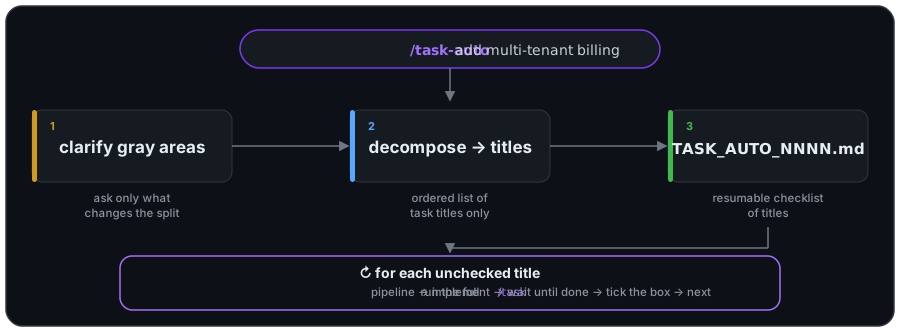
- It only produces titles. All the depth — refine, research, grill, compose, critique — is
/task's job, run fresh per title./task-autonever researches or specs anything itself. - Clarify first. It asks the few clarifying questions whose answers change how the feature splits, then decomposes the answers into an ordered list of task titles written to
.pi-tasks/TASK_AUTO_NNNN.md. - Sequential, blocking. Each title runs through
/taskto a spec, the spec is implemented, and the loop waits for that to finish before starting the next title. No overlap. - Crash- and cancel-safe. Progress is the markdown checkboxes in the AUTO file.
/task-auto-resume(no id) automatically picks up the active run at the first unchecked title. If a title's/taskrun fails, the loop stops and leaves the run resumable. - Restart-safe, unattended.
/task-auto-resume --unattendedis the same resume with no human in the loop — for a boot hook or a container entrypoint. It continues in-flight runs only: afailedorcancelledrun stopped for a reason a power cycle does not clear, so it is reported and left alone rather than re-entered against the same wall. Either way the resume banner states exactly what it measured — how long since the run last wrote, and that nothing was rolled back — and attributes no cause, because a stopped host, a hung child, and a slow task look identical from here. Pair it withrestart: unless-stoppedon long-running containers and an overnight outage costs minutes instead of the whole night. - One commit per task. When auto-commit is on (the default) and you're in a git repo, the working tree is snapshotted into a single commit after each title passes, so the run produces a clean per-task history. It's best-effort: outside a repo, with nothing to commit, or on any git error, the loop reports the reason and keeps going. Toggle it in
/task-config.
Remote — drive a task from your phone
The remote server is on by default — it starts automatically with each session, with nothing taking up screen space (disable it in /task-config). Run /remote any time to pop a QR code and the connection URLs: a Tailscale line and a LAN line when both are available (the QR encodes the Tailscale-preferred one). Open the URL on any device that can reach the host and you get a live view of the session: streaming output, tool calls, and the /task status block (phase, elapsed, context). It's bidirectional — the browser can:
- Answer grill /
/task-autoclarify questions. Each question appears as a card with the recommended default pre-filled (Accept), a free-text box (Submit), Skip, or Cancel task. - Start and control tasks. Type
/task …,/task-auto …,/task-cancel,/task-resume, etc. — they run on the host. - Send plain messages to the agent.
Prompts use a first-answer-wins race: the same question shows in the local TUI and every connected browser, and whoever answers first wins — the other surfaces dismiss. With nobody connected, /task behaves exactly as before; the remote path is purely additive.
Push notifications
Tap the bell (◯ → ◉) in the remote header to get pushed a notification — even with the app backgrounded or the phone locked — when:
- a grill / clarify question needs answering ("pi needs your input"), or
- a task finishes ("Task finished").
Host agent errors are deliberately not pushed — most of them happen outside any task, and a push on every one is just noise.
Delivery is server → push service → device over the Web Push standard (service worker + VAPID), so it reaches a suspended device. It works on desktop browsers and on iOS home-screen PWAs.
iOS setup (these are Apple's requirements, not ours):
- Open the HTTPS Tailscale URL (
/remotelists it). iOS only allows push from a secure context — the plainhttp://LAN URL won't work. - Share → Add to Home Screen, then open the app from that icon. iOS only permits notifications for installed PWAs.
- Launch the app, tap the bell, and Allow when prompted.
Subscriptions are mirrored to ${XDG_DATA_HOME:-~/.local/share}/pi-task/subscriptions.json and reloaded on startup, so they survive a full pi restart — the server keeps reaching a backgrounded device without waiting for it to re-register. Notifications are suppressed while the app is focused in the foreground — the in-page UI already shows the prompt there.
VAPID keys are generated once and persisted to ${XDG_DATA_HOME:-~/.local/share}/pi-task/vapid.json (deleting them invalidates existing subscriptions). The JWT contact (sub) defaults to the project URL; override it with PI_REMOTE_PUSH_SUBJECT (e.g. your own mailto:[email protected]). To debug delivery, set PI_REMOTE_PUSH_DEBUG=1 and tail /tmp/pi-task-push.log — it records each push and the push-service HTTP status (201 delivered, 403/400 token/key problem, 410 stale subscription).
/remote stop shuts the server down for the rest of the session (it comes back on the next session start). There is no authentication — it's a personal LAN/Tailscale tool. Don't expose the port to untrusted networks.
Bundled tools
pi-task also registers four MCP-style worker tools (formerly @mjasnikovs/pi-worker). All are parallel-execution-capable, so the parent session can issue several calls in one turn.
pi-worker
Spawns an isolated child pi --print session with read-only tools (read, grep, find, ls — no bash, no writes). Use it for noisy file/code work that would otherwise flood the main context.
pi-worker-search
Runs a web search and returns a compact markdown list (title · URL · snippet). Use it to discover candidate URLs before fetching. The search engine is set in /task-config (default: Exa):
| Provider | Key required? |
| --- | --- |
| Exa (default) | No |
| DuckDuckGo | No |
| Brave | Yes — BRAVE_SEARCH_API_KEY (also accepted as BRAVE_API_KEY). Grab a free key at api.search.brave.com/app/keys. |
pi-worker-fetch
Fetches a URL, cleans HTML to markdown (Readability + Turndown), then hands it to an isolated child that extracts only the content answering your query. The parent never sees the raw page.
- HTML is cleaned; text formats (plain text, markdown, JSON, XML/feeds,
llms.txt, …) pass through verbatim. Binary responses — PDFs, images, octet-streams — return a clear error. - A GitHub
/blob/URL is rewritten toraw.githubusercontent.combefore fetching. The blob page renders the file client-side, so a plain fetch returns the chrome and none of the code. - Bodies over 2 MB are rejected.
- The extraction child runs with
--no-toolsto mitigate visible-text prompt injection.
pi-worker-docs
Resolves an installed package, indexes its API surface and README into a local SQLite cache, retrieves the most relevant chunks for your query, and passes them to an isolated child that extracts the focused answer. Version-pinned to whatever the project actually resolved.
The manifest decides which registry, not the model. text, base, aeson, tokio and clap are all real npm packages and real Rust/Haskell ones, so a name alone cannot say which was meant — and guessing npm returns a confident answer about an unrelated package. That is a wrong answer, not a miss.
| Ecosystem | Detected by | Surface read | Version comes from |
| --- | --- | --- | --- |
| npm | package.json, or a node_modules/ directory | the .d.ts files the package ships, plus README | the installed package.json |
| cargo | Cargo.toml, at the directory or one level below it | .rs source reduced to public item heads, doc comments and attributes | Cargo.lock |
| hackage | *.cabal, cabal.project, stack.yaml or package.yaml | .hs source reduced to the export list, signatures and type declarations | dist-newstyle/cache/plan.json, then cabal.project.freeze, then stack.yaml.lock |
| go | go.mod or go.work, at the directory, above it or one level below | .go source reduced to exported declarations, struct fields, interface methods and doc comments | go.mod, which since Go 1.17 carries the resolved closure |
- No manifest, no lookup. In a directory with none of the above the tool refuses, spawns nothing and installs nothing, and points you at
pi-worker-search/pi-worker-fetchinstead. - Two manifests (a Tauri app, say) are resolved by whichever registry already has the package on disk. If neither does, the call is refused as ambiguous and you pass
ecosystem: "cargo"to say which. - A package the project does not have is fetched once into a dedicated cache dir:
npm install --ignore-scriptsfor npm, the.cratetarball for cargo, the Hackage tarball (or cabal's own cached copy) for hackage, the module zip fromproxy.golang.orgfor go. - A Haskell module name is refused by name —
Data.Aesonis not a package,aesonis. - For go you pass the import path,
github.com/gin-gonic/gin/bindingornet/http, because that is what a Go file names. The module serving it is worked out by asking the proxy for the longest prefix that resolves —gin/bindingbelongs togin, whileaws-sdk-go-v2/service/s3is its own module. Vendored source and the local module cache are read first and cost nothing. - The Go standard library is not on the proxy. It is read from a local
GOROOTwhere there is one, and otherwise sliced out of thegolang.org/toolchainarchive over HTTP range requests — about 2 MB fornet/httpagainst 83 MB for the archive. - The first call for a
(ecosystem, package, version)triple pays a one-time ingestion cost; later calls are FTS-only. - Cache lives at
${XDG_CACHE_HOME:-~/.cache}/pi-worker/docs.sqlite— delete it to reset.
Known gaps. The rest of pi-task is still npm-shaped: the final gate, repo-health and orientation read the working directory first-wins, so a Tauri repo gets cargo docs answers while the gate runs bun run test, not cargo test. Phantom-import checking, dependency-name extraction for research enrichment, and the @types/… redirect chain are npm concepts and are no-ops elsewhere. Adding an ecosystem is one row in src/workers/docs-ecosystems.ts plus its parsers — profiles live in code and arrive as pull requests with tests, never as user configuration.
Settings — /task-config
Run /task-config to toggle pi-task's behavior in an editor dialog. Settings persist to ~/.config/pi-task/config.json.
| Setting | Default | What it does |
| --- | --- | --- |
| remote control | on | The remote UI server (QR code, phone access). Turn off to never start it. |
| auto-commit | on | Snapshots the working tree into one git commit per /task-auto sub-task (see above). |
| verify work | on | After each /task (and /task-auto task) implements — but before it's checked off or committed — actually runs the spec's own VERIFY block in the real workspace. pi-task otherwise only authors a VERIFY block and never executes it, so a task that doesn't build is indistinguishable from one that works. A fresh read + bash child of the same local model runs the declared check, observes the real output, and reports PASS/FAIL (a legitimately no-op VERIFY is a PASS). On FAIL the run doesn't dead-stop: you get a boxed picker — Autofix (re-run the implementation turn against the failure, then re-verify; no attempt cap) or Accept (override a misjudged artifact) — and dismissing it pauses the run, resumable. A genuine clean pass is also the behavioral signal that lets enforce guidelines fix in place (see below). |
| enforce guidelines | on | After each /task (and /task-auto task) is committed, re-checks that commit's work against the project's AGENTS.md / CLAUDE.md (in the working directory). A bare fix-in-place pass trashes working code (A/B-proven), so enforcement is gated on the verify work signal. With a genuine verify pass: a fresh read + edit child of the same local model reads the last commit's diff and fixes violations in place; its fixes are committed separately as an ENFORCE GUIDELINES commit, then the verify signal is re-run against the enforced tree — a regression reverts the enforce commit and keeps the verified work. Without that signal (verify off, no spec, or an accept-override): the pass runs read-only and only reports violations, never rewrites logic. Either way a violation it can't clear (or a pass that can't run) only warns — the task commit already landed, so the run continues. Skipped when nothing was committed for the task. |
| project tour | on | Pre-reads the project's core files (manifest, config, domain types, schema, entrypoints, API surface) once and hands the contents to the read-heavy research workers, so they skip re-discovering the same files cold. Bounded by a hard byte budget; applied only where it helps (FILES/APIS workers). |
| parallel research | off | Run the four research workers concurrently instead of one at a time. Leave off on a single-GPU local backend (concurrent streams split the GPU and slow each other down); turn on only for a parallel-capable model server. |
| research cache | on | Cache docs/search/fetch worker results for the duration of one /task-auto run so sibling tasks re-asking the same package/URL + query reuse the first pipeline's digest instead of re-fetching. Per-run isolated, external-only (project-source . lookups excluded), success-only. |
| search engine | Exa | Engine behind pi-worker-search and freshness/enrichment checks. Exa (default) and DuckDuckGo need no API key; Brave requires BRAVE_SEARCH_API_KEY. |
| command timeout | 15 min | Wall-clock ceiling on a single tool execution. Local models routinely run a command that never returns (a hung build, a dev server, a check with no timeout) and the run wedges until you abort by hand — pi's bash tool has an optional timeout with no default, so this is the missing one. One knob, two surfaces: in the main session the overrun call is cancelled (killing the tool's whole process tree) plus a reminder turn; in the verify/fix gate children the child is killed and re-spawned with a hint, halving the ceiling on repeat hangs. Choices: 5/10/15/30 min or off — off unguards both surfaces, gates included. |
| stuck reply retry | 10 min | Inactivity ceiling on the model stream. A hung or silently-dropped stream throws nothing at all, so neither the connection-error retry (it needs a reported error) nor the command timeout (tool calls only) nor the dead-backend stall guard (a reachable endpoint reads as proof of life) can see it — an mx5 run lost ~2.9h to three of them while the model server stayed healthy. Measured as time since the last stream event of any kind, so a slow model emitting one token every 30s is never touched, and it pauses while a tool runs. On expiry the main session aborts the turn (through the same channel the command watchdog uses) and posts a resume reminder; a child is killed and routed into the existing connection-error retry. Choices: 5/10/20/30 min or off. Keep it generous on local backends — prompt processing on a large context legitimately emits nothing for minutes. |
| yolo mode | off | Unattended runs. Wherever pi-task would stop and ask, it takes the option already marked RECOMMENDED, stamps the artifact (YOLO) so an audit can tell a machine decided, and shows no prompt at all — clarify/grill answers, the verify-FAIL picker (auto-Accept, recorded as a yolo debt), and the final-gate picker (autofix while the budget lasts, then leave the run FAILED). A question with no recommendation is skipped, never invented. For throwaway/test projects nobody is watching; a real run should decide these itself. |
| profile | default | How much the helper sessions think, in one word, for every step at once. Local models differ sharply here: some break without reasoning, some waste minutes with it, and some cannot do it at all. default uses the per-step table pi-task has measured, on and off force one answer everywhere and ignore that table, and custom is whatever the step rows say — changing any of them switches this to custom. A step on inherit passes no flag at all, so it uses whatever thinking level pi itself is set to, which is what every step did before this setting existed. |
| steps: … | models inherit; levels per the shipped table | One row per group of steps, carrying BOTH dials: the model those children run on and the level they think at, shown as level · model. Enter walks a two-step picker — model first, then level — and the level step offers only what that model declares, opening on the one that will actually run. That is the whole point of the merge: pi silently CLAMPS a level a model cannot do (a level you set can be erased, and an off can be clamped back up to medium), so instead of discovering that later you watch the cursor land on the level you are really getting. Models are offered from pi.modelRegistry.getAvailable() and stored as the canonical provider/id that pi's own --model takes. inherit on the model half emits no flag, so an all-inherit table is byte-identical to a build without this feature; that is the shipped default, because which models exist is a property of your machine and nothing here can be measured for you. A stored model this machine cannot resolve is never erased (you may have set it on another machine): the flag is dropped, the step runs on pi's default, and a startup hint names the step. Two need care — a provider registered by a host extension needs that extension enabled under ext: … or those children exit 1; and implementation is not free, because it is your session moved for the turn and moved back, and a model switch re-bills the whole prompt as a cache miss, twice per task. |
| debug logs | events | How much of a run is written to its log directory, ${XDG_STATE_HOME:-~/.local/state}/pi-task/<repo-hash>/<run-id>/*-debug.log — outside the repository, so the trail is never committed, never rewound by a gate, and never re-read when one is. events keeps decisions and guard actions — which phase ran, why a worker was retried, what the git-state guard restored, what a write-capable child changed on disk, why a gate returned FAIL — a few lines per task. full adds every line the child model emitted and every tool result; that's ~85% of the bytes (a real 247 KB verify-debug.log is 1315 lines, 521 of them tool dumps) and is what you want while actively debugging. off writes nothing. Control characters are stripped and long lines are capped, so the files stay greppable. Nothing in pi-task ever reads these files back, so the setting cannot change how a run behaves — only whether you can explain it afterwards, and a log not written can't be recovered later. A completed /task-auto run keeps the 20 most recent runs' logs for the repository and deletes the rest. |
| watch: … | all on | One toggle per tool in the live session, deciding whether command timeout applies to it. The list is discovered from pi.getAllTools() when the menu opens — built-ins first, then each extension's tools with the owning entry-point path in the description — so nothing is typed by hand and an uninstalled tool just stops being listed. Turn one off only for a tool that already owns a longer bounded, cancellable contract of its own (the guard exists because pi's bash has an optional timeout with no default — that reasoning doesn't transfer to a tool that has one). Two things to know before you do: a genuine hang in an unwatched tool is caught by nothing, since stuck reply retry is paused for the whole time any tool runs; and an unwatched tool is still killed as collateral if a watched sibling in the same turn overruns, because pi runs sibling tool calls concurrently and the abort ends the whole turn. Stored as exemptions, so the default and every tool pi-task has never seen stay guarded. |
| ext: … | all off | One toggle per installed host pi extension, loading it into every child session by explicit path. Children otherwise run with extensions off, so a provider registered by an extension (e.g. pi-lmstudio) doesn't exist in them and they can't resolve the default model. Children also inherit the extension's tools and hooks, so only enable ones you trust. The list is strictly additive (discovery stays off), and an entry whose file is gone is skipped at spawn time, never fatal. |
Configuration
| Variable | Used by | Notes |
| --- | --- | --- |
| BRAVE_SEARCH_API_KEY / BRAVE_API_KEY | pi-worker-search, research enrichment | Required only when the Brave search engine is selected in /task-config. |
| XDG_CACHE_HOME | pi-worker-docs | Overrides the docs cache location (defaults to ~/.cache). |
| CARGO_HOME | pi-worker-docs | Where crate source checkouts are read from (defaults to ~/.cargo). |
| CABAL_DIR | pi-worker-docs | Where cabal's downloaded package tarballs are read from (also checks ~/.cabal/packages and ${XDG_CACHE_HOME:-~/.cache}/cabal/packages). |
| XDG_DATA_HOME | remote push | Where the VAPID keypair is stored (defaults to ~/.local/share). |
| XDG_STATE_HOME | task trail | Where a run's *-debug.log files are kept, under pi-task/<repo-hash>/<run-id>/ (defaults to ~/.local/state). A relative value is ignored, per the XDG spec. |
| PI_REMOTE_PUSH_SUBJECT | remote push | VAPID JWT sub contact. Defaults to the project URL; set your own mailto:[email protected] or https://…. |
| PI_REMOTE_PUSH_DEBUG | remote push | When set (e.g. 1), logs push delivery and push-service HTTP status. Off by default. |
| PI_REMOTE_PUSH_LOG | remote push | Path for the debug log (defaults to /tmp/pi-task-push.log). |
| PI_TASK_DEBUG_LOG | task trail | Overrides the debug logs setting for one session: off, events, or full. For reproducing a report without walking someone through /task-config. An unrecognised value is ignored, not treated as off. |
| CHROME_BIN | verify-work render check | Explicit headless Chrome-family binary. Tried before the Playwright cache and a browser on PATH. No browser found ⇒ the render check SKIPs; it never installs one. |
| PLAYWRIGHT_BROWSERS_PATH | verify-work render check | Where to look for a cached Playwright Chromium (defaults to ~/.cache/ms-playwright, or ~/Library/Caches/ms-playwright on macOS). |
Tasks are persisted to <cwd>/.pi-tasks/TASK_NNNN.md. A run also keeps small
line-oriented ledgers beside them — contracts, launch contract, environment
notes, accepted debt, repair queue, requirements. The *-debug.log trail is not
among them: it lives outside the tree, under
${XDG_STATE_HOME:-~/.local/state}/pi-task/<repo-hash>/<run-id>/.
Add .pi-tasks/ to your .gitignore if you don't want
them checked in.
Development
bun install
bun run test       # 4770 tests pass across 252 files (3 skips)
bun run lint       # prettier + eslint + tsc --noEmit
bun run build      # tsc → dist/
Built with Bun, TypeScript (strict), and TypeBox for tool schemas.
License
AGPL-3.0-only © Edgars Mjasnikovs
Free and open source under the GNU Affero General Public License v3.0: you may use, modify, and redistribute it, but any modified version you run — including over a network as a hosted service — must make its complete source available under the same license. Contributions are accepted under the Contributor License Agreement, which allows dual-licensing; for a commercial license that does not carry the AGPL's copyleft obligations, contact the author.