
@mklyml/core
v0.1.2
Published
A human-readable, AI-friendly markup language that compiles to HTML


Readme
@mklyml/core
The core mklyml language — parser, compiler, style system, AI tools, and reverse conversion.
mklyml is a block-based markup language that compiles to HTML. Write structured content in a flat text file — headings, text, cards, newsletters, documentation — and mklyml compiles it to production HTML with scoped CSS.
--- core/heading
level: 1

Hello, World!

--- core/card
image: https://example.com/photo.jpg
link: https://example.com

## Featured Article

A card with an image, title, body, and link — one block.

--- core/text

Regular **markdown** with *italic* and [links](https://example.com).
This compiles to semantic HTML with BEM-scoped CSS classes:
<h1 class="mkly-core-heading">Hello, World!</h1>

<div class="mkly-core-card">
  <img class="mkly-core-card__img" src="https://example.com/photo.jpg" />
  <div class="mkly-core-card__body">
    <h2>Featured Article</h2>
    <p>A card with an image, title, body, and link — one block.</p>
  </div>
  <a class="mkly-core-card__link" href="https://example.com"></a>
</div>Install
bun add @mklyml/coreQuick Start
import { mkly } from '@mklyml/core';

const result = mkly(`
--- core/heading
level: 1

Hello!

--- core/text

This is **bold** and *italic* text.
`);

console.log(result.html);
console.log(result.css);
With Kits and Plugins
Load the newsletter kit for email newsletters. Add the email plugin for production-ready email HTML:
import { parse, compile, createRegistry, CORE_KIT } from '@mklyml/core';
import { NEWSLETTER_KIT } from '@mklyml/kits/newsletter';
import { emailPlugin } from '@mklyml/plugins/email';

const doc = parse(source);
const result = compile(doc, createRegistry(), {
  kits: { core: CORE_KIT, newsletter: NEWSLETTER_KIT },
  plugins: [emailPlugin()],
});

// result.html → email-ready HTML with inline styles and table layout
Load the docs kit for documentation sites. Add the docs plugin for heading anchors, copy buttons, and tabs:
import { DOCS_KIT } from '@mklyml/kits/docs';
import { docsPlugin } from '@mklyml/plugins/docs';

const result = compile(doc, createRegistry(), {
  kits: { core: CORE_KIT, docs: DOCS_KIT },
  plugins: [docsPlugin()],
});
16 Core Blocks
| Block | Description |
|-------|-------------|
| core/heading | H1–H6 headings |
| core/text | Markdown paragraphs |
| core/image | Responsive images |
| core/button | CTA buttons |
| core/card | Content cards with image, body, link |
| core/list | Ordered and unordered lists |
| core/code | Syntax-highlighted code |
| core/quote | Blockquotes with attribution |
| core/hero | Hero sections with background image |
| core/section | Container for grouping blocks |
| core/header | Page/email header |
| core/footer | Page/email footer |
| core/cta | Call-to-action sections |
| core/divider | Horizontal rules |
| core/spacer | Vertical spacing |
| core/html | Raw HTML passthrough |
Style System
Styles live in --- style blocks, separate from content:
--- style
accent: #e2725b
fontHeading: Georgia, serif

core/card
  border-radius: 12px
  box-shadow: 0 4px 12px rgba(0,0,0,0.1)
  .img
    object-fit: cover
  .img:hover
    opacity: 0.8
  :hover
    transform: translateY(-2px)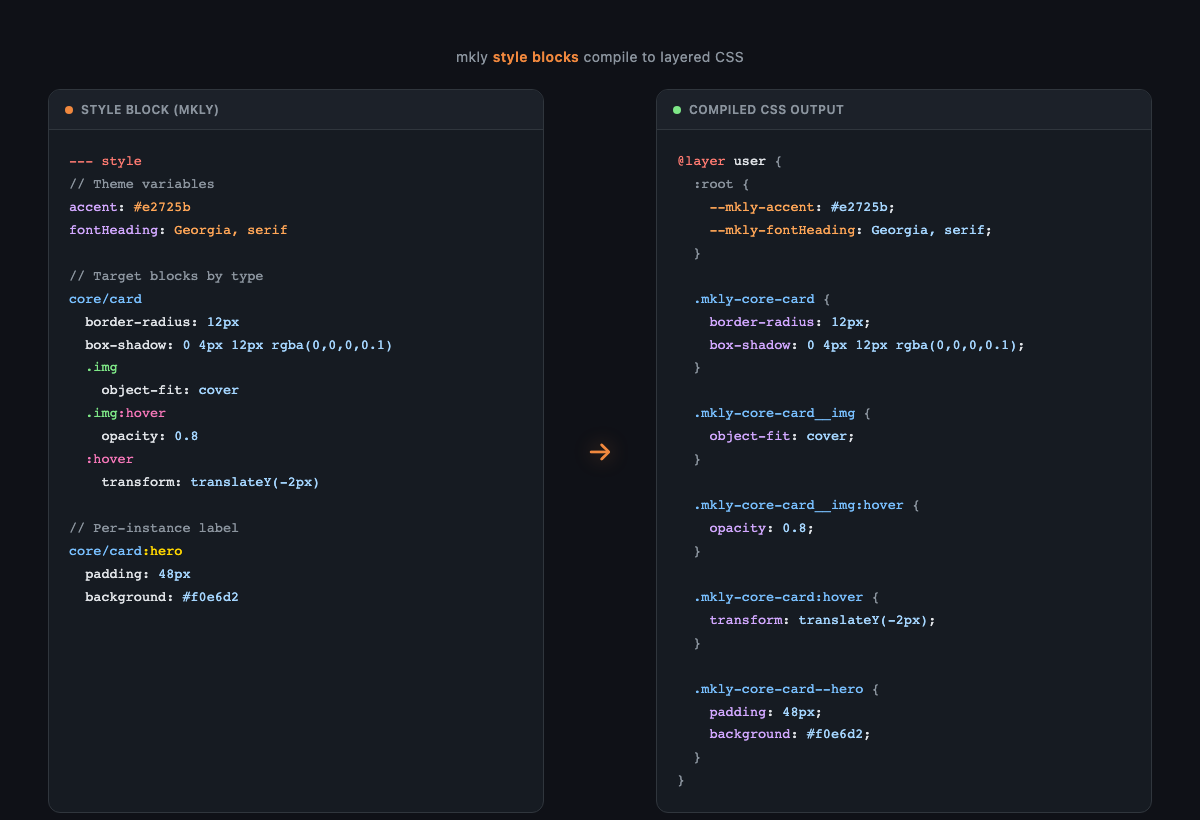
Per-instance labels — style specific blocks without affecting others:
--- core/card: hero

## The Hero Card

--- style
core/card:hero
  padding: 48px
  background: linear-gradient(135deg, #f0e6d2, #fff)
CSS cascade: @layer kit, theme, preset, user — each layer overrides the previous.
Themes & Presets
--- theme: newsletter/sunset-boulevard
--- preset: newsletter/editorial
Themes set colors and fonts. Presets set spacing, radius, and shadows. They compose independently — any theme works with any preset.
AI Integration
import { buildMklySystemPrompt, validateMklyOutput } from '@mklyml/core';

const prompt = buildMklySystemPrompt({
  kits: [CORE_KIT, NEWSLETTER_KIT],
  includeExamples: true,
});

const { valid, errors } = validateMklyOutput(aiOutput, [CORE_KIT]);
Reverse Conversion
import { htmlToMkly } from '@mklyml/core';

const mklymlSource = htmlToMkly('<h1>Hello</h1><p>World</p>');
API Reference
Parse & Compile: parse, compile, mklyml, tokenize, createRegistry
Style Graph: parseStyleGraph, serializeStyleGraph, compileStyleGraphToCSS, mergeRule, removeRule, getStyleValue
Kits & Plugins: defineKit, defineBlock, definePlugin
AI: buildMklySystemPrompt, buildBlockReference, validateMklyOutput
Reverse: htmlToMkly, detectOrigin, reverseWeb, reverseEmail, importHtml
Related
- mklyml-editor — Visual editor with live preview and style inspector
- mklyml-kits — Newsletter kit (14 blocks, 19 themes, 17 presets) + Docs kit (15 blocks)
- mklyml-plugins — Email plugin (CSS inlining, tables) + Docs plugin (anchors, tabs)
- mklyml-docs — Documentation site