npm package discovery and stats viewer.

Discover Tips

  • General search

    [free text search, go nuts!]

  • Package details

    pkg:[package-name]

  • User packages

    @[username]

Sponsor

Optimize Toolset

I’ve always been into building performant and accessible sites, but lately I’ve been taking it extremely seriously. So much so that I’ve been building a tool to help me optimize and monitor the sites that I build to make sure that I’m making an attempt to offer the best experience to those who visit them. If you’re into performant, accessible and SEO friendly sites, you might like it too! You can check it out at Optimize Toolset.

About

Hi, 👋, I’m Ryan Hefner  and I built this site for me, and you! The goal of this site was to provide an easy way for me to check the stats on my npm packages, both for prioritizing issues and updates, and to give me a little kick in the pants to keep up on stuff.

As I was building it, I realized that I was actually using the tool to build the tool, and figured I might as well put this out there and hopefully others will find it to be a fast and useful way to search and browse npm packages as I have.

If you’re interested in other things I’m working on, follow me on Twitter or check out the open source projects I’ve been publishing on GitHub.

I am also working on a Twitter bot for this site to tweet the most popular, newest, random packages from npm. Please follow that account now and it will start sending out packages soon–ish.

Open Software & Tools

This site wouldn’t be possible without the immense generosity and tireless efforts from the people who make contributions to the world and share their work via open source initiatives. Thank you 🙏

© 2026 – Pkg Stats / Ryan Hefner

@mordn/chat-widget

v0.14.2

Published

A customizable AI chat widget for React applications

Downloads

2,443

Readme

@mordn/chat-widget

A customizable, secure-by-default AI chat widget for React/Next.js apps, with conversation persistence and attachments handled for you.

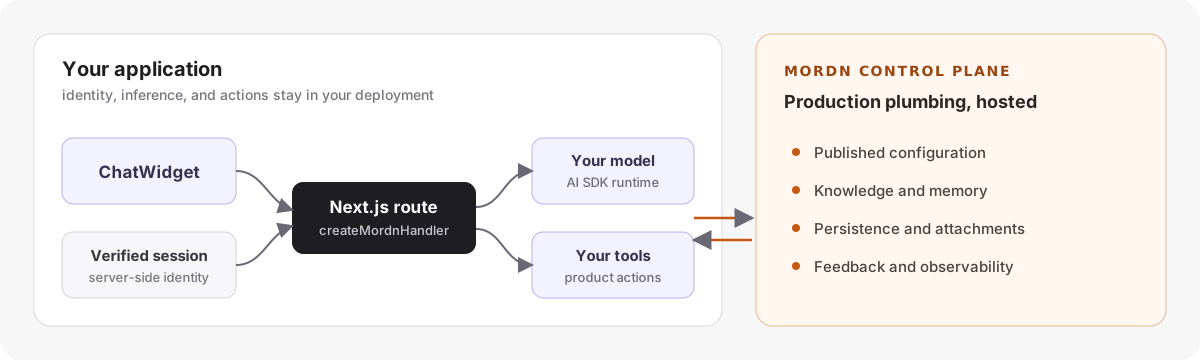
The widget owns the hard, dangerous-to-get-wrong backend plumbing — conversation ownership, idempotent persistence, history, private attachments, streaming — behind one mounted handler. You supply the three things that are genuinely yours: who the user is (auth), which model, and which tools.

⚠️ Security: you establish identity on the server

The widget sends an X-User-Id header, but it is not an authentication boundary — the browser controls it. You must implement getChatUserId(req) to return the user id from your verified server session (Clerk, NextAuth, Supabase Auth, …). The scaffold's stub throws until you do this, so a fresh install is never silently insecure.

Trusting a client-supplied id is the IDOR bug that lets one user read another user's chats. The package is designed so this is unrepresentable once you wire up getChatUserId. Read SECURITY.md.

Quick Start

# 1. Install
npm install @mordn/chat-widget @ai-sdk/react drizzle-kit

# 2. Run the setup wizard
npx @mordn/chat-widget

The wizard creates exactly four files:

  • app/api/chat/[[...chat]]/route.ts — one catch-all that mounts the whole backend
  • lib/chat-auth.ts — the getChatUserId stub you implement (the security boundary)
  • drizzle.config.ts — points at the package's chat schema
  • .env.example

Requirements

Peer dependencies (you provide these in your app):

  • Next.js 14, 15, or 16 (App Router)
  • React 18 or 19
  • ai v5 or v6 (Vercel AI SDK)
  • @ai-sdk/react v3 — the AI SDK's React bindings the widget renders with (install it alongside ai)
  • drizzle-orm ^0.44 and postgres ^3.4 — only if you use the default Drizzle store (skip if you bring your own ChatStore)
  • A PostgreSQL database (Supabase recommended) — for the default store
  • An AI provider package for your model, e.g. @ai-sdk/anthropic

Styling ships pre-scoped in @mordn/chat-widget/styles.css — you do not need Tailwind in your app to use the widget.

Setup

1. Environment Variables

Copy .env.example to .env.local and fill in your credentials (see the file for the full list — DATABASE_URL, and the Supabase keys if you keep uploads).

2. Implement the auth boundary

Open lib/chat-auth.ts and replace the throwing stub with your real session lookup:

// Clerk example
import { auth } from '@clerk/nextjs/server';

export async function getChatUserId() {
  const { userId } = await auth();   // from the verified session — never a header
  return userId;
}

3. Database Setup

npx drizzle-kit push   # creates chat_conversations + chat_messages

4. Configure your model and tools

Everything is configured in the single route.ts the wizard created — model, system prompt, store, storage, and tools:

export const { GET, POST, DELETE } = createChatHandler({
  getUserId: getChatUserId,
  model: anthropic('claude-sonnet-4-5'),
  store: createDrizzleChatStore(),       // or bring your own ChatStore
  storage: createSupabaseStorage(),      // or bring your own StorageAdapter
  // buildTools: async (ctx) => ({ tools: { /* ... */ }, cleanup: async () => {} }),
});

Bring your own database / storage: pass a custom store / storage that implement the ChatStore / StorageAdapter interfaces from @mordn/chat-widget/server. The hosted defaults and your own implementations are interchangeable — same handler, same security.

Mount the widget (client)

'use client';

import { ChatWidget } from '@mordn/chat-widget';
import '@mordn/chat-widget/styles.css';

export default function Assistant({ userId }: { userId: string }) {
  return (
    <ChatWidget
      userId={userId}                 // your app's user id (for the client)
      // Theming = exactly three colors (or omit for the stock palette).
      // Presets available: import { THEME_PRESETS } from '@mordn/chat-widget'
      theme={{ backgroundColor: '#ffffff', textColor: '#262626', primaryColor: '#171717' }}
      features={{ fileUpload: true }} // needs `storage` configured on the handler
      display={{ layout: 'popup', size: 'default', resizable: true }}
      starterPrompts={[
        { title: 'What can you help me with?' },
        { title: 'How do I get started?' },
      ]}
    />
  );
}

The widget sends userId as an X-User-Id header for convenience, but the server ignores it for authorization — your getChatUserId is the only source of identity. See the security note above.

Suggested follow-ups

Turn on contextual next-step chips with one server-side option:

export const { GET, POST, DELETE } = createChatHandler({
  getUserId: getChatUserId,
  model: anthropic('claude-sonnet-4-5'),
  store: createDrizzleChatStore(),
  followUps: true,
});

After the main answer finishes streaming, the handler makes a small structured second call with the same resolved model and appends up to three suggestions as a data-follow-ups part on the assistant message. The widget renders them automatically; clicking one sends it as the next user message. They are also persisted with the message, so history reloads do not need to regenerate them. The second call is included in the turn's usage/cost totals.

Tune the count and generation timeout:

followUps: { max: 4, timeoutMs: 5_000 }

For a fully custom server generator, pass generate(messages, ctx). The existing client-side ChatWidget followUps.generate remains available as a BYO-transport fallback, but the server option is recommended because provider credentials never reach the browser. Set followUps: false in the handler to force-disable a hosted dashboard setting. (There is deliberately no static suggestion list: the same chips after every reply are noise — fixed prompts belong in starterPrompts.)


Opening the widget from your site (Ask-AI buttons & shortcuts)

The widget can be opened from your OWN page chrome — a nav "Ask AI" button, a search bar affordance, a keyboard shortcut — with no React ref and no JS at all for the button case. All three routes are equivalent to calling the ChatWidgetHandle ref's open() / close() / toggle(): same allowAutoReopen gate, same controlled-mode onOpenChange behaviour, same persistState persistence.

1. Keyboard shortcut — set display.keyboardShortcut. Off by default; the widget never hijacks a host page's keybindings unless you opt in.

<ChatWidget userId={userId} display={{ keyboardShortcut: 'mod+i' }} />

2. Data-attribute buttons — add data-mordn-chat-open (or -toggle / -close) to any element, anywhere in your markup, including static or markdown-generated docs pages. No shortcut config needed; this always works.

<button data-mordn-chat-open>Ask AI</button>

3. CustomEvent API — the programmatic equivalent, for a search bar, a command palette, or any other trigger you already have wired up.

document.dispatchEvent(new CustomEvent('mordn-chat:open'));

mordn-chat:close and mordn-chat:toggle work the same way. See the keyboardShortcut JSDoc in DisplayConfig for the full combo syntax ("mod+k", "ctrl+shift+/", a bare "/", …), the typing guard for bare keys, and multi-instance behaviour.


Script-tag embed (any site)

No React and no bundler? Docs sites built with MkDocs, Sphinx, Hugo, Jekyll, VitePress, Docusaurus, or plain HTML can embed the widget with a single script tag. The dist/embed.global.js bundle is self-contained — React and the whole widget are compiled in, so the host page needs nothing installed.

You still run your own chat handler (see Setup); the embed is just a framework-free way to mount the client against it.

Declarative (one tag, no JavaScript)

<script
  src="https://unpkg.com/@mordn/chat-widget/dist/embed.global.js"
  data-api-base="https://your-app.com/api/chat"
  data-agent-id="docs-bot"
></script>

The widget mounts itself once the page is ready. Available shortcut attributes, each mapping to the same config key you'd pass in React: data-user-id, data-agent-id, data-api-base, data-model, data-target (a CSS selector to mount into), and data-css-url. For any field not covered by a shortcut, pass a full JSON config in data-config:

<script
  src="https://unpkg.com/@mordn/chat-widget/dist/embed.global.js"
  data-config='{"apiBase":"https://your-app.com/api/chat","theme":{"backgroundColor":"#171717","textColor":"#ededed","primaryColor":"#fafafa"},"display":{"layout":"popup"},"starterPrompts":[{"title":"How do I get started?"}]}'
></script>

Precedence: data-config is the base and individual data-* shortcuts overlay it, so you can share one JSON blob and override a single field per page.

Imperative (window.MordnChat)

Omit the data attributes and drive it yourself. init accepts the same config object as the React <ChatWidget> props and returns a handle:

<script src="https://unpkg.com/@mordn/chat-widget/dist/embed.global.js"></script>
<script>
  const chat = MordnChat.init({
    apiBase: 'https://your-app.com/api/chat',
    agentId: 'docs-bot',
    theme: { backgroundColor: '#ffffff', textColor: '#262626', primaryColor: '#171717' },
    display: { layout: 'popup', size: 'default' },
  });

  // Drive it programmatically:
  chat.open();
  chat.close();
  chat.toggle();
  chat.destroy(); // unmount and remove the container

  // The same methods are also available on the global directly:
  MordnChat.open();
</script>

init is idempotent — calling it again tears down the previous mount first, so it's safe to re-init after a client-side route change on a docs SPA.

Anonymous visitors

Docs readers usually aren't logged in, so userId is optional here. When you omit it, the embed generates a persistent anon-… id and stores it in localStorage so a visitor's conversation history survives reloads (scoped per agentId, so two agents on one origin keep separate anonymous identities). As with the React path, this id is a client-side scoping key only — your getChatUserId on the server remains the identity boundary (see the security note above).

Cross-origin embeds (CORS)

The examples above point data-api-base at another origin — the widget on docs.example.com calling your-app.com. Because the widget sends an X-User-Id header, every cross-origin request triggers a CORS preflight, so the handler must be told to answer it. Two steps:

// app/api/chat/[[...chat]]/route.ts — note the added OPTIONS export
export const { GET, POST, DELETE, OPTIONS } = createChatHandler({
  getUserId: getChatUserId,
  // Exact origins that may embed this handler ('*' allows any):
  cors: { allowOrigins: ['https://docs.example.com'] },
  // …store, storage, model as usual
});

That's all for anonymous/docs traffic. If your getUserId reads a session cookie and you want it to work cross-origin, both ends must opt into credentials — set allowCredentials: true in the handler's cors and requestCredentials: 'include' on the widget (via data-config or React props). Same-origin apps need none of this: without cors, behavior is unchanged.

Bundle size and CSP

  • The bundle includes React, ReactDOM, and the widget (estimated ~250–400 KB gzipped). You do not need React on the host page. Code highlighting (shiki) is not bundled — it lazy-loads from a CDN only if a response contains a code block, and falls back to plain text if that load is blocked.
  • The widget's CSS is injected once into a <style data-mordn-chat> tag, so a strict Content-Security-Policy needs style-src 'unsafe-inline' (or serve the stylesheet yourself and set data-css-url / cssUrl to link it, which uses the CDN/self-hosted fallback path instead). The styles are pre-scoped to .chat-widget-container, so they never leak into the host page.

Bring your own database / storage

The default createDrizzleChatStore() and createSupabaseStorage() are just implementations of two interfaces. To use your own database, ORM, or object store, implement the interface and pass it instead — same handler, same security guarantees:

import type { ChatStore, StorageAdapter } from '@mordn/chat-widget/server';

const myStore = (userId: string): ChatStore => ({ /* ... */ });
const myStorage = (userId: string): StorageAdapter => ({ /* ... */ });

createChatHandler({ getUserId, model, store: myStore, storage: myStorage });

Both factories are constructed per request with the server-verified user id, so a store/adapter instance can only ever touch that user's data — cross-user access (IDOR) is unrepresentable. See SECURITY.md for the full model.

File uploads & the storage bucket

createSupabaseStorage() expects a private chat-attachments bucket and the service-role key:

NEXT_PUBLIC_SUPABASE_URL="https://your-project.supabase.co"
SUPABASE_SERVICE_ROLE_KEY="your-service-role-key"   # server-only, never NEXT_PUBLIC

Create the bucket as Private — the adapter never relies on public read; it mints short-lived signed URLs and re-signs them on history load. A public bucket would defeat the security model. Omit the storage option entirely to disable uploads.


Handler options (createChatHandler)

| Option | Required | Description | |--------|----------|-------------| | getUserId(req) | yes | Return the user id from your verified server session, or null (→ 401). The security boundary. | | model | yes | A LanguageModel, or (ctx) => LanguageModel for per-user selection. | | store | no* | A ChatStoreFactory. Use createDrizzleChatStore() or your own. Required until a hosted default ships. | | storage | no | A StorageAdapterFactory (e.g. createSupabaseStorage()). Omit to disable uploads. | | buildTools(ctx) | no | async (ctx) => ({ tools, cleanup? }). cleanup is called exactly once per turn (finish/error/abort) — use it to close per-request resources like an MCP client. | | buildSystemPrompt(ctx) | no | Returns the system prompt; receives the request context to personalise. | | transformMessages(msgs, ctx) | no | Last-chance rewrite of model messages (e.g. image part handling). | | onChatFinish(info) | no | Post-persist hook for telemetry/usage. | | onError(err) | no | Map a stream error to the user-facing string. | | stopWhen | no | AI SDK stop condition for tool-call loops (default: bounded step count). | | upload | no | { allowedMediaTypes?, maxBytes? } — server-side upload policy. | | maxHistoryMessages | no | Sliding-window size sent to the model (default 30). |

The widget exposes only these seams. Ownership checks, idempotent persistence, history pagination, attachment re-signing, and socket teardown are owned by the handler and are not configurable — getting them wrong is a bug, not a setting.


Knowledge base (RAG) & ingestion

The optional knowledge module (@mordn/chat-widget/server/knowledge) ingests docs into a vector store and retrieves them at chat time. Ingestion is docs-aware by default:

  • Markdown-first extraction. HTML pages are converted to structure-preserving markdown (headings, code fences with language, lists) instead of flat prose; .md/.mdx pages and text/markdown responses pass through as-is.
  • Heading-aware chunking. Chunks are packed within a section, a fenced code block is never split, and each chunk is prefixed with its breadcrumb (Guide › Persistence › Sliding window) and stamped with anchor + headingPath metadata.
  • Deep-link citations. Web citations get a #anchor fragment so a source links to the exact section that answered, not the top of the page.
  • llms.txt support. Point ingestion at a site's llms.txt index and it fetches every linked doc; sitemap/crawl sources auto-discover and prefer a site's llms.txt when one exists.
import { ingest } from '@mordn/chat-widget/server/knowledge';
import { createKnowledgeDrizzleStore } from '@mordn/chat-widget/server/knowledge/drizzle';

const store = createKnowledgeDrizzleStore({ embedder });

await ingest({
  store: store('agent:my-agent'),
  namespace: 'agent:my-agent',
  sources: [
    { type: 'llms', url: 'https://docs.example.com/llms.txt' },
    { type: 'url', url: 'https://docs.example.com/guide.md' },
  ],
  // docsMode: true,       // default — set false for the legacy plain path
  // preferLlmsTxt: true,  // default — sitemap/crawl auto-discover llms.txt
});

From the CLI (see the command list in chat-widget --help):

npx @mordn/chat-widget ingest --llms https://docs.example.com/llms.txt

chunkMarkdown and htmlToMarkdown are exported too, for bring-your-own ingestion pipelines that want the same structure-aware chunking and anchors.


Test your docs bot in CI

If you use the knowledge base to answer questions from your docs, retrieval can silently regress when you re-crawl or restructure them. Write down the questions your bot must answer and check them on every push — no LLM calls, so it is free to run in CI.

Create an evals.json (versioned; each case asserts what retrieval should surface):

{
  "version": 1,
  "defaults": { "topK": 5, "minScore": 0.2 },
  "cases": [
    {
      "id": "install-pnpm",
      "question": "How do I install with pnpm?",
      "expect": {
        "sourceIncludes": "docs.example.com/install",
        "anchor": "pnpm",
        "minScore": 0.4,
        "notSourceIncludes": "legacy"
      }
    }
  ]
}

Each case runs the question through your retriever (built from the same chat-widget.config as ingest) and passes when every check passes:

  • sourceIncludes — a retrieved chunk's citation URL or source contains this string (string or array; any match).
  • notSourceIncludes — no retrieved chunk matches (guards against a wrong/legacy page returning).
  • minScore — the top retrieved score is at least this.
  • anchor — a retrieved chunk's heading anchor contains this (populated by docs-aware ingestion).

Run it. The command exits 0 when all cases pass and 1 on any failure:

npx @mordn/chat-widget eval --file evals.json

Add --json for the full result object (per-case checks + retrieved chunks), handy for custom reporting. Drop it into GitHub Actions:

- run: npm ci
- run: npx @mordn/chat-widget eval --file evals.json
  env:
    DATABASE_URL: ${{ secrets.DATABASE_URL }}
    GEMINI_API_KEY: ${{ secrets.GEMINI_API_KEY }}

You can also run the suite programmatically with runEvals from @mordn/chat-widget/server/knowledge.


Exports

// Client component + styles
import { ChatWidget } from '@mordn/chat-widget';
import '@mordn/chat-widget/styles.css';

// Server handler + the pluggable contracts (server-only)
import {
  createChatHandler,
  type ChatStore, type ChatStoreFactory,
  type StorageAdapter, type StorageAdapterFactory,
  ConversationOwnershipError,
} from '@mordn/chat-widget/server';

// Default Postgres/Drizzle store (server-only)
import { createDrizzleChatStore, schema } from '@mordn/chat-widget/server/drizzle';

// Default Supabase storage adapter (server-only)
import { createSupabaseStorage } from '@mordn/chat-widget/server/supabase';

// Knowledge base / RAG: ingestion, retrieval, docs-aware helpers, and the CI eval suite (server-only)
import {
  ingest,
  chunkMarkdown, htmlToMarkdown,
  createSearchKnowledgeTool, citationUrl,
  runEvals, type EvalFile,
  type IngestSource, type IngestOptions,
} from '@mordn/chat-widget/server/knowledge';

License

MIT