
@mosetta/ide-plugin-doc
v0.0.14
Published
What is open, what is unsaved, and what changed on disk behind your back.

Maintainers
 pre-fabricated
Readme
Documents
@mosetta/ide-plugin-doc · What is open, what is unsaved, and what changed on disk behind your back.
What it does
The daemon keeps every file of the project in memory, edits included. This plugin is the tab's side of that: which file is open, where the caret should jump, whether there are unsaved edits, and what happened to files on disk while you were editing.
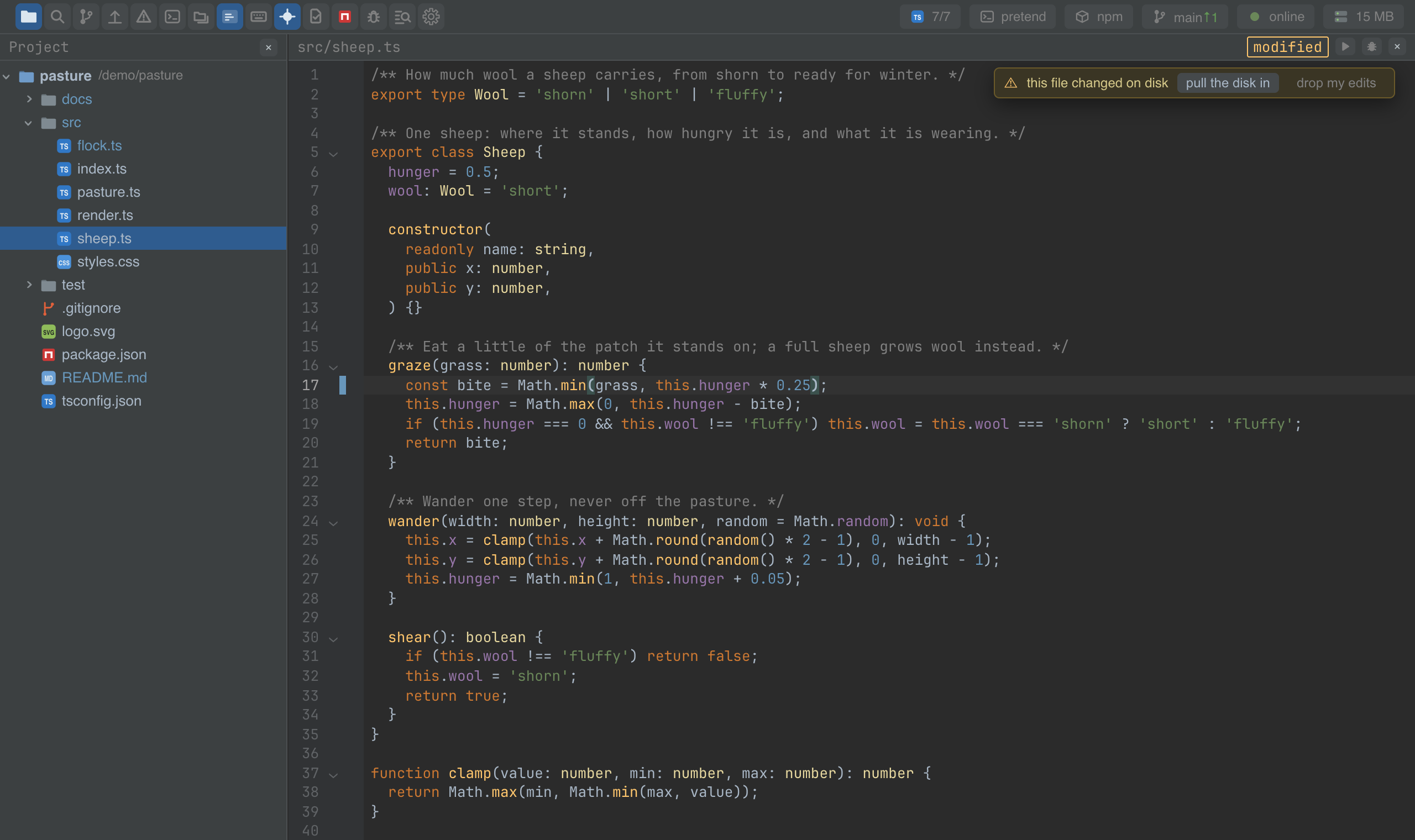
- Unsaved edits survive a reload. They live in the daemon, not in the tab, so closing the tab loses nothing. The editor's header says modified while there are any.
- Changes on disk are pulled in when the file in memory is clean, and reported when it is not: a strip above the editor says the file has diverged from disk, and offers to compare the two in the merge screen. Nothing is overwritten silently in either direction.
- Save and reload on a key, and optional saving when the keyboard leaves the text.
Keys
| Command | macOS | Windows and Linux |
|---|---|---|
| file.save — write the open file | Cmd+S | Ctrl+S |
| file.reload — re-read it from disk, dropping edits | Option+Shift+R | Ctrl+Alt+R (browser), Ctrl+Shift+R (desktop) |
Settings
Section doc in settings.json:
| Key | Default | What it does |
|---|---|---|
| autosave | off | focusLost writes the file when the keyboard leaves the text — a click in the tree, search opened, another window. |
Screenshots and demos
Using it from another plugin
Opening files and jumping to places goes through this plugin, whoever draws the text.
import DocPlugin from '@mosetta/ide-plugin-doc';

const docs = this.ide.getPlugin(DocPlugin);

await docs.goTo('src/flock.ts', 24, 4);          // open and put the caret there
await docs.openFile('README.md', { focus: false }); // show it, keep the keyboard where it is

const path = docs.openDoc.value?.path;            // what is open now (a signal)
const unsaved = await docs.unsaved();              // paths that differ from disk
| Member | What it is |
|---|---|
| openFile(path, options?) | Open a file in the editor; focus: false leaves the keyboard where it was. |
| goTo(path, line, character?) | Open a file if needed and place the caret. Lines are zero-based. |
| peekFile(path) | A file's text from memory, without opening it. |
| closeFile() | Close what is open. |
| openDoc | Signal: the open document (path, text, version, dirty, …) or null. |
| liveText | Signal: the text on screen right now, unsaved edits included. |
| dirty | Signal: whether the open file has unsaved edits. |
| diverged | Signal: files whose memory and disk differ, and why. |
| unsaved() | Paths with unsaved edits, after flushing the pending ones. |
| saveUnsaved() | Write them all; returns the paths that could not be written. |
| replaceText(text) | Replace the open file's text from outside the editor, as a git revert does. |
| autosaves | Whether files save by themselves — ask it before asking the user to save. |
Running something that reads the disk? Save first, the way the debugger does:
const left = await docs.saveUnsaved();
if (left.length > 0) return this.ide.complain(this.ide.t('notes.unsaved', { files: left.join(', ') }));