
@mosetta/ide-plugin-keymap
v0.0.14
Published
Keys as data: one dispatcher for every key, a keymap editor, and an honest list of the keys the browser keeps.

Maintainers
 pre-fabricated
Readme
Keymap
@mosetta/ide-plugin-keymap · Keys as data: one dispatcher for every key, a keymap editor, and an honest list of the keys the browser keeps.
What it does
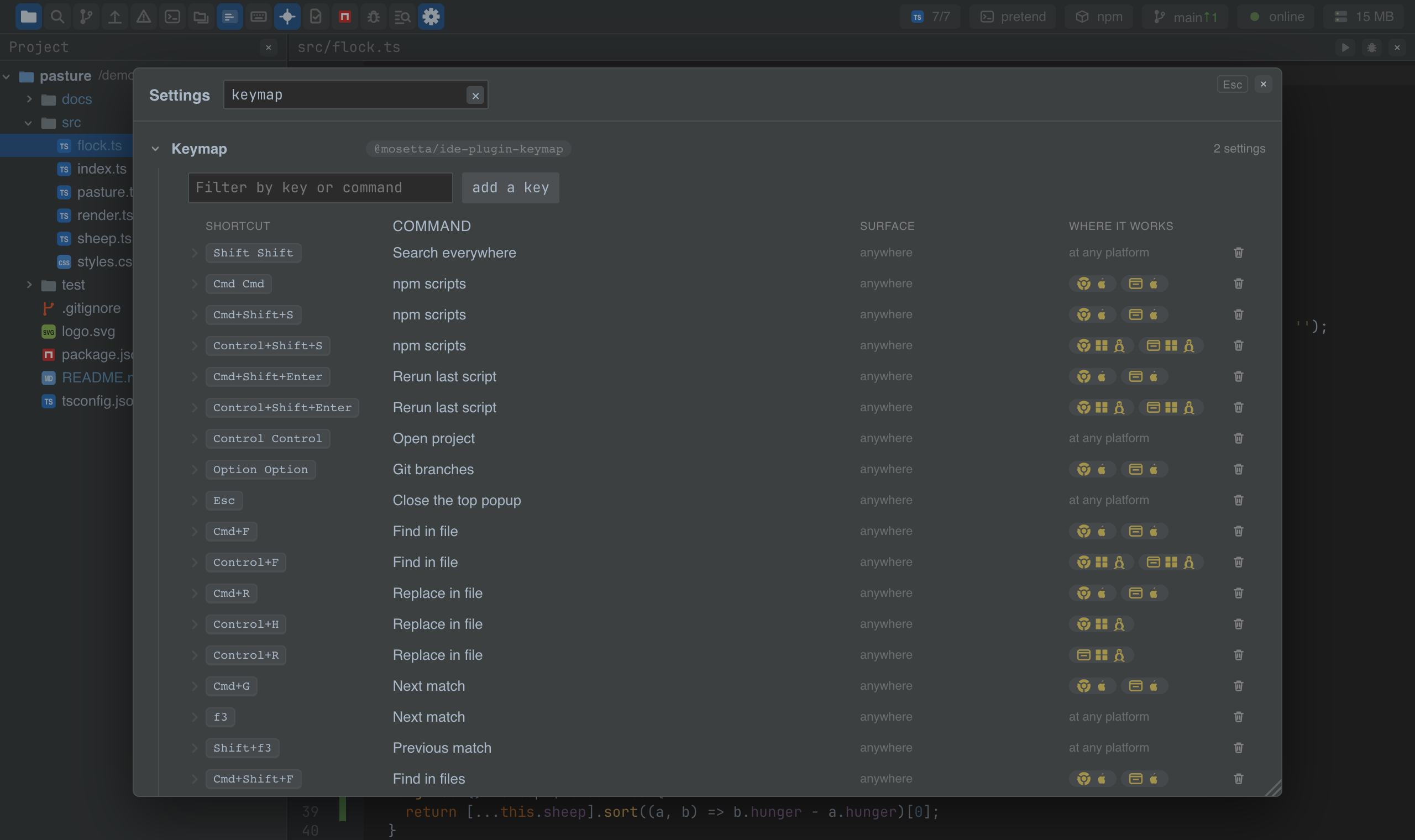
Every shortcut in the IDE is a row of data — a command, a chord of physical keys, the surface where it applies (the editor, the tree, a popup…) and the environments it holds in (browser or desktop, macOS, Windows or Linux). One dispatcher listens to the keyboard and runs the command; buttons call the same commands, so a key and a button can never disagree.
- Physical keys, not characters. A chord is read by the key's position, so shortcuts keep working in any keyboard layout, Cyrillic included.
- Double presses: Shift Shift, Cmd Cmd, Ctrl Ctrl — a rhythm on a bare modifier.
- Your changes are the difference. The
keymapsection insettings.jsonholds only the rows you changed: a row with the same chord replaces the factory one, and a row with"remove": truetakes one away. The factory keymap stays the package's data. - An editor for it: the settings window shows the keymap as a table of chords and surfaces, with a field that records the chord you press.
- Keys the browser keeps are listed, with the reason — Cmd+W, Cmd+T and a few others never reach a page. The desktop app takes back most of them.
Settings
Section keymap in settings.json — your rows only:
{
  "keymap": {
    "bindings": [
      { "command": "search.everywhere", "key": "meta+o" },
      { "key": "meta+p", "remove": true },
      { "command": "panel.terminal", "key": "control+backquote", "where": ["browser:mac", "electron:mac"] }
    ]
  }
}
A chord is written as meta, control, alt and shift in that order, then the key;
when limits a row to a surface, where to environments.
Screenshots and demos
Using it from another plugin
A command gets keys by being declared — @command('notes.open') — and by a row in the
keymap; the plugin does not listen to the keyboard itself. To show a command's keys on
a button or in a tip:
import KeymapPlugin from '@mosetta/ide-plugin-keymap';

const keymap = this.ide.getPlugin(KeymapPlugin);
keymap.keysFor('search.everywhere'); // ['Shift Shift', 'Cmd+P', 'Cmd+2'] on a Mac — as the user has them
| Member | What it is |
|---|---|
| keysFor(command) | The keys a command is called by, humanised for this platform. |
| layout | Signal: the whole keymap — factory plus the user's rows. |
| personal | Signal: the user's rows only. |
| keys | What the dispatcher sees: the host, the platform, the bindings, and the echo of the last press. |
| chordHeld(command, event) | Whether a command's chord is held during a click — for Cmd-click. |
| primaryHeld(event) | Whether the platform's main modifier is held. |
A widget that edits text and handles its own keys declares them in keys.mechanics
(id and keys(isMac) returning the chords it owns), so the dispatcher leaves those
alone while it has the focus.