
@mosetta/ide-plugin-keys
v0.0.14
Published
Press any key and see what it does — or why it cannot do anything.
Downloads
660

Maintainers
 pre-fabricated
Readme
Keys window
@mosetta/ide-plugin-keys · Press any key and see what it does — or why it cannot do anything.
What it does
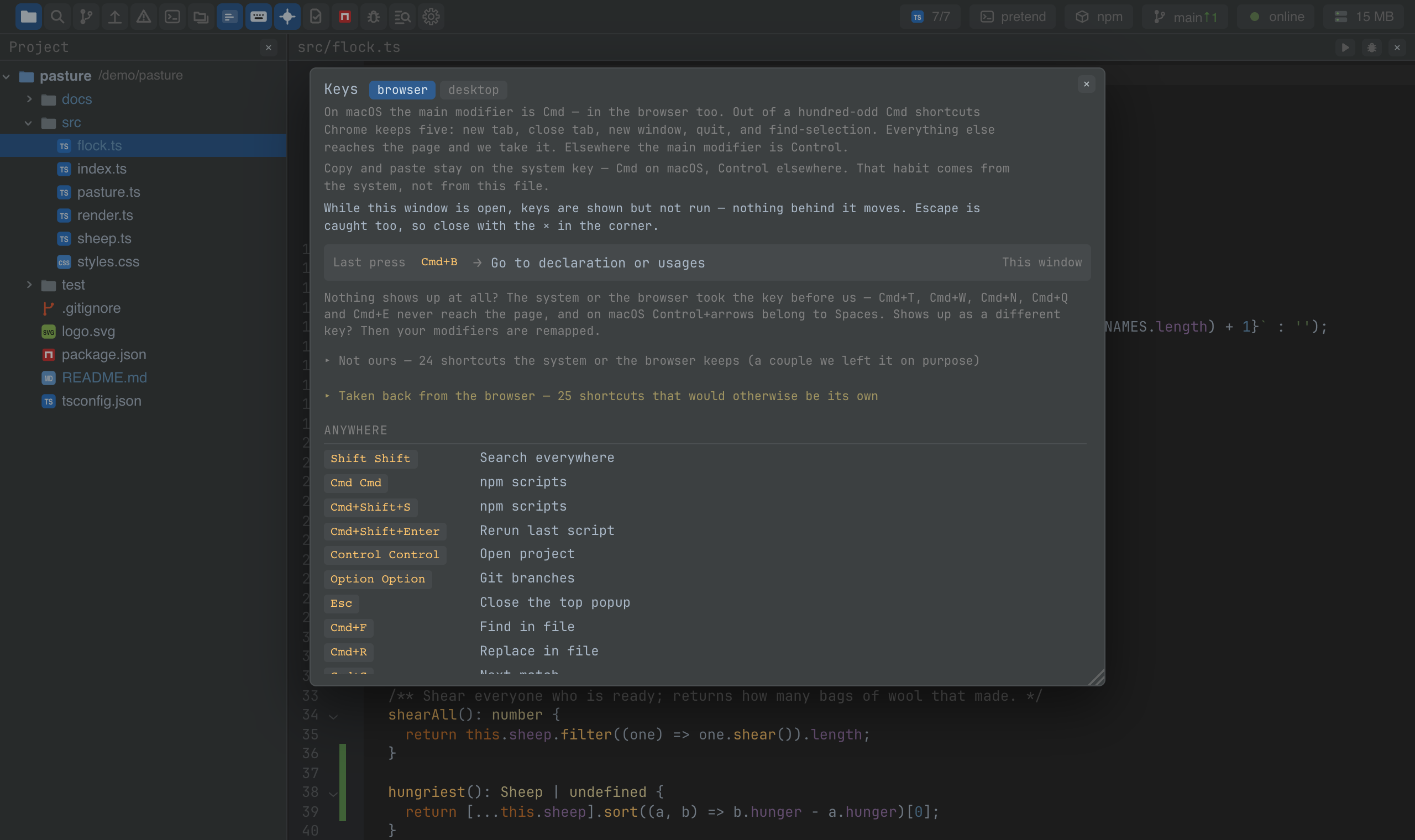
A window that answers "what does this key do here?". While it is open, keys are shown rather than run: press a chord and the window says which command it calls, on which surface — or that the browser or the system keeps it and it never reaches the page.
Below the echo sit the whole keymap for your platform, grouped by surface, and two lists people ask about: the shortcuts the system or the browser keeps for itself, and the ones the IDE takes back from the browser. A chord that shows up as something unexpected usually means a modifier is remapped at the system level; the window makes that visible.
Keys
| Command | macOS | Windows and Linux |
|---|---|---|
| keys.show | Cmd+9 | Ctrl+Alt+9 (browser), Ctrl+9 (desktop) |
Screenshots and demos
Using it from another plugin
Nothing to call: the window reads the keymap plugin's keys (the bindings, the reserved
keys and the echo of the last press), and every command a plugin declares appears in it
by itself. It is a good place to check that a command you added got the key you meant.