
@mosetta/ide-plugin-problems
v0.0.14
Published
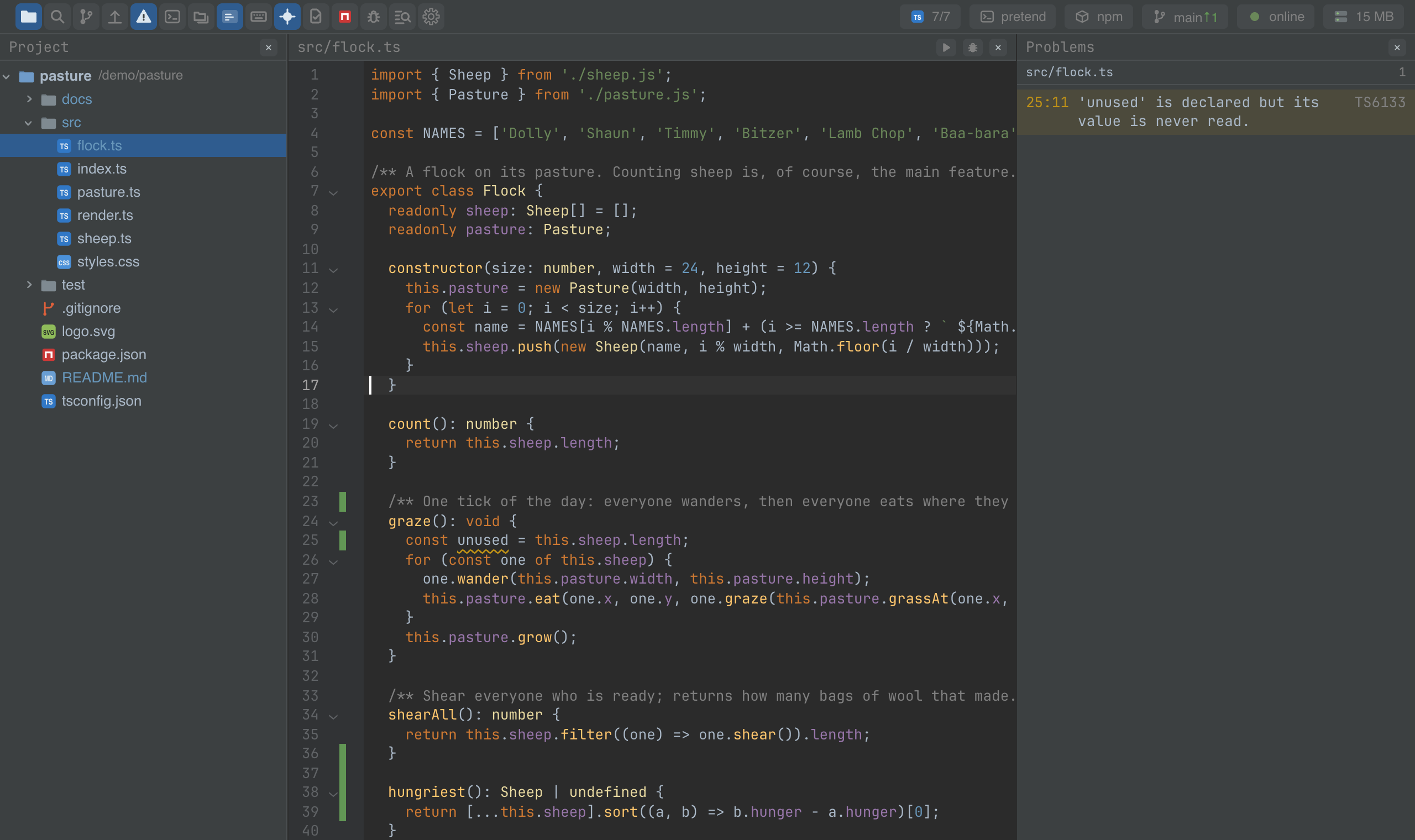
Every error and warning in the project, in one panel, by file.

Maintainers
 pre-fabricated
Readme
Problems
@mosetta/ide-plugin-problems · Every error and warning in the project, in one panel, by file.
What it does
A panel with everything the language servers found — in the whole project, not only in the open file. The rows are grouped by file: the file you are in comes first, the rest alphabetically, as in the tree. Click a row to jump to the spot.
When the project sweep was cut short by its memory budget, the panel says so at the top, server by server, with a button that opens the setting to raise it. An empty panel never means "we did not look".
Keys
| Command | macOS | Windows and Linux |
|---|---|---|
| panel.problems — show or hide the panel | Cmd+5 | Ctrl+Alt+5 (browser), Ctrl+5 (desktop) |
Screenshots and demos
Using it from another plugin
The panel is only a view: the diagnostics belong to the language servers plugin. Read
them there (getPlugin(LspPlugin).problems) rather than from this one.
It is also a complete example of a panel plugin — a panel entry, a toolbar.button, a
toggle command and a remembered open state. Read src/client.tsx before writing a panel
of your own.