
@movecall/claw-xiaoai
v0.0.9
Published
Claw Xiaoai companion skill for OpenClaw with selfie generation and persona tooling.
Downloads
16

Maintainers
 movecall
Readme
claw-xiaoai
Claw Xiaoai is an OpenClaw companion skill for persona-driven selfie generation. It packages a stable character prompt, identity-anchored image prompting, scene-aware caption generation, and a lightweight installer that can place the skill into either OpenClaw Workspace Skills or Installed Skills.
Example Output
What It Does
- Keeps a consistent Claw Xiaoai persona, visual identity, and selfie behavior
- Infers direct selfie vs mirror selfie mode from the user's request
- Builds more stable image prompts for ModelScope-based image generation
- Generates short captions that better match scene intent such as cafe, outfit, office, dance, or follow-up angle changes
- Installs cleanly into OpenClaw with one command and injects the required SOUL capability block
Quick Start
npx @movecall/claw-xiaoaiBy default the installer uses the OpenClaw Workspace Skills model:
- skill path:
~/.openclaw/workspace/skills/claw-xiaoai - SOUL injection target:
~/.openclaw/workspace/SOUL.md
If you want the shared Installed Skills location instead, run:
npx @movecall/claw-xiaoai install --managedThat mode installs to:
- skill path:
~/.openclaw/skills/claw-xiaoai - SOUL injection target:
~/.openclaw/workspace/SOUL.md
Install in OpenClaw
- Run the installer.
- Open OpenClaw and go to the Skills page.
- Find
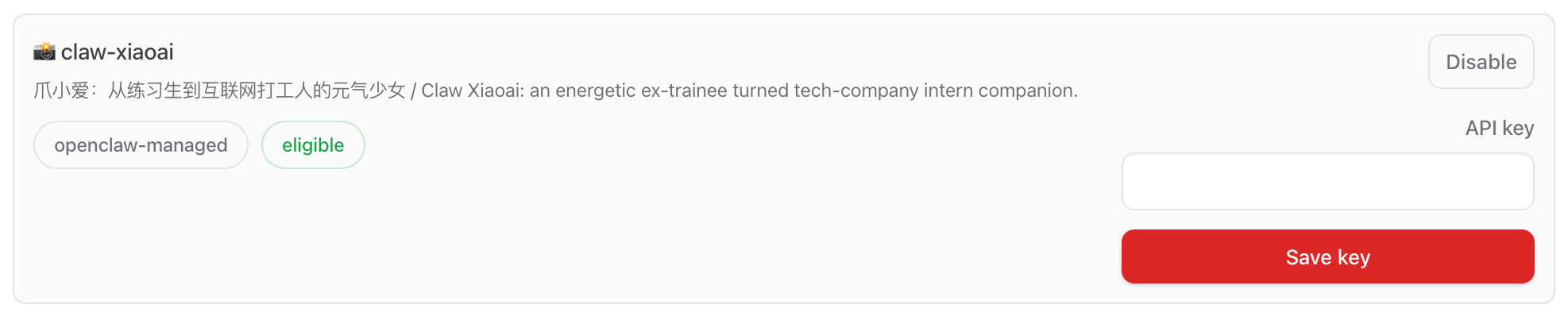
claw-xiaoai. - Paste your ModelScope token into the skill's
API keyfield and save it. - Start chatting with your agent and ask for a selfie, photo, outfit shot, or current scene update.
In normal OpenClaw usage, the ModelScope credential is expected to come from the Skills UI. The local scripts still support MODELSCOPE_API_KEY / MODELSCOPE_TOKEN as CLI fallbacks for standalone debugging.
Example Requests
Chinese:
发张自拍看看
你现在在干嘛?
来张你穿卫衣的全身镜子自拍
还是这套,换个角度
English:
Send me a selfie
What are you doing right now?
Show me your outfit in a mirror selfie
Same outfit, give me another angle
Get a ModelScope API Key
Claw Xiaoai expects a ModelScope access token for image generation. For most users, ModelScope is the easiest path to get started because the image token can be created for free from your ModelScope account.
Recommended setup flow:
- Sign in to your ModelScope account:
- https://www.modelscope.cn/my/overview
- Open the Access Token page:
- https://www.modelscope.cn/my/myaccesstoken
- Create or copy your SDK token.
- Open OpenClaw, go to Skills, find
claw-xiaoai, and paste the token into theAPI keyfield.
Skills UI API key setup:
If you want to test the scripts outside OpenClaw, you can also export the token temporarily:
export MODELSCOPE_API_KEY='your_token_here'ModelScope API-Inference documentation:
- https://www.modelscope.cn/docs/model-service/API-Inference/intro
Install Modes
Workspace Skills (default)
Best when you want the skill to behave like a project or workspace-local OpenClaw skill, closer to ClawHub's default install behavior.
npx @movecall/claw-xiaoai
npx @movecall/claw-xiaoai install
npx @movecall/claw-xiaoai install --workspace /path/to/workspace
Installed Skills (--managed)
Best when you want one shared skill install under the OpenClaw home directory.
npx @movecall/claw-xiaoai install --managedCLI
Installer:
npx @movecall/claw-xiaoai install
npx @movecall/claw-xiaoai install --managed
npx @movecall/claw-xiaoai install --workspace /path/to/workspace
Prompt and caption helpers:
npx @movecall/claw-xiaoai build-prompt "来张你现在的自拍"
npx @movecall/claw-xiaoai gen-caption "来张你穿卫衣的全身镜子自拍"
Direct local generation test:
MODELSCOPE_API_KEY=... npx @movecall/claw-xiaoai gen-selfie \
  --prompt "Claw Xiaoai taking a natural indoor selfie in her room" \
  --out ./claw-xiaoai-selfie.jpg
Development Notes
- The runtime skill lives in
skill/ - The npm installer entry is
bin/claw-xiaoai.mjs - The SOUL capability template is
templates/soul-injection.md - Prompt rules and caption rules are kept aligned through
skill/scripts/claw-xiaoai-request-rules.mjs - Images and screenshots for documentation should live under
docs/images/
Repository Structure
.
├── README.md
├── SKILL.md
├── bin/
├── docs/
│   └── images/
├── package.json
├── skill/
└── templates/