
@mquan/mochi
v1.1.0
Published
Visualize code with simple and interactive diagrams


Readme
mochi
Visualize code with simple and interactive diagrams
Drop in a path. Mochi opens a browser viewer, lets you pick a file (or directory, or a few coordinating files), and asks Claude to produce a steppable diagram of how that code behaves. Three lenses — flow, architecture, protocol — picked per scope automatically, with one-click switching between alternatives. Each diagram has 6–15 curated steps with causal "WHY" narration and code-anchored highlights.
Install
Start using in any local codebase
cd ~/some-codebase
npx @mquan/mochi          # equivalent to: npx @mquan/mochi .
npx @mquan/mochi src/     # pin to a subdirectory
npx @mquan/mochi -p 6000  # pick a port
The plain
mochislot on npm is taken by an old test runner — publish under a scope (e.g.@mquan/mochi) and adjustpackage.json#nameto match beforenpm publish --access public.
For a local clone (or when hacking on mochi itself):
git clone [email protected]:mquan/mochi.git
cd mochi
nvm use            # picks Node 22.0.0 from .nvmrc
npm install
npm run build
npm start          # boot pointing at the cwd
npm start -- src/  # or any path (note the `--` arg separator)
Inside the repo, use
npm start— notnpx @mquan/mochi. npx short-circuits when it sees the localpackage.json#namematches and then fails withsh: mochi: command not found. See Troubleshooting.
Setup
Mochi reuses your Claude Code session via the claude CLI as a subprocess
— there is no separate ANTHROPIC_API_KEY to manage and no separate
billing surface.
Requirements:
- Node.js ≥ 22.0.0 (a
.nvmrcis pinned to22.0.0;nvm usepicks it up) - Claude Code installed and on your
PATH - Run
claude /loginonce
Mochi probes for claude --version at startup and exits with a clear
message if the CLI is missing or unauthenticated.
First diagram
npx @mquan/mochi          # from any codebase you want to read
npm start                 # from inside a local clone of the mochi repo
The browser opens (server binds to 127.0.0.1 on the first free port at
or above 5173). Then:
- Click any file in the tree on the left — code appears in the Code tab.
- Optionally type an intent in the bar at the top — e.g. "how does auth work", "trace a request".
- Hit Generate.
A new Diagram tab opens, streams progress (resolving scope → indexed → asking Claude → validating), and renders the spec. You can:
- Click a block in the diagram → switches back to the Code tab and scrolls to the anchored lines.
- Click a Protocol / Architecture / Flow pill in the lens switcher → re-asks Claude using that lens for the same scope.
- Click ▶ Play below the diagram → walks through the steps with narration.
- Click ✕ on any Diagram tab → closes it (and cancels its in-flight stream if still running).
Each Generate opens a new Diagram tab — old diagrams aren't overwritten.
Lenses
Flow — step-by-step execution path through a single function or file. Branches, loops, early returns.
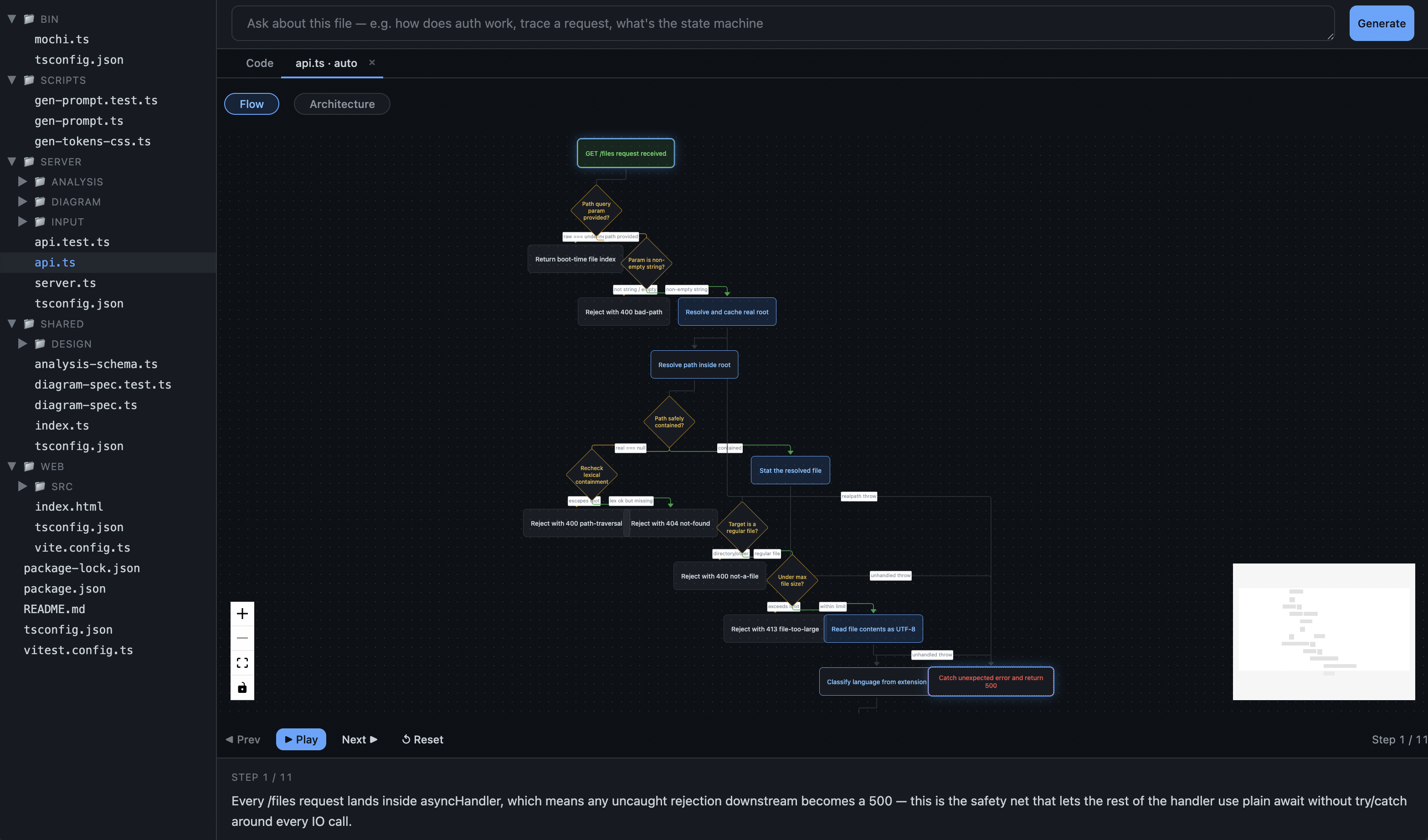
Architecture — deployable units (services, modules, components) and how they communicate. Pick a directory or a handful of files.
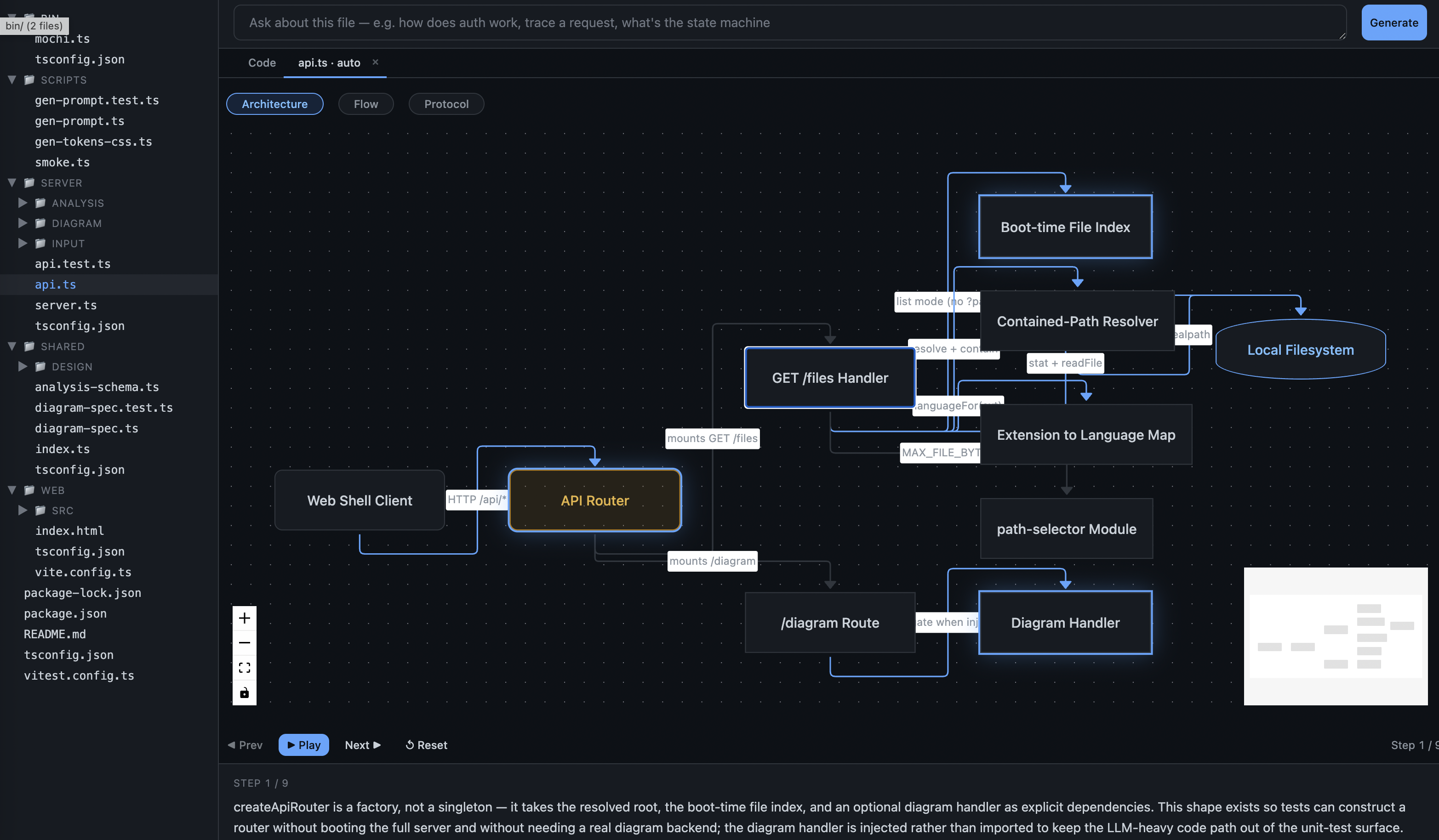
Protocol — message exchanges between participants over time. Swim-lane sequence view. Pick two or more coordinating files.
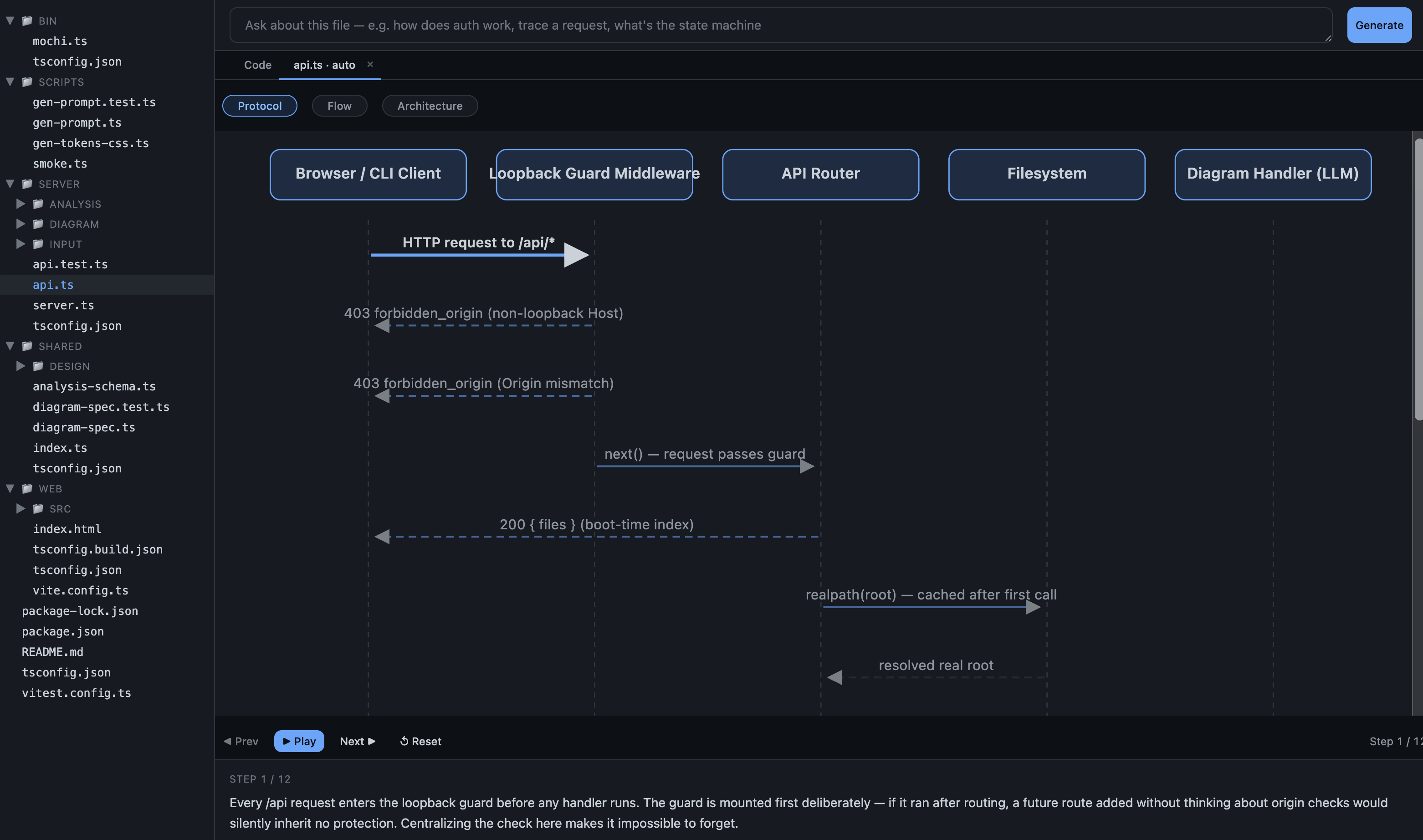
Mochi includes alternative_lenses in every spec, so you can pivot from
"this is a flow" to "show me as architecture" in one click.
Troubleshooting
- "Claude can't authenticate" — run
claude /loginand retry. - "Scope is too large" — narrow the selection. Multi-file scopes work best with 2–5 closely-related files.
- "Nothing useful to diagram here" — Claude returned an empty spec. Try a different file, or add an intent to focus the question.
claudenot found at startup — install Claude Code and ensure it's on yourPATH.- Stale cache — caching is keyed by the SHA-256 of the resolved scope
- prompt version. Edit the file (or bump
PROMPT_VERSIONinserver/diagram/prompt-version.ts) to invalidate.
- prompt version. Edit the file (or bump
sh: mochi: command not foundwhen runningnpx @mquan/mochifrom inside the mochi repo — npx sees the localpackage.json#namematches, skips its registry fetch, and tries to execmochifrom$PATH(where it isn't). Usenpm startinstead when you're inside the repo;npxis for other codebases. (See the Development section.)
Development
nvm use            # picks Node 22.0.0 from .nvmrc
npm install
Build + run — the standard loop after every change to server, prompts, or generated assets (tokens, prompt template):
npm run build       # tsc + vite + gen-prompt + gen-tokens-css
npm start           # boot the server pointing at the cwd (= node ./dist/bin/mochi.js .)
npm startis the canonical in-repo runner.npx @mquan/mochidoes not work from inside this repo — npx sees the localpackage.json#nameand short-circuits the registry install, then fails to find amochion PATH. That's an npx quirk for "you're inside the package you're trying to run."
Open the URL the server logs (defaults to http://127.0.0.1:5173).
Ctrl-C to stop.
Fast iteration — for web-only changes, use the dev server (Vite HMR + tsx-watched server, no rebuild step):
npm run devTests:
npm run test       # vitest — unit + integration
npm run smoke      # spec-contract smoke (validates every lens fixture)
Ship checks
npm run build       # production build
npm run smoke       # spec-contract smoke
npm pack --dry-run  # confirm tarball contents + size