@mrclrchtr/supi-code-intelligence
v11.1.0
Published
LSP and AST navigation, search, diagnostics, and refactoring

Maintainers
 mrclrchtr
Readme
@mrclrchtr/supi-code-intelligence


A Pi coding agent extension to navigate symbols, search code structure, check diagnostics, and preview and apply semantic refactors.
Install
pi install npm:@mrclrchtr/supi-code-intelligenceAdd -l for a project-local install. To try the package for one run:
pi -e npm:@mrclrchtr/supi-code-intelligenceFor local development, run pi install ./packages/supi-code-intelligence from the SuPi repository root. Run /reload after changes.
This package is included in the SuPi release installer. SuPi remains pre-release. The package bundles its LSP and Tree-sitter runtime dependencies, but not language-server binaries.
Under Bun, including compiled applications such as Pi-Bolt, structural analysis also requires a Node.js executable named node on PATH. The parser runs in a protected Node child process, not in Bun. If Node.js is unavailable, structural analysis reports an installation error; LSP startup remains separate.
What it adds
- Language Server Protocol (LSP) tools for types, definitions, references, implementations, diagnostics, workspace symbols, and semantic refactoring.
- Tree-sitter tools for syntax, declarations, structural search, and calls as written in source code. These calls are not a semantic call graph.
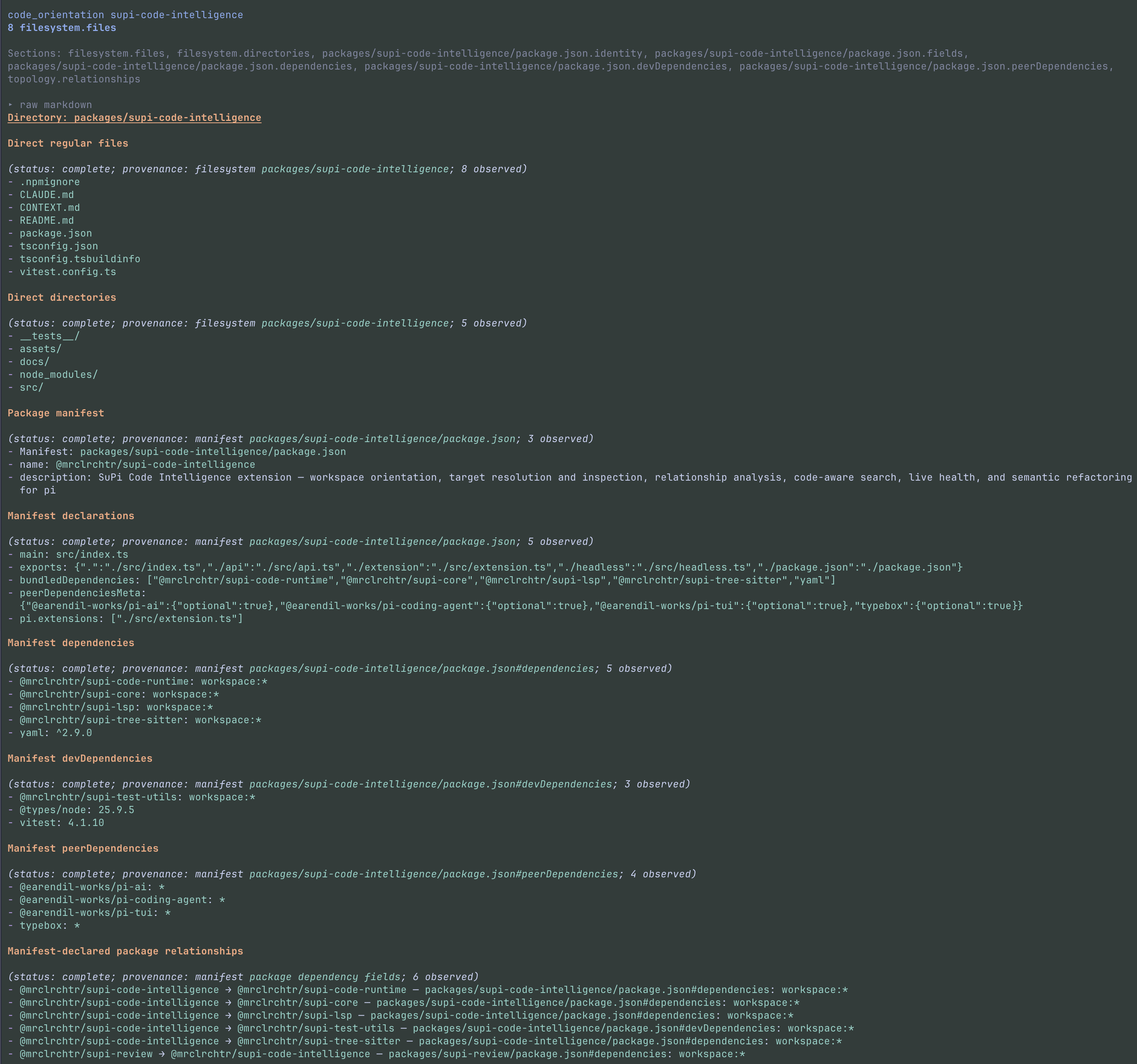
- Workspace orientation from included files and explicit project declarations. It works without package metadata. Directory orientation can also show configured instruction files and Mermaid diagrams of declared relationships.
- Visible evidence limits that distinguish no matches from incomplete or unavailable analysis. Search modes do not silently switch to each other or to text search.
- An optional first-turn overview with observed names, paths, file-extension counts, and project declarations. It is enabled by default. Repository descriptions retain their source fields and are untrusted evidence, not instructions.
The overview is a hidden Pi message, not a live architecture graph. It is not repeated when the active session branch already contains it. It works in source-only projects. Names and paths have priority over descriptions. Omitted collected facts remain in a temporary captured-result file.
Usage
Ask Pi normal coding questions. For example:
- “Map this repository and find the authentication package.”
- “Find references and implementations of
PaymentProvider.” - “Show the calls written inside
executeAskUser.” - “Find interface declarations under
packages/api.” - “Refresh the language-server diagnostics for this file.”
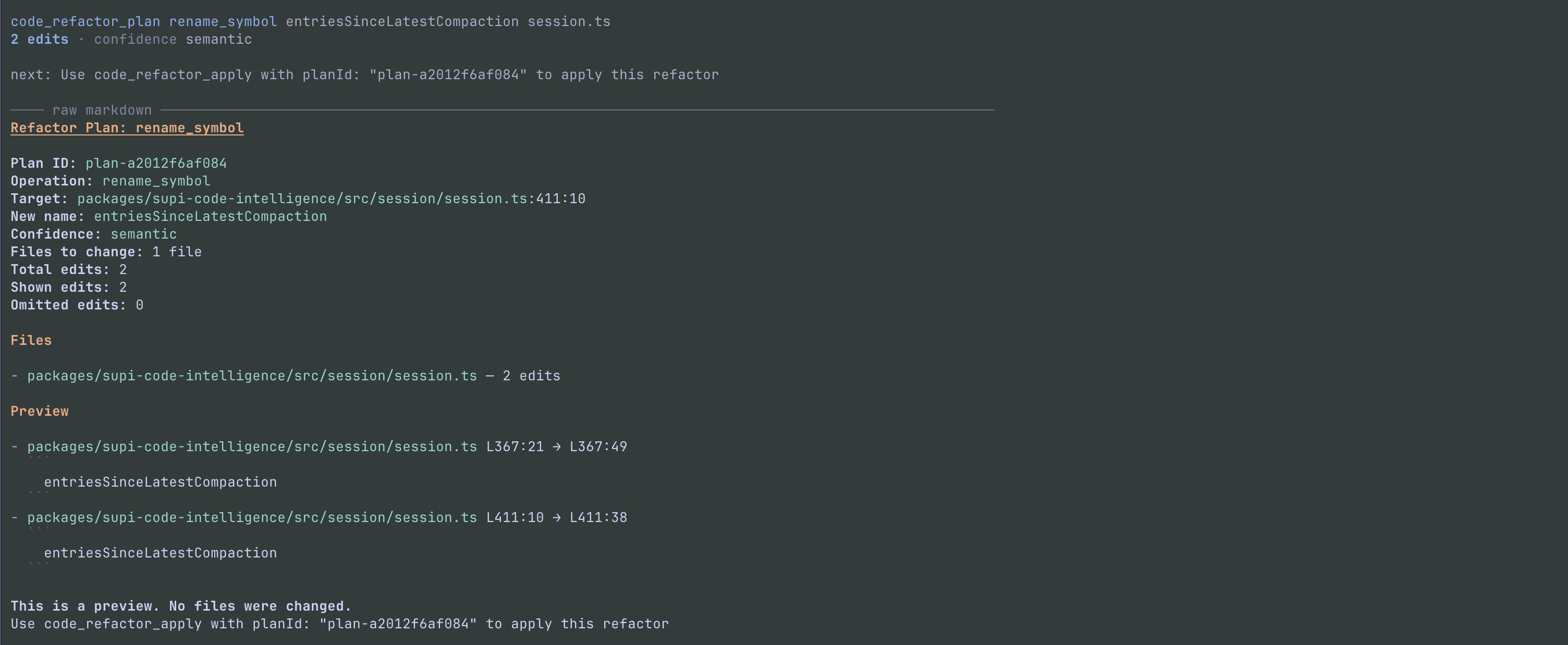
- “Preview a rename from
oldNametonewName. Do not apply it yet.”
Agent tools
The full extension registers all eight tools at startup; it does not load them on demand.
| Tool | Purpose |
|---|---|
| code_orientation | Show workspace facts, or focus on a path, module, or symbol target |
| code_resolve | Resolve a real symbol anchor or semantic query to target handles, or list a file's declarations |
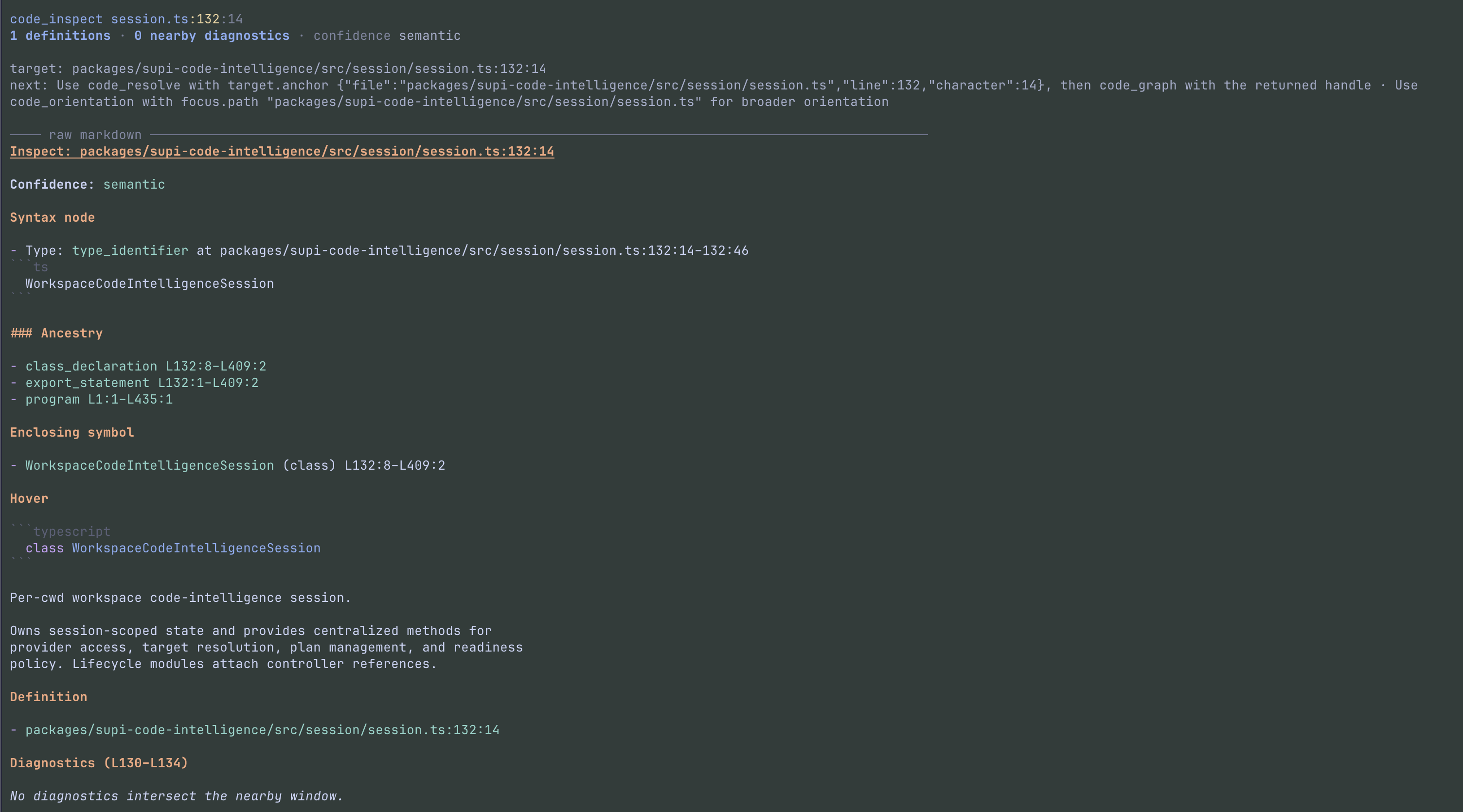
| code_inspect | Inspect syntax, the enclosing declaration, hover information, definitions, and nearby diagnostics at one point |
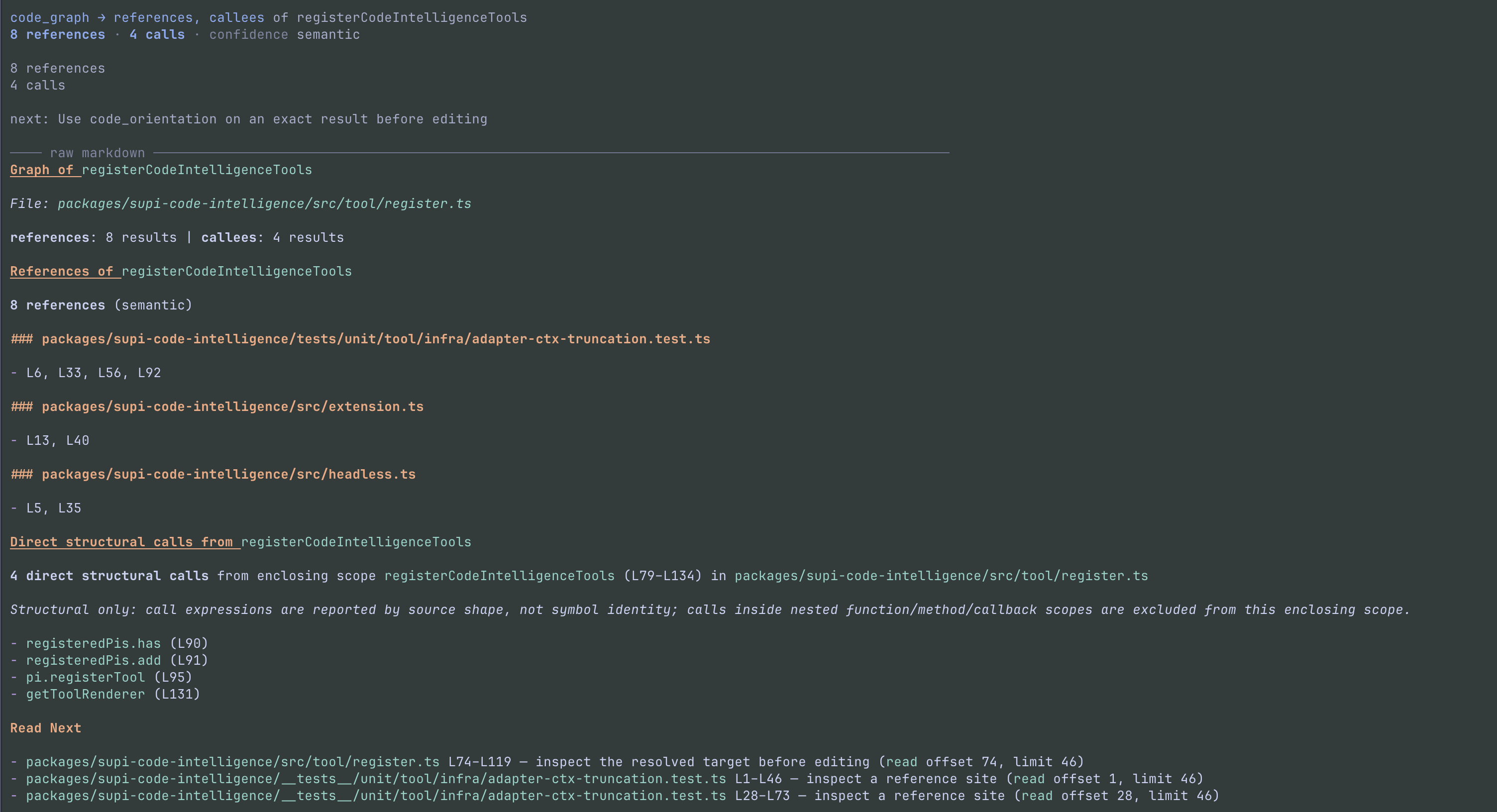
| code_graph | Find semantic references and implementations, or structural calls from the enclosing scope |
| code_find | Search with an explicit ast or semantic mode |
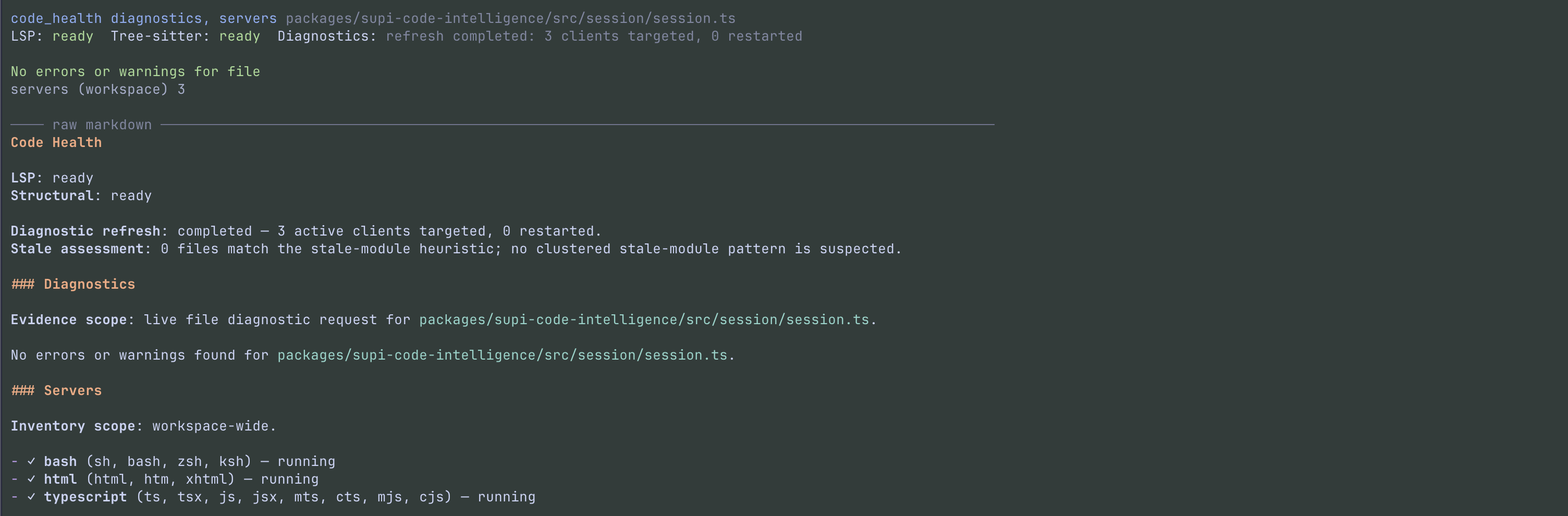
| code_health | Report diagnostic observations and language-server health |
| code_refactor_plan | Store a semantic refactor preview without changing files |
| code_refactor_apply | Apply a fresh stored plan after file and edit checks |
Use Pi's grep for literal or regular-expression search. Source points use 1-based lines and 1-based UTF-16 columns. A target or focus selector must contain exactly one choice.
Example tool calls:
code_orientation({ focus: { path: "packages/api" } })
code_find({ query: "PaymentProvider", mode: "semantic", scope: ["packages/api"] })
code_health({ scope: "packages/api/src/index.ts", refresh: true })
Important tool rules:
- Resolve: new target handles require semantic readiness. A comment or whitespace point is not a symbol; use
code_inspectthere. Handles are session-local and become stale when file contents change. Resolve the symbol again rather than reuse a stale handle. Symbol queries put case-sensitive exact-name matches first, before the display cap. Provider order stays unchanged within exact-name and other matches. An incomplete provider result never selects a target automatically. - Graph: relations are
references(default),callees, andimplements. Use["all"]for all three. Callee depth isdirectby default;deepincludes nested scopes, not transitive calls. Callees match source shape, not symbol identity. Counts include each distinct call site; repeated expressions share one agent-output row with all shown line/column coordinates. Each relation reports its counts and limits once. Provider-limited results have unknown totals; invalid locations are disclosed separately. Callee previews shorten receiver argument lists from syntax without changing grouping by the full expression. Matching previews get local expression numbers so distinct source expressions remain clear. Unavailable references and implementations keep the provider reason. If no provider exists, the result names that gap. Unavailable callees keep the provider reason and a source-inspection next step. Ambiguous targets ask for candidate selection, not input correction. Candidate limits retain exact totals, or unknown totals when the provider returns partial data. Agent output and both transcript views disclose omissions. Only shown candidates receive target handles. The human transcript shows the resolved target and per-relation evidence types and status. The expanded view groups up to 20 sites per relation by file, without a duplicate Markdown body. If this display limit hides returned sites, the transcript links to a temporary file with all returned evidence. This file does not include evidence beyondmaxResults, and its path does not add text to an otherwise complete agent result. Merged read ranges use neutral guidance. - Find: AST mode requires
kind:definition,import,export,call,type,interface,class,method, orenum. Semantic mode does not acceptkind. A suppliedscopeis a non-empty array. - Health:
includeacceptsdiagnosticsandservers(both by default);levelissummary(default) ordetailed. Server inventory and route counts remain workspace-wide, even with a diagnostic scope. A diagnostic snapshot does not prove that the whole workspace is clean. Tsconfig and jsconfig coverage applies only to TypeScript and JavaScript-family files; other-language files have noTsconfiglabel.
code_health({ refresh: true }) retries failed startup and exhausted process-crash routes in scope, with at most one attempt per route per call. It collects fresh diagnostic evidence and reports recovery separately from diagnostic confirmation. A broad maintenance attempt can include active tracked files outside a requested directory, but the diagnostic result keeps the requested directory and tracked-file boundary. The report labels maintenance evidence separately from result coverage. A later refresh can retry a failed route. Reports show up to 16 route entries per recovery list and disclose omitted entries. Use an exact file scope when a route reports use-exact-file.
Structured codemode results
code_resolve, code_find, and code_graph declare output schemas. Direct calls retain compact text; codemode receives JSON instead of Markdown. Resolve returns targets with reusable handle values; Find returns bounded matches; Graph returns per-relation sections with bounded items. UI details and internal target-store entries are not exposed.
Check kind before consuming evidence. Invalid input and candidate selection return recovery data; whole-tool capability failures still throw. evidenceLists (and Graph's per-section evidence) retain exact or unknown totals, shown/omitted counts, partial reasons, and invalid-location counts. AST results retain their scan policy, exclusions, limitations, and failures. Coordinates are one-based UTF-16 except zero-based recovery error ranges.
Example codemode script that returns counts rather than every reference:
const graph = await tools.code_graph({
  target: { symbol: { query: "PaymentProvider", scope: "packages/api" } },
  relations: ["references"],
});
return graph.kind === "completed"
  ? graph.sections.map(({ relation, source, status, evidence, message }) =>
      ({ relation, source, status, evidence, message }))
  : graph;
Workspace and directory observations
Automatic collection stays within the session working directory. Ancestor Git roots and workspace manifests do not expand that boundary. An explicit directory focus can select a different root. Each tool call makes a new observation; its output does not depend on an earlier overview.
- Git inventories contain tracked and non-ignored untracked files. Tracked files remain eligible when ignore rules match them. Configured exclusions still apply.
- Without Git, collection uses accessible files and configured exclusions. Directory names do not determine project roles or generated-file status.
- Symbolic links are recorded, not followed. An explicit ignored or excluded directory can be observed separately. This does not change automatic inclusion elsewhere.
- Metadata readers cover Node
package.jsonand workspace declarations, Python[project]inpyproject.toml, RustCargo.toml, and Gogo.mod/go.work. They do not run build tools or project code. - Unsupported, dynamic, inherited, malformed, and unresolved declarations are disclosed. Go replacement directives and unsupported quoted-string escapes are not interpreted. Native project kinds remain separate; nearby Python or Rust projects do not become Node workspace members.
- Project declaration groups share their observed kind and project-relative identity source. Identical membership declarations share their native kind, source field, and value. List limits and omission counts still apply to individual declarations and memberships, not groups. A membership group refers to listed projects only when their identities match exactly; otherwise it lists member paths.
- Explicit directory results keep project identity, direct directories/files, applicable instructions, and collection problems inline. Complete ancillary sections (extension counts, nested declarations, memberships, declared paths, and dependency topology) move to captured details with an omission summary. Incomplete ancillary observations remain inline. Root-focused Orientation also keeps project declarations and memberships inline for workspace navigation.
- Captured directory diagrams retain separate dependency categories and declared values. Unique declared-name matches do not prove installed dependency resolution or runtime architecture.
- The inventory retains at most 10,000 entries. An explicit in-root directory is collected before unrelated paths use that budget. External directory focus uses its own observation. Metadata files have a 1 MiB read limit. The first-turn collector has a 10-second deadline; tool calls use their request control. Results disclose incomplete collection.
Estimated tokens are ceil(characters / 4). The overview warns above 1,000 and has a 2,000-token hard cap. Workspace and directory navigation warn above 2,000 and have a 4,000-token hard cap. Warnings go to UI and debug only. maxResults can reduce a list, but cannot bypass the total cap.
The overview links captured details only when navigation rows or descriptions are omitted. Explicit workspace/directory Orientation also preserves raw inventory evidence. Captured-result files contain the complete collected observation, not just the selected rows. Reading them does not refresh facts or establish that every possible fact was collected. Instruction snippets have a separate budget and still respect Pi's final output safety limit. Unread instruction text is identified and is not recorded as supplied. File- and symbol-focused navigation retain their existing output.
Consent-gated Gradle observations
Overview and workspace/directory Orientation can add a Gradle model observation for one selected Gradle 9 build. Overview selects the session working directory; an explicit directory focus selects that exact directory. A regular settings.gradle or settings.gradle.kts is required there. No ancestors or independent nested builds are queried automatically. File, module, and symbol focuses do not select additional builds.
- Permission is project-only:
code-intelligence.gradleObservationis"allow","deny", or absent in.pi/supi/config.json. Global values are ignored. Eligible interactive startup asks when unset; Cancel does not persist. Without UI, unset never executes. - Allow also requires Pi's actual project-trust gate: a trusted startup with protected project resources, or a saved Pi trust approval. Pi implicitly trusts directories without protected resources, so a bare SuPi config containing Allow is insufficient. Use
/trustand reload in that case. Explicit external roots require their own saved trust approval; permission remains owned by the session project. /supi-settings→ Code Intelligence → Gradle observations changes the next query. Reset removes the project value and restores asking at the next eligible startup. Deny/reset request cancellation of owned in-flight helpers. Cancellation cannot undo side effects or stop unrelated Gradle daemons.- Execution risk: Gradle initializes settings and plugins. They may execute arbitrary code, download distributions/dependencies, write caches, and access files/services outside the reporting root. Reporting bounds are not a sandbox. Only
BuildEnvironmentandGradleBuild/BasicGradleProjectmodels are requested; SuPi schedules no build/test tasks and requests no dependency, task, source-set, or IDE models. - Wrapper properties select their declared distribution, never the Tooling API client's version. Conventional
gradle-9.x[-qualifier]-(bin|all).zipURLs are required to establish the major before querying; unidentifiable/custom archive names fail closed. Relative file URLs resolve against the wrapper properties. When properties are absent, the first executable Gradle on PATH must resolve through symlinks to an installation withbin/gradleand a singlelib/gradle-launcher-9.*.jar. SDKMAN-style symlinks and direct version-manager installation paths work; opaque mise/asdf shims are not executed. Put the selected installation'sbindirectory on PATH. Unsupported wrappers and unresolved installations are disclosed without fallback. - Java is selected from existing
JAVA_HOME/bin/java, then PATH. Java 17–24 is the conservative compatible range for Gradle 9; no JDK is installed. The helper pins the model request to its own Java home. Actual qualification is narrower; see the helper qualification and dependency notices. - Projects retain build-root identity plus logical path, name, parent path, and Gradle-reported actual directory. Duplicate names remain distinct. Included builds are references only, not recursively expanded trees. External directories are attributed references; inventory never expands to them. No declaration fields/ranges, source ownership, dependency resolution, or architecture are inferred.
- The existing 10-second Overview deadline, request cancellation/deadlines, navigation budgets, captures, and untrusted-evidence handling still apply. Helper output is capped at 1 MiB and 10,000 projects. Missing prerequisites, unsupported versions, initialization failure, cancellation, expiry, and oversized results are explicit limitations, never “no projects.” There are no automatic retries, console-report fallback, or stale-model reuse.
Transcript failures
All Code Intelligence tools show PI execution failures with the tool name and the available reason. Structured failure text takes priority; a failure without details uses PI's plain error text. The transcript removes terminal controls and keeps up to 4096 characters. Collapsed output keeps two wrapped rows; expanded output keeps 20. A notice discloses further display limits. These limits do not change agent output or saved results.
Candidate selection for Graph, Resolve, and Orientation uses one structured transcript view. The collapsed view shows Choose a target and one count summary. Incomplete symbol-query results retain the provider reason and distinguish collected candidates from display omissions in agent output and both transcript views. The transcript removes terminal controls from this disclosure and limits it to 4096 source characters and 3 collapsed or 10 expanded body rows, plus a notice when text is hidden. These display limits do not change agent output or saved details. The expanded view shows one candidate section and selection guidance; it does not repeat raw Markdown when candidate rows are available. Older results use structured evidence when available. When candidate rows are unavailable, or structured reason or guidance is missing, the renderer uses a bounded raw detail view with up to 4096 source characters and 40 wrapped body rows. It shows a truncation notice and keeps any existing full-output link.
Refactor checks
The planner accepts one target handle or anchor and one operation: rename_symbol, extract_function, extract_variable, update_imports, or delete_dead_code. Rename, import updates, and dead-code removal depend on the language server and validated edits. Function and variable extraction are currently unavailable for all languages: standard LSP code actions do not provide a safe exact extraction-name contract. Unsupported operations do not fall back to text edits.
Rename can discover affected files and repeat the request once after validated same-route enrollment, with a limit of 64 files. A null server document version for an open file is accepted only with a verified request snapshot of synchronized content. Plans retain its content fingerprint and client version; unknown or mismatched state remains unavailable.
Plans are held in memory for the current session. Apply accepts only the returned planId; it does not create or regenerate a plan. It checks SHA-256 file fingerprints, provider-authorized roots, document versions when available, edit ranges, and overlaps before writing. Changed files require a new plan. A successful apply removes the plan.
Refactors can change several files. If a later write fails, the tool attempts to restore earlier files and reports restoration failures. It does not create a Git commit. The plan/apply split is not a user confirmation dialog: the agent can call apply. Review the diff and run tests.
Language support
The matrix shows built-in LSP routes and implemented AST operations, not a live server test. Install the required language servers yourself. The extension starts available configured commands in trusted projects; it does not download or install servers. A route does not guarantee hover, references, diagnostics, or refactors. Each semantic feature needs a ready server that supports it.
Tree-sitter grammars are bundled and parse locally without an LSP server. Both layers match file extensions without case sensitivity; AST grammar selection does not use a shebang. LSP and AST extension lists are separate.
| Language | Default LSP command | LSP file extensions | AST file extensions | AST search operations |
|---|---|---|---|---|
| TypeScript / JavaScript | typescript-language-server | .ts, .tsx, .js, .jsx, .mts, .cts, .mjs, .cjs | .ts, .tsx, .js, .jsx, .mts, .cts, .mjs, .cjs | Outline, imports, exports, calls |
| Python | pyright-langserver | .py, .pyi | .py, .pyi | Outline, imports, calls |
| Rust | rust-analyzer | .rs | .rs | Outline, imports, calls |
| Go | gopls | .go, .mod | .go | Outline, imports, calls |
| C / C++ | clangd | .c, .h, .cpp, .hpp, .cc, .cxx, .hxx, .c++, .h++ | .c, .h, .cpp, .hpp, .cc, .cxx, .hxx, .c++, .h++ | Outline, imports, calls |
| Bash / shell | bash-language-server | .sh, .bash, .zsh, .ksh | .sh, .bash, .zsh, .ksh | Outline, calls |
| HTML | vscode-html-language-server | .html, .htm, .xhtml | .html, .htm, .xhtml | Outline |
| SQL | sql-language-server | .sql | .sql | Outline |
| Ruby | ruby-lsp | .rb, .erb, .gemspec | .rb, .gemspec | Outline, calls |
| Java | jdtls | .java | .java | Outline, imports, calls |
| Kotlin | kotlin-lsp | .kt, .kts | .kt, .kts | Outline, calls |
| R | R with the languageserver package | .r | .r | Outline, calls |
| LaTeX / BibTeX | texlab | .tex, .bib | .tex, .sty, .cls | Outline, imports |
The AST operation column applies only to the AST extensions in that row:
- Outline supplies
code_findkinddefinition. TS/JS, Python, Java, Go, Rust, and C/C++ include nested named declarations and members, not every local binding. Kindstype,interface,class,method, andenumuse common filters while results retain native declaration kinds. For example, a Rust trait matchesinterface, and a Go struct or Java record matchestype; they do not become classes. Other languages retain their existing extraction limits. HTML outlines contain elements with non-emptyidattributes. SQL outlines contain supportedCREATEdeclarations and shallow table/type members. - Imports supply kind
importand match written source targets, not local aliases or resolved files. Supported forms include JS/TS declarations, Pythonimport/from, Java ordinary/static imports, Go import paths, Rustuse/extern crate/externalmod, literal C/C++ includes, and LaTeX dependency directives. Conditional directives are source evidence, not proof of active dependencies. CommonJS loader calls, dynamic import calls, computed targets, and C++20 module imports are not collected. - Exports supply kind
exportfrom file-level JS/TS export statements. CommonJS assignments and a cross-language public-interface model are not supported. - Calls supply kind
callfrom file-wide call-site queries; graph callees use a separate anchored query. Each distinct site retains its source coordinates, including repeated calls on one line. These are written expressions, not symbol-identity relationships. Rust macro invocations remain syntax evidence; JSX tags and compiler-expanded calls are not collected. HTML, SQL, and LaTeX have no built-in call-site or callee queries. .mod,.erb, and.bibhave built-in LSP routes but no AST grammar..styand.clshave AST support but no built-in LSP route..hselects C by default; project file associations can select C++ consistently for parsing and the LSP document language ID..jsxselects JavaScript;.tsxselects TSX. Shell extensions all select the Bash grammar, not separate Zsh or KornShell grammars.
AST search and point syntax inspection can work without LSP. New target handles require semantic readiness, including handles used for code_graph callee queries. Workspace and directory inventories can include any file type; inclusion does not establish language support.
Unlisted extensions have no built-in route or grammar. A custom LSP server can add semantic coverage, but it does not add AST support. See the AST operation matrix and LSP route matrix for details. The source definitions are the LSP defaults, grammar map, AST operation registry, and search-kind mapping.
Reference-server verification
The language capability baseline has a separate public-tool acceptance suite and required Linux/macOS CI jobs. Its server and toolchain pins are test combinations, not promises for every installed version. Qualification remains pending until both pinned jobs pass. Parser tests and configured routes do not qualify semantic support.
Pyright remains the default Python route. The audited Pyright server does not provide implementation lookup. The Python acceptance case uses an explicit Basedpyright configuration; this is not an automatic fallback. Install Basedpyright yourself and configure it if you need that reference combination:
{
  "lsp": {
    "servers": {
      "python": {
        "command": "basedpyright-langserver",
        "args": ["--stdio"]
      }
    }
  }
}
Basedpyright uses basedpyright.* settings rather than most python.* settings, and has different diagnostic defaults. SuPi does not translate them. See the server settings reference.
Developers run pnpm test:language-baseline:acceptance with the pinned prerequisites. Missing prerequisites fail the command; they do not produce skipped passes. The CI setup installs test tools on isolated runners, not through the runtime extension.
Search and output limits
- An AST search has a 5,000 eligible-file limit and a 10-second deadline shared by file enumeration and analysis. These are not tool-call settings.
- Below directory roots, AST search excludes hidden entries, dependency/build/cache directories, symlinks, non-regular files, configured
code-intelligence.excludepaths, paths ignored by.gitignore, and files unsupported by the requested operation. It reads regular, non-symlink workspace-root and nested.gitignorefiles, with directory-relative rules and negation; it does not use global Git ignores or.git/info/exclude. Explicit roots are resolved and honored, including ignored paths and symlink roots. An explicitly selected ignored directory overrides ancestor ignore rules, but still applies its own and nested.gitignorefiles. See the scan policy for the exact directory list. - AST scan details report
policy.ignoreFiles: trueand ignored-path counts/examples under thegitignoreexclusion reason. Each exclusion summary includesscopeRoot, the canonical requested root displayed relative to cwd when inside it. Counts describe encountered traversal skips per scope and reason, not distinct files absent from the combined result: another explicit scope may include a skipped path. An excluded directory counts as one skip, not as a count of its unvisited descendants. Ignore-file read failures make the scan incomplete; the warning includes bounded examples of unreadable paths. - An exact file that does not support the requested AST operation is invalid. Results disclose policy exclusions, interrupted scans, provider limits, and omitted matches. No matches do not mean that unsupported files were searched.
- Syntax recovery retains usable evidence as partial and reports the affected file and available error ranges. Scan limits separate recovered syntax from provider failures, with counts and file examples for each. Partial scans have unknown match totals. A recovered parse does not establish complete absence.
- Tool text has an economic inline budget of 8,000 characters (approximately 2,000 tokens). Oversized results prioritize status, evidence counts, limitations, and diagnostic snippets before an explicitly incomplete text excerpt. The complete returned text is saved to a temporary file, linked before the excerpt. Counts describe the returned result, not the shortened preview. UI details and structured codemode evidence are not truncated by this budget.
- Workspace/directory navigation and instruction delivery retain their separate budgets above. Pi's default 2,000-line / 50 KB safety limit still applies to every tool. Result-list limits also apply to saved text: a spill file does not recover evidence omitted by
maxResults.
Status and settings
In interactive Pi, open the status overlay:
/supi-ci-statusIt shows server routes and roots, missing or running servers, diagnostics, and capability warnings. The terminal must be at least 60 columns wide. Use Up/Down to select a diagnostic file, Enter or Space to expand it, r to reload the displayed snapshot, a to collapse it, and Escape to close. The extension also adds LSP status to the footer. Use code_health for health reports outside the interactive terminal.
The package registers Code Intelligence and LSP settings. If @mrclrchtr/supi-settings is installed, use /supi-settings to edit them. A standalone Code Intelligence install does not include that settings UI.
Configuration files:
- Global:
~/.pi/agent/supi/config.json - Project:
.pi/supi/config.json
Project values override global values, which override defaults. Project configuration and instruction discovery require project trust. For an untrusted project, the overview setting uses global values and defaults only; no LSP controller is started for that session.
| Setting | Default | Effect |
|---|---|---|
| code-intelligence.overviewEnabled | true | Add the hidden overview; the choice is fixed for the session |
| code-intelligence.instructionFileNames | ["CLAUDE.md", "AGENTS.md"] | Ordered plain filenames for directory instruction discovery |
| code-intelligence.gradleObservation | unset | Project-only "allow" / "deny"; actual Pi project trust also required; changes apply to the next query |
| code-intelligence.exclude | [] | Gitignore-style patterns for automatic workspace navigation, LSP work, and broad AST searches; not an access control |
| code-intelligence.fileAssociations | [] | Ordered C/C++ language rules in trusted project configuration only; edit the JSON file directly |
| lsp.servers.<language>.enabled | Enabled unless false | Disable a language server |
Example .pi/supi/config.json:
{
  "code-intelligence": {
    "overviewEnabled": false,
    "instructionFileNames": ["AGENTS.md", "CLAUDE.md"],
    "exclude": ["generated/**"]
  },
  "lsp": {
    "servers": {
      "python": { "enabled": false }
    }
  }
}
Use typescript, python, rust, go, c, ruby, java, kotlin, bash, html, sql, r, or latex for built-in server keys (cpp aliases c). Server command and routing overrides are defined in the LSP configuration reference. .pi-lsp.json is not read. Only the boolean true enables the overview; non-boolean values do not enable it. The shared exclusion list uses gitignore syntax and project-over-global replacement. An explicit project [] clears configured patterns. /supi-settings shows the config path and says to reload or restart Pi after saving. LSP and AST work use saved exclusions after reload or restart. New workspace observations read the current exclusions. Exact file and explicitly selected directory requests remain available. An old lsp.exclude value reports a migration error and is not used.
C/C++ file associations
Set ordered rules in the project's .pi/supi/config.json:
{
  "code-intelligence": {
    "fileAssociations": [
      { "pattern": "vendor/**/*.h", "language": "c" },
      { "pattern": "**/*.h", "language": "cpp" }
    ]
  }
}
The first matching rule wins; no match keeps the extension default. Patterns are case-sensitive globs over project-relative paths with / separators. They support *, ?, **, character classes, and brace alternatives. Rules apply only to existing C-family suffixes and accept only c or cpp. A rule cannot add an AST grammar or change server routing. Invalid rules fail configuration loading. There is a limit of 64 rules and 512 characters per pattern.
Global association values and untrusted project values do not apply. The workspace provider host captures one rule set for AST grammar selection and LSP document language IDs. Restart Pi, or release all sessions that share the host and reload, to use changed rules. This setting has no settings-overlay editor. It does not bypass exclusions or establish compiler flags.
Directory orientation checks the path from the workspace root to the focused directory. It selects the first valid configured instruction file per directory, skips files already loaded by Pi or shown on the active branch, and shows at most 200 lines per file. Resolved instruction paths must stay inside the workspace. These snippets are tool output, not additions to Pi's system prompt.
Privacy and security
Pi extensions run with your system permissions; this package is not a sandbox. Language servers run as local processes and receive source files. Review server commands and project configuration before trusting a project. code-intelligence.exclude and AST scan exclusions are not access controls.
Tool results and the hidden overview enter Pi's model context and can be saved in session history. They can contain source text, paths, manifest data, diagnostics, and instruction-file contents. Truncated tool results, orientation captures, and graph display overflow also leave collected text in local temporary files. These files are not durable session storage and can be removed by system cleanup. “Hidden” means not displayed in the transcript, not hidden from the model.
Public entrypoints
| Export | Surface |
|---|---|
| @mrclrchtr/supi-code-intelligence/api | Type-only provider contracts, architecture models, targets, health observations, and tool results; no runtime functions |
| @mrclrchtr/supi-code-intelligence/extension | Default full Pi extension factory |
| @mrclrchtr/supi-code-intelligence/headless | Default inspection-only extension factory and HEADLESS_INSPECTION_TOOL_NAMES |
| @mrclrchtr/supi-code-intelligence/package.json | Package manifest |
The package-root export also re-exports types; prefer /api. See the type exports for the complete list.
The headless factory registers only code_resolve, code_inspect, code_orientation, code_graph, code_find, and code_health for managed child sessions. It adds no refactor tools, settings, commands, UI, or overview. It is a tool profile, not a filesystem sandbox.
See it in action
Select any screenshot to open it at full resolution.
Understand the workspace
Inspect an exact symbol
Follow references and calls
Check live health
Preview a refactor