
@mt-kit/eslint-config
v3.2.0
Published
> 基于 ESLint 10 的现代化代码规范配置,支持 TypeScript、Vue、React 等多种技术栈
Downloads
390

Maintainers
 not-have-warehouse
Readme
@mt-kit/eslint-config
基于 ESLint 10 的现代化代码规范配置,支持 TypeScript、Vue、React 等多种技术栈


📚 相关文档
🚀 快速开始
安装
# 使用 npm
npm install -D eslint @mt-kit/eslint-config

# 使用 pnpm
pnpm add -D eslint @mt-kit/eslint-config

# 使用 yarn
yarn add -D eslint @mt-kit/eslint-config
基础配置
创建 eslint.config.js 文件:
import EsLint from "@mt-kit/eslint-config";

export default EsLint;
TypeScript 项目
import EsLint from "@mt-kit/eslint-config";

export default [
  ...EsLint,
  {
    ignores: [
      ".vite",
      "node_modules",
      "dist",
      "build",
      "public",
      "forge.env.d.ts"
    ]
  }
];
Vue 项目
import { VUE } from "@mt-kit/eslint-config";

export default [
  ...VUE
];
React 项目 + TypeScript
import { REACT } from "@mt-kit/eslint-config";

export default [
  ...REACT
];
💡 推荐配置
建议配合 @mt-kit/prettier-config 一起使用,确保代码风格的一致性。
🛠️ 脚本配置
package.json 配置
{
  "name": "demo",
  "version": "1.0.0",
  "description": "",
  "keywords": [],
  "type": "module",
  "scripts": {
    "clear": "rm -fr node_modules",
    "lint": "pnpm eslint .",
    "fix": "eslint \"./**/*.{css,tsx,vue,ts,js,html}\" --fix"
  },
  "peerDependencies": {
    "eslint": ">=10.0.0"
  },
  "devDependencies": {
    "@mt-kit/eslint-config": "^X.Y.Z",
    "eslint": "^X.Y.Z"
  }
}
VS Code 配置
创建 .vscode/settings.json 文件:
{
  "editor.codeActionsOnSave": {
    "source.fixAll.eslint": "explicit",
    "source.formatDocument": "explicit"
  },
  "editor.tabSize": 2,
  "editor.insertSpaces": true,
  "editor.detectIndentation": false
}
支持的扩展
推荐安装以下 VS Code 扩展:
📋 可用配置
| 配置名称 | 描述 | 适用场景 |
|---------|------|----------|
| EsLint | 默认导出,基础 JavaScript/TypeScript 配置 | 所有项目 |
| VUE | 命名导出,默认配置 + Vue SFC 规则 | Vue 项目 |
| REACT | 命名导出,默认配置 + JSX/React 规则 | React 项目 |
⚙️ 高级配置
自定义规则
import EsLint from "@mt-kit/eslint-config";

export default [
  ...EsLint,
  {
    rules: {
      // 自定义规则
      "no-console": "warn",
      "@typescript-eslint/no-unused-vars": "error"
    }
  }
];
忽略文件配置
import EsLint from "@mt-kit/eslint-config";

export default [
  ...EsLint,
  {
    ignores: [
      "node_modules/**",
      "dist/**",
      "build/**",
      "public/**",
      "*.config.js",
      "*.config.ts"
    ]
  }
];
🔌 插件生态
核心插件
| 插件名 | 版本 | 作用 |
|--------|------|------|
| eslint | >=10 | ESLint 核心包,提供代码分析和检查功能 |
| @eslint/js | ^10.0.1 | JavaScript 基础配置和规则 |
| @stylistic/eslint-plugin | ^5.10.0 | 统一的代码风格配置插件 |
TypeScript 支持
| 插件名 | 版本 | 作用 |
|--------|------|------|
| @typescript-eslint/eslint-plugin | ^8.0.0 | TypeScript 专用规则和检查 |
| @typescript-eslint/parser | ^8.0.0 | TypeScript 代码解析器 |
代码质量
| 插件名 | 版本 | 作用 |
|--------|------|------|
| eslint-plugin-unicorn | ^69.0.0 | 现代 JavaScript/TypeScript 最佳实践 |
| eslint-plugin-import-x | ^4.17.1 | 模块导入管理和解析 |
| eslint-plugin-unused-imports | ^4.4.1 | 检测未使用的导入语句 |
| eslint-plugin-jsdoc | ^63.0.10 | JSDoc 注释一致性检查 |
工具集成
| 插件名 | 版本 | 作用 |
|--------|------|------|
| eslint-plugin-jsonc | ^3.2.0 | JSON/JSONC 文件格式校验 |
| eslint-plugin-regexp | ^3.1.1 | 正则表达式优化和错误检测 |
| eslint-plugin-command | ^3.5.2 | 项目命令规则检查 |
| eslint-plugin-eslint-comments | ^3.2.0 | ESLint 注释使用优化 |
Vue.js 支持
| 插件名 | 版本 | 作用 |
|--------|------|------|
| eslint-plugin-vue | ^10.9.2 | Vue.js 专用规则和模板检查 |
| vue-eslint-parser | ^10.4.1 | Vue SFC 解析器 |
React 支持
| 插件名 | 版本 | 作用 |
|--------|------|------|
| @eslint-react/eslint-plugin | ^5.10.0 | React / JSX / DOM / Web API 规则 |
| eslint-plugin-react-hooks | ^5.2.0 | React Hooks 正确使用检查 |
| eslint-plugin-react-refresh | ^0.5.3 | React Fast Refresh 组件导出检查 |
| eslint-plugin-react-compiler | ^19.1.0-rc.2 | React Compiler 兼容性检查 |
🎯 规则特性
代码风格
- 缩进: 2 空格缩进
- 引号: 单引号优先
- 分号: 自动添加分号
- 换行: 自动换行和格式化
代码质量
- 未使用变量: 自动检测和移除
- 导入顺序: 自动排序和分组
- 类型检查: 严格的 TypeScript 类型检查
- 命名规范: 统一的命名约定
最佳实践
- 现代语法: 支持最新的 JavaScript/TypeScript 特性
- 性能优化: 避免性能反模式
- 安全性: 检测潜在的安全问题
- 可维护性: 提高代码可读性和可维护性
📝 编码规范
事件处理方法命名
单一事件处理
当文件中只有一个事件处理器时:
// ✅ 推荐
const handleClick = () => { /* ... */ };
const handleChange = () => { /* ... */ };
const handleSubmit = () => { /* ... */ };

// ❌ 不推荐
const onClick = () => { /* ... */ };
const onChange = () => { /* ... */ };命名格式: handle + 事件名
多个事件处理
当文件中有多个同类型事件处理器时:
// ✅ 推荐
const handleCreateClick = () => { /* ... */ };
const handleEditClick = () => { /* ... */ };
const handleDeleteClick = () => { /* ... */ };

const handleNameChange = () => { /* ... */ };
const handleEmailChange = () => { /* ... */ };命名格式: handle + 作用 + 事件名
变量处理方法命名
读取操作
// ✅ 推荐
const getLoading = () => isLoading;
const getUserInfo = () => userInfo;
const getCurrentTime = () => new Date();

// ❌ 不推荐
const loading = () => isLoading;
const userInfo = () => userInfo;命名格式: get + 变量名
设置操作
// ✅ 推荐
const setLoading = (value: boolean) => { isLoading = value; };
const setUserInfo = (info: UserInfo) => { userInfo = info; };
const setCurrentTime = (time: Date) => { currentTime = time; };命名格式: set + 变量名
转换操作
// ✅ 推荐
const transformLoading = (loading: boolean) => loading ? '加载中...' : '完成';
const transformUserInfo = (info: UserInfo) => ({ ...info, displayName: info.name });
const transformData = (data: any[]) => data.map(item => ({ ...item, id: item.id.toString() }));命名格式: transform + 变量名
数据处理方法命名
接口数据处理
// ✅ 推荐
const fixDataList = (list: ApiResponse[]) => list.map(item => ({ ...item, processed: true }));
const fixDataUser = (user: ApiUser) => ({ ...user, fullName: `${user.firstName} ${user.lastName}` });
const fixDataConfig = (config: ApiConfig) => ({ ...config, version: '1.0.0' });命名格式: fixData + 接口方法名
组件命名规范
React 组件
// ✅ 推荐 - PascalCase
const UserProfile = () => { /* ... */ };
const ProductCard = () => { /* ... */ };
const NavigationMenu = () => { /* ... */ };

// ❌ 不推荐
const userProfile = () => { /* ... */ };
const product_card = () => { /* ... */ };
Vue 组件
<!-- ✅ 推荐 - PascalCase -->
<template>
  <UserProfile />
  <ProductCard />
  <NavigationMenu />
</template>

<script setup lang="ts">
// 组件名使用 PascalCase
defineOptions({
  name: 'UserProfile'
});
</script>
文件命名规范
src/
├── components/
│   ├── user-profile.vue
│   ├── product-card.tsx
│   └── navigation-menu.tsx
├── hooks/
│   ├── use-user-info.ts
│   └── use-product-list.ts
├── utils/
│   ├── format-date.ts
│   └── validate-email.ts
└── types/
    ├── user.ts
└── product.ts命名规则:
- 组件文件:
PascalCase - Hook 文件:
camelCase(以use开头) - 工具文件:
camelCase - 类型文件:
camelCase
❓ 常见问题
配置问题
1. 模块类型错误
问题: 在 package.json 中添加 "type": "module"

解决方案:
{
  "type": "module"
}
2. VS Code 版本兼容性
问题: The language client requires VS Code version ^1.89.0 but received version 1.
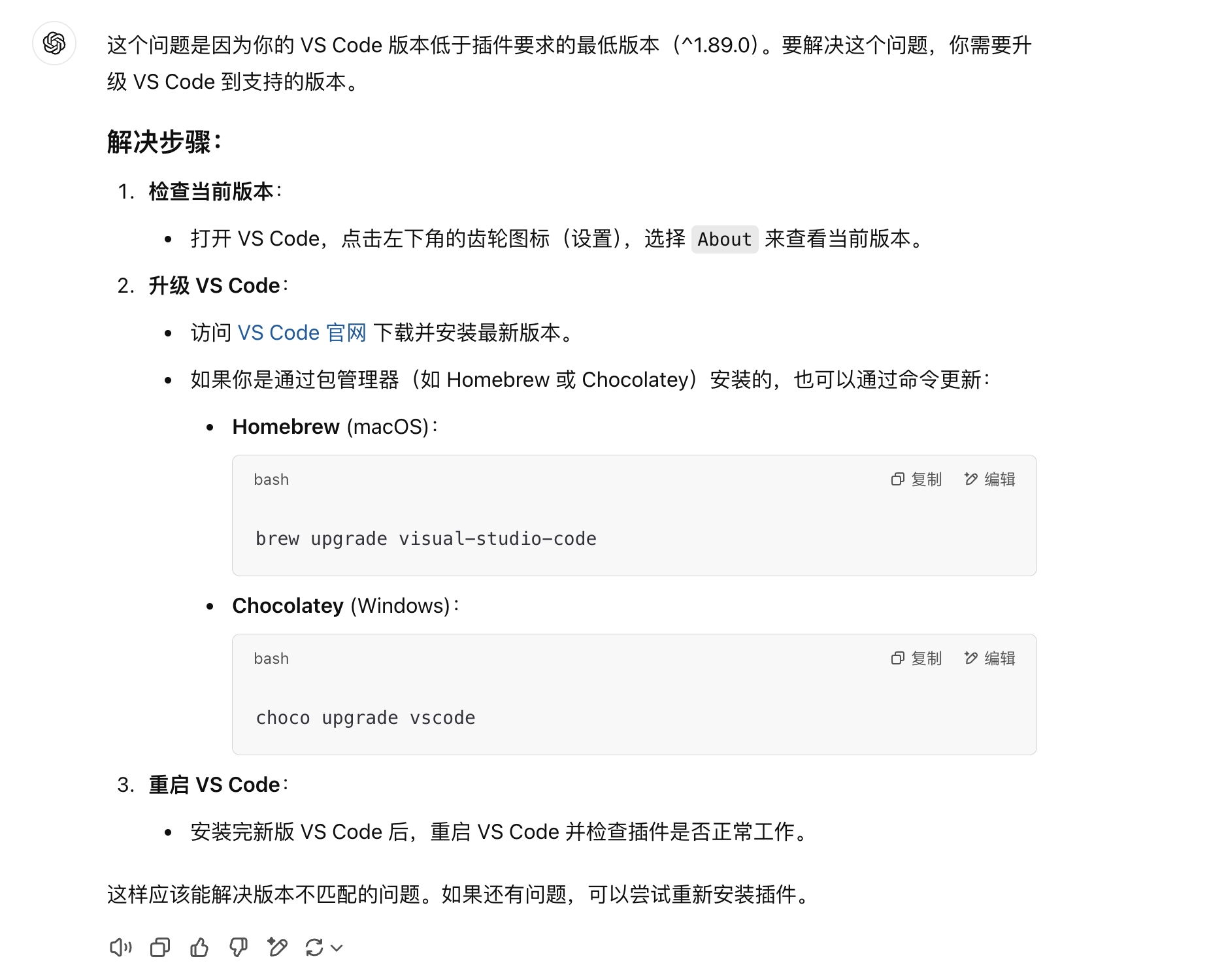
解决方案:
- 升级 VS Code 到最新版本
- 或者降级相关扩展版本
性能问题
1. ESLint 运行缓慢
原因: 项目文件过多或规则配置复杂
解决方案:
export default [
  ...EsLint,
  {
    ignores: [
      "node_modules/**",
      "dist/**",
      "build/**",
      "coverage/**",
      "*.min.js"
    ]
  }
];
2. 内存不足
原因: 大型项目或复杂规则导致内存溢出
解决方案:
# 增加 Node.js 内存限制
node --max-old-space-size=4096 ./node_modules/.bin/eslint .
🔧 故障排除
检查配置
# 检查 ESLint 配置
npx eslint --print-config src/index.js

# 检查特定文件的规则
npx eslint --print-config src/components/Button.tsx
调试模式
# 启用调试模式
DEBUG=eslint:* npx eslint src/
清理缓存
# 清理 ESLint 缓存
npx eslint --cache-location .eslintcache --cache src/
📞 支持
- 问题反馈: GitHub Issues
- 文档更新: GitHub Pull Requests