
@mustafaaksoy41/react-native-offline-queue
v0.1.13
Published
A flexible, high-performance offline queue and synchronizer for React Native. Works great with React Query (TanStack Query).

Maintainers
 mustafaaksoy41
Readme
📡 react-native-offline-queue
A lightweight, high-performance offline queue and sync manager for React Native. Queue operations when offline, sync automatically or manually when connectivity returns. Works great with React Query (TanStack Query).
📖 Full Documentation · GitHub · npm

















Features
- Offline-first mutations — API calls are queued when offline, executed when online
- Optimistic UI updates — UI responds instantly, data syncs in the background
- Flexible sync modes —
auto(silent sync) ormanual(prompt the user) - Pluggable storage — MMKV, AsyncStorage, or bring your own adapter
- Live sync progress — track each item as it syncs (pending → syncing → success/failed)
- Zero unnecessary re-renders — all hooks built on
useSyncExternalStore, no Context-based cascading - Mutation state tracking —
isLoading,isQueued,isSuccess,isErrorper mutation - React Query compatible — use
mutateAsyncinside handlers - Customizable restore UI — Alert, Toast, BottomSheet, or silent — you decide
- Background task compatible — use
OfflineManager.flushQueue()from any context
Example App (Video)
A demo app showing offline mutations, optimistic UI updates, and auto-sync when connectivity returns.
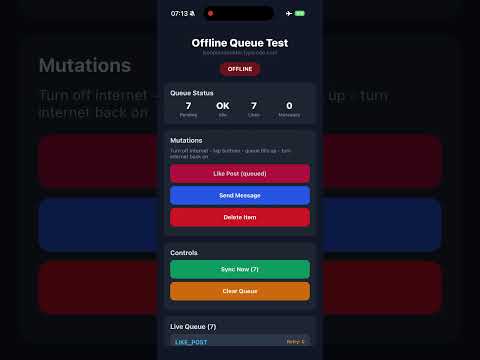
Tap the thumbnail to watch on YouTube
Network Status
The most basic thing: know if the user is online or offline. Use this anywhere in your app — only the component that reads isOnline re-renders when it changes.
import { useNetworkStatus } from '@mustafaaksoy41/react-native-offline-queue';

function ConnectionBanner() {
  const { isOnline } = useNetworkStatus();

  if (isOnline === null) return null; // still detecting
  if (isOnline) return null;          // online, nothing to show

  return (
    <View style={{ backgroundColor: '#ff4444', padding: 8 }}>
      <Text style={{ color: 'white', textAlign: 'center' }}>
        📴 You are offline. Changes will sync when you’re back online.
      </Text>
    </View>
  );
}
No re-renders:
useNetworkStatusis built onuseSyncExternalStore. It reads from a singleton store, not React Context. Components that don't call this hook are completely unaffected by connectivity changes.
Installation
npm install @mustafaaksoy41/react-native-offline-queue

# Required peer dependency
npm install @react-native-community/netinfo

# Pick ONE storage adapter (optional — defaults to in-memory)
npm install react-native-mmkv           # Recommended: fast, synchronous
# OR
npm install @react-native-async-storage/async-storage
iOS
cd ios && pod installQuick Start
1. Wrap your app with OfflineProvider
You can handle sync in two ways. Pick the one that fits your project:
Option A — Per-action handlers (recommended)
Each component defines its own API call. Provider stays clean:
// App.tsx
import { OfflineProvider } from '@mustafaaksoy41/react-native-offline-queue';

export default function App() {
  return (
    <OfflineProvider config={{ storageType: 'mmkv', syncMode: 'auto' }}>
      <YourApp />
    </OfflineProvider>
  );
}
Option B — Centralized handler
One global function handles all actions. Useful if you want a single place to manage API calls:
// App.tsx
import { OfflineProvider } from '@mustafaaksoy41/react-native-offline-queue';

const offlineConfig = {
  storageType: 'mmkv',
  syncMode: 'auto',
  onSyncAction: async (action) => {
    switch (action.actionName) {
      case 'LIKE_POST':
        await api.likePost(action.payload);
        break;
      case 'CREATE_POST':
        await api.createPost(action.payload);
        break;
      case 'SEND_MESSAGE':
        await api.sendMessage(action.payload);
        break;
    }
  },
};

export default function App() {
  return (
    <OfflineProvider config={offlineConfig}>
      <YourApp />
    </OfflineProvider>
  );
}
2. Use mutations in your components
With per-action handler (Option A):
Each component defines its own API call via handler:
import { useOfflineMutation } from '@mustafaaksoy41/react-native-offline-queue';

function LikeButton({ postId }) {
  const [liked, setLiked] = useState(false);

  const { mutateOffline } = useOfflineMutation('LIKE_POST', {
    handler: async (payload) => {
      await fetch('https://api.example.com/likes', {
        method: 'POST',
        headers: { 'Content-Type': 'application/json' },
        body: JSON.stringify(payload),
      });
    },
    onOptimisticSuccess: () => setLiked(true),
  });

  return (
    <Button
      title={liked ? '❤️' : '🤍'}
      onPress={() => mutateOffline({ postId })}
    />
  );
}
Without handler (Option B):
If you're using a centralized onSyncAction, just skip the handler — the global function will handle it:
function LikeButton({ postId }) {
  const [liked, setLiked] = useState(false);

  const { mutateOffline } = useOfflineMutation('LIKE_POST', {
    onOptimisticSuccess: () => setLiked(true),
  });

  return (
    <Button
      title={liked ? '❤️' : '🤍'}
      onPress={() => mutateOffline({ postId })}
    />
  );
}
How it works:
- Online: The handler (or
onSyncAction) runs immediately. No queue involved. - Offline: The action is saved to the queue, and
onOptimisticSuccessfires so the UI updates instantly. - When connectivity returns: Queued actions are synced — per-action handler first, then
onSyncActionas fallback.
How API requests work (real URLs)
The handler is where you make the actual API call — fetch, axios, or your API client. When the user presses a button:
- Online:
handler(payload)runs immediately → yourfetch('https://api.myapp.com/...')fires right away. - Offline:
{ actionName, payload }is stored in the queue. When connectivity returns, the queue flushes andhandler(payload)runs for each item → your real API requests are sent.
function CreatePostScreen() {
  const { mutateOffline } = useOfflineMutation('CREATE_POST', {
    handler: async (payload) => {
      // Your real API URL — runs immediately when online, or after queue flushes when offline
      const res = await fetch('https://api.myapp.com/v1/posts', {
        method: 'POST',
        headers: {
          'Content-Type': 'application/json',
          'Authorization': `Bearer ${await getAuthToken()}`,
        },
        body: JSON.stringify(payload),
      });
      if (!res.ok) throw new Error(await res.text());
    },
    onOptimisticSuccess: () => navigation.goBack(),
  });

  return (
    <Button
      title="Submit"
      onPress={() => mutateOffline({ title, body })}
    />
  );
}
| User action | Network | What happens |
|-------------|---------|--------------|
| Button press | Online | handler runs → fetch fires → API receives request |
| Button press | Offline | Action queued, onOptimisticSuccess fires, UI updates |
| Connectivity restores | — | Queue flushes → each handler runs → real API calls sent |
Full Example
Here's what a real app looks like with multiple offline-capable actions. Each component owns its own API logic — no central switch-case needed.
// App.tsx
import { OfflineProvider } from '@mustafaaksoy41/react-native-offline-queue';

export default function App() {
  return (
    <OfflineProvider config={{ storageType: 'mmkv', syncMode: 'auto' }}>
      <HomeScreen />
    </OfflineProvider>
  );
}
// CreatePostForm.tsx
import { useOfflineMutation } from '@mustafaaksoy41/react-native-offline-queue';
function CreatePostForm() {
const { mutateOffline } = useOfflineMutation('CREATE_POST', {
handler: async (payload) => {
await fetch('/api/posts', {
method: 'POST',
body: JSON.stringify(payload),
});
},
onOptimisticSuccess: (payload) => {
// Add to local list immediately
setPosts((prev) => [...prev, { ...payload, id: 'temp', pending: true }]);
},
});
return <Button title="Post" onPress={() => mutateOffline({ title, body })} />;
}// CommentSection.tsx
function CommentSection({ postId }) {
const { mutateOffline } = useOfflineMutation('ADD_COMMENT', {
handler: async (payload) => {
await fetch(`/api/posts/${payload.postId}/comments`, {
method: 'POST',
body: JSON.stringify({ text: payload.text }),
});
},
onOptimisticSuccess: (payload) => {
setComments((prev) => [...prev, { text: payload.text, pending: true }]);
},
});
return <Button title="Comment" onPress={() => mutateOffline({ postId, text })} />;
}// MessageBubble.tsx
function MessageBubble({ chatId }) {
const { mutateOffline } = useOfflineMutation('SEND_MESSAGE', {
handler: async (payload) => {
await fetch(`/api/chats/${payload.chatId}/messages`, {
method: 'POST',
body: JSON.stringify({ text: payload.text }),
});
},
onOptimisticSuccess: (payload) => {
addMessage({ text: payload.text, status: 'sending' });
},
});
return <Button title="Send" onPress={() => mutateOffline({ chatId, text: message })} />;
}Each handler is self-contained: when the user goes offline, actions are queued with their actionName. When connectivity returns, the queue flushes and each action runs through its registered handler automatically.
Using with React Query (TanStack Query)
Use your existing useMutation hook — the handler calls mutateAsync. No duplicate fetch, no extra API layer. Your mutation does everything (POST, cache invalidation, etc.).
Pattern — Handler uses mutateAsync from useMutation
import { useMutation, useQueryClient } from '@tanstack/react-query';
import { useOfflineMutation } from '@mustafaaksoy41/react-native-offline-queue';

function CreatePostForm() {
  const queryClient = useQueryClient();

  // Your existing React Query mutation — mutationFn, onSuccess, retry, etc.
  const { mutateAsync } = useMutation({
    mutationFn: (payload: { title: string; body: string }) =>
      fetch('https://api.myapp.com/posts', {
        method: 'POST',
        headers: { 'Content-Type': 'application/json' },
        body: JSON.stringify(payload),
      }).then((r) => r.json()),
    onSuccess: () => queryClient.invalidateQueries({ queryKey: ['posts'] }),
  });

  // Handler = your mutation. Online: runs immediately. Offline: queued, runs when back online.
  const { mutateOffline } = useOfflineMutation('CREATE_POST', {
    handler: async (payload) => {
      await mutateAsync(payload);
    },
    onOptimisticSuccess: (payload) => {
      queryClient.setQueryData(['posts'], (old: any) =>
        old ? [...old, { ...payload, id: 'temp', pending: true }] : [payload]
      );
    },
  });

  return (
    <Button
      title="Post"
      onPress={() => mutateOffline({ title, body })}
    />
  );
}
With custom hooks / API layer
If your mutations live in custom hooks:
// hooks/useCreatePost.ts
export function useCreatePost() {
  const queryClient = useQueryClient();
  return useMutation({
    mutationFn: api.createPost,  // your axios/fetch wrapper
    onSuccess: () => queryClient.invalidateQueries({ queryKey: ['posts'] }),
  });
}

// CreatePostForm.tsx
function CreatePostForm() {
  const { mutateAsync } = useCreatePost();

  const { mutateOffline } = useOfflineMutation('CREATE_POST', {
    handler: async (payload) => await mutateAsync(payload),
    onOptimisticSuccess: (payload) => { /* ... */ },
  });

  return <Button onPress={() => mutateOffline({ title, body })} />;
}
Summary
| Handler does | Your mutation does |
|--------------|--------------------|
| Calls mutateAsync(payload) | POST/GET, retry, cache invalidation, error handling |
No duplicate logic. Same mutation for online and offline sync.
Configuration
interface OfflineManagerConfig {
  // Storage backend for persisting the queue
  storageType?: 'mmkv' | 'async-storage' | 'memory';
  storage?: StorageAdapter;       // Or pass a custom adapter

  // Sync behavior when connectivity restores
  syncMode?: 'auto' | 'manual';

  // Key used for storage persistence
  storageKey?: string;

  // Handler that processes each queued action during sync
  onSyncAction?: (action: OfflineAction) => Promise<void>;

  // Called when device goes online with pending items (manual mode only)
  onOnlineRestore?: (params: {
    pendingCount: number;
    syncNow: () => Promise<void>;
    discardQueue: () => Promise<void>;
  }) => void;
}
Sync Modes
| Mode | Behavior |
|------|----------|
| auto | Queue is flushed silently as soon as connectivity returns |
| manual | onOnlineRestore callback fires — you decide what to show |
Handling Online Restore (Manual Mode)
When syncMode is 'manual', you control what happens when the device goes back online. Set the onOnlineRestore callback in your config.
Option A: Alert
onOnlineRestore: ({ pendingCount, syncNow, discardQueue }) => {
  Alert.alert(
    'Back Online',
    `${pendingCount} pending operations. Sync now?`,
    [
      { text: 'Later', style: 'cancel' },
      { text: 'Discard', style: 'destructive', onPress: discardQueue },
      { text: 'Sync', onPress: syncNow },
    ]
  );
},
Option B: Toast
import Toast from 'react-native-toast-message';

onOnlineRestore: ({ pendingCount, syncNow }) => {
  Toast.show({
    type: 'info',
    text1: 'Back online',
    text2: `Tap to sync ${pendingCount} pending operations`,
    onPress: () => {
      syncNow();
      Toast.hide();
    },
  });
},
Option C: Bottom Sheet
import { bottomSheetRef } from './BottomSheetController';

onOnlineRestore: ({ pendingCount, syncNow }) => {
  // Open your bottom sheet and pass sync controls
  bottomSheetRef.current?.present({ pendingCount, syncNow });
},
Option D: Silent
Omit onOnlineRestore entirely. Nothing happens — you handle sync manually through the useOfflineQueue hook.
Hooks
useOfflineMutation(actionName, options?)
Queue-aware mutation hook with built-in state tracking. Calls the handler directly when online, queues when offline.
Returns:
const {
  mutateOffline, // (payload) => Promise<void>
  status,        // 'idle' | 'loading' | 'success' | 'error' | 'queued'
  isIdle,        // true before any mutation
  isLoading,     // true while the handler is running (online only)
  isSuccess,     // true after a successful direct call
  isError,       // true if the direct call threw (action still queued as fallback)
  isQueued,      // true when the action was added to the offline queue
  error,         // Error | null
  reset,         // () => void — reset status back to idle
} = useOfflineMutation('ACTION_NAME', options);
| Option | Type | Description |
|--------|------|-------------|
| handler | (payload) => Promise<void> | API call for this action. Registered automatically, used during sync. |
| onOptimisticSuccess | (payload) => void | Fires immediately — update your local state here |
| onSuccess | (payload) => void | Fires only after a successful direct call (online) |
| onError | (error, payload) => void | Fires if the direct call fails while online |
With fetch:
function LikeButton({ postId }) {
  const { mutateOffline, isLoading, isQueued } = useOfflineMutation('LIKE_POST', {
    handler: async (payload) => {
      await fetch('/api/likes', {
        method: 'POST',
        body: JSON.stringify(payload),
      });
    },
    onOptimisticSuccess: () => setLiked(true),
  });

  return (
    <Button
      title={isLoading ? '⏳' : isQueued ? '📡 Queued' : '❤️ Like'}
      onPress={() => mutateOffline({ postId })}
      disabled={isLoading}
    />
  );
}
With React Query:
import { useMutation, useQueryClient } from '@tanstack/react-query';

function LikeButton({ postId }) {
  const queryClient = useQueryClient();

  const { mutateAsync } = useMutation({
    mutationFn: (payload) => api.likePost(payload),
    onSuccess: () => queryClient.invalidateQueries({ queryKey: ['posts'] }),
  });

  const { mutateOffline, isQueued } = useOfflineMutation('LIKE_POST', {
    handler: async (payload) => await mutateAsync(payload),
    onOptimisticSuccess: () => {
      queryClient.setQueryData(['posts', postId], (old) => ({
        ...old, liked: true,
      }));
    },
  });

  return (
    <Button
      title={isQueued ? '📡 Queued' : '❤️ Like'}
      onPress={() => mutateOffline({ postId })}
    />
  );
}
State flow:
| Scenario | status flow |
|----------|---------------|
| Online + success | idle → loading → success |
| Online + API fails | idle → loading → queued (fallback) |
| Offline | idle → queued |
useOfflineQueue()
Access the live queue state. Uses useSyncExternalStore under the hood — only re-renders when the queue actually changes.
const { queue, pendingCount, isSyncing, syncNow, clearQueue } = useOfflineQueue();| Property | Type | Description |
|----------|------|-------------|
| queue | OfflineAction[] | Current queue contents |
| pendingCount | number | Number of pending items |
| isSyncing | boolean | Whether a sync is in progress |
| syncNow | () => Promise<void> | Trigger a manual sync |
| clearQueue | () => Promise<void> | Remove all queued items |
useNetworkStatus()
Reactive connectivity status. Built on useSyncExternalStore — only re-renders when the value actually changes. No Context, no cascading re-renders.
import { useNetworkStatus } from '@mustafaaksoy41/react-native-offline-queue';

function MyComponent() {
  const { isOnline } = useNetworkStatus();

  return (
    <View>
      <Text>Status: {isOnline === null ? 'Detecting...' : isOnline ? '✅ Online' : '📴 Offline'}</Text>
    </View>
  );
}
| Property | Type | Description |
|----------|------|-------------|
| isOnline | boolean \| null | true = online, false = offline, null = not yet detected |
Re-render guarantee: If your component doesn't call
useNetworkStatus(), it will never re-render due to connectivity changes. This is by design — we use a subscriber pattern instead of React Context.
useSyncProgress()
Live progress tracking during a sync session. Useful for building progress UIs inside sheets or modals.
const {
  isActive,       // Is a sync session running?
  totalCount,     // Total items in this batch
  completedCount, // Successfully synced
  failedCount,    // Items that failed
  percentage,     // 0–100
  currentAction,  // The action being synced right now
  items,          // Per-item status: pending | syncing | success | failed
} = useSyncProgress();
Example: Progress list inside a Bottom Sheet
{items.map((item) => (
  <View key={item.action.id} style={styles.row}>
    <Text>{item.status === 'success' ? '✅' : item.status === 'failed' ? '❌' : '⏳'}</Text>
    <Text>{item.action.actionName}</Text>
  </View>
))}
Direct API Access
OfflineManager is a singleton accessible from anywhere — not just React components. Useful for background tasks, service layers, or testing.
import { OfflineManager } from '@mustafaaksoy41/react-native-offline-queue';

// Queue an action manually
await OfflineManager.push('SEND_MESSAGE', { text: 'hello' });

// Flush the queue
await OfflineManager.flushQueue();

// Read the queue
const items = OfflineManager.getQueue();

// Clear everything
await OfflineManager.clear();
Background Sync
This package doesn't manage background tasks — that's platform-specific and depends on your setup. But OfflineManager works outside of React, so you can call it from any background task runner:
import BackgroundFetch from 'react-native-background-fetch';
import { OfflineManager } from '@mustafaaksoy41/react-native-offline-queue';

BackgroundFetch.configure({
  minimumFetchInterval: 15,
}, async (taskId) => {
  // Re-configure if the app was killed and relaunched
  await OfflineManager.configure({
    storageType: 'mmkv',
    onSyncAction: myApiHandler,
  });

  await OfflineManager.flushQueue();
  BackgroundFetch.finish(taskId);
});
This works with any background task library: react-native-background-fetch, expo-task-manager, iOS BGTaskScheduler via a native module, etc.
Storage Adapters
Built-in Adapters
| Adapter | Install | Limits | Best For |
|---------|---------|--------|----------|
| MMKV | npm i react-native-mmkv | ~unlimited (file-backed, grows dynamically). Per-value performance drops above ~256KB. | Small-to-medium queues (<1000 items). Fastest read/write. |
| AsyncStorage | npm i @react-native-async-storage/async-storage | Android: 6MB total (default). iOS: no hard limit (SQLite). Per-value: 2MB on Android. | Apps that already use AsyncStorage. |
| Memory | built-in | RAM only — lost on app kill. | Development, testing, or ephemeral queues. |
MMKV v4: Uses
createMMKV()(react-native-mmkv v4). If on v3, upgrade:npm i react-native-mmkv@^4.
How much queue data is realistic? A typical queued action is ~200–500 bytes (JSON). So 1000 queued actions ≈ 500KB — well within limits for both MMKV and AsyncStorage.
If your queue could grow beyond 5000+ items or individual payloads exceed 1MB (e.g. base64 images), consider Realm or a custom SQLite adapter.
Using a Built-in Adapter
// MMKV (recommended)
<OfflineProvider config={{ storageType: 'mmkv', ... }} />

// AsyncStorage
<OfflineProvider config={{ storageType: 'async-storage', ... }} />

// In-memory (no persistence)
<OfflineProvider config={{ storageType: 'memory', ... }} />
Custom Storage Adapter
Implement the StorageAdapter interface to use any storage backend:
import { OfflineProvider, type StorageAdapter } from '@mustafaaksoy41/react-native-offline-queue';

const myStorage: StorageAdapter = {
  getItem: async (key) => { /* return string | null */ },
  setItem: async (key, value) => { /* persist string */ },
  removeItem: async (key) => { /* delete key */ },
};

<OfflineProvider config={{ storage: myStorage, syncMode: 'auto', onSyncAction: handler }}>
  <App />
</OfflineProvider>
Realm Adapter (Built-in, Record-Based)
Realm stores each queue item as a separate database record. No JSON serialization overhead, no size limits, native query support.
npm install realm
cd ios && pod install
Zero-config (default table created automatically):
<OfflineProvider config={{ storageType: 'realm', syncMode: 'auto', onSyncAction: handler }}>
  <App />
</OfflineProvider>
This automatically creates an OfflineQueueItem table in a dedicated offline-queue.realm file:
| Column | Type | Description |
|--------|------|-------------|
| id | string (PK) | Unique action ID |
| actionName | string | e.g. 'LIKE_POST' |
| payload | string | JSON-stringified payload |
| createdAt | int | Timestamp |
| retryCount | int | Failed attempt count |
With your own Realm instance (shared with your app's data):
import Realm from 'realm';
import { OfflineProvider } from '@mustafaaksoy41/react-native-offline-queue';

// Your app's Realm schemas + queue schema
const realm = await Realm.open({
  schema: [UserSchema, PostSchema, OfflineQueueItemSchema],
});

<OfflineProvider config={{
  storageType: 'realm',
  realmOptions: { realmInstance: realm },
  syncMode: 'auto',
  onSyncAction: handler,
}}>
  <App />
</OfflineProvider>
Performance comparison:
| Operation | MMKV (key-value) | Realm (record-based) | |-----------|-------------------|----------------------| | Push 1 item (100 items in queue) | Rewrite 100 items as JSON | Insert 1 record | | Push 1 item (10,000 items in queue) | Rewrite 10,000 items as JSON | Insert 1 record | | Remove 1 item | Rewrite entire queue | Delete 1 record | | Load on startup | Parse entire JSON string | Read table records |
When to use Realm over MMKV:
- Queue can grow to 10,000+ items
- Individual payloads are large (>1MB)
- You need query/filter capabilities on the queue
- Your app already uses Realm for other data
Types
interface OfflineAction<TPayload = any> {
  id: string;
  actionName: string;
  payload: TPayload;
  createdAt: number;
  retryCount: number;
}

type SyncItemStatus = 'pending' | 'syncing' | 'success' | 'failed';

interface SyncProgressItem {
  action: OfflineAction;
  status: SyncItemStatus;
  error?: string;
}
Sync Strategies
You have two ways to define how queued actions get synced. Use them together or pick one — the per-action handler always takes priority.
Per-action handler (recommended)
Each mutation defines its own API call. The handler is registered automatically when the component mounts, and used during sync. This keeps the API logic next to the component that triggers it.
const { mutateOffline } = useOfflineMutation('LIKE_POST', {
  handler: async (payload) => {
    await api.likePost(payload);
  },
});
Global onSyncAction (fallback)
A catch-all function in the provider config. Useful as a fallback, or if you prefer managing all your API calls from one place.
<OfflineProvider config={{
  storageType: 'mmkv',
  syncMode: 'auto',
  onSyncAction: async (action) => {
    switch (action.actionName) {
      case 'CREATE_POST':
        await api.createPost(action.payload);
        break;
      case 'DELETE_COMMENT':
        await api.deleteComment(action.payload);
        break;
    }
  },
}}>
Resolution order
When the queue flushes, each action is resolved like this:
- Per-action handler registered via
useOfflineMutation→ used if available - Global
onSyncActionfrom provider config → used as fallback - No handler found → action fails with an error
How It Works
The whole thing is built around a single OfflineManager singleton. It holds the queue in memory, persists it through whichever storage adapter you pick, and handles the sync logic.
OfflineProvider wraps your app and wires everything up: it listens for connectivity changes via NetInfo, configures the manager with your settings, and exposes the queue state to hooks.
From your components, you interact through hooks:
useOfflineMutation— defines the API handler and pushes actions to the queue (or calls the handler directly if online)useOfflineQueue— reads the current queue state without unnecessary re-rendersuseSyncProgress— gives you per-item progress during a sync session
When the device comes back online, the manager either flushes the queue automatically or calls your onOnlineRestore callback, depending on the sync mode you chose. Each queued action is resolved through its registered handler first, then falls back to the global onSyncAction.
Storage is abstracted behind a simple getItem / setItem / removeItem interface, so swapping between MMKV, AsyncStorage, Realm, or your own backend is just a config change.
Testing
This package is tested with Jest. All core logic is covered with unit tests.
# Run all tests
npm test

# Run in watch mode
npm run test:watch

# Run with coverage report
npm test -- --coverage
Test Coverage
| Module | Tests | What's Covered | |--------|-------|----------------| | Queue CRUD | 8 | push, remove, clear, getQueue, unique ID generation | | Subscriptions | 2 | listener notify on change, cleanup after unsubscribe | | Network Status | 5 | initial null, setOnline, no-op on same value, snapshot | | Handler Registry | 4 | register, unregister, overwrite, unknown handler | | flushQueue | 8 | per-action > global handler, retry count, failed items persist, concurrent guard | | Sync Progress | 3 | initial state, active tracking, per-item success/fail status | | Online Restore | 4 | auto flush, manual callback, empty queue, discardQueue | | Configuration | 3 | syncMode, onSyncAction, isInitialized | | Total | 38 | |
CI
Tests run automatically on every push and pull request via GitHub Actions. The CI pipeline tests against Node.js 18 and 20.
License
MIT