
@mylasertools/laser-split
v0.1.2
Published
Split a sign that is bigger than your laser bed into pieces that lock together. Puzzle, dovetail, heart, butterfly key and more joints, packed onto sheets. TypeScript, CLI and an embeddable web component.


Readme
Laser Split
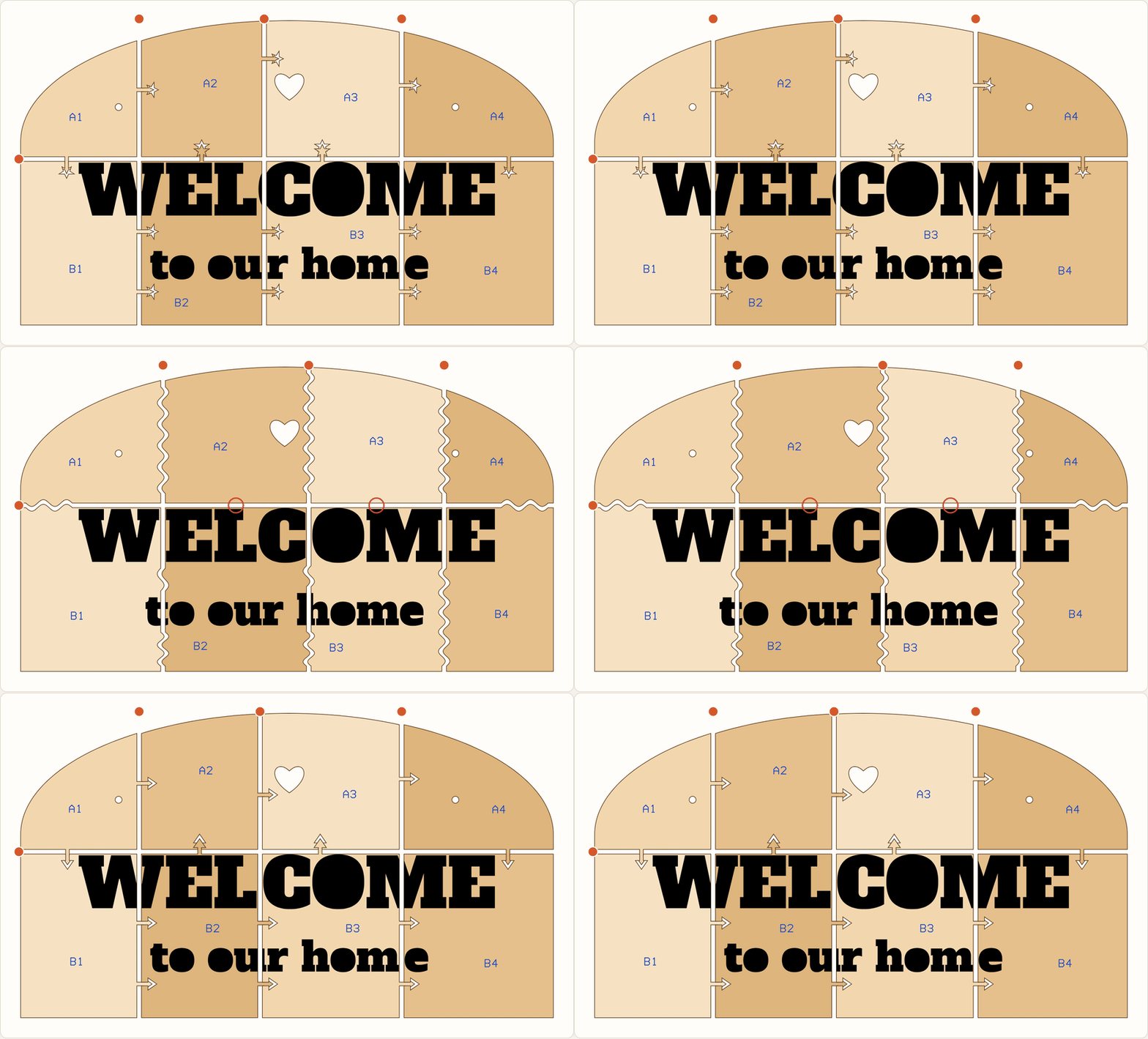
Make it bigger than your laser. Split a sign, backer or piece of wall art that is larger than your laser bed into pieces that lock together, packed onto sheets that fit. A one metre sign on a 12 × 20 inch bed, with puzzle, dovetail, heart, star or butterfly-key joints.


Try the live demo → · Embed it · API · CLI · Report an issue
TypeScript · ESM + CommonJS · Browser + Node.js 20+ · Web component · MIT
An open-source tool by MyLaserTools. The demo runs this repository's own build and processes everything locally. Nothing is uploaded. The GIFs are captured from the running demo with npm run capture.
Why
Most desktop lasers cut about 300 × 500 mm. Signs, backers, door hangers and wall art are often a metre wide. Splitting them by hand means guessing where to cut, drawing joints that fit, compensating for kerf, and then nesting everything onto sheets. This package does all of it in one step:
- Finds the fewest pieces. It works out the smallest grid where every piece, joints included, fits your bed in either orientation.
- Places the seams with care. Seams avoid thin slivers, prefer to cross the material once, keep the pieces even, and steer around your engraved text and artwork.
- Adds joints that fit. Each joint is checked across its full footprint so it never pokes out of an edge or into a hole. Near artwork, joints move along the seam or flip to the other side.
- Compensates for kerf. Mating edges grow by half the beam width minus your clearance, so the pieces press together instead of rattling.
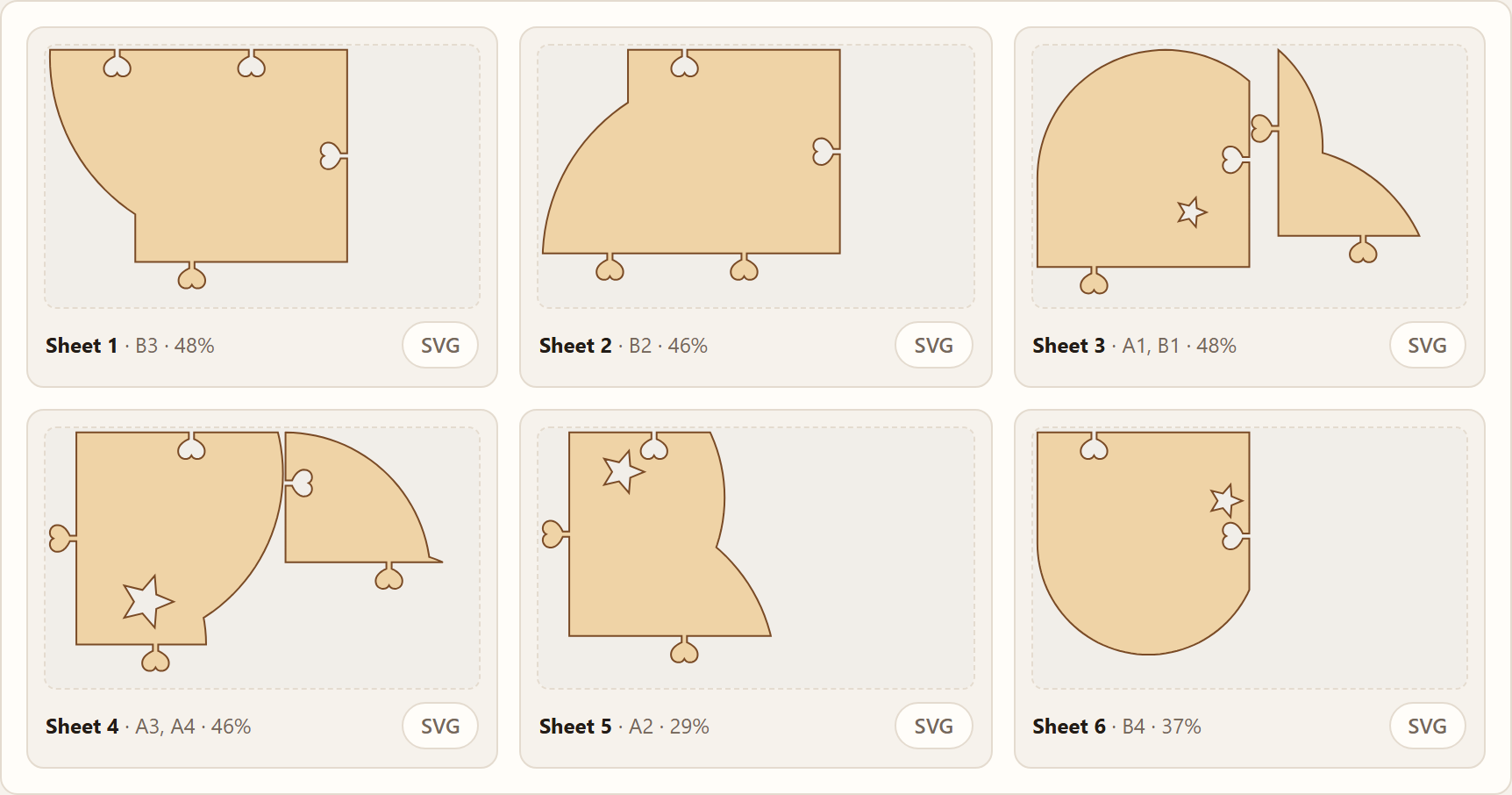
- Packs the sheets. Pieces, keys and backer strips are packed onto bed-sized sheets, turned 90° when that saves a sheet.
- Labels everything. Each piece gets a name like
B2on its own label layer, and an assembly map shows where it goes.
Joints
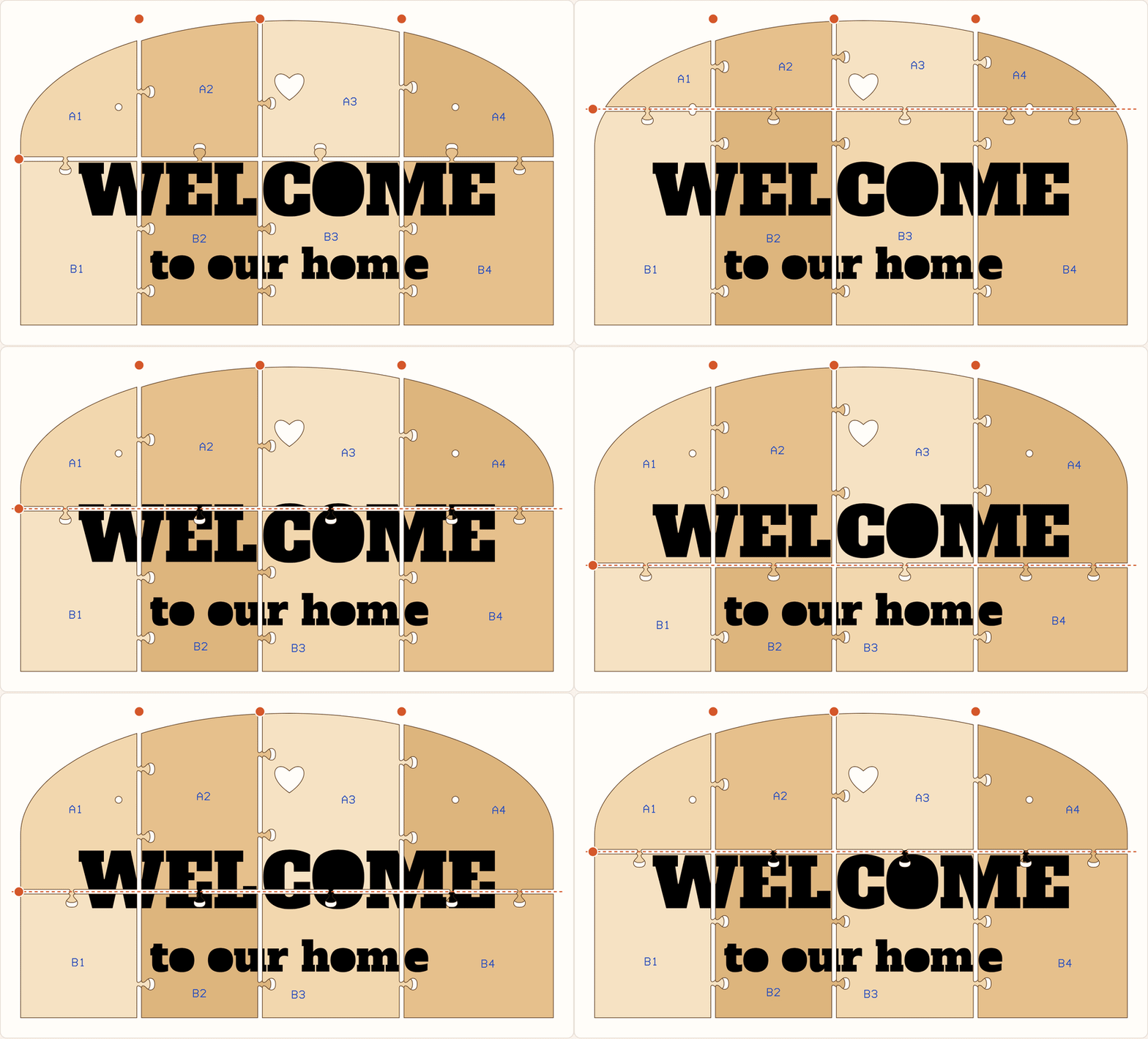
| Joint | Holds by itself | Best for |
| ---------- | --------------- | --------------------------------------------------------- |
| puzzle | yes | Busy artwork, where a classic knob disappears |
| dovetail | yes | Wood signs where straight lines look deliberate |
| heart | yes | Wedding, baby and family signs |
| arrow | yes | Strong pull-out resistance with a graphic look |
| star | yes | Kids rooms, holidays and party backers |
| bowtie | yes | Butterfly keys cut from the same sheet, or a contrast one |
| wave | with glue | Soft, almost invisible seams |
| zigzag | with glue | Lots of glue surface |
| finger | with glue | Self-aligning square teeth |
| scallop | with glue | Cloud and lace edges |
| straight | with backers | The least visible line |
Any joint can be combined with backer strips: glue plates cut from the same material that sit behind each seam.
Install
npm install @mylasertools/laser-splitOr run it without installing:
npx @mylasertools/laser-split sign.svg --width 1000 --bed 12x20in --joint heartEmbed it
<laser-split> is a framework-free web component with the whole interface: drop zone, size, bed, joint picker, fit settings, a draggable assembly view, sheet previews and a zip download. It works in plain HTML, React, Vue, Svelte, Shopify themes and site builders.
<script
  type="module"
  src="https://cdn.jsdelivr.net/npm/@mylasertools/laser-split/dist/element.js"
></script>

<laser-split width="1000" bed="12x20in" joint="heart"></laser-split>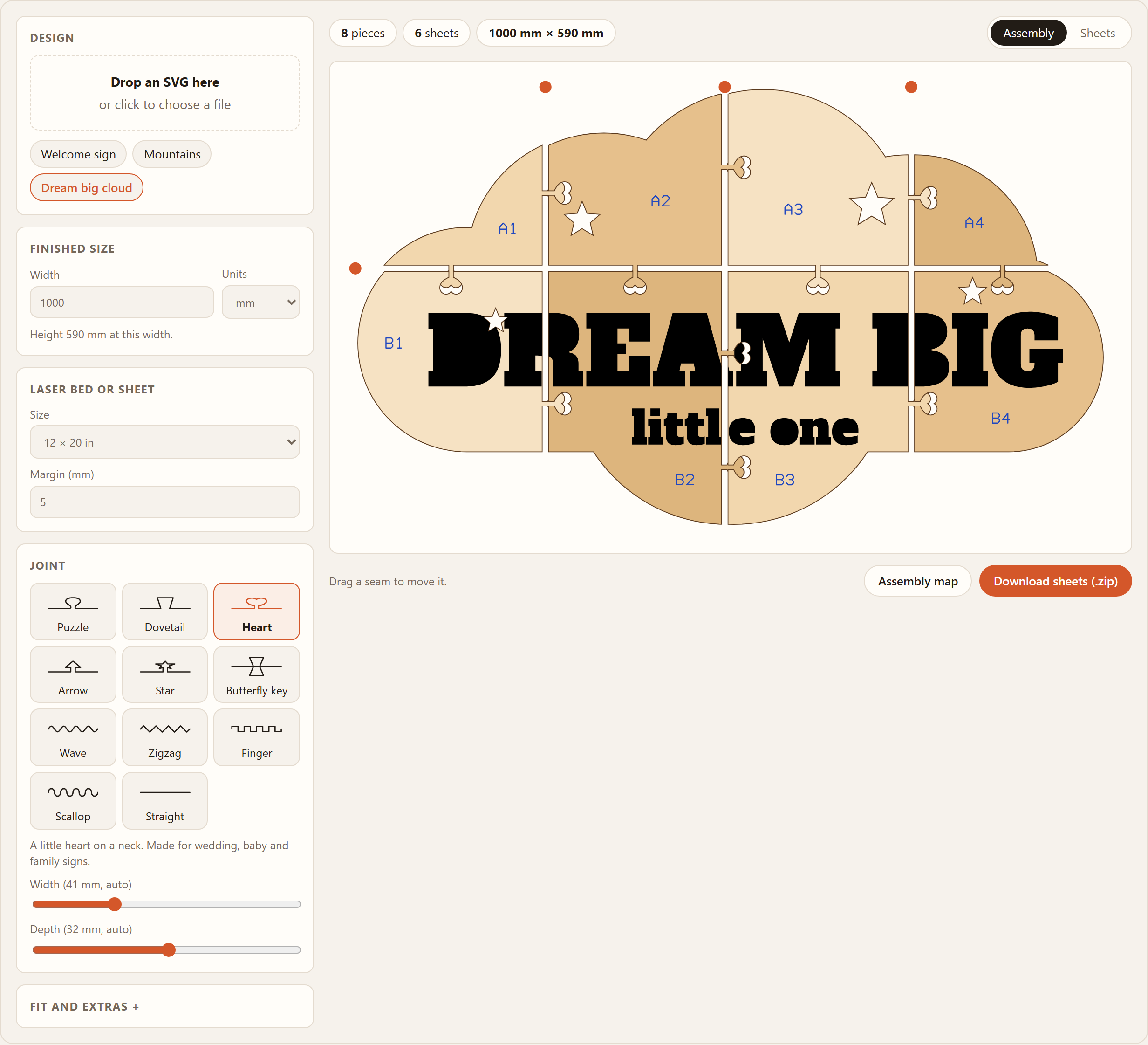
Attributes: src (an SVG URL to load), width (mm), unit (mm, cm or in), bed (a preset id or WxH such as 600x400 or 24x12in), joint, joint-size, joint-depth, kerf, clearance, margin, backers, labels="off", filename, theme (light or dark), and hide with any of upload size bed joint fit download to lock parts of the interface.
Properties and methods: el.svg = markup, el.samples = [{ name, svg, options }], el.load(urlOrMarkup), el.split(), el.result, el.options, el.files(), el.download('all' | index | 'assembly').
Events: split fires after every update with { result, options }. download fires with { files } before anything is saved. Call event.preventDefault() to take the files yourself, for example to attach them to an order or open them in your own editor.
Theming: set --ls-accent, --ls-bg, --ls-surface, --ls-ink, --ls-muted, --ls-line, --ls-wood, --ls-radius and --ls-font on the element. It follows the system dark mode unless theme is set. ::part(panel), ::part(stage) and ::part(issues) are exposed for deeper styling.
Use it in code
import { splitSvg } from '@mylasertools/laser-split';

const result = splitSvg(svg, {
  width: 1000, // finished width in mm
  bed: '12x20in', // or { width: 508, height: 304.8 }
  joint: 'dovetail',
  kerf: 0.15, // full beam width
  clearance: 0.1, // total gap between mating edges
});

for (const sheet of result.sheets) save(`sheet-${sheet.index + 1}.svg`, sheet.svg);
save('assembly.svg', result.assembly);
console.log(result.issues);
Every sheet is a plain SVG at the bed's physical size:
#cut: red hairlines (#ff0000) to cut through.#engrave: your artwork in its original colours, clipped to each piece.#labels: blue (#0000ff) single-line piece names. Score them lightly, put them on the back, or switch the layer off.
API
splitSvg(svg, options?)
| Option | Type | Default | |
| -------------- | --------------------------- | --------------- | ------------------------------------------------------- |
| width | number | drawing size | Finished width in mm. Height follows the design |
| height | number | none | Finished height in mm, used when width is not set |
| bed | string \| {width, height} | '12x20in' | Preset id, 'WxH', 'WxHin' or a size in mm |
| margin | number | 5 | Clear border on every sheet, mm |
| spacing | number | 3 | Gap between parts that share a sheet, mm |
| rotate | boolean | true | Allow parts to turn 90° on the sheet |
| joint | JointType | 'puzzle' | See Joints |
| jointSize | number | 14% of the bed | Joint width along the seam in mm, 12 to 70 by default |
| jointDepth | number | from the width | How far a joint reaches into the next piece, in mm |
| jointSpacing | number | 4 × jointSize | Target distance between joints on one crossing |
| kerf | number | 0.15 | Full beam width in mm |
| clearance | number | 0.1 | Total gap between mating edges after cutting |
| seams | { x?, y? } | automatic | Seam positions in finished mm from the top-left corner |
| columns | number | automatic | Force the number of columns |
| rows | number | automatic | Force the number of rows |
| backers | number | 0 | Width of glue strips behind each seam, 0 for none |
| labels | boolean | true | Write the label layer |
| engrave | string[] | none | Colours to keep as engraving, for example ['#0000ff'] |
| tolerance | number | 0.05 | Curve flattening tolerance in mm |
| precision | number | 3 | Decimal places in the output |
Returns:
sheets[]:{ index, width, height, parts, usage, svg }, one per bed-sized sheet.parts[]:{ id, kind, column, row, polygons, details, bounds, area, sheet, placement, rotated }.kindispiece,keyorbacker.placementmaps design coordinates onto the sheet.assembly: an SVG of the finished design with every part in place, spread slightly apart.seams,seamLimits,seamPaths: where the seams are, how far each can move with every piece still fitting the bed, and their outlines with joints.joints[]:{ type, seam, center, width, depth, side, length? }.issues[]:NO_JOINT(a crossing too short for a joint),SMALL_JOINT,SMALL_FRAGMENT(a seam leaves a tiny piece),PART_TOO_LARGE(with seams you set),SEAM_OUTSIDE,OPEN_PATH_KEPT,UNSUPPORTED_SKIPPED.width,height,scale,columns,rows,bed,unit: 'mm'.
splitPolygons(contours, options?)
The same, for closed contours in millimetres that you already have. Nested contours alternate solid and hole.
Helpers
JOINTS: id, name, description, whether it locks, and its depth ratio, for building pickers.jointIcon(type): path data for a small joint preview in a 120 × 60 box.BEDSandresolveBed(bed): common bed and sheet sizes.assemblySvg(result, options?),pathData(polygons)andzip(files): rendering and packaging.
Errors are thrown as SplitError with a stable code.
CLI
laser-split sign.svg --width 1000 --bed 12x20in --joint dovetail --out sign-split
laser-split sign.svg -w 900 -b 400x400 -j bowtie --kerf 0.2 --json
laser-split --beds
It writes one SVG per sheet and an assembly map, prints any issues, and exits with 1 when a part does not fit the bed. Run laser-split --help for every option.
What it reads
path,rect,circle,ellipse,polygon,polylineandline, with nestedtransforms,viewBox, physical units and CSS class styles from Illustrator and Inkscape exports.- Outline files, the usual laser file: closed outlines are the material, a shape inside a shape is a hole, and filled shapes are kept as engraving.
- Silhouette files with no outlines: the filled shapes are the material.
- Open paths are kept as lines on the pieces they cross. Shapes in the
engravecolours are always kept as artwork. - Text and images are skipped and reported. Convert text to paths first.
Good to know
- Seams cross material where it is solid. A seam through a narrow neck, a hole or a line of text costs more, so it goes elsewhere when the bed allows it.
- On tab joints every tab on a seam points the same way, so a piece only grows on one side. That keeps pieces larger and the sheet count lower. A tab flips only when your artwork is in the way and the other piece still fits.
- Kerf
0.15and clearance0.1suit 3 mm plywood on a diode or CO₂ laser. Cut a two-piece test first and adjust clearance until the joint presses in by hand. - Big designs with thousands of parts take a few seconds; a typical sign takes well under a tenth of a second.
License
MIT © MyLaserTools. Clipper2 is bundled under the Boost Software License; see THIRD-PARTY-NOTICES.md.