
@mylasertools/laser-stencil
v0.1.0
Published
Add bridges to stencils so the middles of letters and shapes don't fall out. SVG, TypeScript, CLI and browser.


Readme
Laser Stencil
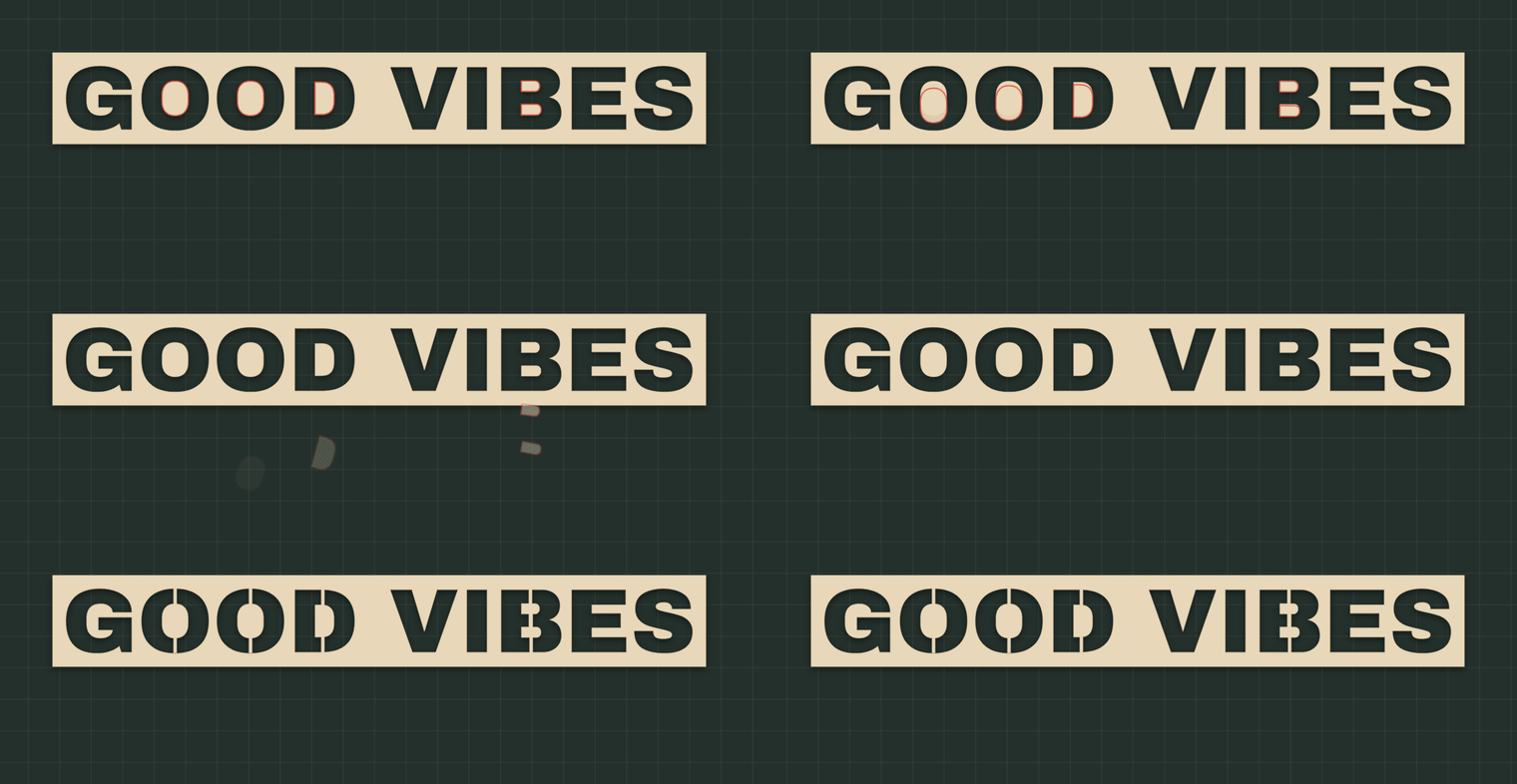
Cut the letters. Keep the middles. Find every piece of a stencil that would fall out, and add the shortest bridges to hold it in place. Works with any font or SVG, in the browser, the CLI or TypeScript.


Try the live demo → · API · CLI · Report an issue
TypeScript · ESM + CommonJS · Browser + Node.js 20+ · MIT
An open-source tool by MyLaserTools. The demo runs this repository's own build and processes everything locally. Nothing is uploaded. The GIFs are captured from the running demo with npm run capture.
Why
Cut an O out of card, vinyl, mylar or plywood and its middle drops out. The same happens to A, B, D, P, Q, R, 0, 4, 6, 8, 9, %, & and @, and to any shape with an enclosed area. Stencil fonts solve this for a handful of typefaces. This package solves it for any font or artwork:
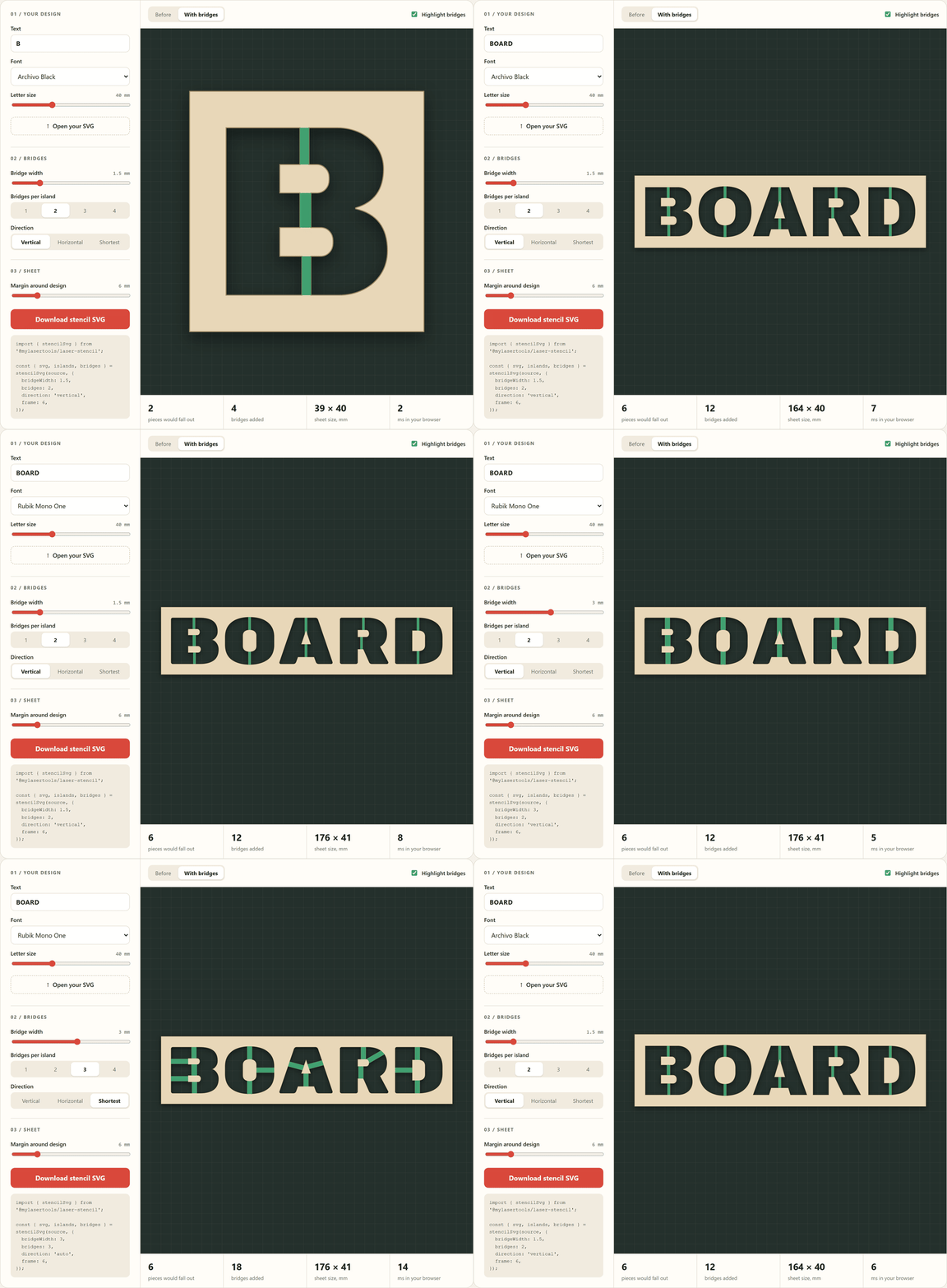
- It finds every enclosed piece ("island") that would fall out, including islands nested inside other islands.
- For each island, it looks for the shortest straight crossings to the surrounding sheet, in the direction you prefer.
- It places bridges on opposite sides of the island, checks the full bridge width, and keeps the bridge material in the cut.
Install
npm install @mylasertools/laser-stencilOr run it without installing:
npx @mylasertools/laser-stencil design.svg -o design-stencil.svgUse it
import { stencilSvg } from '@mylasertools/laser-stencil';

const result = stencilSvg(svgString, {
  bridgeWidth: 1.5, // mm
  bridges: 2, // per island
  direction: 'vertical', // or 'horizontal', or 'auto' for the shortest at any angle
  frame: 8, // optional sheet outline, 8 mm around the design
});

result.svg; // laser-ready SVG in millimetres, hairline cut outlines
result.islands; // every piece that would have fallen out
result.bridges; // where each bridge went, how long and at what angle
result.issues; // anything it could not fix, explained
For GOOD VIBES in Archivo Black at 40 mm: 5 islands found, 10 bridges added, about 20 ms.
Already have outlines? Skip the SVG
Generators and editors that work with polygons can call the geometry directly. Coordinates are in millimetres.
import { stencilPolygons } from '@mylasertools/laser-stencil';

const { polygons, islands, bridges } = stencilPolygons(contours, { fillRule: 'evenodd' });
Just check a file
import { findIslands } from '@mylasertools/laser-stencil';

const islands = findIslands(svgString); // [] means nothing falls out
CLI
laser-stencil sign.svg -o sign-stencil.svg            # 2 vertical bridges per island
laser-stencil sign.svg -w 2.5 -b 1 -d auto            # one 2.5 mm bridge at the best angle
laser-stencil sign.svg --frame 10 -o sign-sheet.svg   # add a sheet outline 10 mm around it
laser-stencil sign.svg --islands --json               # report only, as JSON
cat sign.svg | laser-stencil - > sign-stencil.svg     # stdin and stdout
| Option | Default | Meaning |
| ----------------- | ---------- | -------------------------------------------- |
| -o, --output | stdout | Where to write the stencil SVG |
| -w, --width | 1.5 | Bridge width in mm |
| -b, --bridges | 2 | Bridges per island, 1 to 4 |
| -d, --direction | vertical | vertical, horizontal or auto |
| --min-area | 0 | Let islands smaller than this (mm²) fall out |
| --frame | none | Sheet outline this many mm around the design |
| --fill | off | Write filled shapes instead of cut outlines |
| --islands | off | Report islands only |
| --json | off | Print the report as JSON |
The exit code is 1 when an island could not be bridged, so it fits into scripts and CI checks.
API
stencilSvg(svg, options?)
| Option | Type | Default | |
| --------------- | -------------------------------------- | ------------ | --------------------------------------------------------------- |
| bridgeWidth | number | 1.5 | Bridge width in mm |
| bridges | 1 \| 2 \| 3 \| 4 | 2 | Bridges per island |
| direction | 'vertical' \| 'horizontal' \| 'auto' | 'vertical' | Other angles are tried only when this one cannot hold an island |
| minIslandArea | number | 0 | Islands smaller than this (mm²) are left to fall out |
| frame | number | none | Add a sheet outline this many mm outside the design |
| output | 'cut' \| 'fill' | 'cut' | Hairline outlines for the laser, or filled shapes for previews |
| tolerance | number | 0.02 | Curve flattening tolerance in mm |
| precision | number | 3 | Decimal places in the output |
Returns { svg, width, height, unit: 'mm', polygons, islands, bridges, issues }.
islands[]:{ id, area, bounds, center, polygon, bridges, skipped }, with sizes in mm and mm².bridges[]:{ island, center, angle, length, width, polygons }. Anangleof 90 is vertical, 0 is horizontal.issues[]:UNBRIDGED_ISLAND(no straight crossing fits),FEWER_BRIDGES(fewer than requested fit),OPEN_PATH_IGNORED.
stencilPolygons(contours, options?)
Same options without frame, output and precision, plus fillRule: 'nonzero' | 'evenodd'. Returns { polygons, islands, bridges, issues }.
findIslands(svg, options?) and toPathData(polygons, precision?)
Report the islands without changing anything, and turn polygons into SVG path data.
Errors are thrown as StencilError with a stable code.
What it reads
path,rect,circle,ellipse,polygon,polylineandline, with nestedtransforms,viewBoxand physical units (mm,cm,in,px,pt).- Filled shapes use their own
fill-rule. Outline-only artwork (fill="none"with a stroke), the usual shape of a laser file, is read as nested outlines: a shape inside a shape is a hole. - Text must be converted to paths first. Open paths are ignored and reported. Scripts, external references, clipping and masks are rejected.
- Output curves are flattened to straight segments within
tolerance(0.02 mm by default), well below a laser's kerf.
Good to know
- Bridges are measured across their full width, not just along a centre line, so a bridge never pokes into a counter edge.
- When there are two or more bridges, they go on different sides of the island, so pieces can't swing.
- Islands inside islands (a ring inside an O) are bridged to their own surroundings, never across the counter.
- Bridge width is your call. Around 1 to 2 mm suits card and vinyl at 40 mm letter size; thicker sheets and larger letters want more.
Development
npm ci
npm run check      # build, tests, bundle size
npm run demo       # http://127.0.0.1:4175/demo/
npm run capture    # regenerate the README GIFs (needs ffmpeg)
npm run examples   # regenerate examples/
Demo fonts are Archivo Black, Alfa Slab One and Rubik Mono One, all under the SIL Open Font License 1.1 and used only by the demo. See demo/fonts. Clipper2 is bundled under the Boost Software License; see THIRD-PARTY-NOTICES.md.
License
MIT © MyLaserTools