
@nans13/react-bs-grid
v2.0.3
Published
Twitter Bootsrap Grid system for React

Maintainers
 nans13
Readme
React Flex Grid system
A tiny library that add only the Twitter Boostrap grid system in your project.
Installation
npm install @nans/react-bs-grid
Usage
Simple use
<Container>
    <div>items</div>
   	<div>items</div>
    <div>items</div>
</Container>
Parameters
Direction
<Container direction='row'||'row-reverse'||'column'||'column-reverse' />
Justify
<Container justify='flex-start'||'flex-end'|| 'space-between'||'space-around'||'center', />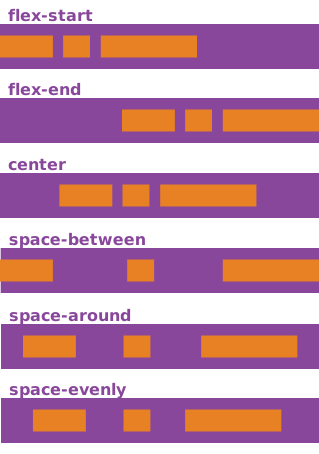
alignItem
<Container alignItem='flex-start'||'flex-end'||'stretch'|| 'center', />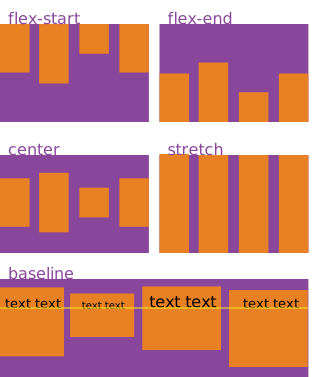
alignContent
<Container alignContent='flex-start'||'flex-end'||'space-between'||'space-around'||'stretch'||'center' />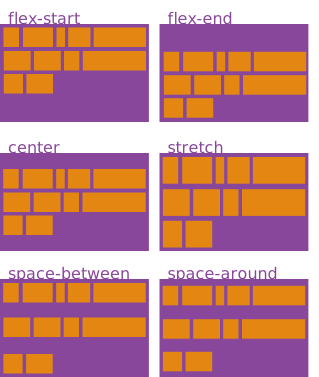
Wrap
<Container wrap='nowrap'||'wrap'||'wrap-reverse' />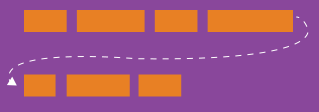
Hidden
<Container hidden={true || false} />Usage with Col
col allows to manage parameters on children.
<Container>
    <Col order="1" alignSelf="stretch"></Col>
    <Col></Col>
</Container>
Parameters
Order
<Col order={INT} />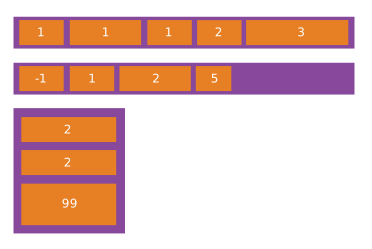
Align-Self
<Col alignSelf='flex-start'||'flex-end'||'stretch'||'center', />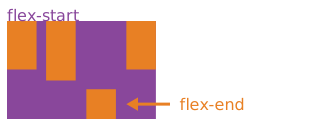
Flex Manage the "col" size
<container>
    <Col flex=1/>
    <Col flex=2/>
    <Col flex=1/>
</container>
Hidden
<Container hidden={true || false} />Usage with display management
Like twitter bootstrap I use xs, sm, md, xl, lg to make the difference between all the display size.
| type | screen size | | ------------ | ------------ | | xs | < 576px | | sm | < 768px | | md | < 992px | | lg | < 1200px | | xl | other |
each type use a simple Object
{
    direction: [directionType],
	justify: [justifyType],
	wrap: [wrapType],
	alignContent: [alignContentType],
	alignItem: [alignItemType],
	hidden: [bool]
}

<Container
    xs={{hidden: true}}
    sm={{direction: 'column'}}
    md={{direction: 'row'}}
/>

<Col
    xs={{hidden: true}}
    sm={{flex: 2}}
/>
The display works with "min-width" so if you want to display in column from md (so lg and xl included) you just have to put the parameters in md = {...}
Storybook
npm run storybook
Test
npm run test:watch