
@naskilabot/spiderbrain
v0.1.1
Published
Real-time behavioral web and AI monitoring powered by SynGanglion.

Maintainers
 naskilabot
Readme
SPIDERBRAIN
Real-time behavioral web and AI monitoring through SynGanglion.
Author: Alnasrif Haliddin · @Nasrif30
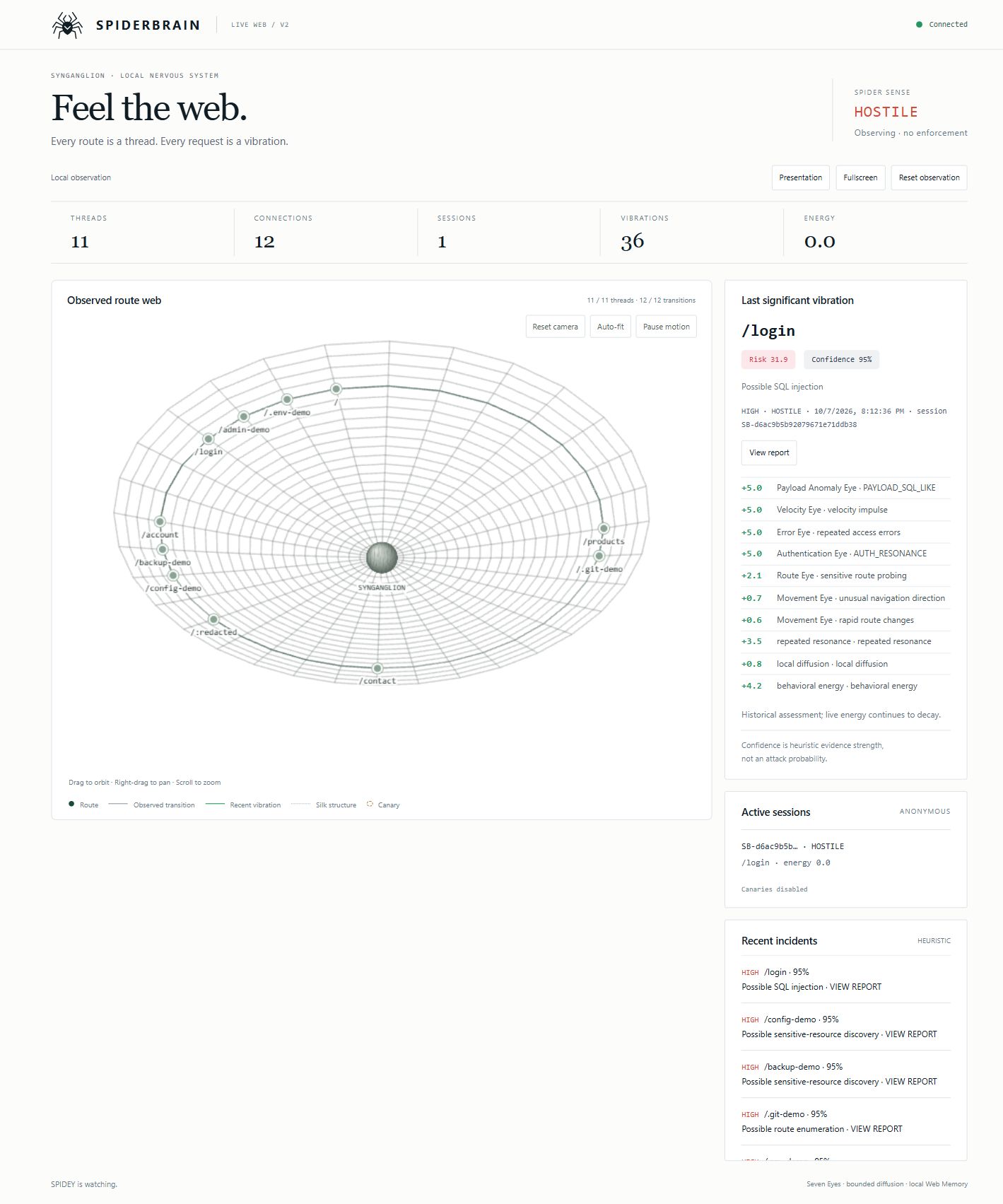
Routes are threads. Requests are vibrations. Sessions accumulate behavioral energy. SpiderBrain correlates those signals into a live route web and explainable, sanitized incident reports. Its CLI supports local startup, monitoring and inspection.
Version 0.1.1 (CLI and package hotfix prepared; not yet published) · TypeScript · Node 24.9+ · MIT
Quick Start
Requires Node.js 24.9 or newer and npm. @naskilabot/[email protected] is published on npm. Choose one of these options:
Install globally, then start the SpiderBrain dashboard:
npm install -g @naskilabot/spiderbrain
spiderbrain start --open
Run without installing globally:
npx @naskilabot/spiderbrain start --openMonitor your own already-running local website:
spiderbrain monitor http://localhost:3000 --open
# Or without a global installation:
npx @naskilabot/spiderbrain monitor http://localhost:3000 --open
start runs the local dashboard, Sensor, SynGanglion, collector and incident engine. It starts no target website and generates no traffic. monitor creates a gateway for the explicit target you supply. Browse the Monitoring Gateway URL printed by SpiderBrain to generate observed traffic. Requests must pass through that gateway or an integrated sensor.
To build and install a local release tarball from a source checkout with dependencies installed:
npm run pack:release
npm install -g ./.spiderbrain/naskilabot-spiderbrain-0.1.1.tgz
spiderbrain start --open
For SDK integration in your application:
npm install @naskilabot/spiderbrainSee Web Monitoring for the Express integration example.
From source:
git clone https://github.com/Nasrif30/SPIDERBRAIN.git
cd SPIDERBRAIN
npm ci
npm run build
npm start -- --open
Dashboard: http://127.0.0.1:5173/web. Occupied preferred ports fall back to OS-selected loopback ports; use the URLs printed at startup. No port or target scanning occurs. The internal development website is started separately with npm run demo from source.
Overview
SpiderBrain is a local security research platform for applications integrating its telemetry. Small mathematical models and independent behavioral Eyes feed SynGanglion, risk, confidence and state progression. No LLM, cloud service, Docker or external database is required.
Why SpiderBrain
Related behavior across routes can reveal more than one request. SpiderBrain joins velocity, unsuccessful traversal, authentication outcomes, sanitized input anomalies and bounded history. It explains evidence before recommending a defensive response. It does not automatically block or retaliate.
Live Demo Result
The owner reports a successful authorized two-laptop proof of concept. A second laptop browsed the synthetic application through a temporary Cloudflare Tunnel while the host processed live HTTP telemetry, route movement, state changes, incidents and JSON exports. This validates the demonstration pipeline, not production security effectiveness. Regression tests exercise the same local pipeline.
Screenshots
The hero image is captured from the actual running application using explicitly generated local HTTP requests. Live web and incident report show the same build. No AI mockup or fabricated detection is used. A two-laptop photograph is not referenced because no publishable capture was supplied.
Architecture
flowchart TD
    A[Browser or instrumented AI application] --> B[Local gateway or application observer]
    B --> C[Validated in-process collector]
    C --> D[SpiderBrain Sensor]
    D --> E[SynGanglion]
    E --> F[Behavioral Eyes]
    F --> G[Risk and confidence scoring]
    G --> H[Incident intelligence]
    H --> I[Local realtime dashboard]
    I --> J[Incident report and JSON export]
    D --> K[SILK event bus]
    K --> L[SQLite Web Memory and SSE]
    F --> M[Velocity, route and error evidence]
    F --> N[Authentication, payload, movement and Honey evidence]
    G --> O[Decay, resonance, entropy and energy]
The Sensor redacts before analysis or publication. SILK publishes sanitized decisions after sensing; SSE carries actual snapshots and pulses to the dashboard.
How SpiderBrain Works
HTTP traffic / explicit AI metadata
                 ↓
Gateway or application observer
                 ↓
Collector → Sensor → SynGanglion / Eyes
                 ↓
Risk + confidence → incident intelligence
                 ↓
Realtime web + reports + local memory
Vibration is a bounded intensity × rarity × velocity × context model. Energy decays exponentially. Repeated related evidence resonates. Bounded graph diffusion shares awareness without feedback. Entropy supports other signals and never independently proves hostility. Inertia requires evidence to advance and time plus clean behavior to recover.
SynGanglion
The central behavioral correlation layer keeps bounded session histories, a directed route graph and decaying signal totals. States are DORMANT, CALM, CURIOUS, ALERT, SUSPICIOUS, HOSTILE and TRAPPED (reserved by the current watch-only response policy). Decisions carry contributions and reasons. This is deterministic mathematics, not artificial general intelligence.
Behavioral Eyes
| Eye | Evidence | | --- | --- | | Velocity | Impulses and sustained request pressure | | Route | Unsuccessful sensitive-route probing and missing-route diversity | | Authentication | Explicit application failures, denials and anonymous identity changes | | Error | Repeated 401/403/404 responses; 5xx alone is not visitor misconduct | | Movement | Contextual unsuccessful navigation; rare successful browsing stays quiet | | Honey | Explicitly enabled synthetic canary interactions | | Payload Anomaly | Recognized SQL-like, script-like, traversal or shell-like structure flags |
Route/repeated resonance, navigation entropy and behavioral energy are supporting models, not extra Eyes. Each Eye contributes at most 5. Higher states need multiple Eyes and inertia; one anomaly cannot independently create HOSTILE.
Web Monitoring
The Express SDK observes completed responses and explicit authentication outcomes. The zero-code gateway observes only requests forwarded through its fixed target. Both reuse the same Sensor/engine. Routes, transitions, timing, status, latency, anonymous cohorts and safe flags feed the web. Aborted requests and WebSocket messages are outside this release's coverage.
import express from 'express';
import { spiderbrain, noteAuthentication } from '@naskilabot/spiderbrain';

const app = express();
const guardian = spiderbrain({ dashboard: true, publicRoutes: ['/catalog'] });
app.use(guardian); // before application routes
app.get('/catalog', (_req, res) => res.send('Catalog'));
app.listen(3000, '127.0.0.1');
console.log(await guardian.ready); // selected local URLs

// In an existing authentication handler, after determining the outcome:
// noteAuthentication(res, { type: 'login_failure', identityKey: opaqueReference });
// On orderly application shutdown: await guardian.close();
Authentication is not guessed from status codes. Use opaque account references, not credentials. publicRoutes accepts trusted public literal segments, never user input. Sensor, createSensor, Redactor and framework-neutral observe() are exported. Adapters beyond Node/Express are future work.
AI Monitoring
AI applications, gateways or agent runtimes must emit compatible metadata. SpiderBrain does not inspect arbitrary AI systems automatically. Supported types: AI_MODEL_REQUEST, AI_MODEL_RESPONSE, AI_AGENT_ACTION, AI_TOOL_CALL, AI_TOOL_RESULT, AI_WORKFLOW_TRANSITION, AI_AUTH_EVENT.
const guardian = spiderbrain({
  dashboard: true,
  publicAINames: ['demo-model', 'read_catalog'],
});
guardian.emit({
  type: 'AI_TOOL_CALL',
  sessionId: opaqueWorkflowReference,
  tool: 'read_catalog',
  durationMs: 12,
  status: 200,
});
Session references become anonymous. Names outside publicAINames become redacted. Safe metadata stays in a bounded 256-event runtime buffer exposed by guardian.aiEvents(). Events also become normalized request-like observations for existing velocity, status, route and energy models. There is no AI semantic classifier or prompt analysis. Authentication around AI services can use the explicit authentication API.
Prompts, outputs, tool arguments, tokens and arbitrary metadata objects are rejected. Sensitive-content capture is not supported. Event names do not independently assert malicious tool use.
Risk vs Confidence
Risk: accumulated behavioral disturbance represented by displayed contributions.
Confidence: strength and consistency of supporting evidence, bounded at 95% by current heuristic calibration. It is not attack probability. Neither metric proves compromise or identity.
Incident Intelligence
Fourteen heuristic labels cover possible SQL injection, authentication brute force, credential stuffing patterns, enumeration, sensitive-resource discovery, traversal, command injection, XSS, automated scanning, flooding, switching, abnormal navigation, restricted access and unknown anomalies. Labels require supporting behavior, not a route name alone.
Click a route, session or Recent incidents row to inspect route, anonymous session, assessment, severity, risk, confidence, evidence, signal contributions, HTTP behavior, timeline, state progression and recommendations. JSON filenames include incident ID and UTC date. No raw payloads or credentials are shown.
Quiet traffic preserves the timestamped Last significant vibration; live energy continues to decay. One significant report survives until reset/restart. The incident list holds at most 128 reports with 15-minute retention. This is not a permanent incident archive.
Development Demo — source only
apps/demo-site is a separate synthetic React/Vite/Express test target retained in the source repository. Its client assets are excluded from the public npm package. Public start and monitor never start it. From a source checkout, explicitly run:
npm run demoDevelopment website: http://127.0.0.1:4173/; its separate dashboard defaults to http://127.0.0.1:5173/web. Use the printed URLs if preferred ports are occupied. Routes include /, /products, /login, /account, /admin-demo, /.env-demo, /backup-demo and /config-demo. Fictional accounts demo, visitor, analyst use the publicly documented demo-only password lab-only. Synthetic resource contents never read production secrets.
Presentation changes spacing/status size only. Fullscreen uses the browser API. Reset observation requires confirmation and clears transient sessions, graph activity, risk and reports. Stored Web Memory, configuration and downloaded exports survive. Restart to change environment settings.
Installation
Requires Node 24.9+, built-in SQLite and npm; Git for source cloning. The verified development runtime is Windows / Node 24.9.0, which displays an experimental SQLite warning. cloudflared is optional for deliberate demonstrations. Cross-platform browser commands exist; only Windows live opening is verified in this audit.
Local Testing
npm ci
npm run build
npm start -- --open
# Monitor an already running application:
npm run monitor -- http://localhost:3000 --open
--port sets the dashboard port for start or gateway port for monitor; --dashboard-port explicitly sets the dashboard port. 0 requests an available port. --open opens only the dashboard. For monitor, --open-site additionally opens the gateway to your target. Browser-open failure prints URLs and is nonfatal. Ctrl+C closes listeners, SSE connections and database. The CLI uses one foreground process.
Two-Laptop Demonstration
flowchart LR
    A[Laptop 2: authorized operator] -->|HTTPS| B[Temporary Cloudflare Tunnel]
    B --> C[Laptop 1: loopback demo website]
    C --> D[SpiderBrain Sensor]
    D --> E[SynGanglion]
    E --> F[Local realtime dashboard]
    E --> G[Incident intelligence]
Laptop 1 runs the application and watches the local dashboard; Laptop 2 visits the deliberately shared temporary website URL. This diagram represents the owner-reported demo. The temporary hostname is not included or assumed active.
Remote Demo Mode
Local mode is default. Remote demonstration is a source-only development workflow; it does not affect public CLI startup. To deliberately expose the synthetic website, PowerShell:
$env:SPIDERBRAIN_REMOTE_DEMO="1"
npm run demo
In a separate terminal, use the actual website port printed at startup:
cloudflared tunnel --url http://127.0.0.1:4173Only the demo website relaxes public Host handling. Dashboard, telemetry, database and controls remain local. SpiderBrain never starts tunnels, creates public URLs or binds to 0.0.0.0. Cloudflare headers are unverified hints, not authentication. Restore local mode by stopping, setting $env:SPIDERBRAIN_REMOTE_DEMO="0", then restarting.
Security Model
- Local Host/Origin checks protect dashboards/telemetry. Reset additionally requires same-origin POST and a runtime control token.
- Queries, cookies, authorization, IP addresses, raw identity references and private form contents are excluded from observations. The demo transiently checks bounded allowlisted input structure and discards values.
- Sensor failures fail open. Native middleware leaves the application independent. The proxy depends on its own foreground process for forwarding; if it stops, browse the original target directly.
- Anonymous cohorts can merge visitors behind NAT/tunnels and never identify people.
- SQLite metadata is local, bounded and not encrypted by SpiderBrain; review filesystem access before deployment.
- Canaries require explicit opt-in and fixed synthetic content. No payload execution, automatic enforcement or retaliation occurs.
The proxy forwards HTTP/HTTPS to an explicit fixed target. Remote upstreams require --allow-remote and authorization. No certificates, TLS MITM, interface monitoring or target discovery. WebSocket upgrades receive 426. Cookie domains, absolute application URLs, path-prefix redirects and application CSP may require native SDK integration.
Project Structure
apps/demo-site/       Synthetic website, collector, reports and presentation
packages/sensor/     Redaction, anonymous sessions, Sensor and local telemetry
packages/express/    Completed-response observer and explicit auth outcomes
packages/shared/     Observation and decision schemas
synganglion/         Eyes, physics, graph, scoring and Web Memory
silk/                Bounded isolated event bus
deception/           Opt-in synthetic canaries
dashboard/           Native WebGL/canvas web and SSE client
sdk/                 Express/AI APIs and fixed-target proxy
cli/                 CLI commands and default-browser launcher
arena/               Owned deterministic regression scenarios
tests/               Engine, privacy, integration and release tests
docs/                Real screenshots, diagrams, release notes and audit
scripts/             Typecheck, package build and release verification
Testing
npm test
npm run typecheck
npm run build
npm pack --dry-run
Coverage includes decay, caps, false-positive controls, fail-open redaction, state inertia, memory, HTTP/SSE, local/remote guards, reports, proxy, ports, reset, SDK and AI events. Release audit records exact results and the clean tarball test. Calibration notes document research measurements and their limits.
Limitations
Heuristics may miss threats or produce false positives. Detection proves neither compromise nor exploitation nor identity. There is no production enforcement, multi-user authenticated dashboard, encrypted incident archive or AI semantic classifier. WebSocket forwarding is unsupported. Current evidence is proof-of-concept validation; production needs additional hardening and application-specific evaluation. Quick Tunnels are temporary demonstrations.
Roadmap
Persistent incident history, configurable policies, additional application/AI adapters, replay/graph analytics and continued performance/false-positive evaluation. These are future work.
Responsible Use
Only monitor websites and applications you own or are explicitly authorized to test. SpiderBrain supports defensive research, education and integrated web/AI telemetry; it is not an exploitation framework.
Author
Alnasrif Haliddin · GitHub: @Nasrif30
License
MIT License. Copyright © 2026 Alnasrif Haliddin.