
@naxodev/opencode-music-player
v0.5.5
Published
macOS system Now Playing controls for the OpenCode 2 TUI

Maintainers
 nacho_vazquez
Readme
@naxodev/opencode-music-player
A sidebar player and compact bottom bar for the OpenCode 2 TUI that display and control the active macOS system media session.
It supports browsers, Spotify, Apple Music, Kaset, and other apps exposed through media-control. The player keeps the existing OpenCode theme and provides keyboard and mouse controls.
Architecture
One reconnecting music-session client supplies replayed and live state, provider status, transport, and daemon-owned native artwork bytes. The shared same-user daemon owns provider discovery, provider events and polling, the playback clock, and global transport ordering.
OpenCode keeps plugin/controller lifecycle, the Solid compact and sidebar UI, transport loading feedback, seek coalescing, notifications, waveform projection, iTunes catalog fallback and downloads, conversion, bounded presentation cache/jobs, and Kitty or half-block rendering. Plugin disposal removes local listeners and presentation work, then disposes only its session client. Other clients keep the shared daemon alive.
Read the music session architecture field guide for the daemon protocol, replay, reconnect, and cleanup model.
Artwork
The player retains a completed cover when the same recording loses duration metadata or reports a duration within one second of the resolved value. Conflicting recording metadata starts a new acquisition. A catalog duration keeps the seek bar usable when the provider has no duration; this host-only fallback does not change daemon playback state. A valid provider duration takes priority.
The daemon performs the bounded native media-control get --now read and validates the complete recording identity before and after the read. OpenCode uses those bytes when available, then keeps iTunes Search fallback, image downloads, conversion, cache/job ownership, and terminal rendering locally. Artwork failure never blocks playback state.
Catalog matching, bounded downloads, cancellation, and transient retries use the shared host-side acquisition policy. OpenCode keeps image conversion and its shared presentation cache/jobs. Track changes remove only the changing view's interest; another view can keep the same job alive.
Run /music-artwork, or select Music → Refresh artwork in the command palette, to recover artwork for the current track after connectivity returns. Automatic recovery stops after three transient attempts. A settled mismatch does not retry on playback snapshots. Refresh starts a new bounded attempt set; repeated refreshes while a job is active share that job. This action does not change playback.
Ghostty and other terminals with Kitty graphics support display the cover as a native image. Other terminals receive a true-color half-block rendering of the same cover.
Terminal multiplexers must pass Kitty graphics through to use native images. The player uses the half-block rendering when the host does not expose that support.
Herdr users can enable its experimental renderer in ~/.config/herdr/config.toml:
[experimental]
kitty_graphics = true
tmux 3.3 and later users must allow wrapped graphics passthrough in ~/.tmux.conf:
set -g allow-passthrough on[!IMPORTANT] This source targets the exact stable host in the validated compatibility metadata. The previous beta host is unsupported. See the compatibility contract for runtime ownership and release requirements.
Requirements
macOS
The exact tested OpenCode host and workspace Bun pin listed in the compatibility metadata
media-control, recommended:brew tap ungive/media-control brew install media-control
nowplaying-cli is a fallback. Its play state can freeze for some media apps.
Install
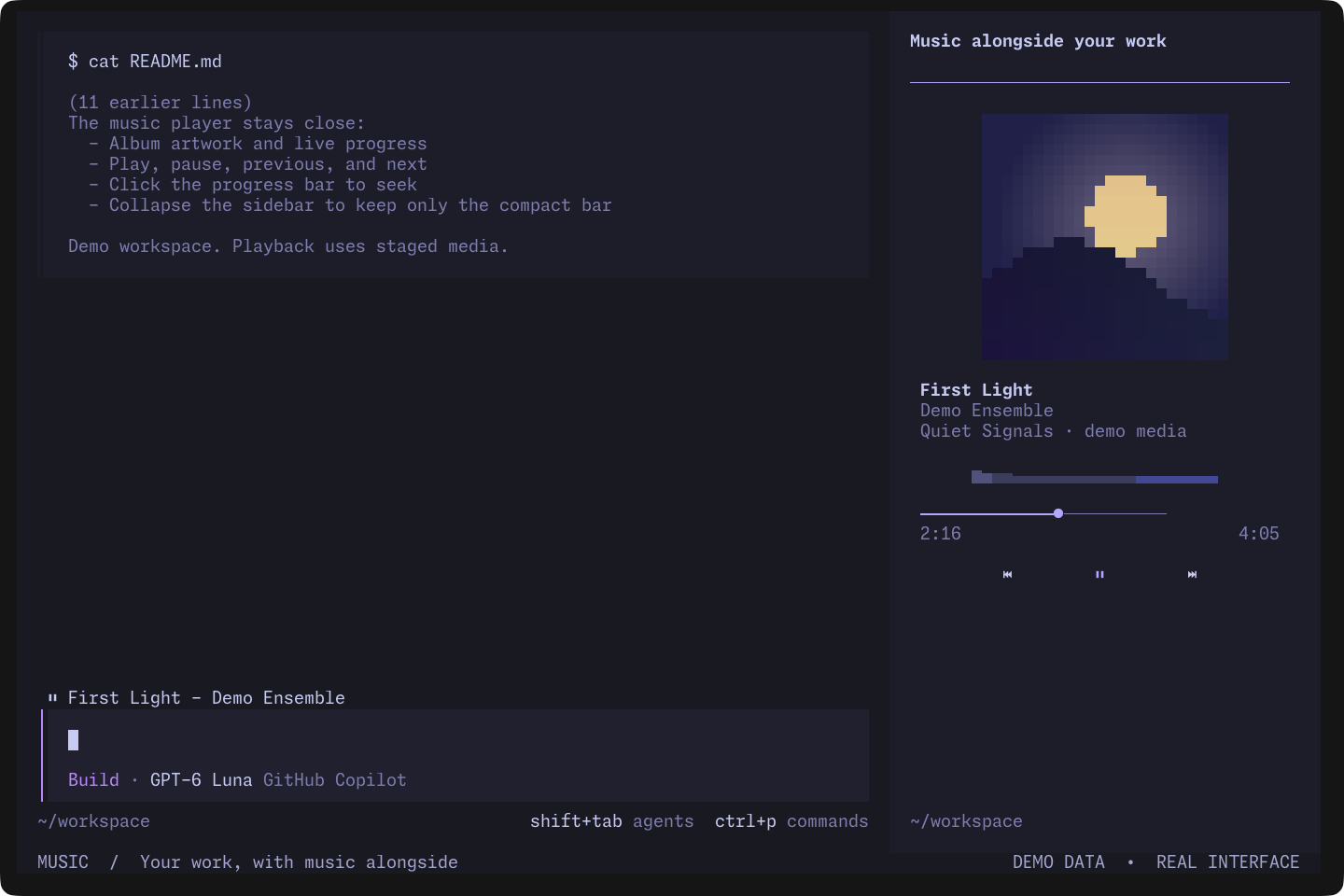
Watch the silent player demo (19 seconds): pause, resume, seek, and collapse the sidebar. The real interface uses staged media and original cover artwork.
Add the package to plugins in your global ~/.config/opencode/cli.json (or $XDG_CONFIG_HOME/opencode/cli.json):
{
  "$schema": "https://opencode.ai/v2/cli.json",
  "plugins": ["@naxodev/opencode-music-player"],
}
OpenCode installs npm plugin packages and their production dependencies in its isolated cache. Restart OpenCode after changing the package entry.
This package requires the supported OpenCode Bun host. The host supplies the exact plugin API, OpenTUI, and Solid versions through its runtime resolver. OpenTUI packages are optional peers. The plugin API and Solid are required from the host but omitted from npm peer metadata because their prospective peer graphs conflict with the embedded versions. Music-core and pngjs remain production dependencies. Standalone loading outside OpenCode is unsupported. Workspace development uses all four exact pins from the lockfile.
Local checkout
OpenCode imports local packages directly and does not install their dependencies. Install them first:
git clone https://github.com/naxodev/ai.git
cd ai
bun install --frozen-lockfile
bun run --cwd packages/opencode-music-player build
Then reference the absolute package path:
{
  "$schema": "https://opencode.ai/v2/cli.json",
  "plugins": ["/absolute/path/to/ai/packages/opencode-music-player/dist"],
}
Verify
The package precompiles JSX to JavaScript and keeps every package import external. npm pack builds the artifact automatically. Rebuild after source edits for local testing; the host watches the generated entrypoints.
Start opencode and run /plugins in the TUI. The list should include music-player. CLI-only plugins do not appear in the server plugin API. Inspect ~/.local/share/opencode/log/opencode.log for package resolution or setup errors.
Controls
Play/pause uses the shared playback toggle contract. Each activation toggles the daemon's accepted state in queue order, even when this view's icon is stale. Rapid clicks remain separate commands.
The compact bar appears below the active route whenever a current track exists, including while playback is paused. It remains visible when the session sidebar is collapsed. Wide terminals show the playback marker, title, and artist. Medium terminals omit the artist. Narrow terminals truncate the title, then keep only the playback marker when metadata cannot fit safely. The bar always stays on one row.
| Input | Action |
| ------------------ | -------------- |
| ctrl+shift+p | Play or pause |
| ctrl+shift+left | Previous track |
| ctrl+shift+right | Next track |
Development
bun install --frozen-lockfile
bun run check
The workspace smoke packs OpenCode and music-core, installs them into an isolated project, and launches the exact manifest-selected OpenCode CLI. It verifies the packed plugin's deterministic playing, paused, collapsed, narrow, and smallest layouts. See the workspace contribution guide for the contribution and release process.
Community
- Ask usage questions in GitHub Discussions.
- Report reproducible bugs with the bug form.
- Read SUPPORT.md before requesting support.
- Report vulnerabilities privately as described in the workspace security policy.