
@naxodev/opencode-vim
v0.4.2
Published
Native Vim-style modal prompt editing for the OpenCode 2 TUI

Maintainers
 nacho_vazquez
Readme
@naxodev/opencode-vim
Native Vim-style modal prompt editing for the OpenCode 2 TUI.
[!IMPORTANT] This source requires the exact stable host in the validated compatibility metadata. The host supplies its plugin API and theme; users do not install a separate theme package. The previous beta host is unsupported.
Requirements
- The exact tested OpenCode host and workspace Bun pin listed in the compatibility metadata
- Neovim, required only for development parity tests
- A supported clipboard executable for system clipboard yanks: macOS
pbcopy, Waylandwl-copy, X11xcliporxsel, or Windows PowerShell
Install
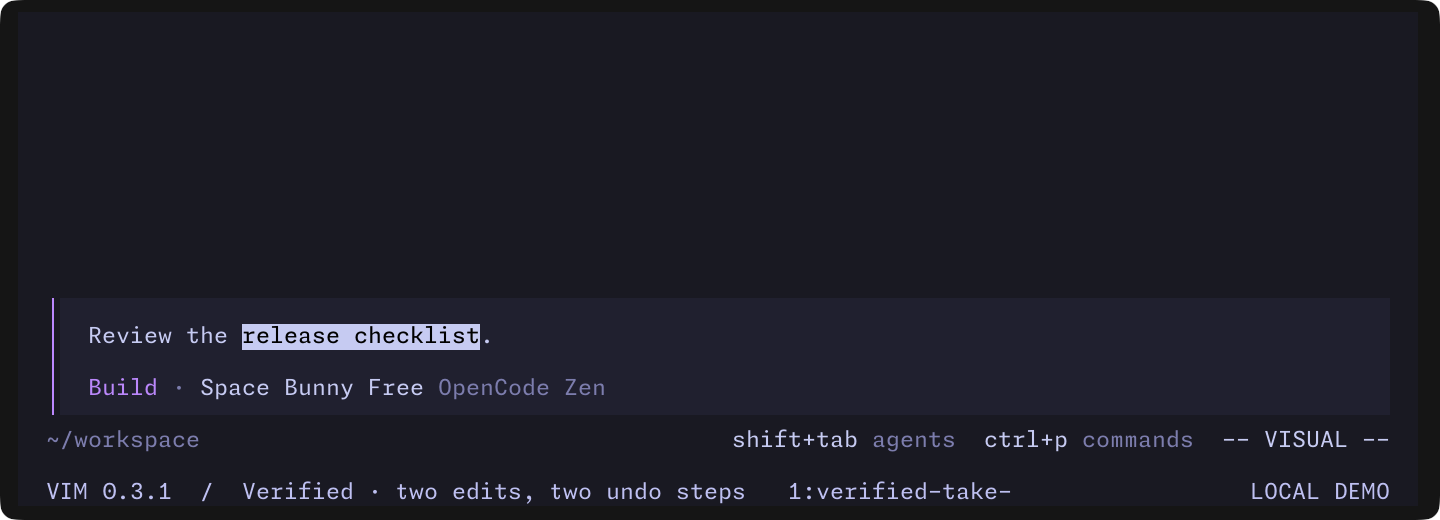
Watch the silent editing demo (20 seconds). It demonstrates insert, normal motions, visual selection, x deletion, . repeat, and two separate u operations that restore the original prompt. The capture verifies each resulting text in Vim 0.3.1 on OpenCode 2.0.16. See the key reference for the full command set.
Add the npm package to plugins in the global ~/.config/opencode/cli.json:
{
  "plugins": ["@naxodev/opencode-vim"],
}
OpenCode installs the package and its production dependencies in an isolated cache. Restart OpenCode after changing the package entry.
To start in normal mode, use the object form:
{
  "plugins": [
    {
      "package": "@naxodev/opencode-vim",
      "options": { "startMode": "normal", "clipboard": "auto" },
    },
  ],
}
Options
| Option | Values | Default | Purpose |
| ----------- | -------------------------------------------------------------------------- | -------- | ------------------------------------- |
| startMode | "insert", "normal" | insert | Select the initial Vim mode. |
| clipboard | "auto", "none", "pbcopy", "wl-copy", "xclip", "xsel", "clip" | auto | Select the system clipboard provider. |
Use /vim or the command palette action Toggle Vim mode to persistently enable or disable modal editing.
Compatibility
Linux integration
CI runs the packed plugin in the exact supported OpenCode host on Ubuntu. It verifies package-name loading, insert/normal/visual modes, undo and register retention across reload, shell-command submission, and Unicode clipboard output through xclip.
For a local reproduction, install tmux, xvfb, xauth, and xclip with your system package manager. From packages/opencode-vim, run:
xvfb-run -a env OPENCODE_VIM_SMOKE_X11=1 bun run smoke:packageThis creates an isolated X11 display, temporary host HOME/XDG directories, and a dedicated tmux server. The TUI itself needs a terminal, not a graphical desktop. Xvfb is needed only for the clipboard check. Do not enable OPENCODE_VIM_SMOKE_X11 against your desktop display: it writes test text to that display's clipboard. Ordinary smokes keep clipboard access disabled.
Wayland uses wl-copy during normal operation, but this CI job verifies X11 only. Host waits and subprocesses have finite deadlines; failures print the stage, captured pane, and host log before temporary resources are removed. Native Windows host and clipboard evidence remains separate from this Linux path.
Windows evidence
Windows CI verifies the native host executable, packed installation, real-renderer/unit behavior, and actual Unicode clipboard writes through PowerShell. Interactive modal editing, submission, reload, and exit in Windows Terminal require the native Windows procedure. Those interactive checks remain manual; a green quality job or WSL result does not establish them.
Host runtime
The supported host and renderer versions are exact pins, not a wider range. See the compatibility contract for migration and release requirements.
The package ships precompiled JavaScript for the supported OpenCode Bun host. The host supplies the exact plugin API, OpenTUI, and Solid versions through its runtime resolver. OpenTUI packages are optional peers. The plugin API and Solid are required from the host but omitted from npm peer metadata because their prospective peer graphs conflict with the embedded versions. Standalone loading outside OpenCode is unsupported. Workspace development uses all four exact pins from the lockfile.
Key Reference
| Keys | Action |
| ------------------------------- | ----------------------------------------------- |
| escape, ctrl+[ in insert | Enter normal mode |
| escape in normal | Cancel pending Vim input or the OpenCode action |
| i, a, A, I | Enter insert mode |
| o, O | Open a line and enter insert mode |
| ctrl+o | Run one normal-mode command from insert mode |
| h, j, k, l | Move left, down, up, or right |
| w, b, e | Move by words |
| W, B, E | Move by whitespace-delimited big words |
| f, F, t, T + character | Find or move till a character on the line |
| ;, , | Repeat the last character find or reverse it |
| 0, ^, $ | Move within the current line |
| % | Move to the matching (), {}, or [] |
| gg, G | Move to the first or last line |
| digits | Prefix a motion or operation with a count |
| d, c, y + motion | Delete, change, or yank by motion |
| dd, cc, yy | Delete, change, or yank complete lines |
| iw, aw | Select an inner word or a word with whitespace |
| i(/a(, i{/a{, i[/a[ | Select inside or around paired delimiters |
| i"/a", i'/a' | Select inside or around quotes |
| x, X, D, C | Delete characters or to the end of the line |
| p, P | Paste after or before |
| r + character | Replace characters |
| ., [count]. | Repeat the last change, optionally with a count |
| v, V | Enter character or line visual mode |
| o in visual mode | Swap the active visual endpoint |
| d, x, c, y in visual | Delete, change, or yank the selection |
| C, S in visual mode | Change the selected lines |
| p, P in visual mode | Replace the selection from the unnamed register |
| r + character in visual mode | Replace each selected character |
| J, ~ in visual mode | Join selected lines or toggle selected case |
| >, < in visual mode | Indent or outdent selected lines |
| u, ctrl+r | Undo or redo one Vim command |
| J | Join lines |
| return in insert | Submit through OpenCode's native input handling |
| return in normal | Submit with the native OpenCode binding |
| ctrl+return in insert | Submit with the native OpenCode binding |
| : | Open the EX command dialog |
| / | Open the session timeline |
| [, ] | Move the session view by half a page |
| {, } | Select the previous or next session message |
| j, k on empty input | Select the next or previous prompt history item |
Yanks also update the system clipboard when a configured provider is available.
auto uses pbcopy on macOS and PowerShell Set-Clipboard on Windows. The
Windows provider remains named clip in configuration. On Linux it prefers
wl-copy in Wayland sessions, then xclip and xsel when X11 is available.
Limitations
- The public V2 keymap API cannot intercept arbitrary printable Unicode. An unlisted Unicode key may reach the editor in normal or visual mode.
- Character finds register every printable ASCII target with the public keymap. Unicode find targets remain subject to the public keymap limitation above.
- Active leader prefixes are left to OpenCode except
v,V, and$, which Vim reserves for visual and line-end motions. The API does not expose inactive or dynamically changed leader configuration. - Clipboard integration requires a supported executable on
PATHand the matching display environment. Clipboard failures show at most one warning and never affect edits or the unnamed Vim register. Use"clipboard": "none"to disable integration and its availability warning. - This is prompt editing, not full Vim emulation. Only the commands listed above are implemented.
- OpenCode must be able to install npm dependencies. Offline startup works only after OpenCode has cached the package and its dependencies.
- EX commands resolve available OpenCode slash names and aliases.
:q/:quitand:helpwork only when matching public OpenCode commands are available. - EX does not implement Vim file commands such as
:wor shell commands such as:!. - The public prompt dialog does not report whether Enter was typed or pasted. The plugin relies only on the dialog's confirmation and cancellation result.
- Block visual mode is not implemented. Character and line visual changes form one undo transaction and repeat their selection shape with dot.
- Visual
r<Enter>is rejected. Vim stores literal carriage returns for this command, but OpenCode's editor only safely represents line feeds.
Verify
Start OpenCode and confirm the prompt footer shows the active mode:
-- INSERT --Use /vim to toggle the footer between the active mode and VIM OFF. If the footer does not appear, inspect ~/.local/share/opencode/log/opencode.log. The server /api/plugin endpoint does not report client-only TUI plugins.
Development
bun install --frozen-lockfile
bun run check
The workspace check verifies formatting and types, runs unit and headless Neovim parity tests, and verifies the tarball. Workspace tests check exports with the exact development dependencies. Real-host smokes cover package-name installation from an empty cache and plugin reload without installed host libraries. The isolated production-consumer audit requires no installed host libraries or consumer overrides. The parity suites compare text, cursor, mode, and unnamed register semantics for implemented Vim commands. OpenCode host mappings are outside the parity contract.
For local host testing, run bun run --cwd packages/opencode-vim build from the workspace root. Configure the absolute packages/opencode-vim/dist directory in cli.json. Rebuild after source edits; the host watches the generated entrypoints. npm pack runs the build automatically.
Buffer jumps intentionally land on the first nonblank character. Headless Neovim's default nostartofline setting preserves the desired column for gg and G. The parity suite records both exact outcomes when those columns differ.
Attribution
This package's design was informed by two prior projects:
oribarilan/vimcode— an earlier OpenCode Vim plugin. The transition-engine design informed this native OpenCode 2 implementation. That project's license is preserved in LICENSE.vimcode.lajarre/pi-vim— Pi modal-editing design that also provided inspiration. Credit here is for design inspiration only; this package does not copy or shippi-vimsource.