
@naxodev/pi-music-dock
v0.3.4
Published
Pi status-line dock and responsive side panel for macOS system Now Playing (media-control)

Maintainers
 nacho_vazquez
Readme
@naxodev/pi-music-dock
A Pi extension that shows macOS system Now Playing in the status area and a responsive side panel. It renders a calm Tokyonight-blue waveform, track metadata, optional native album artwork, and transport controls.
The extension calls ctx.ui.setStatus for the footer line. The side panel is a tui.showOverlay owned by an empty setWidget host (not ctx.ui.custom), so reload and shutdown dispose it synchronously without hanging on a done() Promise. It does not replace Pi's footer, so it composes with the built-in footer and custom footers that render extension statuses.
Architecture
Play/pause follows the shared playback toggle contract. Each activation toggles the daemon's accepted state in queue order, including actions interleaved with OpenCode.
Each live Pi TUI session owns one reconnecting music-session client and its local status, side panel, waveform, artwork, and notification lifecycle. The same-user machine-local daemon owns provider discovery, provider stream and polling, the playback clock, global transport ordering, and native media reads.
The side panel is a plugin-only approximation. Pi has no layout-reserving sidebar slot, so the panel is a right-center overlay that may cover transcript content. It is not a true layout sidebar.
Reload and shutdown mark the old Pi session inactive, remove client listeners, stop the waveform interval, clear status, dispose artwork and images, hide the overlay exactly once, and await client disposal. Reloading or exiting Pi does not stop a daemon that still serves OpenCode or another client.
Read the music session architecture field guide for the shared daemon's ownership, replay, reconnect, and idle-exit behavior.
Requirements
macOS
Node.js 22.19 or later
A Pi version in the declared peer ranges, which also list the exact test dependencies
media-control, recommended:brew tap ungive/media-control brew install media-control
nowplaying-cli is supported as a fallback. Some applications expose less reliable playback state through this fallback.
Terminal image support
Native album artwork renders through pi-tui Image when the terminal supports Kitty, iTerm2, Ghostty, WezTerm, or Warp graphics. Other terminals, missing artwork, and unsupported image bytes show a short text placeholder. MIME type is detected locally from bounded base64 or downloaded bytes (PNG, JPEG, GIF, WebP only). The session protocol is not widened for Content-Type.
When native artwork is unavailable, too large for the daemon bound, unsupported, or fails with a provider error, the panel uses the shared host-side catalog acquisition policy. Pi requests and validates PNG bytes because its Kitty image path declares PNG. Image sniffing, dimension limits, and rendering stay local. Track changes, reload, and shutdown abort obsolete acquisition and fence late results.
Run /music-artwork to recover artwork for the same track after connectivity returns. Automatic recovery stops after three transient attempts. A settled mismatch does not retry on playback snapshots. Refresh starts a new bounded attempt set; repeated refreshes during loading share that work. This action does not change playback.
Install
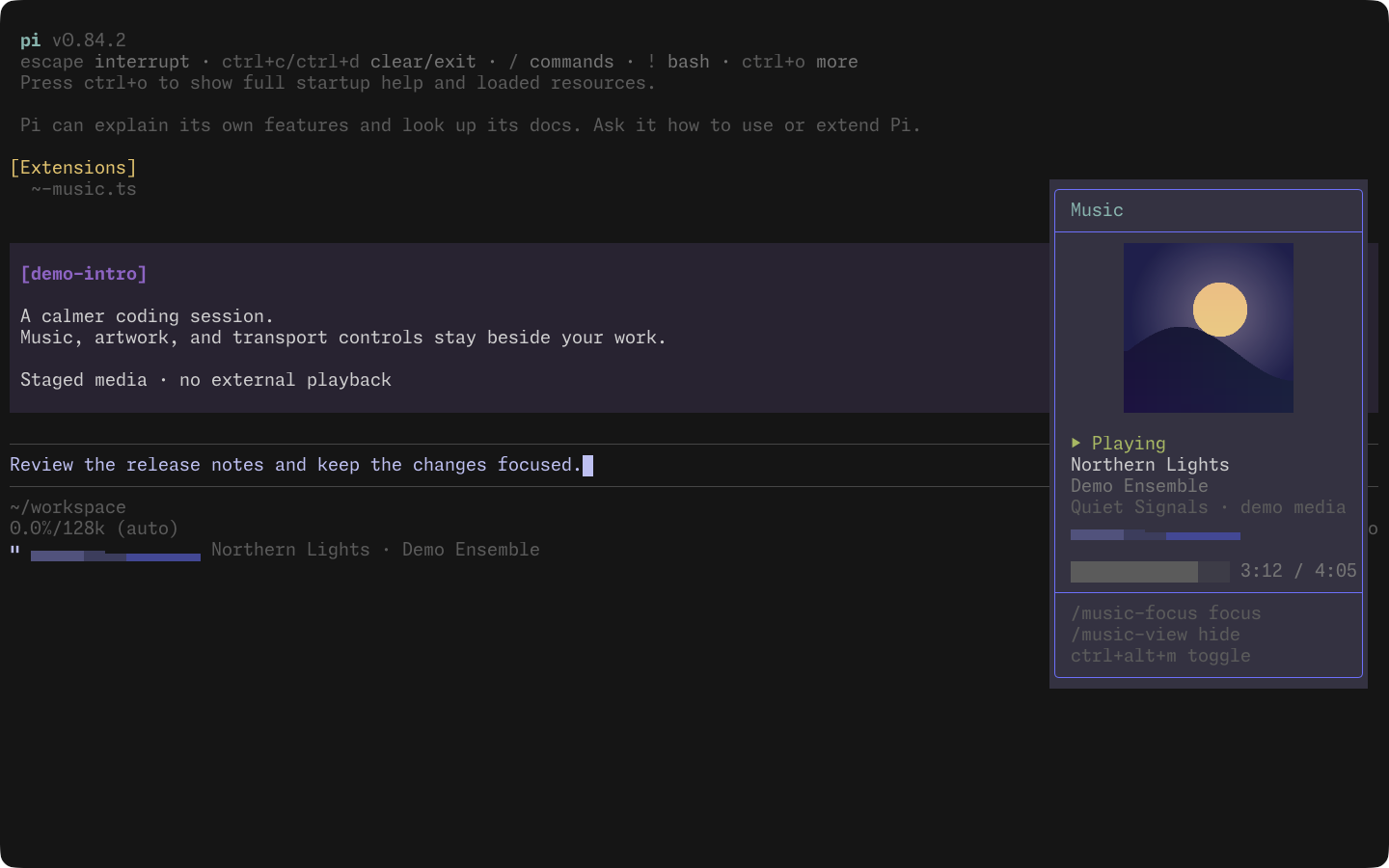
Watch the silent dock demo (14 seconds): focus the panel, seek, pause, resume, and return to the prompt. The real interface uses staged playback and original cover artwork, captured directly in Ghostty.
Install from npm:
pi install npm:@naxodev/pi-music-dockFor local development, clone the workspace and install the package directory:
git clone https://github.com/naxodev/ai.git
cd ai
bun install --frozen-lockfile
pi install ./packages/pi-music-dock
Restart Pi or run /reload after installation.
To remove the npm package:
pi remove npm:@naxodev/pi-music-dockCommands and shortcuts
| Input | Action |
| ---------------- | --------------------------------------- |
| /music | Play or pause |
| /music-next | Play the next track |
| /music-prev | Play the previous track |
| /music-view | Toggle side panel visibility |
| /music-focus | Focus the side panel for transport keys |
| /music-artwork | Refresh artwork for the current track |
| ctrl+alt+p | Play or pause |
| ctrl+alt+n | Play the next track |
| ctrl+alt+b | Play the previous track |
| ctrl+alt+m | Toggle side panel visibility |
Slash commands are the reliable fallback when a terminal does not forward a shortcut. The status icon describes the next action: ⏸ while playing and ▶ while paused.
Focused panel keys
After /music-focus:
| Key | Action | | ------ | ------------------------------- | | Space | Play or pause | | Left | Previous track | | Right | Next track | | Escape | Unfocus; return input to editor |
The panel is nonCapturing by default, so the editor keeps normal input until you focus it.
Shortcut constants are at the top of extensions/music-dock/index.ts. Edit them and run /reload to use different bindings.
Side panel behavior
- Default: visible on terminals 80 columns or wider, including common 82-column Herdr split panes.
- Responsive: auto-hides below 80 columns, leaving at least 50 columns beside the 30-column overlay.
- Size: about 30 columns wide, up to about 90% of terminal height, anchored
right-center. - Content: artwork (or placeholder), title, artist, album, animated waveform, progress/time, play state, and concise keyboard help. Every line is clipped to the panel width.
- Overlay vs real sidebar: this is an overlay approximation. It can cover transcript text. Pi does not currently expose a layout-reserving sidebar slot for extensions.
/music-view and ctrl+alt+m toggle user visibility. Narrow-terminal auto-hide still applies when the user has not hidden the panel.
How it composes
pi-music-dock publishes one status line with ctx.ui.setStatus("music-dock", value). It never calls setFooter, so another extension may own the footer without a conflict. Its ANSI waveform avoids plain spaces because status sanitizers may collapse adjacent spaces.
The side panel uses one OverlayHandle owned by the host widget. Clearing that widget key on reload or shutdown hides the handle and disposes the panel once. Transport commands and the status line stay unchanged whether the panel is visible, hidden, or focused.
Manual verification
Automated tests cannot confirm live macOS media state or terminal rendering. Verify a release in a real Pi TUI:
- Start playback and confirm the status line shows the pause icon, an animated waveform, and the current title and artist.
- On a wide terminal, confirm the right-center side panel shows metadata, waveform, progress, and artwork or a placeholder.
- Resize below 80 columns and confirm the panel auto-hides; widen again and confirm it returns.
- Run
/music-viewandctrl+alt+m; confirm toggle. Run/music-focus, then Space / arrows / Escape. - Run
/music,/music-next, and/music-prev; confirm controls and status reflect the shared daemon state. - Try
ctrl+alt+p,ctrl+alt+n, andctrl+alt+b; use the slash commands if the terminal intercepts a chord. Run/music-focus, then use[and]to seek backward/forward ten seconds. The targets use the accepted playback snapshot projected to the current time, clamp at zero and one second before the track end, and leave playback commands to the daemon. Missing position or duration displaysSeek unavailable. Escape returns focus to the prompt; unfocused brackets do not seek. - Run
/reload; confirm one Pi client, one overlay, and one status remain. - Keep another host connected, close Pi, and confirm the other host remains healthy.
- Exit the final client; confirm the daemon can complete idle shutdown and remove its owned socket artifacts.
Development
bun install --frozen-lockfile
bun run check
bun packages/pi-music-dock/scripts/waveform-demo.ts
The package smoke packs the dock and music-core, then installs them with Pi's exact development pins and with the minimum supported v1 pair (1.0.0). Each run loads the packed extension through RPC, checks the registered commands, and verifies a status-zero exit without leftover processes. Run bun run --cwd packages/pi-music-dock smoke:package on macOS because the package is macOS-only.
The v1 peer range accepts stable Pi 1.x releases and excludes Pi 2.x. The existing pre-v1 ranges remain supported. The compatibility metadata lists the exact development pins; the smoke checks do not prove compatibility with every version in the declared ranges or verify interactive terminal rendering.
See the workspace contribution guide for contribution and release instructions.