
@nearhost/cli
v0.5.0
Published
Open dev servers on your other machines at trusted https://<name>.test addresses over your own SSH. A terminal app for macOS and Linux.

Maintainers
 edcs
edcsReadme
Nearhost
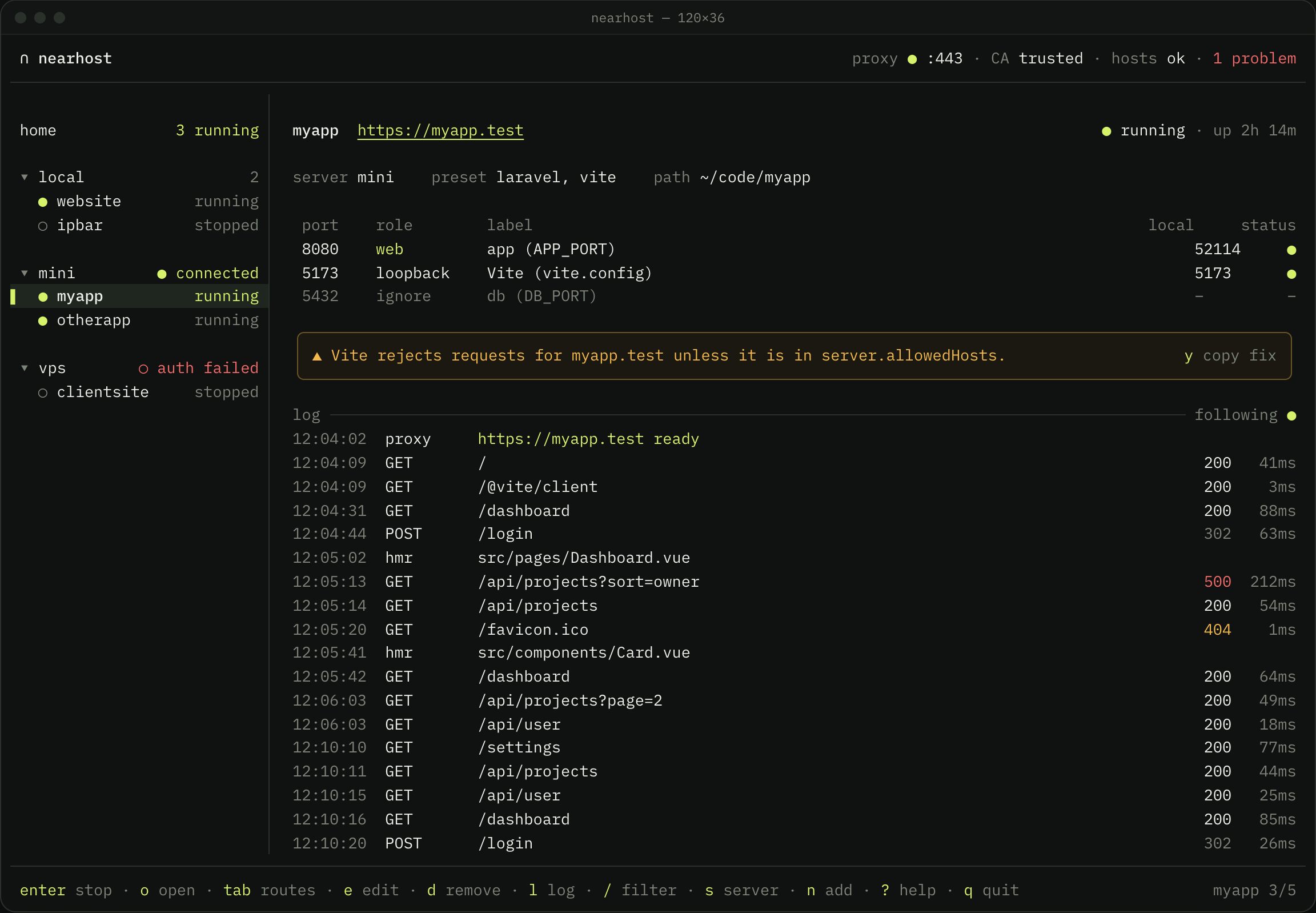
Nearhost is a terminal app that opens a dev server running on one of your other machines at a local https://myapp.test, over the SSH config you already have. You install nothing on the server, and cookies, OAuth redirects, WebSockets and hot reload behave as they do on localhost.
npx @nearhost/cliWebsite · Docs · GitHub · Releases
Why Nearhost
You write code on a laptop and run it somewhere else: a desktop under the desk, a home server, a VPS, or a container on this machine. The app listens on localhost over there, and your browser sits over here. Today that means an ssh -L flag for every port, plain HTTP that breaks secure cookies and OAuth callbacks, and hot reload that fails when you miss a port.
Nearhost gives each project a name, a certificate your browser trusts and SSH forwards that reconnect on their own. Add a project once and you reach it at https://myapp.test today, tomorrow and after a reboot.
- One address per project. Each project keeps a stable
.testname, so bookmarks, cookies and OAuth callbacks keep working. - Real HTTPS, trusted once. Nearhost creates its own local certificate authority on first run, and you trust it once. Secure cookies and service workers behave as they do in production. No shared key ships in the binary, so nobody else can mint certificates for your names.
- Your own SSH. Nearhost runs OpenSSH, so
Include,Match, ProxyJump, agent forwarding and keychain identities apply. Ifssh miniworks without a prompt, Nearhost works. - Nothing on the server. No agent, no config change and no open port. Your dev server keeps listening on
localhost. - Hot reload and WebSockets. Upgrades travel through the same SSH connection as the page. Nearhost can forward a dev server's port to the same number on your laptop, so asset URLs that point at
localhoststill resolve. - Any stack. If it listens on a port, Nearhost can serve it. It reads port variables from
.envand proposes routes. Presets from a registry you trust add Docker Compose, Vite and Laravel Sail. - Local projects too. Projects on your laptop get the same name and certificate, so one tool covers the laptop and the servers.
- Your traffic stays yours. No relay, no account and no public URL. Nearhost owns one marked block in
/etc/hostsand asks forsudoonly when that block changes.
Install
Run it once with npx:
npx @nearhost/cliOr install the nearhost command for good:
npm install -g @nearhost/cli
nearhost
pnpm (pnpm add -g @nearhost/cli) and bun (bun add -g @nearhost/cli) work too. Nearhost runs on macOS and Linux, on Apple silicon, Intel and ARM.
The binary also ships through Homebrew (brew install nearhost/tap/nearhost) and a shell installer (curl -fsSL https://nearhost.dev/install.sh | sh). The install guide covers each one.
On Linux
Nearhost serves HTTPS on port 443 and redirects port 80, and a normal user cannot bind either. Run nearhost doctor: it prints the setcap command that grants the binary that one capability, with the binary's path inside node_modules filled in. Run it again after each upgrade.
Quick start
- Start Nearhost. Run
nearhost. On first run it explains its local certificate authority and trusts it for you, asking for your password throughsudo. - Add a server. Press
sand pick a host alias from~/.ssh/config, or typeuser@host. Nearhost checks that it connects without a prompt. Thelocalserver needs no setup. - Add a project. Press
nand give the project's path. Nearhost reads its.envover SFTP and proposes the ports: which one serves the web app, which need a loopback forward and which to ignore. - Open it. Nearhost adds a hosts entry, issues a certificate and routes
https://myapp.testthrough the SSH connection. Pressoto open it in your browser.
Press ? in the app for every key. For scripts and terminals without a screen, nearhost up serves the same projects headless until you press Ctrl-C.
From a coding agent
Coding agents can add the project they work in, on this machine or on a server Nearhost connects to. Install the skill for Claude Code, Codex, Cursor, Gemini CLI and other agents that read skills:
npx skills add nearhost/nearhost -gThen ask the agent to add the project, with /nearhost add in Claude Code. Nearhost opens the add form already filled in, and nothing changes until you save it. Read more.
Commands
| Command | What it does |
| --- | --- |
| nearhost | Open the full-screen view and serve every enabled project |
| nearhost add [path] | Add a project, discovering its ports from its files |
| nearhost ls | List the configured projects and their routes |
| nearhost up [project...] | Serve projects without the full-screen view |
| nearhost doctor | Check ports, the certificate authority, the hosts block and server access |
| nearhost trust / untrust | Add or remove the local certificate authority in the system trust store |
| nearhost hosts clean | Remove the Nearhost block from /etc/hosts |
Every command takes --help.
How it compares
Nearhost serves your own machines to your own browser. To show work to someone else, use a public tunnel service instead.
ssh -Lby hand gives you the same OpenSSH forwards, typed per port and retyped after every dropped connection, with no hostname and no certificate.- Editor port forwarding gives you
localhost:portURLs while the editor window stays open. Nearhost runs in a terminal, and each project keeps the same HTTPS name every day. - A VPN or mesh network usually needs an agent on every machine and a dev server that listens beyond
localhost. - A public tunnel service sends your traffic through someone else's relay to a public URL, usually behind an account.
How this package works
@nearhost/cli holds a small Node launcher. The Go binary comes in a platform package, @nearhost/cli-darwin-arm64, @nearhost/cli-darwin-x64, @nearhost/cli-linux-arm64 or @nearhost/cli-linux-x64, and npm installs only the one that matches your machine. No install script runs, so --ignore-scripts works. Each binary matches the one on the GitHub release byte for byte, and versions published by the release workflow carry npm provenance.
Licence
MIT. The source lives at github.com/nearhost/nearhost, and the documentation at nearhost.dev/docs.