
@neoloopy/cld-canvas
v0.1.8
Published
Framework-agnostic CLD canvas renderer + in-memory edit engine (shared by the neoloopy Obsidian plugin and neoloopy.com).

Maintainers
 frozenabe
Readme
@neoloopy/cld-canvas
Framework-agnostic causal loop diagram (CLD) canvas renderer and in-memory edit engine used by neoloopy surfaces, including the Obsidian plugin and web app. Pure TypeScript, ESM-only, with no runtime dependency on Obsidian, React, Vue, or a server.
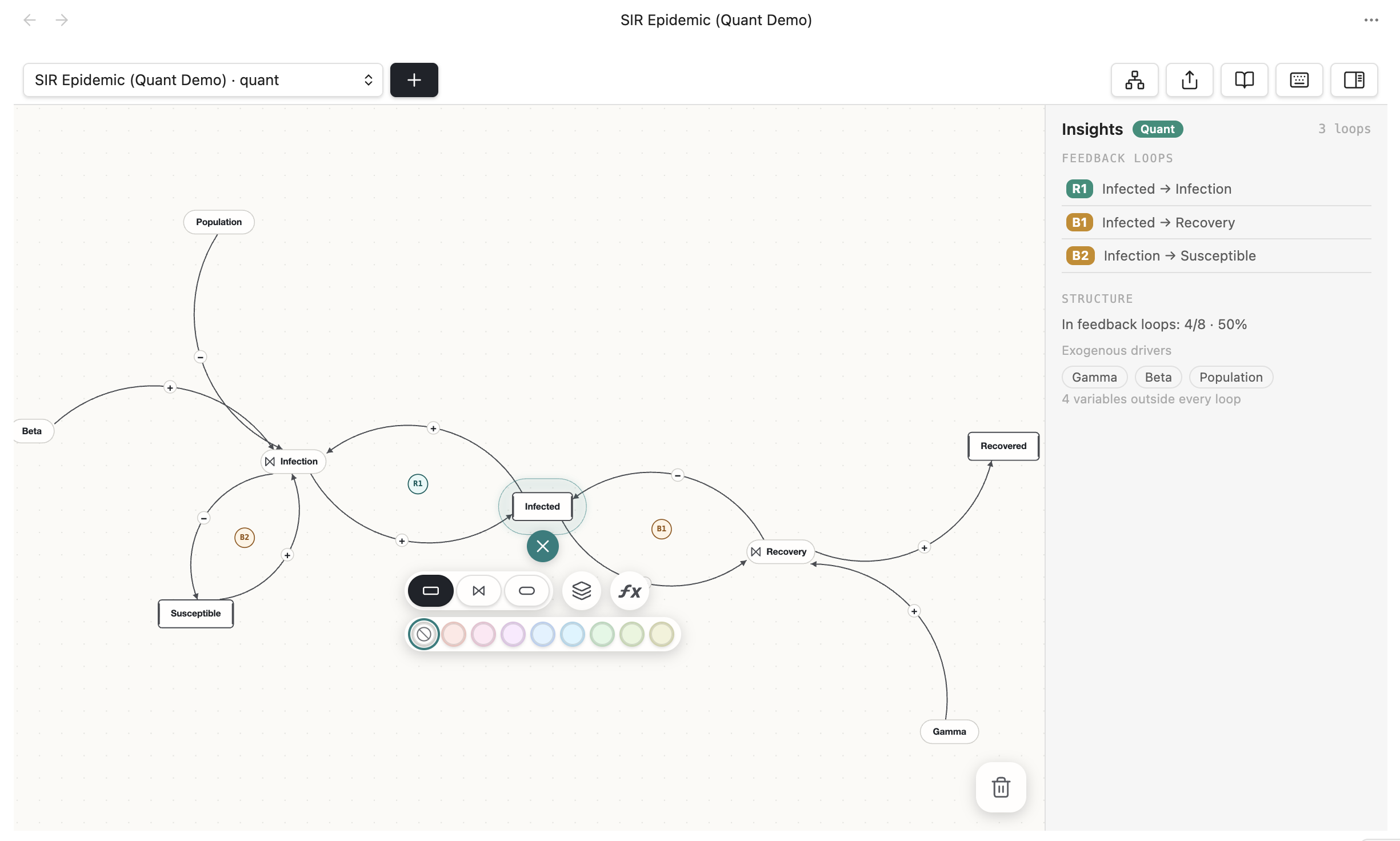
The canvas this package renders — an SIR epidemic model open in Obsidian with the link-editing toolbar.
This README is ordered easy → hard — start at the top with the one-tag React drop-in and go only as deep as you need:
- React, in one tag — easiest
- Build and render it yourself — any framework / full control
- The engine — create, edit, and load models
- Exporting and analysis — advanced
Install
npm install @neoloopy/cld-canvasIf you use the engine (NativeEngine), also install a YAML parser for note
frontmatter — the package does not bundle one:
npm install yaml1. React, in one tag (easiest)
Drop the <CldCanvas> component below into your
project, hand it a spec, and you're done:
import { CldCanvas } from "./CldCanvas";

export default function App() {
  return (
    <CldCanvas
      spec={{
        variables: [
          { label: "Users", type: "stock" },
          { label: "Word of mouth" },
          { label: "Signups" },
        ],
        links: [
          { from: "Users", to: "Word of mouth", polarity: "+" },
          { from: "Word of mouth", to: "Signups", polarity: "+" },
          { from: "Signups", to: "Users", polarity: "+" },
        ],
      }}
    />
  );
}
It builds the model, detects the feedback loops, frames the diagram, and gives
you pan (drag) + zoom (wheel) — with no surrounding CSS required. Props: spec
(required), theme ("light" | "dark" | a custom Theme), interactive
(default true), height (number px or CSS string, default 400), plus
onReady(graph) / onError(error) callbacks.
The <CldCanvas> component
Copy this one file into your project; its only dependencies are
@neoloopy/cld-canvas and yaml.
// CldCanvas.tsx — a drop-in React wrapper around @neoloopy/cld-canvas.
import { useEffect, useMemo, useRef } from "react";
import type { CSSProperties } from "react";
import { parse } from "yaml";
import {
  MemoryStorage,
  NativeEngine,
  Camera,
  SceneCache,
  paint,
  LIGHT,
  DARK,
} from "@neoloopy/cld-canvas";
import type { BuildSpec, GraphView, PaintUi, Theme } from "@neoloopy/cld-canvas";

export interface CldCanvasProps {
  /** The causal-loop diagram to render: variables + polarized links. */
  spec: BuildSpec;
  /** Color tokens — "light" / "dark", or a custom Theme. Default "light". */
  theme?: "light" | "dark" | Theme;
  /** Pan (drag) + zoom (wheel). Default true. */
  interactive?: boolean;
  /**
   * Canvas height. A number is pixels (default 400); a string is used verbatim,
   * so pass "100%" / "60vh" to fill a sized parent. Width always fills the
   * parent, so `<CldCanvas spec={...} />` works with no surrounding CSS.
   */
  height?: number | string;
  className?: string;
  style?: CSSProperties;
  /** Called with the loaded graph (detected loops, badge labels) after a build. */
  onReady?: (graph: GraphView) => void;
  /** Called if the spec is invalid or the model fails to build. */
  onError?: (error: Error) => void;
}

// Interaction fields the painter wants every frame; we drive only pan/zoom, so
// the rest stay inert.
const PAINT_DEFAULTS = {
  selectedNodeId: null,
  selectedEdgeId: null,
  selectedLoopKey: null,
  liveNodeIds: new Set<string>(),
  linkPreview: null,
  connectNodeId: null,
  loopHighlight: null,
  pulsePhase: 0,
  flowPhase: 0,
} satisfies Omit<PaintUi, "cssWidth" | "cssHeight" | "dpr">;

// The full engine path: an in-memory vault, build the model, load the detected
// graph. NativeEngine needs a YAML parser for note frontmatter (yaml).
async function buildGraph(spec: BuildSpec): Promise<GraphView> {
  const engine = new NativeEngine(new MemoryStorage(), parse, {
    modelsRoot: "Models",
  });
  const model = await engine.createModel("model");
  await engine.buildModel(model.folder, spec); // layout defaults to true
  return engine.loadGraph(model.folder);
}

function resolveTheme(t: CldCanvasProps["theme"]): Theme {
  if (t === "dark") return DARK;
  if (t === "light" || t == null) return LIGHT;
  return t;
}

export function CldCanvas({
  spec,
  theme = "light",
  interactive = true,
  height = 400,
  className,
  style,
  onReady,
  onError,
}: CldCanvasProps) {
  const canvasRef = useRef<HTMLCanvasElement | null>(null);
  const camera = useRef(new Camera()).current;
  const sceneCache = useRef(new SceneCache()).current;
  const graphRef = useRef<GraphView | null>(null);
  const fitted = useRef(false);
  const drag = useRef<{ x: number; y: number } | null>(null);

  const resolved = useMemo(() => resolveTheme(theme), [theme]);

  // Mutable mirrors so the build effect and the once-registered listeners read
  // current values without re-subscribing.
  const themeRef = useRef(resolved);
  themeRef.current = resolved;
  const interactiveRef = useRef(interactive);
  interactiveRef.current = interactive;
  const onReadyRef = useRef(onReady);
  onReadyRef.current = onReady;
  const onErrorRef = useRef(onError);
  onErrorRef.current = onError;

  const render = () => {
    const canvas = canvasRef.current;
    const ctx = canvas?.getContext("2d");
    if (!canvas || !ctx) return;

    const dpr = window.devicePixelRatio || 1;
    const width = canvas.clientWidth;
    const height = canvas.clientHeight;
    const bw = Math.max(1, Math.floor(width * dpr));
    const bh = Math.max(1, Math.floor(height * dpr));
    if (canvas.width !== bw) canvas.width = bw;
    if (canvas.height !== bh) canvas.height = bh;

    const scene = sceneCache.build(graphRef.current, new Map(), new Map());
    ctx.clearRect(0, 0, bw, bh);
    if (!scene) return;

    if (!fitted.current && sceneCache.fit(camera, width, height)) {
      fitted.current = true; // frame once per spec; pan/zoom persists after
    }

    paint(ctx, scene, camera, themeRef.current, {
      ...PAINT_DEFAULTS,
      cssWidth: width,
      cssHeight: height,
      dpr,
    });
  };
  const renderRef = useRef(render);
  renderRef.current = render;

  // Rebuild only when the spec's content changes (not on every parent render).
  const specKey = useMemo(() => JSON.stringify(spec), [spec]);
  useEffect(() => {
    let cancelled = false;
    buildGraph(spec)
      .then((graph) => {
        if (cancelled) return;
        graphRef.current = graph;
        fitted.current = false;
        renderRef.current();
        onReadyRef.current?.(graph);
      })
      .catch((e) => {
        if (!cancelled) {
          onErrorRef.current?.(e instanceof Error ? e : new Error(String(e)));
        }
      });
    return () => {
      cancelled = true;
    };
    // eslint-disable-next-line react-hooks/exhaustive-deps
  }, [specKey]);

  // Repaint (no refit) when the theme changes.
  useEffect(() => {
    renderRef.current();
  }, [resolved]);

  // Register resize + wheel once; both read live state via refs.
  useEffect(() => {
    const canvas = canvasRef.current;
    if (!canvas) return;

    const ro = new ResizeObserver(() => renderRef.current());
    ro.observe(canvas);

    const onWheel = (e: WheelEvent) => {
      if (!interactiveRef.current) return;
      e.preventDefault();
      camera.zoomAt(e.offsetX, e.offsetY, Math.exp(-e.deltaY * 0.0015));
      renderRef.current();
    };
    canvas.addEventListener("wheel", onWheel, { passive: false });

    return () => {
      ro.disconnect();
      canvas.removeEventListener("wheel", onWheel);
    };
  }, [camera]);

  return (
    <canvas
      ref={canvasRef}
      className={className}
      style={{
        display: "block",
        width: "100%",
        height: typeof height === "number" ? `${height}px` : height,
        touchAction: "none",
        background: resolved.paper,
        cursor: interactive ? "grab" : "default",
        ...style,
      }}
      onPointerDown={(e) => {
        if (!interactive) return;
        e.currentTarget.setPointerCapture(e.pointerId);
        drag.current = { x: e.clientX, y: e.clientY };
      }}
      onPointerMove={(e) => {
        if (!drag.current) return;
        camera.panBy(e.clientX - drag.current.x, e.clientY - drag.current.y);
        drag.current = { x: e.clientX, y: e.clientY };
        renderRef.current();
      }}
      onPointerUp={(e) => {
        drag.current = null;
        e.currentTarget.releasePointerCapture(e.pointerId);
      }}
    />
  );
}
The same wrapper shape works in Vue, Svelte, or vanilla DOM — only the lifecycle
hook around buildGraph + paint changes.
2. Build and render it yourself
Not on React, or want full control? The wrapper above is just two steps: build
a graph with the engine, then paint it. You need an ES2020 ESM runtime and a
CanvasRenderingContext2D.
Step 1 — build a model and load its graph:
import { parse } from "yaml";
import { MemoryStorage, NativeEngine } from "@neoloopy/cld-canvas";

const engine = new NativeEngine(new MemoryStorage(), parse, {
  modelsRoot: "Models",
});

const model = await engine.createModel("Growth Loop");

await engine.buildModel(model.folder, {
  variables: [
    { label: "Users" },
    { label: "Word of mouth" },
    { label: "Signups" },
  ],
  links: [
    { from: "Users", to: "Word of mouth", polarity: "+" },
    { from: "Word of mouth", to: "Signups", polarity: "+" },
    { from: "Signups", to: "Users", polarity: "+" },
  ],
});

const graph = await engine.loadGraph(model.folder); // detects R/B loops
Step 2 — paint the graph to a canvas:
import { Camera, LIGHT, SceneCache, paint } from "@neoloopy/cld-canvas";

const canvas = document.querySelector("canvas")!;
const ctx = canvas.getContext("2d")!;
const dpr = window.devicePixelRatio || 1;

const width = canvas.clientWidth;
const height = canvas.clientHeight;
canvas.width = Math.floor(width * dpr);
canvas.height = Math.floor(height * dpr);

const camera = new Camera();
const sceneCache = new SceneCache();
const scene = sceneCache.build(graph, new Map(), new Map());

if (scene) {
  sceneCache.fit(camera, width, height);

  paint(ctx, scene, camera, LIGHT, {
    cssWidth: width,
    cssHeight: height,
    dpr,
    selectedNodeId: null,
    selectedEdgeId: null,
    selectedLoopKey: null,
    liveNodeIds: new Set(),
    linkPreview: null,
    connectNodeId: null,
    loopHighlight: null,
    pulsePhase: 0,
    flowPhase: 0,
  });
}
Wire Camera.panBy, Camera.zoomAt, Camera.setScaleAt, and Camera.centerOn
to your own pointer, wheel, trackpad, minimap, or toolbar controls. Canvas
rendering is stateless: keep selection, hover, and animation clocks in your app
state and pass them into SceneCache / paint.
3. The engine
Past rendering, NativeEngine is a full create/edit/load API for neoloopy
models.
Engine methods
const model = await engine.createModel("Model name");
const models = await engine.listModels();
const graph = await engine.loadGraph(model.folder);

const node = await engine.addVariable(model.folder, {
  label: "Inventory",
  type: "stock",
  x: 120,
  y: 80,
});

await engine.updateVariable(model.folder, node.id, {
  label: "Available inventory",
  tags: ["operations"],
});

await engine.addLink(model.folder, node.id, "other-node-id", {
  polarity: "-",
  delay: true,
});

await engine.relayout(model.folder);
await engine.setViewport(model.folder, { x: 0, y: 0, zoom: 1 });
Bulk build (used above) is the fastest path for importing generated or external CLD specs:
await engine.buildModel(model.folder, {
  variables: [
    { id: "demand", label: "Demand" },
    { id: "capacity", label: "Capacity", type: "stock" },
  ],
  links: [
    { from: "demand", to: "capacity", polarity: "+" },
    { from: "capacity", to: "demand", polarity: "-" },
  ],
  layout: true,
});
Storage
NativeEngine works against a small filesystem-like VaultStorage interface:
interface VaultStorage {
  exists(path: string): Promise<boolean>;
  read(path: string): Promise<string>;
  write(path: string, data: string): Promise<void>;
  remove(path: string): Promise<void>;
  mkdirs(path: string): Promise<void>;
  rmdir(path: string): Promise<void>;
  move(from: string, to: string): Promise<void>;
  list(path: string): Promise<{ files: string[]; folders: string[] }>;
}
Use MemoryStorage for tests, demos, and server-side transforms (it is not
persistent). In production, adapt this interface to your host filesystem or
browser persistence layer. All paths are vault-relative and use / separators.
move should preserve or update links when your host supports it — the Obsidian
adapter routes folder moves through Obsidian's file manager so wikilinks remain
valid.
Model format
A model is stored as:
model.jsonfor model metadata and viewportNodes/*.mdfor variable notes with YAML frontmatter and Markdown bodyLoops/*.mdfor feedback loop notes- optional system notes such as
System.md
The engine preserves unknown frontmatter keys so other neoloopy tools can add metadata without being clobbered.
4. Exporting
NativeEngine.export supports json, mermaid, and markdown.
const mermaid = await engine.export(model.folder, "mermaid");

console.log(mermaid.ext);     // "mmd"
console.log(mermaid.mime);    // "text/plain"
console.log(mermaid.content); // graph LR...
You can also use the lower-level renderer functions directly:
import { buildMermaid, render } from "@neoloopy/cld-canvas";5. Analysis helpers
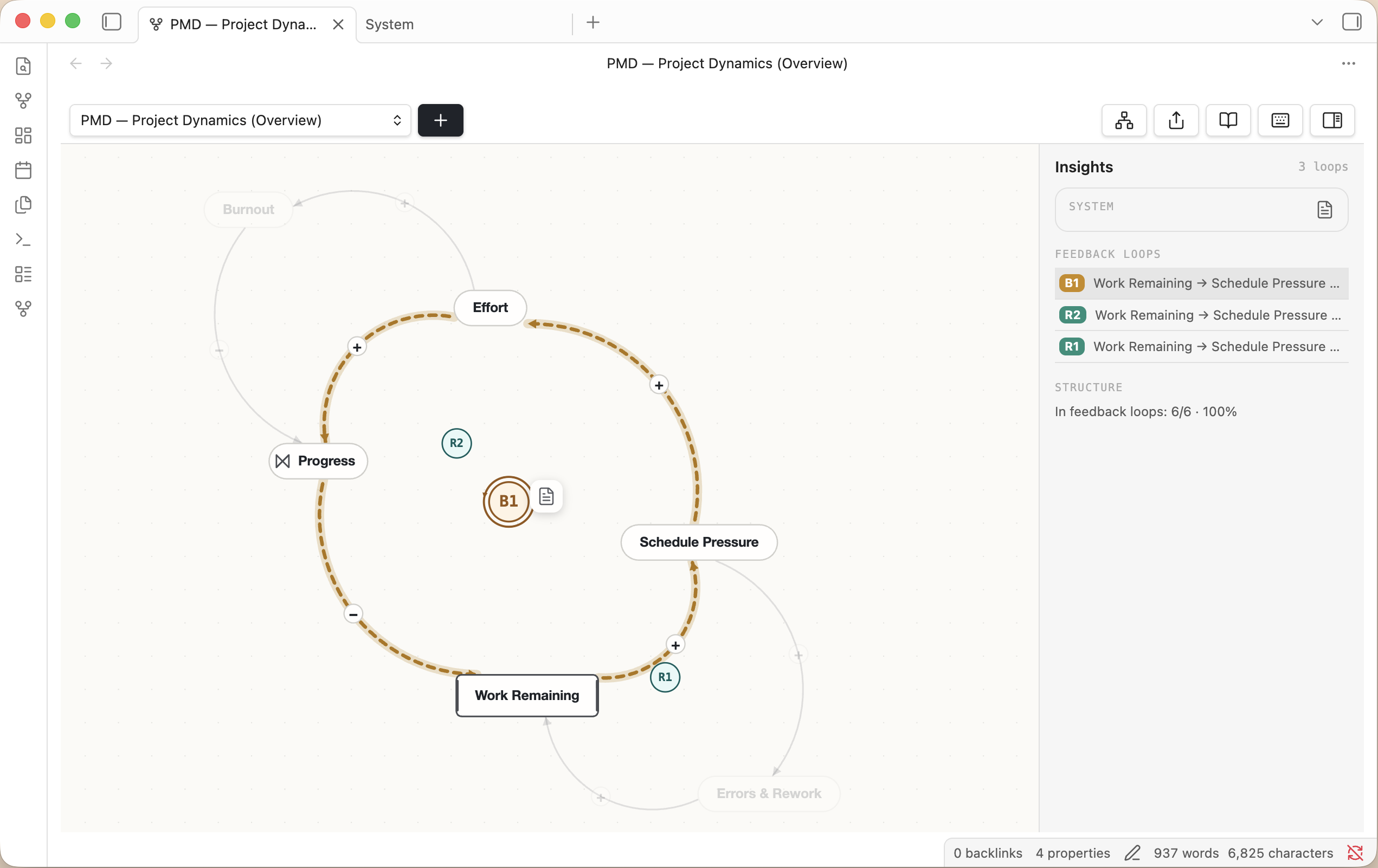
The same loop detection these helpers expose, surfaced in a neoloopy surface — a project-dynamics model with its reinforcing and balancing loops and the insight panel.
import { LoopGraph, discoverCanvasLoops, endogeneity } from "@neoloopy/cld-canvas";

const loopGraph = new LoopGraph(graph.nodes);
const qualitative = loopGraph.detectLoops();
const { loops, analysisError } = discoverCanvasLoops(graph.nodes, qualitative, {
  manifest: graph.manifest,
});
const metrics = loopGraph.metrics();
const summary = endogeneity(graph.nodes, loops);
discoverCanvasLoops first enriches each declared qualitative loop whose whole
authored route resolves to exact visible connectors or material pipe legs, even
when quantitative analysis is unavailable or incomplete. It adds a synthesized
quantitative loop only when its complete executable route resolves just as
exactly.
Material endpoints may be explicit or use the unique, direct, signed legacy
flow-to-stock encoding already supported by SFD rendering. It preserves
qualitative loop identity and deduplicates exact counterparts. Quantitative
discovery failures surface as analysisError and add no partial quantitative
badge. A declared qualitative loop whose exact canvas route cannot be resolved
keeps its established CLD identity and badge but is excluded from SFD; that
qualitative exclusion by itself does not set analysisError. SFD retains every
exactly resolved qualitative loop; a quantitative-only SFD badge additionally
requires at least one first-class material leg.
What is exported
The package exports the public modules from src/index.ts, including:
- Engine:
NativeEngine,NeoloopyEngine,MemoryStorage,VaultStorage - Domain types:
VariableFile,VaultLink,ModelManifest,GraphView - Graph logic:
LoopGraph,DetectedLoop,LoopType,labelLoopsByKey,discoverCanvasLoops - Rendering:
paint,SceneCache,Camera,LIGHT,DARK, geometry helpers - File codecs:
parseNote,serializeNote,manifestFromJson - Exporters:
render,buildMermaid,loopNoteKey - Analysis:
endogeneity
Notes for integrators
- The package is ESM-only. Use
import, notrequire. - The engine is asynchronous because real storage adapters usually perform I/O.
- Canvas rendering is stateless. Keep selection, hover, animation clocks, bow
caches, and badge overrides in your application state and pass them to
SceneCacheorpaint. MemoryStorageis not persistent; it is intended for tests and examples.
License
MIT