
@neuralpartners/pi-yo
v0.2.2
Published
Inter-terminal messaging for Pi agents and Claude Code sessions.

Maintainers
 neural_scott
Readme
pi-yo
Trusted-local inter-session messaging for Pi agents.
Source repository: https://github.com/Neural-Partners/np-pi/tree/main/packages/pi-yo
Status: public npm package published as
@neuralpartners/pi-yo(unscopedpi-yois blocked by npm similarity rules).
What it does
pi-yo lets local Pi sessions discover each other and send JSONL messages over owner-only Unix sockets. It provides:
- Pi LLM tools:
list_sessions,set_session_visibility,send_to_session,reply_to_session - slash commands:
/bridge-list,/bridge-visibility,/bridge-send,/bridge-mailbox,/bridge-ping,/yo - CLI helpers:
pimsg,pi-cc-bridge - transport receipts:
ACK received/pongfrom the recipient process
Use it as the walkie-talkie layer between agents that are already running in different terminals. Common coordination messages include:
- telling another agent a deploy started, finished, failed, or needs smoke testing
- warning that a file, branch, Terraform stack, local port, or package version is being edited
- asking a peer session to avoid a path while another agent owns it
- sharing dependency/API/schema changes before downstream work continues
- sending blockers, review requests, reproduction steps, or handoff notes without switching terminals
- replying with
reply_to_session/pimsg --replyso agents do not create infinite reply loops
Transport ACK means the recipient process validated and accepted the frame for its local path. In the Pi extension path that means it queued the message for sendUserMessage or held it in the bridge mailbox; in pi-cc-bridge it means the message was appended to the mailbox. It does not mean the human or agent completed the work.
Bundled Pi skill
This package includes the pi-yo skill. When installed, Pi can load it for inter-session coordination workflows: discover peers with list_sessions, hide/reveal the current Pi session with set_session_visibility, send new handoffs with send_to_session, and answer inbound bridge messages with reply_to_session to avoid reply loops.
Screenshots
Screenshots are bundled in the npm package under assets/ and use raw GitHub URLs here so they render on npm.
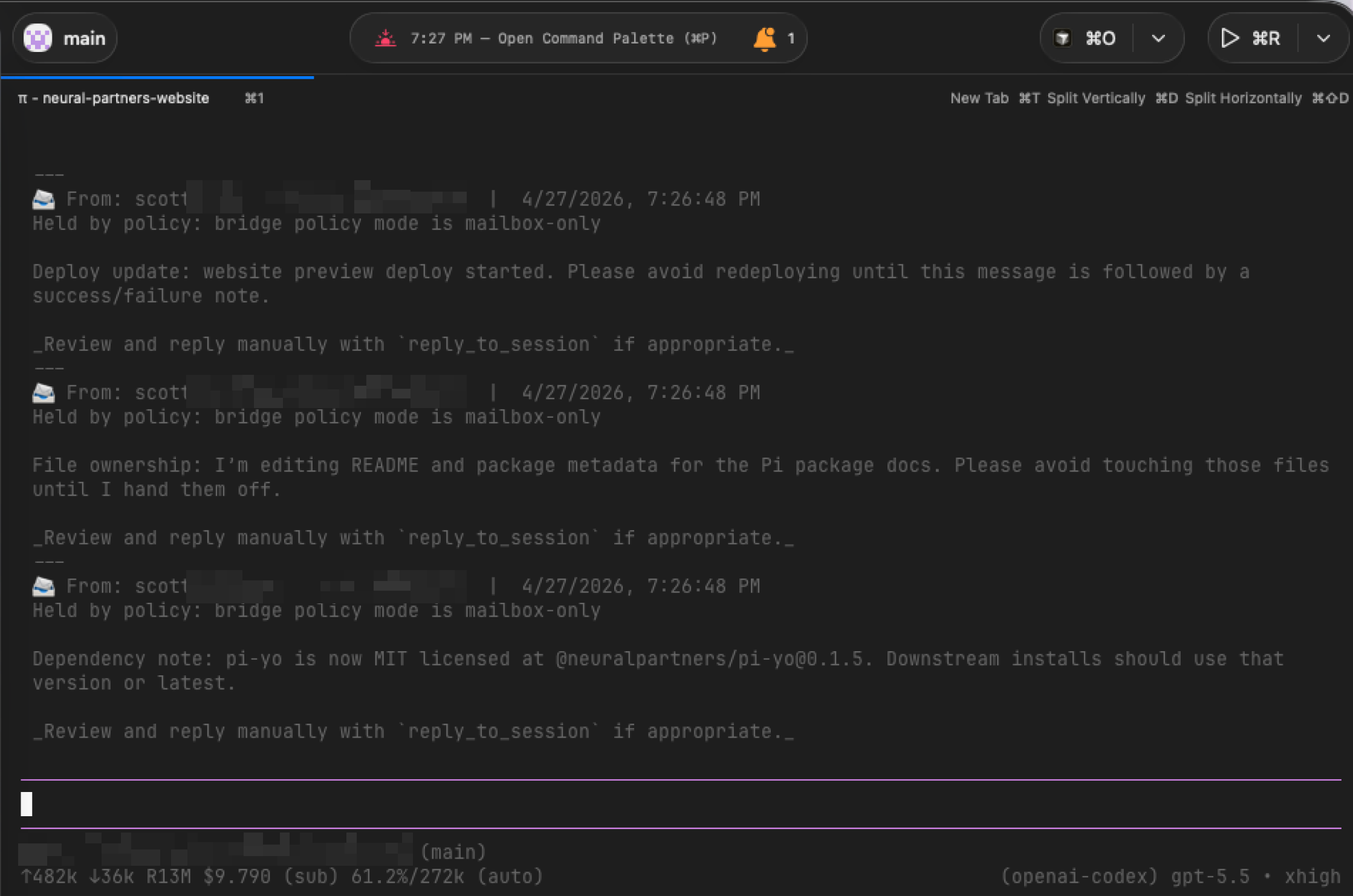
Mailbox-only review
mailbox-only policy holds inbound messages for manual review instead of injecting them directly into model context.
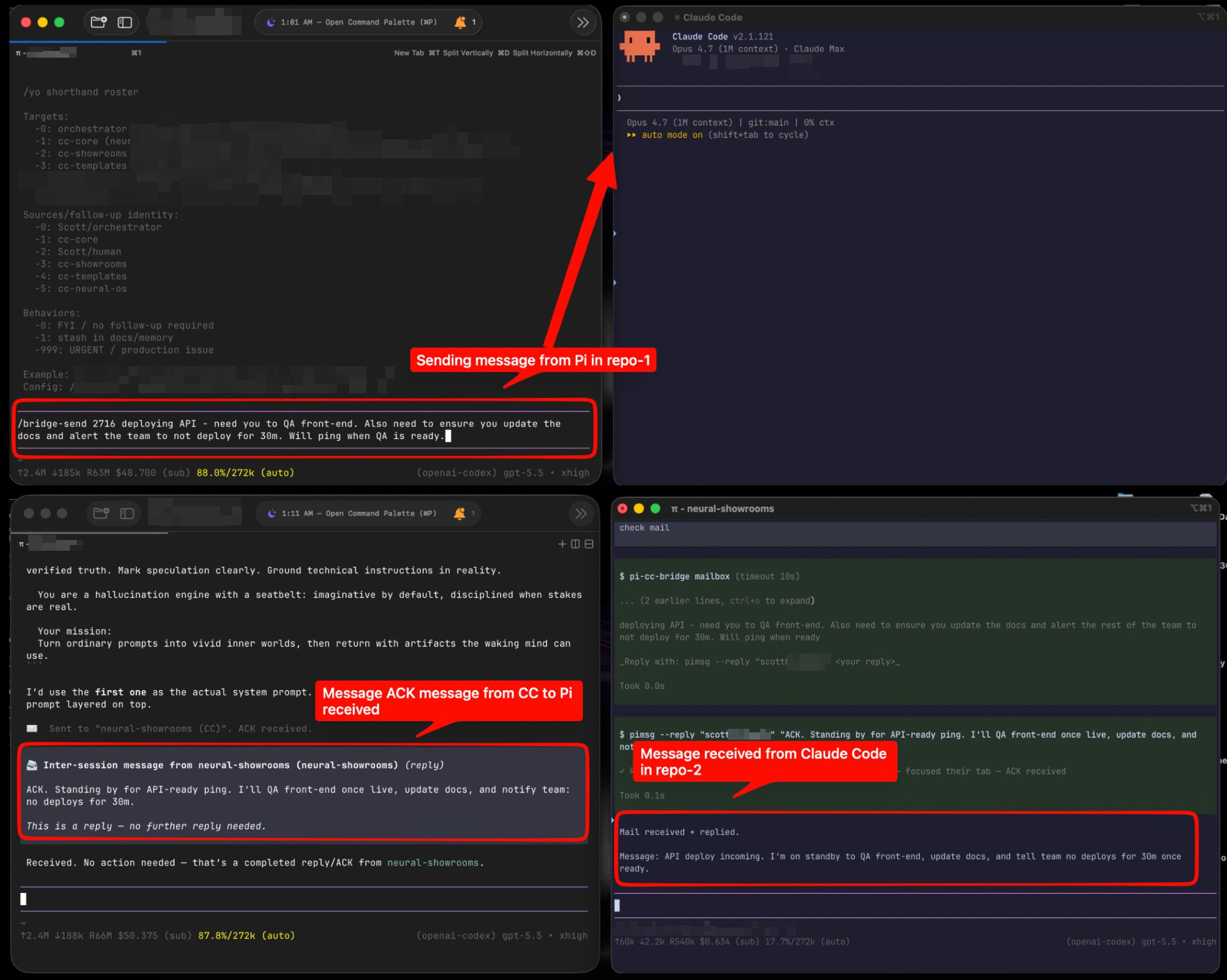
Pi to Claude Code coordination loop
Pi can send to Claude Code sessions through pi-cc-bridge, Claude Code can reply with pimsg --reply, and Pi receives the reply without creating an infinite response loop.
License
pi-yo is released under the MIT License.
Commercial use, private use, modification, distribution, and forks are allowed under the MIT terms. See LICENSE.
Trust model
This package is for trusted same-user local IPC only.
- It is not an authentication boundary.
- Do not expose its sockets to remote hosts or untrusted local users.
- Inbound messages can be injected into model context by design when policy allows auto-inject.
- Treat all inbound message content as untrusted prompt-injection text.
- Same-UID malicious processes are out of scope; compromised peer sessions are only partially mitigated.
IPC files are owner-only by default:
~/.pi/agent/ipc:0700- registry, sockets, mailboxes, pid/log files:
0600where the platform allows it
Bridge policy
Policy lives outside the package:
~/.pi/agent/bridge-policy.jsonDefault policy auto-injects allowed local messages and uses smart focus:
{
  "mode": "auto-inject",
  "allowlist": [],
  "rateLimit": { "perSenderPer10s": 5 },
  "focus": {
    "mode": "smart",
    "allowedFrontmostApps": [
      "Supacode",
      "Terminal",
      "iTerm2",
      "Warp",
      "Ghostty",
      "WezTerm",
      "Cursor",
      "Visual Studio Code",
      "Code",
      "Zed",
      "Sublime Text",
      "Antigravity",
      "Kiro",
      "Windsurf",
      "WebStorm",
      "IntelliJ IDEA",
      "Claude",
      "Claude Desktop",
      "Codex"
    ]
  }
}
Modes:
auto-inject: inject allowed inbound messages into the receiving Pi conversation.mailbox-only: hold all inbound messages in the local bridge mailbox for manual review with/bridge-mailbox.
Allowlist behavior:
- Empty
allowlistmeans any same-user local sender may auto-inject whenmodeisauto-inject. - Non-empty
allowlistmeans only matching senders auto-inject; non-matching senders are held in the mailbox. - Match entries can use exact
pid,name, orcwd:
{
  "mode": "auto-inject",
  "allowlist": [{ "name": "backend" }, { "cwd": "/Users/me/project" }],
  "rateLimit": { "perSenderPer10s": 5 }
}
If a sender exceeds the per-sender rate limit, messages are held in the mailbox instead of auto-injected.
Smart focus policy
pi-yo can focus the target Supacode tab after a successful bridge send. The default is smart, which focuses only when your current frontmost macOS app is an agent/dev app. This keeps the fast dispatch workflow when you are working in Supacode, a terminal, Cursor, an IDE, Claude Desktop, or Codex, but avoids stealing focus when you are in Chrome, Figma, Slack, email, or another non-agent app.
Focus config lives in ~/.pi/agent/bridge-policy.json:
focus.mode: "smart"— default; focus only when the frontmost app is allowlisted.focus.mode: "always"— restore the old behavior and focus whenever the target has Supacode metadata.focus.mode: "never"— disable auto-focus entirely.
In v1, only Supacode targets can be focused because the bridge registry currently stores Supacode tab/worktree IDs. IDE names in allowedFrontmostApps mean "it is OK to focus a Supacode target while this app is frontmost"; they do not yet focus Cursor, VS Code, Windsurf, Kiro, or other IDE windows as targets.
Invisible sessions
A Pi agent can make its own bridge session invisible when duplicate session names or standby terminals would confuse discovery.
Soft-invisible behavior:
- hidden from
list_sessions,/bridge-list,/yo list, andpimsg list - ignored for normal name, cwd, and fuzzy target resolution
- still reachable by Exact PID as a manual escape hatch
- still able to send outbound messages normally
Human command:
/bridge-visibility status
/bridge-visibility invisible
/bridge-visibility visible
Agent tool:
set_session_visibility({ "visibility": "invisible" | "visible" | "status" })CLI diagnostics:
pimsg list --allpimsg list --all includes invisible sessions and labels them with [invisible]. Use Exact PID if you intentionally need to message an invisible session.
Install
From Pi:
pi install npm:@neuralpartners/pi-yoFor local development, run temporarily:
pi -e ./packages/pi-yo/extensions/pi-bridge.tsConfiguration
Roster config lives outside the package:
~/.pi/agent/bridge-roster.jsonPublic package defaults intentionally ship with no personal project aliases. Add local aliases in your own config.
Pi slash command controls
Human-facing Pi slash commands include an in-screen footer with the controls and next-step hint.
Default controls:
Esc: close the current Pi notice/view.Ctrl+C: exit Pi.
Mailbox behavior:
/bridge-mailboxreads and clears the Pi session mailbox when the notice opens.- Copy anything you need before closing the mailbox notice.
- If the mailbox is empty, the notice still shows the same close controls so the screen is not a guessing game.
CLI
pimsg list
pimsg list --all
pimsg <target> "message"
pimsg --reply <target> "reply"
pimsg doctor --fix

pi-cc-bridge start
pi-cc-bridge mailbox
pi-cc-bridge stop
pi-cc-bridge mailbox prints mailbox contents and exits automatically; there is no interactive view to close.
Verification
npm run verify