
@neurora/code-inspector-plugin
v1.3.7
Published
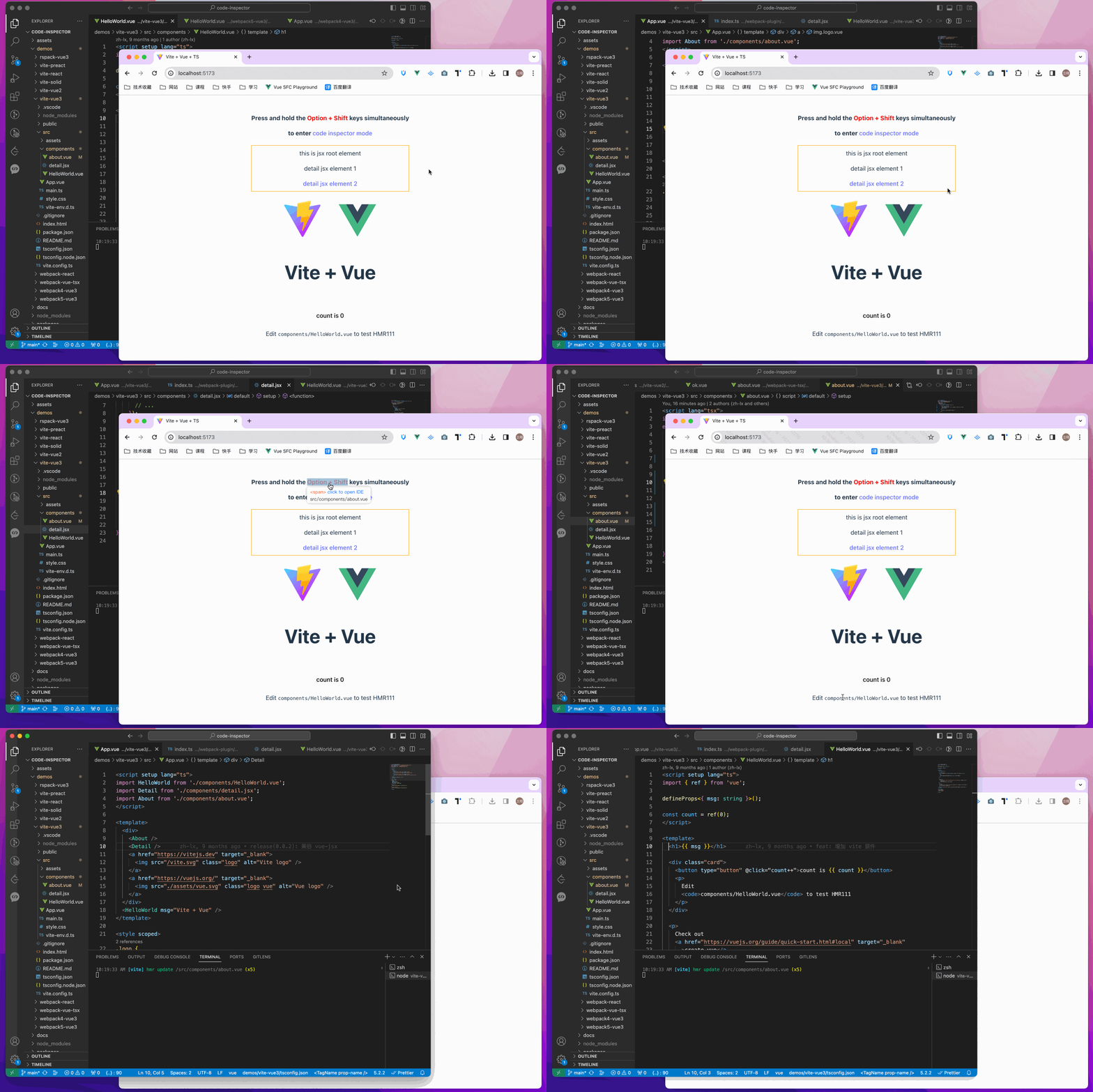
Click the dom on the page, it will open your IDE and position the cursor to the source code location of the dom.

Maintainers
 markshawn
Readme





📖 Introduction
Click the element on the page, it can automatically open the code editor and position the cursor to the source code of the element.
✨ New Feature: Floating Ball Mode
The plugin now supports a floating ball interface for easier interaction:
- 🎯 Draggable floating ball - Position it anywhere on your screen
- 🔄 Mode switching - Toggle between "Copy Path" and "Open Editor" modes with a single click
- 🎨 Visual feedback - Different colors and tooltips for each mode
- 💾 Persistent state - Remembers your preferred position and mode across sessions
💻 Try it out online
- vue online demo
- react online demo
- preact online demo
- solid online demo
- qwik online demo
- svelte online demo
- astro online demo
🎨 Support
The following are which compilers, web frameworks and editors we supported now:
Bundlers:
✅ webpack | ✅ vite | ✅ rspack | ✅ rsbuild | ✅ farm | ✅ esbuild | ✅ turbopack | ✅ makoWeb Frameworks:
✅ vue2 | ✅ vue3 | ✅ nuxt | ✅ react | ✅ nextjs | ✅ umijs | ✅ preact | ✅ solid | ✅ qwik | ✅ svelte | ✅ astroCode Editors:
VSCode | Cursor | Windsurf | WebStorm | Atom | HBuilderX | PhpStorm | PyCharm | IntelliJ IDEA | and Others
🚀 Install
Standard Version
npm i code-inspector-plugin -D
# or
yarn add code-inspector-plugin -D
# or
pnpm add code-inspector-plugin -D
Enhanced Version (with Floating Ball Feature)
For the latest features including the floating ball interface:
npm i @neurora/code-inspector-plugin -D
# or
yarn add @neurora/code-inspector-plugin -D
# or
pnpm add @neurora/code-inspector-plugin -D
🌈 Usage
Quick Setup with Floating Ball
To enable the floating ball feature, add the behavior configuration:
// vite.config.js
import { defineConfig } from 'vite';
import { codeInspectorPlugin } from 'code-inspector-plugin';
// or use @neurora/code-inspector-plugin for guaranteed floating ball support

export default defineConfig({
  plugins: [
    codeInspectorPlugin({
      bundler: 'vite',
      behavior: {
        enable: true,
        enableFloatingBall: true  // Enable floating ball mode
      }
    }),
  ],
});
Configuration Examples
// webpack.config.js
const { codeInspectorPlugin } = require('code-inspector-plugin');

module.exports = () => ({
  plugins: [
    codeInspectorPlugin({
      bundler: 'webpack',
      behavior: {
        enable: true,
        enableFloatingBall: true  // Optional: enable floating ball
      }
    }),
  ],
});
// vite.config.js
import { defineConfig } from 'vite';
import { codeInspectorPlugin } from 'code-inspector-plugin';
export default defineConfig({
plugins: [
codeInspectorPlugin({
bundler: 'vite',
behavior: {
enable: true,
enableFloatingBall: true // Optional: enable floating ball
}
}),
],
});// rspack.config.js
const { codeInspectorPlugin } = require('code-inspector-plugin');
module.exports = {
plugins: [
codeInspectorPlugin({
bundler: 'rspack',
behavior: {
enable: true,
enableFloatingBall: true // Optional: enable floating ball
}
}),
],
};// rsbuild.config.js
const { codeInspectorPlugin } = require('code-inspector-plugin');
module.exports = {
tools: {
rspack: {
plugins: [
codeInspectorPlugin({
bundler: 'rspack',
behavior: {
enable: true,
enableFloatingBall: true // Optional: enable floating ball
}
}),
],
},
},
};// esbuild.config.js
const esbuild = require('esbuild');
const { codeInspectorPlugin } = require('code-inspector-plugin');
esbuild.build({
plugins: [codeInspectorPlugin({
bundler: 'esbuild',
dev: () => true, // Return true in dev, false in production
behavior: {
enable: true,
enableFloatingBall: true // Optional: enable floating ball
}
})],
});// farm.config.js
import { defineConfig } from '@farmfe/core';
import { codeInspectorPlugin } from 'code-inspector-plugin';
export default defineConfig({
vitePlugins: [
codeInspectorPlugin({
bundler: 'vite',
behavior: {
enable: true,
enableFloatingBall: true // Optional: enable floating ball
}
}),
],
});// vue.config.js
const { codeInspectorPlugin } = require('code-inspector-plugin');
module.exports = {
chainWebpack: (config) => {
config.plugin('code-inspector-plugin').use(
codeInspectorPlugin({
bundler: 'webpack',
behavior: {
enable: true,
enableFloatingBall: true // Optional: enable floating ball
}
})
);
},
};For nuxt3.x:
// nuxt.config.js
import { codeInspectorPlugin } from 'code-inspector-plugin';

export default defineNuxtConfig({
  vite: {
    plugins: [codeInspectorPlugin({
      bundler: 'vite',
      behavior: {
        enable: true,
        enableFloatingBall: true  // Optional: enable floating ball
      }
    })],
  },
});
For nuxt2.x:
// nuxt.config.js
import { codeInspectorPlugin } from 'code-inspector-plugin';

export default {
  build: {
    extend(config) {
      config.plugins.push(codeInspectorPlugin({
        bundler: 'webpack',
        behavior: {
          enable: true,
          enableFloatingBall: true  // Optional: enable floating ball
        }
      }));
      return config;
    },
  },
};
For next.js(<= 14.x):
// next.config.js
const { codeInspectorPlugin } = require('code-inspector-plugin');

const nextConfig = {
  webpack: (config, { dev, isServer }) => {
    config.plugins.push(codeInspectorPlugin({
      bundler: 'webpack',
      behavior: {
        enable: true,
        enableFloatingBall: true  // Optional: enable floating ball
      }
    }));
    return config;
  },
};

module.exports = nextConfig;
For next.js(15.0.x ~ 15.2.x):
import type { NextConfig } from 'next';
import { codeInspectorPlugin } from 'code-inspector-plugin';

const nextConfig: NextConfig = {
  experimental: {
    turbo: {
      rules: codeInspectorPlugin({
        bundler: 'turbopack',
        behavior: {
          enable: true,
          enableFloatingBall: true  // Optional: enable floating ball
        }
      }),
    },
  },
};

export default nextConfig;
For next.js(>= 15.3.x):
// next.config.js
import type { NextConfig } from 'next';
import { codeInspectorPlugin } from 'code-inspector-plugin';

const nextConfig: NextConfig = {
  turbopack: {
    rules: codeInspectorPlugin({
      bundler: 'turbopack',
      behavior: {
        enable: true,
        enableFloatingBall: true  // Optional: enable floating ball
      }
    }),
  },
};

export default nextConfig;
With webpack:
// umi.config.js or umirc.js
import { defineConfig } from '@umijs/max';
import { codeInspectorPlugin } from 'code-inspector-plugin';

export default defineConfig({
  chainWebpack(memo) {
    memo.plugin('code-inspector-plugin').use(
      codeInspectorPlugin({
        bundler: 'webpack',
        behavior: {
          enable: true,
          enableFloatingBall: true  // Optional: enable floating ball
        }
      })
    );
  },
});
With mako:
// .umirc.ts
import { defineConfig } from 'umi';
import { codeInspectorPlugin } from 'code-inspector-plugin';

export default defineConfig({
  mako: {
    plugins: [
      codeInspectorPlugin({
        bundler: 'mako',
        behavior: {
          enable: true,
          enableFloatingBall: true  // Optional: enable floating ball
        }
      }),
    ],
  },
});
// astro.config.mjs
import { defineConfig } from 'astro/config';
import { codeInspectorPlugin } from 'code-inspector-plugin';
export default defineConfig({
vite: {
plugins: [codeInspectorPlugin({
bundler: 'vite',
behavior: {
enable: true,
enableFloatingBall: true // Optional: enable floating ball
}
})],
},
});🎮 How to Use
With Floating Ball Mode (New!)
When enableFloatingBall: true is configured:
- A draggable floating ball appears on your page
- Click the ball to switch between modes:
- 📋 Copy Path Mode (Blue) - Click elements to copy their source file path
- 📝 Open Editor Mode (Green) - Click elements to open them in your IDE
- Drag the ball anywhere on your screen for convenience
- Your preferences (position and mode) are saved automatically
Traditional Keyboard Mode
When using keyboard shortcuts:
- Press the combination keys (
Option + Shifton Mac,Alt + Shifton Windows) - Move your mouse over any element to see its source information
- Click to open the element in your IDE at the exact line
🔧 Configuration Options
{
  bundler: 'vite',              // Required: 'vite' | 'webpack' | 'rspack' | ...
  behavior: {
    enable: true,                // Enable the plugin
    enableFloatingBall: true,    // Enable floating ball UI (new feature!)
    locate: true,                // Show element location on hover
    copy: true,                  // Allow copying file path
  },
  hotKeys: ['altKey', 'shiftKey'], // Customize keyboard shortcuts
  showSwitch: true,             // Show toggle switch in dev tools
  autoToggle: true,             // Auto-enable in development
  hideConsole: false,           // Hide console hints
  dev: true,                    // Enable in development mode
  enforce: 'pre',               // Plugin enforce timing
  importClient: 'es6',          // Import syntax: 'es6' | 'code'
  escapeTags: [],               // Tags to ignore
  pathFormat: ['relative', 'absolute'], // Path format in tooltip
  includeUrl: /\.(vue|jsx|tsx)$/, // Files to include
  excludeUrl: /node_modules/,  // Files to exclude
}
📦 Package Ecosystem
Official Packages
- code-inspector-plugin - Main plugin package
- @code-inspector/core - Core functionality
- @code-inspector/vite - Vite integration
- @code-inspector/webpack - Webpack integration
- @code-inspector/esbuild - Esbuild integration
Enhanced Packages (with Floating Ball)
- @neurora/code-inspector-plugin - Enhanced main plugin with floating ball
- @neurora/code-inspector-core - Enhanced core with floating ball support
- @neurora/code-inspector-vite - Enhanced Vite integration
🤝 Contributing
Contributions are welcome! Please feel free to submit a Pull Request. For major changes, please open an issue first to discuss what you would like to change.
👨💻 Contributors
Special thanks to the contributors of this project:
📧 Communication and Feedback
For any usage issues, please leave a message below my Twitter post or submit an issue on Github.
For Chinese users, you can join the QQ group 769748484 or add the author's WeiXin account zhoulx1688888 for consultation and feedback:
💖 Sponsor
Sponsoring this project can help the author create better. If you are willing, thanks for sponsoring me through here.
📄 License
MIT © zh-lx