
@newly/cli
v0.2.145
Published
Develop, provision, and deploy Newly backends from your terminal


Readme
runcloud
Create and control remote mobile simulators and cloud sandboxes from your terminal.
- Simulators — boot real iOS simulators and Android emulators in the cloud, install your app, open deep links, and tunnel a local dev server into them.
- Sandboxes — start a fresh, isolated Linux environment in seconds, run commands in it, snapshot a ready setup, and restore it later as a warm start.
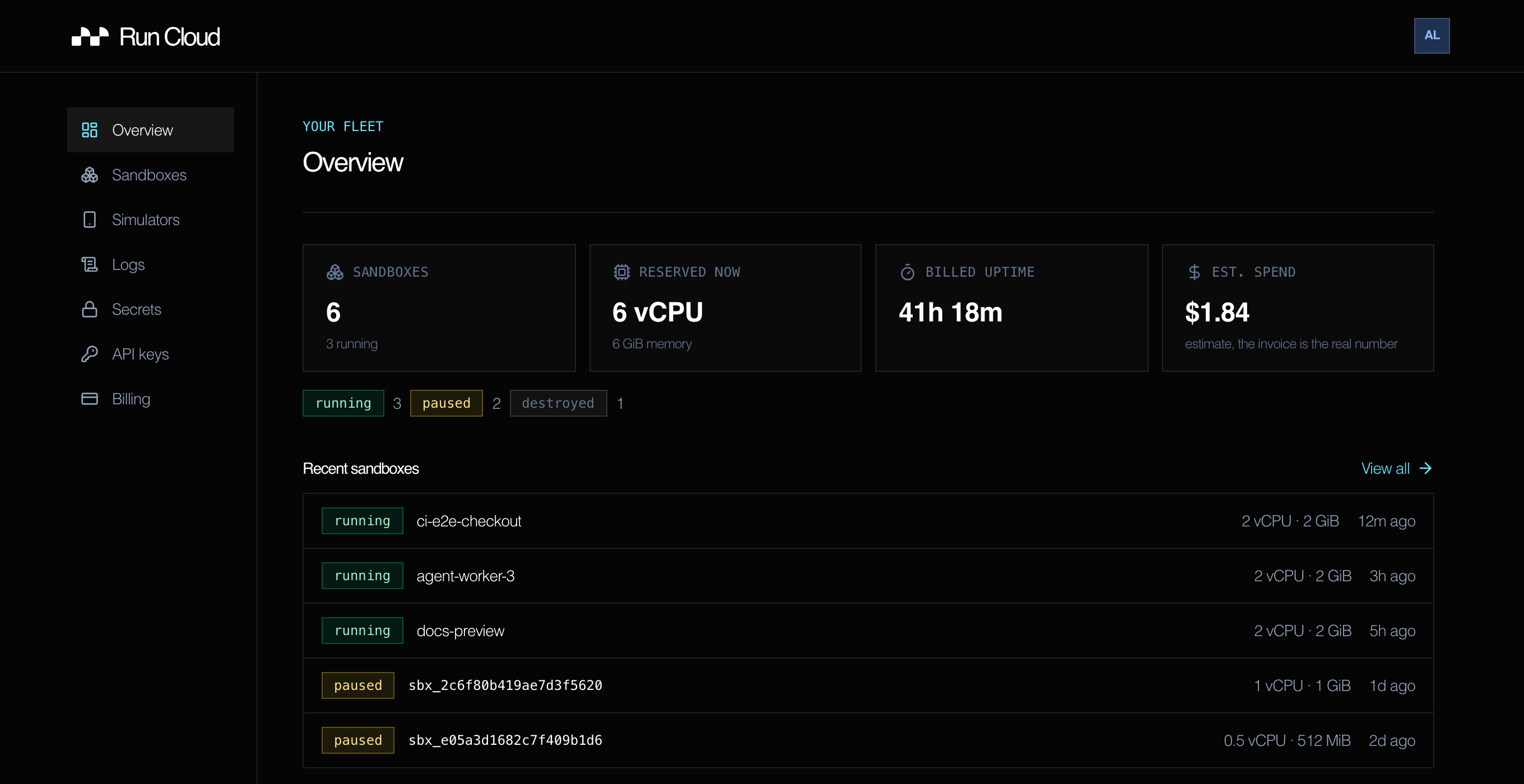
Everything the CLI creates also shows up at run.cloud/dashboard:
Install
npm i -g runcloudInstalls the runcloud binary. Requires Node ≥ 20.
Or take the standalone binary — no Node, no sudo. It installs to ~/.run-cloud/bin
and hands the terminal to runcloud login when it finishes:
curl -fsSL https://run.cloud/install | shLog in
runcloud login   # sign in with email, Google, or GitHub; stores a token in ~/.run-cloud/credentials
runcloud whoami  # show the stored credential: account, API, expiry, file
runcloud logout  # delete the stored credential
runcloud account        # show your entitlement and metered balance
Email signs you in without leaving the terminal. Google and GitHub open a browser and
show a short code to confirm, so login works over SSH and on headless machines too —
pick with --email, --google, --github, or --browser to skip the prompt.
The token expires — re-run runcloud login when a command reports you're logged out.
Logging in while a valid session exists reports that session and offers to keep it,
so running it out of habit no longer replaces a working credential.
runcloud whoami answers which credential is in play without calling the API, and
exits non-zero when there is none or it has expired:
Account     [email protected]
API         https://api.run.cloud
Expires     never
Credential  ~/.run-cloud/credentials
It reports whatever would actually be sent, including a credential supplied through
RUN_CLOUD_API_KEY, which takes precedence over the saved file. The account line is
only filled in when the sign-in method revealed an address — email sign-in does, the
browser and device handoffs do not.
Remote simulators
# iOS
runcloud ios create --model iphone --install ./MyApp.app   # boot a simulator and install an app
runcloud ios list                                          # list active sessions
runcloud ios get <id>                                      # inspect a session (viewer URL, status)
runcloud ios open-url myapp://path --id <id>               # open a URL or deep link
runcloud ios tap <id> 0.5 0.75                             # normalized top-left display coordinates
runcloud ios type-text <id> "Hello from iOS!"              # printable US ASCII, tab, and line feed
runcloud ios accessibility-tree <id> --json                # read the current typed accessibility hierarchy
runcloud ios camera inject <id> ./quadrants.mp4 \
  --bundle-id com.example.Camera                           # inject deterministic app-camera video
runcloud ios microphone inject <id> ./tone.wav \
  --bundle-id com.example.Recorder                         # inject deterministic microphone audio
runcloud ios screenshot <id> --output ios.png              # save a PNG without exposing the viewer URL
runcloud ios recording start <id> --json                   # start an idempotent MP4 screen recording
runcloud ios recording stop <id> <recording-id> --json     # stop and finalize it
runcloud ios recording download <id> <recording-id> \
  --output ios.mp4 --json                                  # download through the authenticated API
runcloud ios logs <id> --tail 200                          # read logs from this lease
runcloud ios logs <id> --follow                            # follow new log entries
runcloud ios delete <id>                                   # release the session

# Android also requires the Expo SDK profile used by the app; pools never substitute.
runcloud android create --model pixel --expo-sdk-profile expo-57
runcloud android swipe <id> 0.5 0.8 0.5 0.2 --duration 250
runcloud android press-key <id> enter
runcloud android accessibility-tree <id> --json
runcloud android camera inject <id> ./quadrants.mp4 --bundle-id com.example.Camera
runcloud android mic inject <id> ./tone.wav --bundle-id com.example.Recorder
runcloud android screenshot <id> --output android.png --json
Use --expo-sdk-profile expo-54 for Expo 54 projects and expo-57 for Expo 57
projects. create, get, list, and mobile launch --json expose the selected
profile and immutable Expo Go APK, emulator image, toolchain, and profile
digests. If that profile is full, the command returns
expo_profile_capacity_unavailable; it does not lease the other pool.
open-url accepts HTTPS URLs and application deep links on both platforms. Keep
the complete target quoted so its URI delimiters stay in one argument:
runcloud ios open-url \
  'runcloudproof://open/items%2F42?message=hello%20world&return=https%3A%2F%2Fexample.com%2Fdone%3Fx%3D1%26y%3Dtwo#proof' \
  --id <id> \
  --json
Success returns ok, platform, sessionId, device, leaseId, and the
exact input url. Replace ios with android for an emulator. See
Open URLs and Deep Links for SDK
and REST examples, platform behavior, validation, and troubleshooting.
On iOS, a first custom-scheme handoff can still require confirming the system's
Open in “App”? prompt after the success acknowledgement.
Useful create flags: --region, --display-name, --inactivity-timeout 3m,
--hard-timeout 1h, --install-asset <name-or-id>, --rm (release when the
command exits), --json.
The same logs commands work for Android. Snapshots are limited to the active
lease and accept 1 to 1,000 lines. In follow mode, --json emits one JSON object
per line.
Both platforms also expose gesture, press-button, rotate, reload,
scroll, toggle-software-keyboard, simulate-memory-warning,
rotate-digital-crown, and set-render-debug. Run runcloud ios --help or
runcloud android --help for the full surface and per-command input choices.
Current mobile sessions return an unsupported-action error for Digital Crown
input; render-debug controls are iOS-only. Android Emulator sessions also
report capsLock, numLock, and scrollLock as unsupported keys.
Coordinates are inclusive normalized display coordinates: (0, 0) is the
top-left and (1, 1) is the bottom-right.
Camera injection accepts MP4 and MOV. Microphone injection accepts AAC, M4A,
MP3, MP4 audio, and WAV; mic is an alias for microphone. Each successful
JSON response contains the uploaded asset ID, so automation can delete it with
runcloud asset delete <asset-id> after the proof completes.
accessibility-tree (accessibility alias) returns an indented terminal tree
or a versioned JSON hierarchy with cross-platform roles, labels, values,
states, bounds, identifiers, and nested children. Secure field values are
always redacted. The command reads only the authenticated active session and
never releases it; use --timeout to change the 20-second client wait.
The recording group is shared by iOS and Android. It provides start,
list, status (get alias), stop, and download. Pass a stable
--idempotency-key to retry start without creating a second recording.
download --output <path> validates the MP4 and reports its byte size and
SHA-256 digest without printing a signed storage URL.
Interaction commands wait for a correlated simulator acknowledgement. They
accept --timeout <milliseconds> (15 seconds by default), --request-id <id>,
and --json. Successful JSON is the API's typed completion envelope. Failures
write a stable { ok: false, error: { code, message, retryable } } envelope to
stderr and exit non-zero. Ctrl-C cancels only the in-flight command, leaves the
session active, and exits with code 130.
Tunnel a local dev server into a simulator
runcloud ios tunnel <id> --local-port 8081   # expose local Metro to the remote session
runcloud ios tunnel-status
Reusable app assets
Upload an app once, install it into as many sessions as you like:
runcloud asset push ./MyApp.app --name my-app
runcloud asset list
runcloud ios create --install-asset my-app
runcloud asset pull <id> --output ./MyApp.app
runcloud asset delete <id>
Sandboxes
runcloud sandbox create                          # start a sandbox (default image: runcloud/agent-base)
runcloud sandbox create --cpu 0.5 --memory 1024  # allocate CPU cores and memory in MiB
runcloud sandbox create --disk 80                # request an 80 GiB root filesystem
runcloud sandbox exec <id> npm run build         # run a command inside it
runcloud sandbox shell <id>                      # interactive shell, streamed over the API
runcloud sandbox logs <id> --lines 200           # tail its logs
runcloud sandbox metrics <id> --range 24h        # CPU, memory, network, and disk usage
runcloud sandbox pause <id>                      # park it; `resume` brings it back warm
runcloud sandbox list
runcloud sandbox rm <id>                          # destroy it
Browser desktops and computer use
Create a desktop sandbox, then open its short-lived signed noVNC URL:
SANDBOX_ID=$(runcloud sandbox create --image runcloud/desktop --json | jq -r '.id')

runcloud sandbox desktop "$SANDBOX_ID"               # open the desktop in a browser
runcloud sandbox desktop "$SANDBOX_ID" --url         # print the signed URL
runcloud sandbox desktop "$SANDBOX_ID" --view-only   # open without keyboard or pointer input
Agents can capture and control the same desktop:
runcloud sandbox screenshot "$SANDBOX_ID" --output screen.png
runcloud sandbox click "$SANDBOX_ID" 420 300
runcloud sandbox type "$SANDBOX_ID" "hello world"
runcloud sandbox key "$SANDBOX_ID" "ctrl+l"
Treat a signed desktop URL as a secret. It grants temporary access to that desktop without asking the browser to send your CLI credential.
Lifetime, pausing, and a public hostname
Two clocks stop a sandbox, and the first one bites after five minutes:
--timeout <seconds>— maximum lifetime, wall-clock from boot or the last resume, busy or not. Defaults to 300;0removes the limit.--idle-pause <seconds>— pause after that much inactivity.
Both pause rather than destroy. runcloud sandbox resume <id> brings a
sandbox back warm with its filesystem intact, and a paused sandbox is destroyed
after 48 hours. --persistent stops both clocks; --expose implies it and
publishes a guest port at a stable <name>-box.run.cloud hostname.
runcloud sandbox create --timeout 3600                      # an hour of wall clock, then pause
runcloud sandbox create --idle-pause 600                    # pause after 10 idle minutes
runcloud sandbox create --name my-project --persistent      # never pauses
runcloud sandbox create --name my-project --expose 3000     # persistent + https://my-project-box.run.cloud
runcloud sandbox expose <id> --port 8080                    # expose later, or move the published port
runcloud sandbox get <id>                                   # inspect, including the hostname
The CLI only sets the timer at create time. To extend it on a running sandbox —
what a long job or a live agent session needs — call
sandbox.setTimeout(id, seconds) from @run-cloud/sdk.
--expose needs --name — that name is the hostname prefix, and it is fixed
once minted.
Exposed sandboxes support SSH, file transfer, VS Code, and custom domains:
runcloud sandbox ssh my-project                  # shell over authenticated SSH (no public port 22)
runcloud sandbox cp my-project ./f :/workspace/f # scp; prefix the remote path with :
runcloud sandbox code my-project                 # VS Code Remote SSH
runcloud sandbox domain add my-project app.example.com
runcloud box … from earlier releases keeps working as a deprecated alias for
these commands.
Snapshot warm-start
Freeze a "repo + deps ready" sandbox, then fork a new one from it in a fraction of a second instead of re-cloning and re-installing:
runcloud sandbox snapshot create <id> --label warm   # snapshot a sandbox
runcloud sandbox snapshot list --sandbox <id>
runcloud sandbox restore <snapshot-id> --name fork   # fork a NEW sandbox from the snapshot
runcloud sandbox snapshot rm <snapshot-id>
Secrets
Store secrets in a named group, then attach the group when you create a sandbox:
runcloud secret-group create aws --key AWS_ACCESS_KEY_ID --key AWS_SECRET_ACCESS_KEY
runcloud secret-group create prod --from-dotenv ./.env.production
runcloud secret-group list
runcloud secret-group show aws                              # names only, never values
runcloud secrets set DATABASE_URL --group prod              # hidden prompt, or --stdin
runcloud secrets set-file sa.json --group prod --path .config/gcloud/sa.json --from-file ./sa.json

runcloud sandbox create --secret-group prod --env LOG_LEVEL=debug
runcloud sandbox create --secret prod/DATABASE_URL          # one secret out of a group
runcloud sandbox create --no-secrets # state explicitly that it holds none--secret-group, --secret, and --env are repeatable and order matters —
a later one wins a name collision, and --env is applied last.
runcloud sandbox secrets set <id> re-attaches on a running sandbox. It
replaces the whole set rather than merging. Use
runcloud sandbox secrets revoke <id> to take everything back; the bare
runcloud sandbox secrets <id> form only shows the last recorded delivery
inventory, not proof of the live guest state.
A value can never be passed as a command argument — it would land in your shell
history, in ps output, and in CI logs. Use a hidden prompt, a file, or stdin.
Custom images
A sandbox boots an OCI image. Register your own once, then create sandboxes from it:
runcloud image create --ref python:3.12-slim   # registers, and waits for the build
runcloud image list
runcloud image refresh python:3.12-slim        # re-pin the tag to its current upstream digest
runcloud sandbox create --image python:3.12-slim
Built in: runcloud/agent-base (the default, including with --expose),
runcloud/desktop, and newly/postgres.
Demos
runcloud demo run --open                         # run the default mosaic from any directory
runcloud demo run live-camera-relay --open       # run the camera relay from any directory
runcloud demo init eight-device-mosaic           # optionally scaffold a standalone project
Bundled demos: eight-device-mosaic, live-camera-relay.
Onboarding sample apps
Download checksum-verified apps that are ready for the remote runtimes:
runcloud sample download ios
runcloud ios create --install ./run-cloud-sample-ios.app.tar.gz

runcloud sample download android
runcloud android create --install ./run-cloud-sample-android.apk
AI coding agents
runcloud skills install                    # install run.cloud skills into this project
runcloud skills install --agents claude --scope global
Supported agents: claude, codex, cursor.
Every command accepts --json for scripting. For programmatic use from
TypeScript, see @run-cloud/sdk.
Credentials & environment
~/.run-cloud/credentials— your session token (mode600).
| Env var | Effect |
|---|---|
| RUN_CLOUD_API_TOKEN / RUN_CLOUD_API_KEY | Use this token instead of the stored credential (CI / headless). |
| RUN_CLOUD_API_URL | Override the control-plane API base URL. |
| RUN_CLOUD_APP_URL | Override the web app URL used for browser login (default https://run.cloud). |