
@nexalix/ledgent
v0.2.2
Published
Every token accounted for. Local cost report for AI coding agents — reads sessions already on disk, zero API calls.


Readme
ledgent
every token accounted for




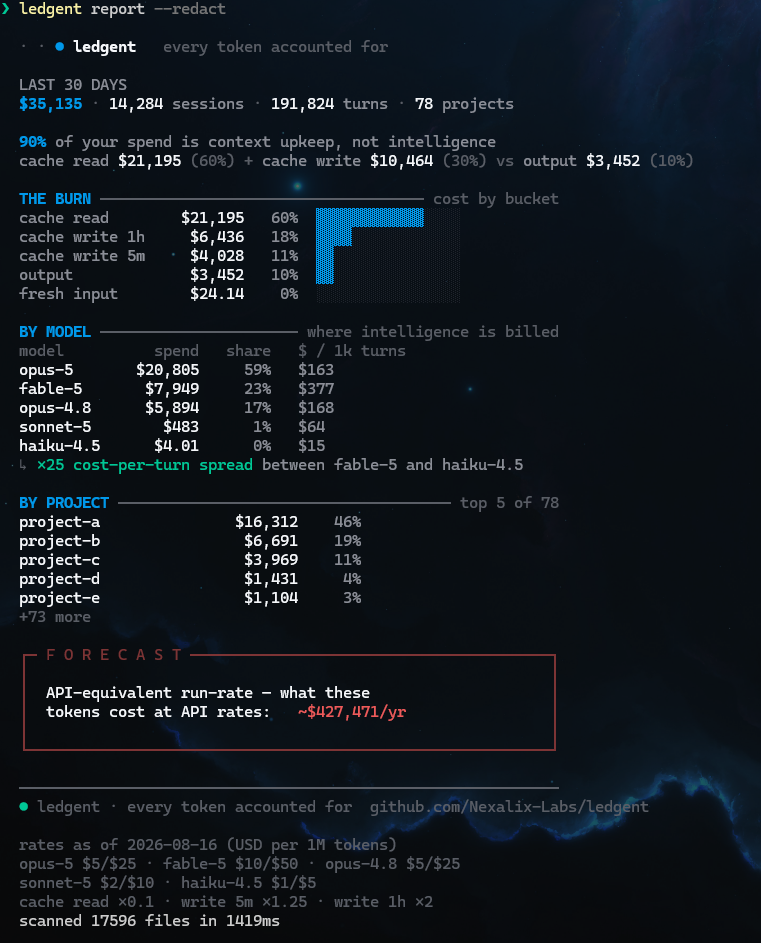
An honest, local cost report for AI coding agents. ledgent reads the session
logs Claude Code already writes to your disk and turns invisible token spend into
a legible number — zero API calls, zero network, your data stays on your machine.
The headline it surfaces is usually uncomfortable: on real agent workloads the
large majority of spend is context upkeep — re-reading and re-writing cached
context — not generation. ledgent shows you exactly where it goes.
Install
# npm (global)
npm install -g @nexalix/ledgent

# or a self-contained, self-updating install (no npm)
curl -fsSL https://raw.githubusercontent.com/Nexalix-Labs/ledgent/main/install.sh | sh   # macOS / Linux
irm https://raw.githubusercontent.com/Nexalix-Labs/ledgent/main/install.ps1 | iex        # Windows
Requires Node.js ≥ 18. Or run without installing: npx @nexalix/ledgent report.
Tested on macOS, Linux, and Windows.
Windows PowerShell may block
npx/npmwith "running scripts is disabled on this system" — that's PowerShell's execution policy, not ledgent (it blocks every npm tool). Run it fromcmd.exe, usenpx.cmd @nexalix/ledgent report, or enable scripts once:Set-ExecutionPolicy -Scope CurrentUser RemoteSigned.
Usage
ledgent report                 # full report, last 30 days
ledgent report --brief         # five-line summary (great for a screenshot)
ledgent report --json          # machine-readable
ledgent report --all           # ignore the window, scan everything
ledgent report --days 7        # a different window
ledgent report --project foo   # only sessions whose path contains "foo"
ledgent report --redact        # replace project names with project-a/b/c
ledgent report --prices px.json  # override model prices (new models, your discount)
ledgent update                 # check GitHub & install the latest (asks first)
ledgent --version
What it measures
Every billable assistant event is priced across five distinct buckets at published per-model rates and the buckets are guaranteed to reconcile to the total:
| bucket | rate | what it is | |---|---|---| | fresh input | 1× | new, uncached input tokens | | cache read | 0.1× | re-read of cached context | | cache write 5m | 1.25× | 5-minute cache creation | | cache write 1h | 2× | 1-hour cache creation | | output | — | generated tokens |
From that it derives the context-upkeep % (cache read + cache write over
total), a per-model and per-project ranking, a ×N cost-per-turn spread between
your priciest and cheapest model, single-project concentration, and an annual
run-rate forecast.
Dollar figures are API-equivalent — what the tokens would cost at API rates. If you run agents on a subscription you did not literally pay them; the number is what the same work costs a la carte, which is the honest basis for comparison.
Prices are the published sticker rates, catalogued per model version because
the rate moves within a family — Sonnet 5 bills $2/$10 while Sonnet 4.6 bills
$3/$15, and the retired Opus 4.1 is 3× the current Opus. Fast mode
(usage.speed, what Claude Code's /fast toggles) is the same model served
faster at 2×, so an Opus 5 fast turn is priced $10/$50 and reported on its own
opus-5:fast row. Context size never changes the per-token rate: there is no
long-context premium tier. A model with no catalogued rate falls back to the
nearest version of its family, is flagged ~est, and can be corrected with
--prices (keyed exactly as the rates footer prints them).
ledgent vs ccusage
ccusage is excellent at how much — your Claude Code spend, per day and per model. ledgent asks why: it splits the same tokens into cost buckets, so you can see that most of the bill is context upkeep (cache reads and writes), not generation — and what's next, projecting the real usage-credit spend you'll actually owe. Same logs, different question; use both.
Updates & network
ledgent makes zero network calls by default. The report is fully offline — it never phones home, never checks for updates, and sends nothing.
The only command that touches the network is ledgent update, and only when you
run it: it checks GitHub Releases, shows the target version and a release-notes
link, asks for confirmation, verifies the download (sha256 — plus an ed25519
signature when one is configured) and atomically swaps the binary with a .bak
rollback. Major-version jumps are never applied without your say-so.
If you want hands-off updates on a self-contained install, opt in with
ledgent update --auto on (turn off with --auto off, or set
LEDGENT_NO_UPDATE=1). npm installs update through npm as usual.
Network calls
| command | network |
|---|---|
| ledgent report (and everything except update) | none |
| ledgent update | one HTTPS GET to api.github.com + the release download |
| background auto-update | only if you opted in with --auto on |
No telemetry, ever. Session contents never leave your machine.
Development
npm install
npm run dev -- report      # run from source (tsx)
npm test                   # pricing catalogue vs the published rate table
npm run verify             # build + test — the release gate
npm run build              # tsc → dist (npm bin)
npm run bundle             # esbuild → dist/ledgent.mjs (single-file OTA artifact)
npx tsc --noEmit           # typecheck
Zero runtime dependencies. Built spec-driven against a fixed design (ledgent
report renders to a dark, JetBrains-Mono, 80-column terminal spec — eight
colors, box-drawing callouts, saturated color reserved for meaning).
npm test checks the rate catalogue against the numbers published on
Anthropic's pricing page,
cache columns included — so the derived 0.1×/1.25×/2× multipliers are verified
against an independent source rather than restated. Prices are data with a date:
when they move, update PRICES and RATES_AS_OF in src/pricing.ts together
and the test tells you whether the table still agrees with the page.
License
Apache-2.0 · a Nexalix project · built in public.