
@nextcloud/vue
v9.13.1
Published
Nextcloud vue components


Readme
@nextcloud/vue


🖼️ UI Kit for building Nextcloud apps with Vue
- ✨ Standardized UI Components
- 🛠️ Composables and frontend utilities
- 🔗 Reference providers utilities
📄 Documentation
| Version | Target | Documentation | |----------------|-----------------------|-------------------------------------------------------| | v9.x [main] | Nextcloud 31+ (Vue 3) | https://nextcloud-vue-components.netlify.app | | v8.x [stable8] | Nextcloud 28+ (Vue 2) | https://stable8--nextcloud-vue-components.netlify.app | | v7.x [stable7] | Nextcloud 25 - 27 | https://stable7--nextcloud-vue-components.netlify.app | | v6.x [stable6] | Nextcloud 24 - 25 | https://stable6--nextcloud-vue-components.netlify.app |
📦 Install
npm i @nextcloud/vue@next🚀 Usage
Import corresponding components and other modules on use. Check the documentation for more details.
import NcButton from '@nextcloud/vue/components/NcButton'
import { useHotKey } from '@nextcloud/vue/composables/useHotKey'
Import from a single root is available as well. Use with caution: this might lead to slower build time and larger bundles in some cases.
import { NcButton, useHotKey } from '@nextcloud/vue'🤝 Contributing
📜 How to contribute
- It's always good to check/create an issue first and discuss the problem or feature you want to work on
- Fork the repository and create a new branch
- Make the changes
- Check the change in Vue-Styleguidist and/or Nextcloud apps
- Do not forget to
lintandtestyour changes - If possible, add tests and documentation for your changes
- Do not forget to
- Commit and push your changes, create a Pull Request
- Make sure to follow the Conventional Commits in commit messages, and PR titles, for example:
fix(NcButton): correct layout on Safari - Make sure to follow the Pull Request template
- Sign-off you commits for the Developer Certificate of Origin (DCO)
- Make sure to follow the Conventional Commits in commit messages, and PR titles, for example:
- Get your PR reviewed
- If you don't receive a feedback in a week, feel free to mention the maintainers, for example, last developers worked on the module
- Get your PR merged
Please read the Code of Conduct. This document offers some guidance to ensure Nextcloud participants can cooperate effectively in a positive and inspiring atmosphere and to explain how together we can strengthen and support each other.
More information on how to contribute: https://nextcloud.com/contribute/
🧑💻 Development setup
First, install dependencies with npm:
npm ci🐸 Development with Styleguidist
The simplest way to develop and debug @nextcloud/vue is to use our live documentation via vue-styleguidist.
Run the development server with component documentation and playground:
npm run styleguideYou can also test if the design still works with a legacy Nextcloud version by setting NEXTCLOUD_LEGACY ENV variable.
NEXTCLOUD_LEGACY=y npm run styleguideUnit tests
npm run testComponent tests
[!TIP] We use Playwright for component tests.
If you don't meet the system requirements, try the provided Development Container.
It also matches the CI environment, so snapshots taken with it are less likely to break in CI.
npm run test:component # or test:component:gui☁️ Development with Nextcloud apps
To test or debug @nextcloud/vue in Nextcloud app you need to pack the library and install it in the app.
- In
nextcloud-vue:- Build the library with:
npm run devfor development buildnpm run buildfor production build
- Pack with
npm pack
- Build the library with:
- In the Nextcloud app:
- Install the packed file by path to the file, for example:
npm install --no-save ../../../nextcloud-vue-9.3.1.tgz - Rebuild the app or run it in
watchmode - To remove the linked package, reinstall dependencies with
npm ci
- Install the packed file by path to the file, for example:
- Repeat every time you do a change in
@nextcloud/vue - Do not commit the created
.tgzfile
[!WARNING] Do not use
npm linkWhile it is a simple and popular way to connect a local npm package to another package, it doesn't have proper dependency resolution which leads to issues. Adding a package via
npm packdoes exactly the same as installing a published package.
🌐 Translations
Use t and n functions from src/l10n.js to display translated strings. They follow gettext and ngettext interface from @nextcloud/l10n/gettext.
<script setup lang="ts">
import { t } from '../../l10n.js'
</script>

<template>
	<element>
		{{ t('Choose') }}
	</element>
</template>
When you edit/create a translated string, you need to update the l10n files. Our awesome translation community will then be notified and a bot will sync translations automatically.
npm run l10n:extract📤 Releasing a new version
- Pull the latest changes from
mainorstableX - Checkout a new branch with the tag name (e.g
v4.0.1):git checkout -b v<version> - Run
npm version patch --no-git-tag-version(npm version minor --no-git-tag-versionif minor). This will return a new version name, make sure it matches what you expect - Generate the changelog content from the release page.
Create a draft release, select the previous tag, click
generatethen paste the content to theCHANGELOG.mdfile- adjust the links to the merged pull requests and authors so that the changelog also works outside of GitHub
by running
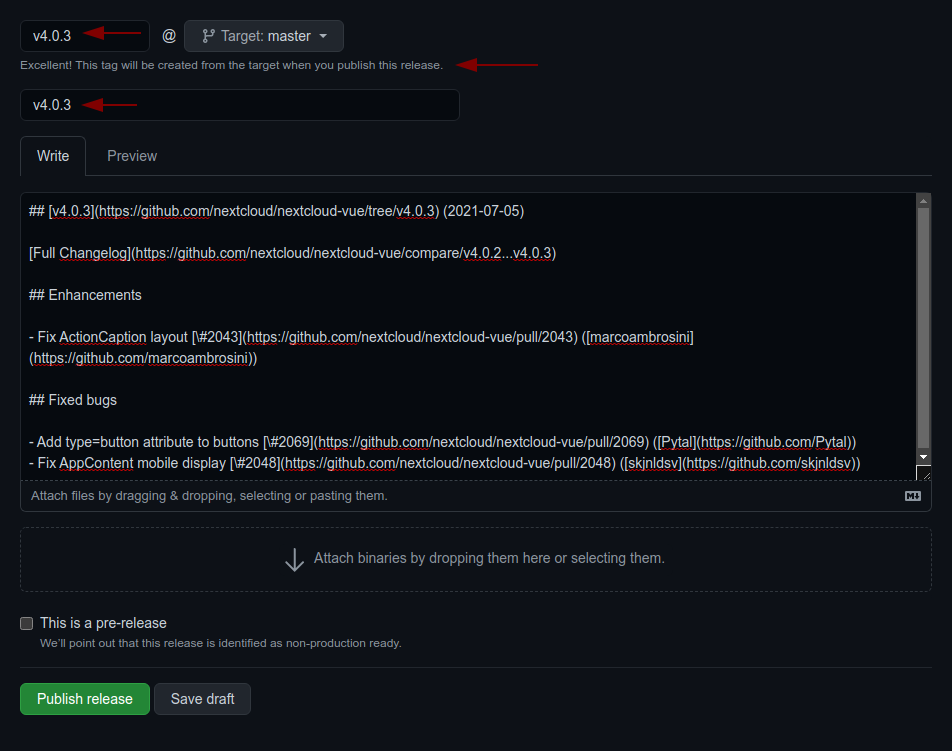
npm run prerelease:format-changelog. This will apply this regex:by @([^ ]+) in ((https://github.com/)nextcloud-libraries/nextcloud-vue/pull/(\d+))Which this as the replacement:[\#$4]($2) \([$1]($3$1)\) - use the the version as tag AND title (e.g
v4.0.1) - add the changelog content as description (https://github.com/nextcloud-libraries/nextcloud-vue/releases)
- adjust the links to the merged pull requests and authors so that the changelog also works outside of GitHub
by running
- Commit, push and create PR
- Get your PR reviewed and merged
- Create a milestone with the follow-up version at https://github.com/nextcloud-libraries/nextcloud-vue/milestones
- Move all open tickets and PRs to the follow-up
- Close the milestone of the version you release
- Publish the previously drafted release on GitHub
Releasing a pre-release
A pre-release can be built in the same way as described above, however it requires manual adjustments to avoid that npm ships the pre-release to all users:
Retag latest to the last stable release
npm dist-tag add @nextcloud/[email protected] latest
Tag the new pre-release as next
npm dist-tag add @nextcloud/[email protected] next