
@nextdj/file-explorer
v1.0.16
Published
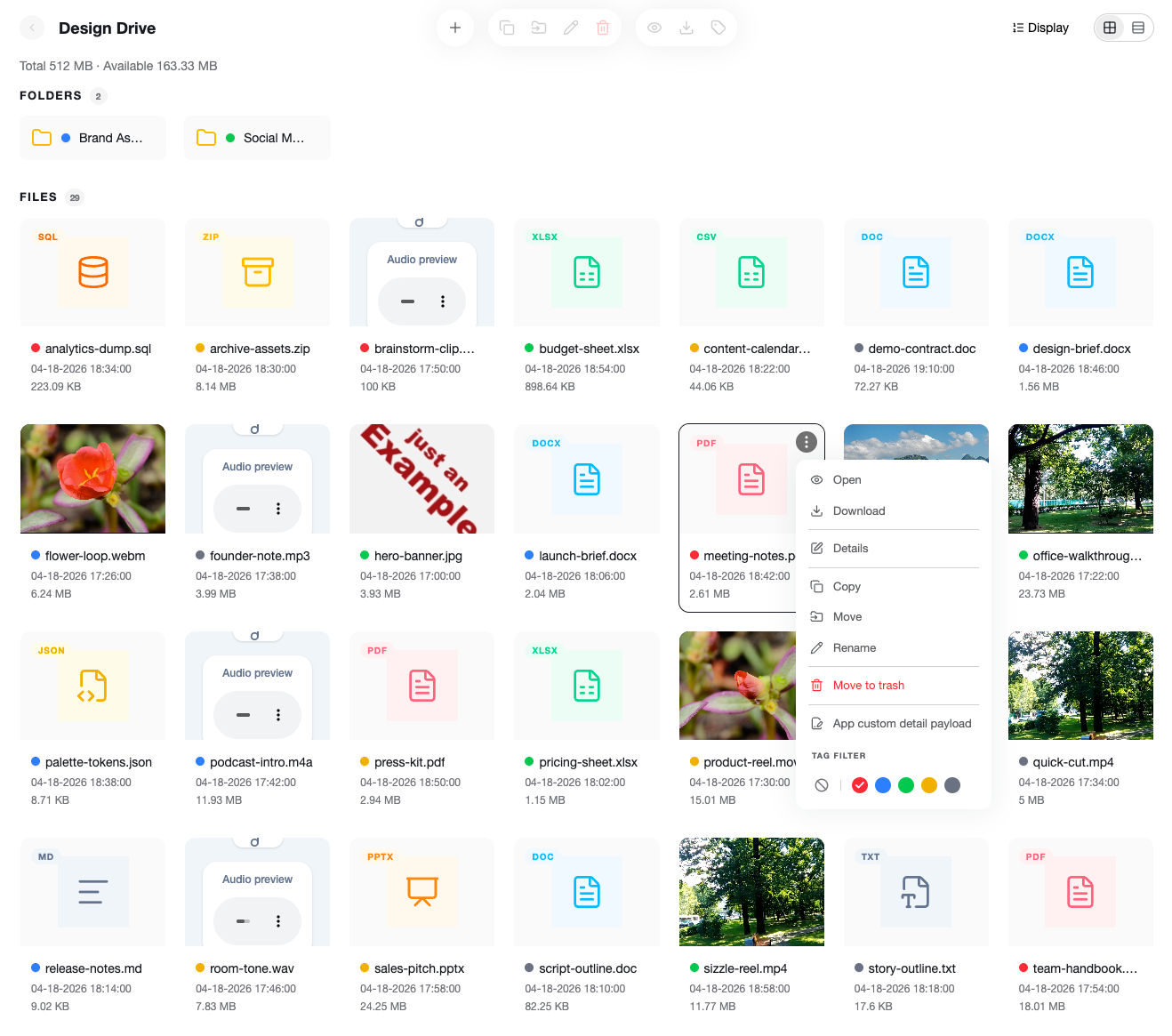
A React file explorer component with uploads, context menus, detail panels, and app-side extensibility.

Maintainers
 nextdj
Readme
@nextdj/file-explorer
一个适合在应用侧集成的 React 文件浏览器组件。
其他语言:
在线示例:
安装
pnpm add @nextdj/file-explorer全局样式中加入:
@import "tailwindcss";
@import "@nextdj/file-explorer/theme.css";
@source "../node_modules/@nextdj/file-explorer/dist/**/*.js";
最小可运行示例
import { FileExplorer, type FileExplorerData } from "@nextdj/file-explorer";

const data: FileExplorerData = {
  breadcrumbs: [{ id: "root", name: "Home" }],
  files: [
    {
      id: "folder-1",
      name: "项目",
      type: "folder",
      updatedAt: new Date().toISOString(),
    },
    {
      id: "file-1",
      name: "readme.txt",
      type: "file",
      size: 1024,
      extension: "txt",
      updatedAt: new Date().toISOString(),
      mimeType: "text/plain",
      mediaType: "file",
    },
  ],
};

export default function Page() {
  return <FileExplorer data={data} />;
}
常用完整示例
import {
  FileExplorer,
  type FileExplorerData,
  type TransferDataSource,
} from "@nextdj/file-explorer";

const data: FileExplorerData = {
  breadcrumbs: [{ id: "root", name: "Home" }],
  files: [
    {
      id: "folder-1",
      name: "项目",
      type: "folder",
      updatedAt: new Date().toISOString(),
    },
    {
      id: "file-1",
      name: "规格说明.pdf",
      type: "file",
      size: 204800,
      extension: "pdf",
      updatedAt: new Date().toISOString(),
      mimeType: "application/pdf",
      mediaType: "file",
    },
  ],
};

const dataSource: TransferDataSource[] = [
  {
    id: "local",
    name: "本地文档",
    list: [{ id: "local", name: "本地文档" }],
  },
];

export default function Page() {
  return (
    <FileExplorer
      data={data}
      dataSource={dataSource}
      onOpen={(file) => {
        console.log("open file", file);
      }}
      onOpenFolder={(folder) => {
        console.log("open folder", folder);
      }}
      onNavigateBreadcrumb={(item) => {
        console.log("breadcrumb", item);
      }}
      onCreate={async ({ name, type, parentId, source }) => {
        console.log("create", { name, type, parentId, source });

        return {
          id: `created-${Date.now()}`,
          name,
          type,
          parentId,
        };
      }}
      onRename={async ({ id, name }) => {
        console.log("rename", { id, name });
      }}
      onDelete={async (entries) => {
        console.log("delete", entries);
      }}
      onCopy={async ({ entries, destination }) => {
        console.log("copy", { entries, destination });
      }}
      onMove={async ({ entries, destination }) => {
        console.log("move", { entries, destination });
      }}
      loadDataSourceFolder={async (source, target) => {
        console.log("load data source folder", { source, target });

        return {
          breadcrumbs: [{ id: target.id, name: target.name }],
          files: [],
        };
      }}
    />
  );
}
常见配置
单选 / 多选、Grid 尺寸、统一字号与主题
<FileExplorer
  data={data}
  allowMultiSelect={false}
  gridSize="lg"
  fontSize="sm"
  theme="dark"
/>
支持:
"sm""md""lg"
fontSize 也支持:
"sm""md""lg"
theme 支持:
"light""dark"
默认视图与默认排序
<FileExplorer
  data={data}
  defaultViewMode="list"
  defaultSortField="updatedAt"
  defaultSortDirection="desc"
/>
受控视图与排序
<FileExplorer
  data={data}
  viewMode={viewMode}
  onViewModeChange={setViewMode}
  sortField={sortField}
  sortDirection={sortDirection}
  onSortChange={(field, direction) => {
    setSortField(field);
    setSortDirection(direction);
  }}
/>
自定义列表列
<FileExplorer
  data={data}
  defaultViewMode="list"
  listColumns={[
    {
      key: "deletedAt",
      label: "删除时间",
      width: "180px",
      sortable: true,
      render: (_, record) => record.metadata?.deletedAt ?? "--",
      sortValue: (record) =>
        record.metadata?.deletedAt
          ? new Date(record.metadata.deletedAt).getTime()
          : 0,
    },
  ]}
/>
说明:
- 自定义列会追加在默认列后面、操作列前面。
- 如果自定义字段需要排序,建议传
sortValue(record)。
如果你想完整接管默认列,建议使用 getListColumns。
比如:隐藏 size、调整顺序、再新增一个“删除时间”列:
<FileExplorer
  data={data}
  defaultViewMode="list"
  getListColumns={(defaultColumns) => {
    const name = defaultColumns.find((col) => col.key === "name")!;
    const type = defaultColumns.find((col) => col.key === "type")!;
    const updatedAt = defaultColumns.find((col) => col.key === "updatedAt")!;
    const actions = defaultColumns.find((col) => col.key === "__actions__")!;

    return [
      name,
      {
        key: "deletedAt",
        label: "删除时间",
        width: "180px",
        sortable: true,
        render: (_, record) => record.metadata?.deletedAt ?? "--",
        sortValue: (record) =>
          record.metadata?.deletedAt
            ? new Date(record.metadata.deletedAt).getTime()
            : 0,
      },
      type,
      updatedAt,
      actions,
    ];
  }}
/>
默认的操作列也包含在 defaultColumns 里,它的 key 是 __actions__,所以你也可以删除、移动或替换它。
例如:彻底删除操作列
<FileExplorer
  data={data}
  defaultViewMode="list"
  getListColumns={(defaultColumns) =>
    defaultColumns.filter((col) => col.key !== "__actions__")
  }
/>
例如:用你自己的按钮替换操作列
<FileExplorer
  data={data}
  defaultViewMode="list"
  getListColumns={(defaultColumns) =>
    defaultColumns.map((col) =>
      col.key === "__actions__"
        ? {
            ...col,
            width: "120px",
            render: (_, record) => (
              <button onClick={() => console.log("自定义操作", record)}>
                自定义
              </button>
            ),
          }
        : col,
    )
  }
/>
头部显示控制
<FileExplorer
  data={data}
  showBreadcrumbs={true}
  showToolbar={true}
  viewControls={{
    showDisplayButton: true,
    showViewToggleButton: true,
    showSortOptions: true,
    showSortDirectionOptions: true,
    showHiddenFileOptions: true,
    showTagFilterOption: true,
  }}
/>
核心参数
| 参数 | 类型 | 说明 |
| --- | --- | --- |
| data | FileExplorerData | 主数据输入,推荐使用。 |
| files | FileNode[] | 旧版拆分输入。 |
| breadcrumbs | BreadcrumbItem[] | 旧版拆分输入。 |
| storageInfo | { totalBytes?: number; availableBytes?: number } | 显示容量信息。 |
| fontSize | "sm" \| "md" \| "lg" | 统一控制组件字号,默认 "md"。 |
| theme | "light" \| "dark" | 主题模式,默认 "light"。 |
| lang | string | 设置语言。 |
| dateFormat | string | 设置时间格式。 |
| renderPreview | (file) => ReactNode | 自定义 grid 预览。 |
| renderDetail | (file) => ReactNode | 自定义详情内容。 |
视图与选择参数
| 参数 | 类型 | 说明 |
| --- | --- | --- |
| allowMultiSelect | boolean | 是否允许多选,默认 true。 |
| gridSize | "sm" \| "md" \| "lg" | Grid 卡片尺寸。 |
| defaultViewMode | "grid" \| "list" | 默认视图模式。 |
| viewMode | "grid" \| "list" | 受控视图模式。 |
| onViewModeChange | (mode) => void | 视图变化回调。 |
| defaultSortField | keyof FileNode \| string | 默认排序字段。 |
| defaultSortDirection | "asc" \| "desc" | 默认排序方向。 |
| sortField | keyof FileNode \| string | 受控排序字段。 |
| sortDirection | "asc" \| "desc" | 受控排序方向。 |
| onSortChange | (field, direction) => void | 排序变化回调。 |
| listColumns | FileListColumn[] | 追加自定义列表列。 |
| getListColumns | (defaultColumns) => FileListColumn[] | 完整控制默认列表列。 |
头部与功能参数
| 参数 | 类型 | 说明 |
| --- | --- | --- |
| showBreadcrumbs | boolean | 控制面包屑是否显示。 |
| showToolbar | boolean | 控制中间工具栏是否显示。 |
| viewControls | FileExplorerViewControls | 控制右侧按钮与显示菜单内容。 |
| toolbarStyle | "default" \| "floating" \| "transparent" | 头部样式。 |
| features | FileExplorerFeatures | 控制内置功能项。 |
| uploadOptions | FileExplorerUploadOptions | 上传配置。 |
| onUploadStateChange | (snapshot) => void | 监听上传状态。 |
转移弹窗参数
| 参数 | 类型 | 说明 |
| --- | --- | --- |
| dataSource | TransferDataSource[] | 复制/移动弹窗中的数据源。 |
| loadDataSourceFolder | (source, target) => Promise<FileExplorerData> | 弹窗中懒加载文件夹。 |
回调参数
| 参数 | 类型 | 说明 |
| --- | --- | --- |
| onOpen | (file) => void | 打开文件时触发。 |
| onOpenFolder | (folder) => void | 打开文件夹时触发。 |
| onNavigateBreadcrumb | (item) => void | 点击面包屑时触发。 |
| onTagColorsChange | (file, colors) => void | 标签颜色变化时触发。 |
| onCreate | (payload) => Promise<{ id; name; type; parentId? } \| void> \| { id; name; type; parentId? } \| void | 主区域和转移弹窗里的创建回调。 |
| onRename | (payload) => void \| Promise<void> | 重命名回调。 |
| onDelete | (entries) => void \| Promise<void> | 删除回调。 |
| onCopy | ({ entries, destination }) => void \| Promise<void> | 复制确认回调。 |
| onMove | ({ entries, destination }) => void \| Promise<void> | 移动确认回调。 |
| appendContextMenuItems | (file) => FileContextMenuItem[] | 追加右键菜单项。 |
| hideContextMenuActions | (file) => FileContextMenuActionId[] | 隐藏内置右键菜单项。 |
| replaceContextMenuActions | (file) => Partial<Record<FileContextMenuActionId, FileContextMenuItem>> | 替换内置右键菜单项。 |
| getContextMenuItems | (file, defaultItems) => FileContextMenuItem[] | 完整覆盖右键菜单。 |
说明
- 这个组件是 UI 层,不是存储 SDK。
- 文件加载、创建、重命名、删除、上传等逻辑由你的 app 自己处理。
onCreate在主文件区和转移弹窗里都会触发;只有弹窗里创建时才会带source。