
@ng-agentic/core
v0.2.1
Published
Production-grade Angular UI components for AI & agent interfaces — streaming chat, tool-calling, reasoning, plans and human-in-the-loop approvals.

Maintainers
 aaronch
Readme
@ng-agentic/core
Agent UI your compliance team can sign off on. Production-grade Angular components for AI & agent interfaces — streaming chat, visible tool-calling, execution plans, human-in-the-loop approvals and AI provenance. Themeable design tokens, accessible (a11y AA), and backend-agnostic through an AG-UI-compatible event contract.




It's a proper component library — installed from npm, themed by design tokens — not a copy-paste snippet kit. The library never talks to an LLM: you connect your own transport (SSE / WebSocket / fixtures) that emits
AgentEvents, and the kit renders them.
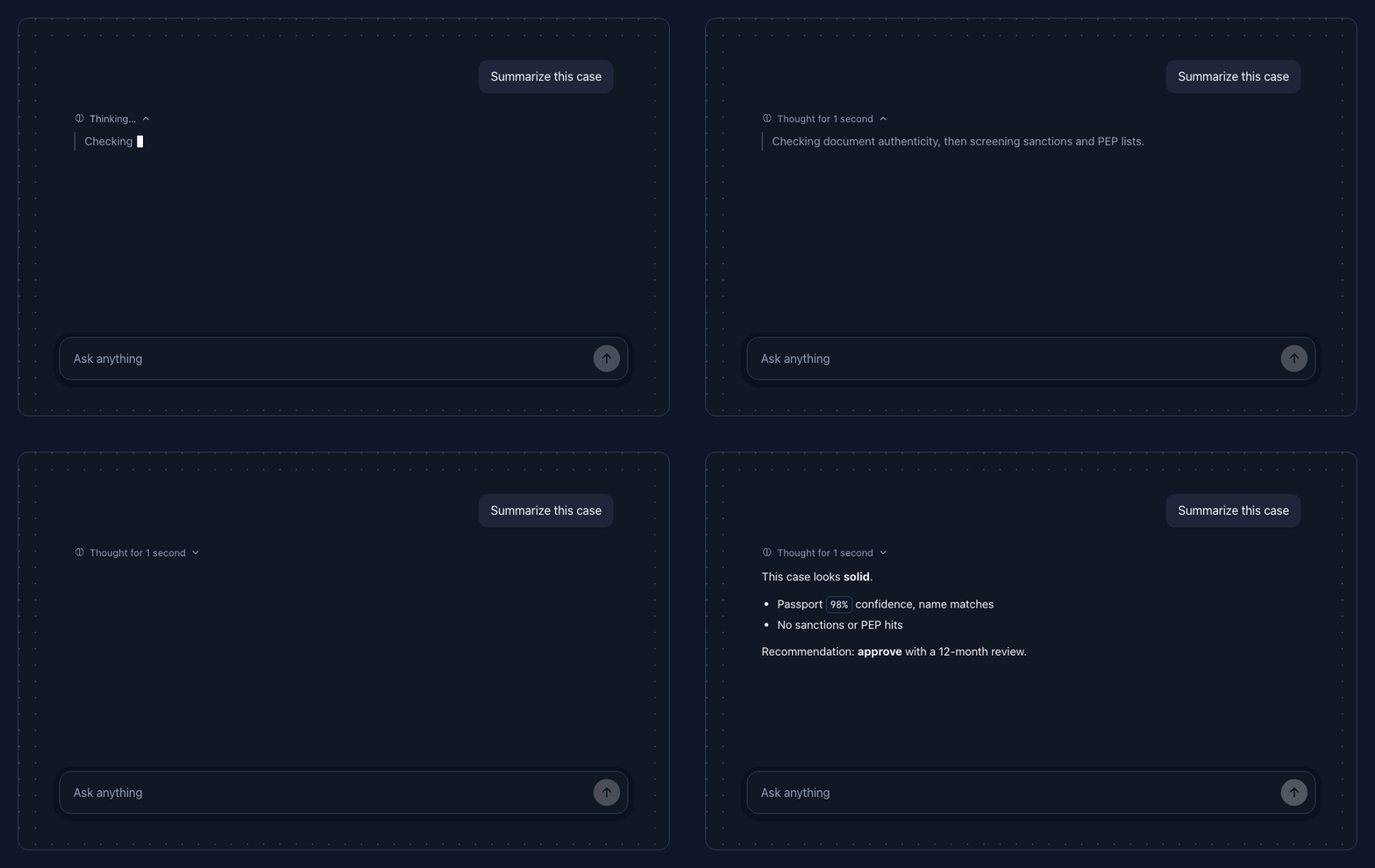
Built for regulated products
In regulated domains — fintech, KYC, legal, health — AI features carry three extra expectations,
and agentic treats them as first-class instead of edge cases:
- A human can intervene —
<agt-approval>gates any action behind approve / edit / reject, with full state tracking (not a bolted-onconfirm()). - AI content is distinguishable from human content — one consistent AI accent and provenance labelling across chat, summaries and form fields.
- Decisions are traceable — visible tool-call cards and execution-trace plans, step by step.
agentic gives you the UI building blocks — compliance itself is your product's job.
Why
Angular has no first-class toolkit for agent UIs. Most options are React-first, chat-only, or force
you to hand-roll streaming, markdown, code highlighting, reasoning traces and provenance. agentic
gives you those as standalone, signal-based, OnPush components that are accessible (a11y AA),
dark-mode aware, and restyle-able without forking CSS.
- Streaming, done right — smooth, controllable markdown reveal with syntax-highlighted code, a live cursor, and a collapsible reasoning trace.
- Agentic, not just chat — tool-calling cards, execution-trace plans, and human-in-the-loop approval gates as first-class components.
- Themeable by tokens — a 3-layer design-token system (primitive → semantic → component) with swappable presets and runtime restyling. No CSS forking.
- Backend-agnostic — connect any transport via a small, AG-UI-compatible event contract. Ships
with
createFixtureTransportfor demos and tests with no API key.
Install
ng add @ng-agentic/coreng add installs @ng-agentic/themes and wires provideAgentic() into your app config for you.
Prefer to do it by hand?
npm i @ng-agentic/core @ng-agentic/themesRequires Angular 21+ (standalone, zoneless-friendly signals).
Quickstart
// app.config.ts
import { provideAgentic } from '@ng-agentic/core';

export const appConfig = {
  providers: [provideAgentic({ theme: { darkModeSelector: '.dark' } })],
};
// case-chat.component.ts
import { Component } from '@angular/core';
import { AgtChat, injectAgent } from '@ng-agentic/core';
@Component({
selector: 'case-chat',
imports: [AgtChat],
template: `<agt-chat [store]="agent" [suggestions]="suggestions" />`,
})
export class CaseChat {
// Bring your own transport (SSE/WebSocket) — or replay a script for demos.
readonly agent = injectAgent({ transport: mySseTransport });
readonly suggestions = ['Summarize this case', 'Any inconsistencies?'];
}injectAgent returns a signal store you can read anywhere:
agent.messages(); // AgentMessage[]
agent.isRunning(); // boolean
agent.plan(); // PlanStep[]
agent.pendingApproval(); // ApprovalRequest | null
agent.send('Summarize this case');
agent.approve(id);
Components
| Component | What it is |
| ------------------ | ---------------------------------------------------------------------------------------------- |
| <agt-chat> | Full chat surface — streaming markdown, code + copy, reasoning trace, empty state, composer. |
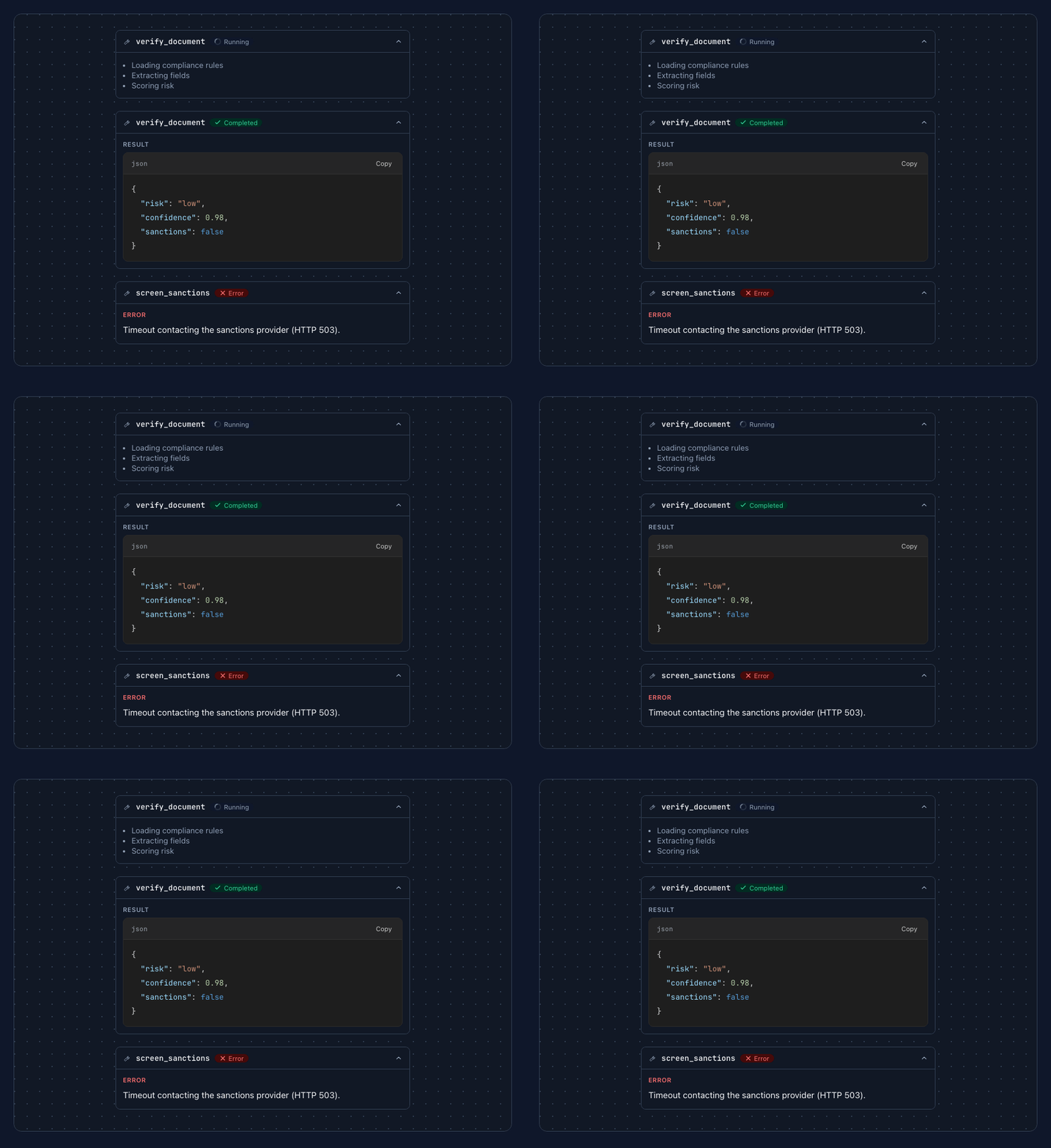
| <agt-tool-call> | Tool invocation card — running (spinner + steps), success (JSON result) or error. |
| <agt-suggestion> | AI form suggestion as ghost text with accept/reject, confidence, and provenance tracking. |
| <agt-summary> | AI-generated summary card — marked as AI content, with regenerate/copy and a loading skeleton. |
| <agt-sidebar> | Collapsible agent side panel with a floating launcher and unread badge (focus + inert). |
| <agt-plan> | Agent execution-trace as a vertical timeline (pending / active / done / error). |
| <agt-approval> | Human-in-the-loop gate — approve, edit or reject an action before the agent proceeds. |
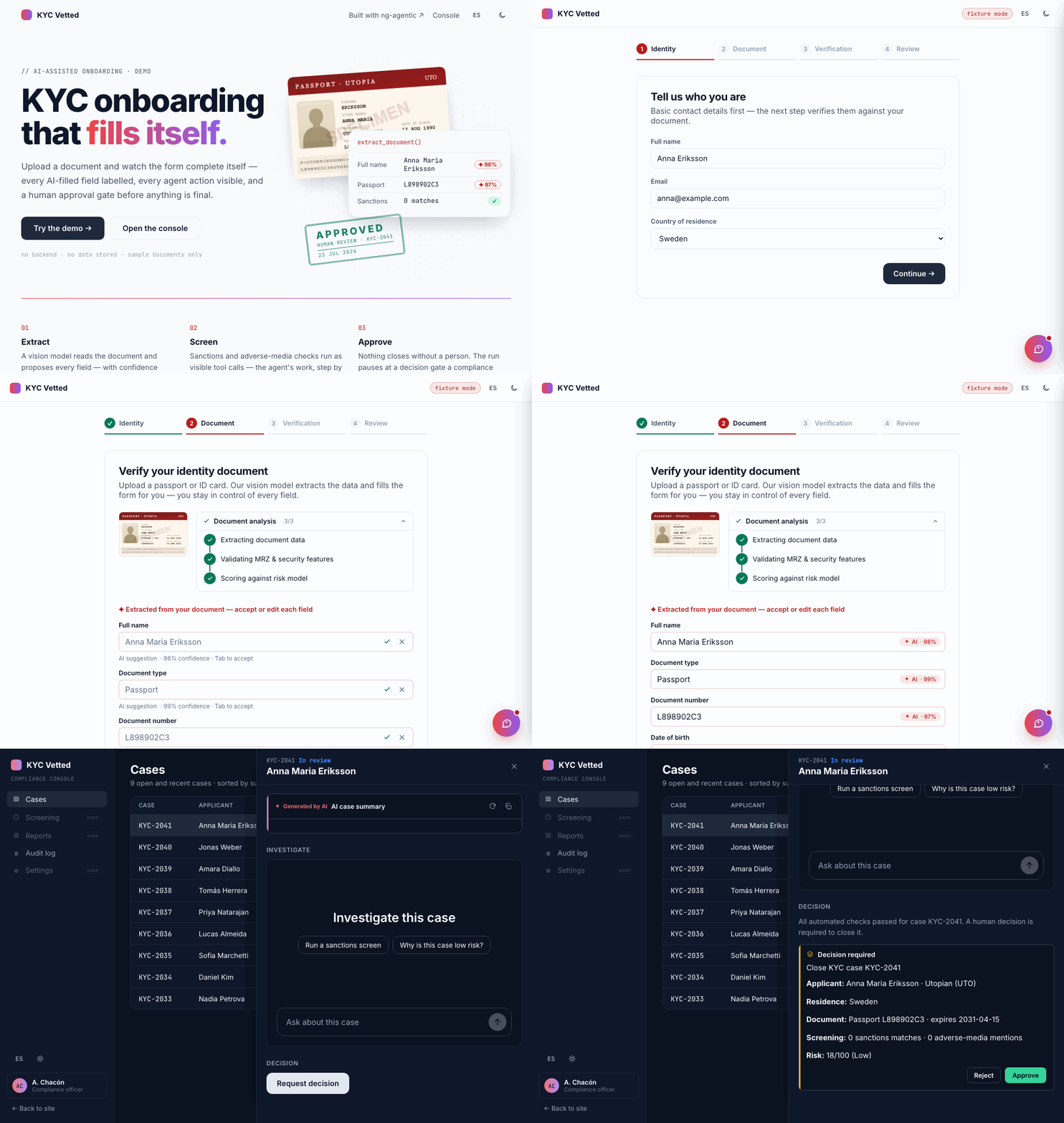
See it in a real product
KYC Vetted — an AI-assisted KYC onboarding demo built entirely on these components, installed from npm: document extraction with a visible plan, per-field AI suggestions with provenance, and a human approval gate in a compliance console. Source.
The contract (AG-UI compatible)
The consumer connects a transport; the library only renders. The event stream is a small, AG-UI-compatible subset:
type AgentEvent =
  | { type: 'reasoning'; delta: string }
  | { type: 'text'; delta: string }
  | { type: 'tool_call'; id: string; name: string; status: 'running' | 'success' | 'error'; detail?: unknown }
  | { type: 'step'; id: string; label: string; status: 'pending' | 'active' | 'done' | 'error' }
  | { type: 'approval_request'; id: string; action: string; payload?: unknown }
  | { type: 'done' }
  | { type: 'error'; message: string };

interface AgentTransport {
  run(input: AgentInput): Observable<AgentEvent>;
}
For demos and tests without a backend, createFixtureTransport(script) replays a recorded sequence
with configurable delays, and pauses on approval_request until you respond.
Theming
Tokens compile to CSS custom properties across three layers — primitive → semantic → component —
so changing one value cascades everywhere. Swap a preset or override any token; nothing forks. See
@ng-agentic/themes for the full token reference.
import { provideAgentic } from '@ng-agentic/core';
import { Aurora, definePreset } from '@ng-agentic/themes';

// A built-in preset (Base = red→violet accent; Aurora = noir, dark-first)...
provideAgentic({ theme: { preset: Aurora, darkModeSelector: '.dark' } });

// ...or your own brand, merged on top of one:
const Brand = definePreset(Aurora, {
  semantic: { colorScheme: { light: { ai: { color: '#e11d48' } } } },
});
Restyle at runtime with AgenticThemeService (setPreset, updatePreset, toggleDarkMode).
Labels & i18n
Every built-in string (status badges, buttons, aria-labels, hints) is provided through the
AGT_LABELS token and defaults to English (AGT_DEFAULT_LABELS). Override it via
provideAgentic({ labels }) — with a static object for a single locale:
import { provideAgentic, AGT_DEFAULT_LABELS, type AgtLabels } from '@ng-agentic/core';

const es: AgtLabels = {
  ...AGT_DEFAULT_LABELS,
  approval: {
    approve: 'Aprobar',
    reject: 'Rechazar',
    edit: 'Editar',
    approved: 'Aprobado',
    rejected: 'Rechazado',
  },
  plan: {
    statuses: { pending: 'Pendiente', active: 'En curso', done: 'Completado', error: 'Fallido' },
  },
  reasoning: {
    thinking: 'Pensando…',
    thoughtFor: (s) => `Pensó durante ${s} segundo${s === 1 ? '' : 's'}`,
    thoughtForUnknown: 'Pensó durante unos segundos',
  },
  // …override as much or as little as you need, spreading the defaults for the rest.
};

provideAgentic({ labels: es });
…or with a Signal<AgtLabels> for live language switching — components re-render when it changes:
import { computed, signal } from '@angular/core';

const locale = signal<'en' | 'es'>('en');
const labels = computed(() => (locale() === 'es' ? es : AGT_DEFAULT_LABELS));

provideAgentic({ labels }); // locale.set('es') switches every component live
Per-instance strings (title, placeholder, emptyTitle, …) remain regular inputs.
Accessibility
Keyboard-first, role/aria-live/inert where it matters, focus management in the sidebar,
prefers-reduced-motion honored, and AA-contrast defaults.
Documentation
- Docs site (Analog.js) — live component demos, API tables, and a theming playground.
/llms.txt— the docs as plain text for LLMs (llmstxt.org).
License
MIT © Aaron Chacón