
@ngnyan/data-table
v1.0.23
Published
A customizable and accessible React data table component with sorting, searching, pagination and action buttons.

Maintainers
 ngnyan
Readme
@ngnyan/data-table


A customizable and accessible React data table component with sorting, searching, and action buttons.
Preview
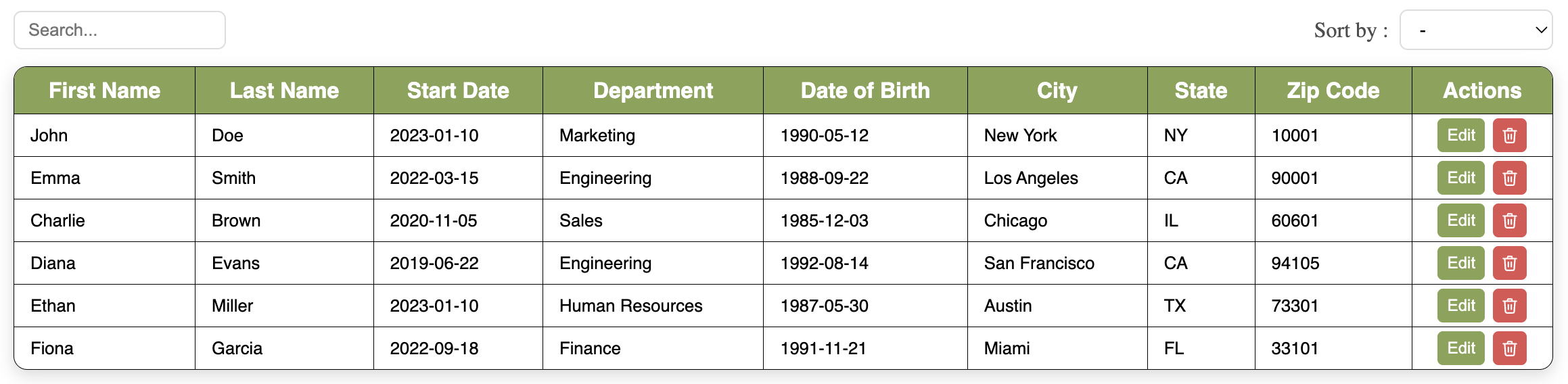
Features
- 🎨 Customizable styles
- 🔍 Searchable table
- 🔃 Sortable columns (dropdown or header click)
- ✏️ Row actions (edit / delete)
- ♿ Accessible
Installation
Install the package in your project :
npm install @ngnyan/data-tableImport the CSS in your project :
import "@ngnyan/data-table/dist/data-table.css";Prerequisites
- Node.js >= 18.0.0
- React 18 or 19
Peer Dependencies
This package requires the following peer dependencies to be installed in your project :
npm install react react-dom| Package | Version |
|---|---|
| react | ^18.0.0 or ^19.0.0 |
| react-dom | ^18.0.0 or ^19.0.0 |
Usage
import { DataTable } from "@ngnyan/data-table";
import "@ngnyan/data-table/dist/data-table.css";

const columns = [
  { key: "firstName", title: "First Name", type: "string" },
  { key: "lastName", title: "Last Name", type: "string" },
  { key: "startDate", title: "Start Date", type: "date" },
];

const data = [
  { id: "1", firstName: "John", lastName: "Doe", startDate: "2023-01-10" },
  { id: "2", firstName: "Emma", lastName: "Smith", startDate: "2022-03-15" },
];

function App() {
  return <DataTable columns={columns} data={data} />;
}
Requirements
- React 18 or 19
- Each row in
datamust have a uniqueidfield for stable sorting and filtering
Columns
Each column is an object with the following properties :
| Property | Type | Required | Description |
|---|---|---|---|
| key | string | ✅ | The key matching the field name in your data object |
| title | string | ✅ | The label displayed in the column header |
| type | string | ❌ | "string" or "date" — used for correct sorting |
const columns = [
  { key: "firstName", title: "First Name", type: "string" },
  { key: "lastName", title: "Last Name", type: "string" },
  { key: "dateOfBirth", title: "Date of Birth", type: "date" },
  { key: "startDate", title: "Start Date", type: "date" },
  { key: "department", title: "Department", type: "string" },
];
Data
Each row in data is an object. The keys must match the key defined in your columns.
const data = [
  {
    id: "1",
    firstName: "John",
    lastName: "Doe",
    dateOfBirth: "1990-05-12",
    startDate: "2023-01-10",
    department: "Marketing",
  },
  {
    id: "2",
    firstName: "Emma",
    lastName: "Smith",
    dateOfBirth: "1988-09-22",
    startDate: "2022-03-15",
    department: "Engineering",
  },
];
Note: Each row must have a unique
idfield. It is used internally for stable sorting and filtering. We recommend usingcrypto.randomUUID()to generate unique ids.
const newEmployee = {
  id: crypto.randomUUID(),
  firstName: "John",
  ...
}
Props
Display
These props allow you to customize the appearance of the table.
| Prop | Type | Default | Description |
|---|---|---|---|
| columns | array | required | Column definitions — see Columns |
| data | array | required | Row data — see Data |
| headerBgColor | string | "#cccccc" | Header background color |
| headerFontColor | string | "#FFFFFF" | Header text color |
| fontFamily | string | "sans-serif" | Table font family |
| borderColor | string | "#000000" | Table border color |
| boxShadow | string | "0px 4px 12px rgba(0,0,0,0.15)" | Table box shadow |
Search
These props allow you to add a search input above the table to filter rows.
| Prop | Type | Default | Description |
|---|---|---|---|
| searchable | bool | false | Enable the search input |
| searchPosition | "left" \| "right" | "left" | Position of the search input |
<DataTable
  columns={columns}
  data={data}
  searchable={true}
  searchPosition="left"
/>
Dropdown sort
These props allow you to add a sort dropdown above the table to sort rows by a selected column.
| Prop | Type | Default | Description |
|---|---|---|---|
| sortable | bool | false | Enable the sort dropdown |
| sortPosition | "left" \| "right" | "right" | Position of the sort dropdown |
| sortPlaceholder | string | "Sort by" | Default text displayed in the dropdown |
| sortLabel | string | "" | Label displayed before the dropdown |
<DataTable
  columns={columns}
  data={data}
  sortable={true}
  sortPosition="right"
  sortPlaceholder="-"
  sortLabel="Sort by :"
/>
Header sort
These props allow you to sort rows by clicking directly on a column header.
| Prop | Type | Default | Description |
|---|---|---|---|
| headerSortable | bool | false | Enable sorting by clicking column headers |
<DataTable
  columns={columns}
  data={data}
  headerSortable={true}
/>
Note:
sortableandheaderSortablecan be used together. They share the same sort state.
Actions
These props allow you to add edit and delete buttons on each row. The column only appears if at least one of onEdit or onDelete is provided.
| Prop | Type | Default | Description |
|---|---|---|---|
| onEdit | function | undefined | Called with the row data when the Edit button is clicked |
| onDelete | function | undefined | Called with the row data when the Delete button is clicked |
| actionEditColor | string | "#cccccc" | Edit button background color |
| actionDeleteColor | string | "#e05252" | Delete button background color |
<DataTable
  columns={columns}
  data={data}
  onEdit={(row) => console.log("Edit", row)}
  onDelete={(row) => console.log("Delete", row)}
  actionEditColor="#87A353"
  actionDeleteColor="#e05252"
/>
Note: The
rowparameter contains all the data of the clicked row, including theidfield.
Accessibility
These props allow you to customize the accessible labels for screen readers. All have default values in English.
| Prop | Type | Default | Description |
|---|---|---|---|
| tableLabel | string | "Data table" | Accessible label for the table |
| searchLabel | string | "Search" | Accessible label for the search input |
| sortByLabel | string | "Sort by column" | Accessible label for the sort dropdown |
| toggleDirectionLabel | string | "Switch sort order" | Accessible label for the sort direction button |
| editLabel | string | "Edit" | Accessible label for the edit button |
| deleteLabel | string | "Delete" | Accessible label for the delete button |
| previousLabel | string | "Previous page" | Accessible label for the previous page button |
| nextLabel | string | "Next page" | Accessible label for the next page button |
<DataTable
  columns={columns}
  data={data}
  tableLabel="Employees list"
  editLabel="Edit employee"
  deleteLabel="Delete employee"
  previousLabel="Previous page"
  nextLabel="Next page"
/>
Examples
Basic table
<DataTable columns={columns} data={data} />Custom header color
<DataTable
  columns={columns}
  data={data}
  headerBgColor="#87A353"
  headerFontColor="#FFFFFF"
/>
With sort dropdown
<DataTable
  columns={columns}
  data={data}
  sortable={true}
  sortPosition="right"
  sortLabel="Sort by :"
  sortPlaceholder="-"
/>
With header click sorting
<DataTable
  columns={columns}
  data={data}
  headerSortable={true}
/>
With search
<DataTable
  columns={columns}
  data={data}
  searchable={true}
  searchPosition="left"
/>
With action buttons
<DataTable
  columns={columns}
  data={data}
  onEdit={(row) => console.log("Edit", row)}
  onDelete={(row) => console.log("Delete", row)}
  actionEditColor="#87A353"
  actionDeleteColor="#e05252"
/>
Pagination
<DataTable
  columns={columns}
  data={data}
  pagination={true}
  rowsPerPage={5}
  paginationBgColor="#87A353"
  paginationActiveTextColor="#FFFFFF"
  paginationTextColor="#000000"
/>
Full example
import { DataTable } from "@ngnyan/data-table";
import "@ngnyan/data-table/dist/data-table.css";

const columns = [
  { key: "firstName", title: "First Name", type: "string" },
  { key: "lastName", title: "Last Name", type: "string" },
  { key: "dateOfBirth", title: "Date of Birth", type: "date" },
  { key: "startDate", title: "Start Date", type: "date" },
  { key: "department", title: "Department", type: "string" },
];

const data = [
  {
    id: "1",
    firstName: "John",
    lastName: "Doe",
    dateOfBirth: "1990-05-12",
    startDate: "2023-01-10",
    department: "Marketing",
  },
  {
    id: "2",
    firstName: "Emma",
    lastName: "Smith",
    dateOfBirth: "1988-09-22",
    startDate: "2022-03-15",
    department: "Engineering",
  },
];

function App() {
  return (
    <DataTable
      columns={columns}
      data={data}
      headerBgColor="#87A353"
      headerFontColor="#FFFFFF"
      searchable={true}
      searchPosition="left"
      sortable={true}
      sortPosition="right"
      sortPlaceholder="-"
      sortLabel="Sort by :"
      headerSortable={true}
      onEdit={(row) => console.log("Edit", row)}
      onDelete={(row) => console.log("Delete", row)}
      actionEditColor="#87A353"
      actionDeleteColor="#e05252"
    />
  );
}
License
MIT
Author
NGnYan