
@nicoloboschi/sheepit
v1.11.0
Published
Your machine, anywhere — a full-featured terminal in your browser. No tmux required.
Downloads
1,042

Maintainers
 nicoloboschi
Readme
Quick Start
npx @nicoloboschi/sheepitOpen http://localhost:4444 in your browser.
That's it. sheepit spawns and manages your shell sessions directly via a persistent PTY daemon — no tmux, no extra setup.
[!WARNING] sheepit has no authentication and binds to all network interfaces (
0.0.0.0) by default. Anyone who can reach the port gets a full shell on your machine. Only run it on trusted networks, and see Security before exposing it remotely.
Options
npx @nicoloboschi/sheepit --port 8080        # custom port (default: 4444)
npx @nicoloboschi/sheepit --host 127.0.0.1   # bind to localhost only (default: 0.0.0.0)
npx @nicoloboschi/sheepit --log-level debug  # verbose logging
Install globally
npm install -g @nicoloboschi/sheepit
sheepit
Minding the flock
sheepit talks about its terminals the way a shepherd talks about sheep, because once you are running a dozen agents at once the question is never "what is this process" — it is "which one needs me right now".
| Word | Means | |---|---| | Sheep | One terminal. Backed by one shell process. | | Pen | A row in the sidebar: one to four sheep sharing a layout and a name. | | The flock | Every pen you have open. | | Grazing | A sheep working away on its own — a command is still running. | | Bleating | A sheep that wants you. It asked a question and is waiting on an answer. |
A pen is the enclosure rather than the animals in it: it keeps its name, layout and place in the sidebar whether or not anything is running, which is why closing a pen closes what it holds. And the plural of sheep is sheep — three sheep, one sheep, never sheeps.
The sidebar counts both at a glance, and the pasture along its bottom edge puts one sheep in the grass per pen — the bleating ones hop and call out, the grazing ones keep their heads down. It is decoration, but it is decoration that tells you whether anything needs you before you have read a single word.
These are the words the interface uses. Underneath, the server and its API keep the ordinary ones — a sheep is a pane and a pen is a workspace — so nothing on the wire needs to know about livestock.
Features
- Terminal in the browser — full xterm.js terminal with mouse, scroll, and color support
- Persistent sessions — PTY daemon keeps your shells alive across server restarts, no tmux needed
- Pre-warmed shell pool — new panes open instantly, no shell-startup lag
- Pens + split panes — single, horizontal, vertical, three-pane (4 variants), and 2×2 grid layouts
- Drag & drop everywhere — reorder pens, swap panes within a pen, move panes between pens, or extract a pane into a new pen
- Zen mode + shareable links — focus a single pane, and the URL always points at the pen (and pane) you're looking at, so you can bookmark it or reopen it later
- Bleating / grazing at a glance — every pane says whether it is running, waiting on you, or idle, from the sidebar and from your phone
- Git integration — branch status, PR links, diff viewer, worktree management
- File browser — navigate, edit, and preview files with syntax highlighting; open files refresh live when something else rewrites them on disk
- Search — grep across your project from the browser
- AI session naming — panes get auto-named based on terminal activity (requires the
claudeorcodexCLI) - Saved commands — keep the commands you run often a click away
- Knowledge notes — scratch markdown notes kept alongside your sessions
- Mobile-friendly — responsive UI with touch scrolling and a tap-only pen list
- File upload — drop files from your desktop onto any terminal to upload and paste the path
- Light and dark — both themes recolour the ANSI palette too, live, without restarting a running session
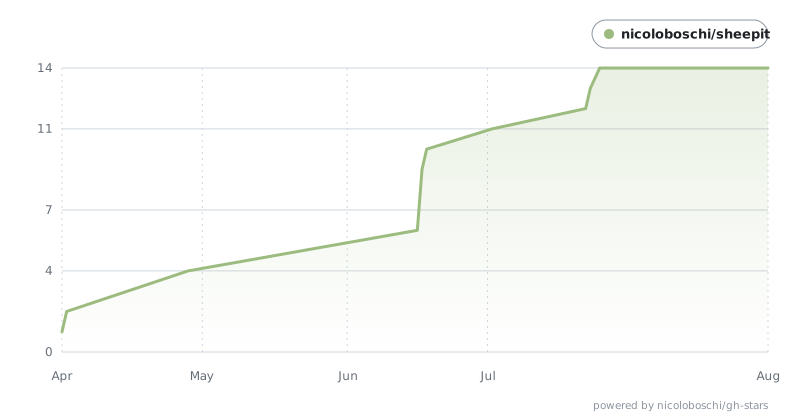
Star History
Security
sheepit gives the browser a real shell on the host — it is as powerful as an
SSH session, but without any authentication. By default the server binds to
0.0.0.0, so it is reachable from every device on your network.
Recommendations:
- Local only: run with
--host 127.0.0.1so nothing outside your machine can connect. - Remote access: keep the bind on localhost and reach it over an SSH tunnel, e.g.
ssh -L 4444:localhost:4444 you@host, then openhttp://localhost:4444locally. - Never expose sheepit directly to the public internet. If you must put it behind a reverse proxy, add authentication (and TLS) at the proxy layer.
Configuration
Settings resolve in this order: command-line flags → environment variables →
~/.config/sheepit/config.json → defaults.
| Setting | Flag | Env var | Default |
|-----------|----------------|----------------------|-----------|
| Host | --host | SHEEPIT_HOST | 0.0.0.0 |
| Port | --port | SHEEPIT_PORT | 4444 |
| Log level | --log-level | SHEEPIT_LOG_LEVEL | info |
Example ~/.config/sheepit/config.json:
{
  "host": "127.0.0.1",
  "port": 4444,
  "logLevel": "info"
}
Upgrading from vipershell
sheepit was called vipershell until the rebrand. Nothing is read from the old locations any more — the config directory, the state directory and the stored preference keys all moved — so an existing install needs one explicit cutover:
./scripts/migrate-from-vipershell.sh --dry-run   # show the plan
./scripts/migrate-from-vipershell.sh             # do it
It moves ~/.config/vipershell → ~/.config/sheepit and ~/.vipershell →
~/.sheepit, re-keys every vipershell:* entry in preferences.json to
sheepit:* (keeping a .pre-sheepit.bak alongside it), and uninstalls the old
vipershell@vipershell agent plugin from Claude Code and Codex — the server
installs sheepit@sheepit on its next start.
Running shells survive. The PTY daemon is reached through a unix socket
inside the config directory, and a socket is bound by inode rather than by
path, so it keeps serving through a rename of its parent — the next sheepit
start reconnects to the same daemon process and finds every shell where it left
it. Stop the server before running the script (the daemon ignores SIGTERM and
stays up on its own); the script refuses to run if either destination already
exists, rather than merging two layouts.
The VIPERSHELL_HOST / _PORT / _LOG_LEVEL environment variables are gone
too — use the SHEEPIT_* names.
Requirements
- Node.js 18+
- Linux only: a C/C++ build toolchain for
node-pty, since it has no Linux prebuilt binaries and compiles from source —python3,make, andg++(e.g.apt install -y build-essential python3). macOS and Windows use prebuilt binaries and need nothing extra.
Development
git clone https://github.com/nicoloboschi/sheepit.git
cd sheepit
npm install
npm run dev      # UI on http://localhost:4444 (HMR), backend API on :4445
./dev.sh wraps the same thing with options — --ui-only to run just the Vite
server against a backend that is already up, and --ui-port / --backend-port
to stand a second worktree alongside the first without a port collision.
Other scripts: npm run build (compile backend + UI), npm test (vitest).