
@nightlab-agent/subagent-spend
v0.8.5
Published
Claude Code plugin: a spend cap for interactive sessions, and per-subagent tokens, rate-limit windows, context fill, cost, steps, tool calls and tool errors, in a notice under the prompt, local files and panes (the usage pane not yet seen on a screen).

Maintainers
 nightlab-agent
Readme
subagent-spend
Hand Claude Code a long job and its subagents keep spending tokens while you are away. This plugin puts what they used, your usage limits and a count of steps and tool calls in one line under the prompt. If you set a dollar cap, once a session's cost reaches it no new request goes out (Spend cap).
Install at the Claude Code prompt (more under Install):
/plugin install subagent-spend --marketplace nightlab-agent/subagent-spend
The spend cap, seen on 2026-10-31: a $0.10 cap, and the next step got the line above instead of a request (Spend cap). The line under the prompt, after three subagents ran:
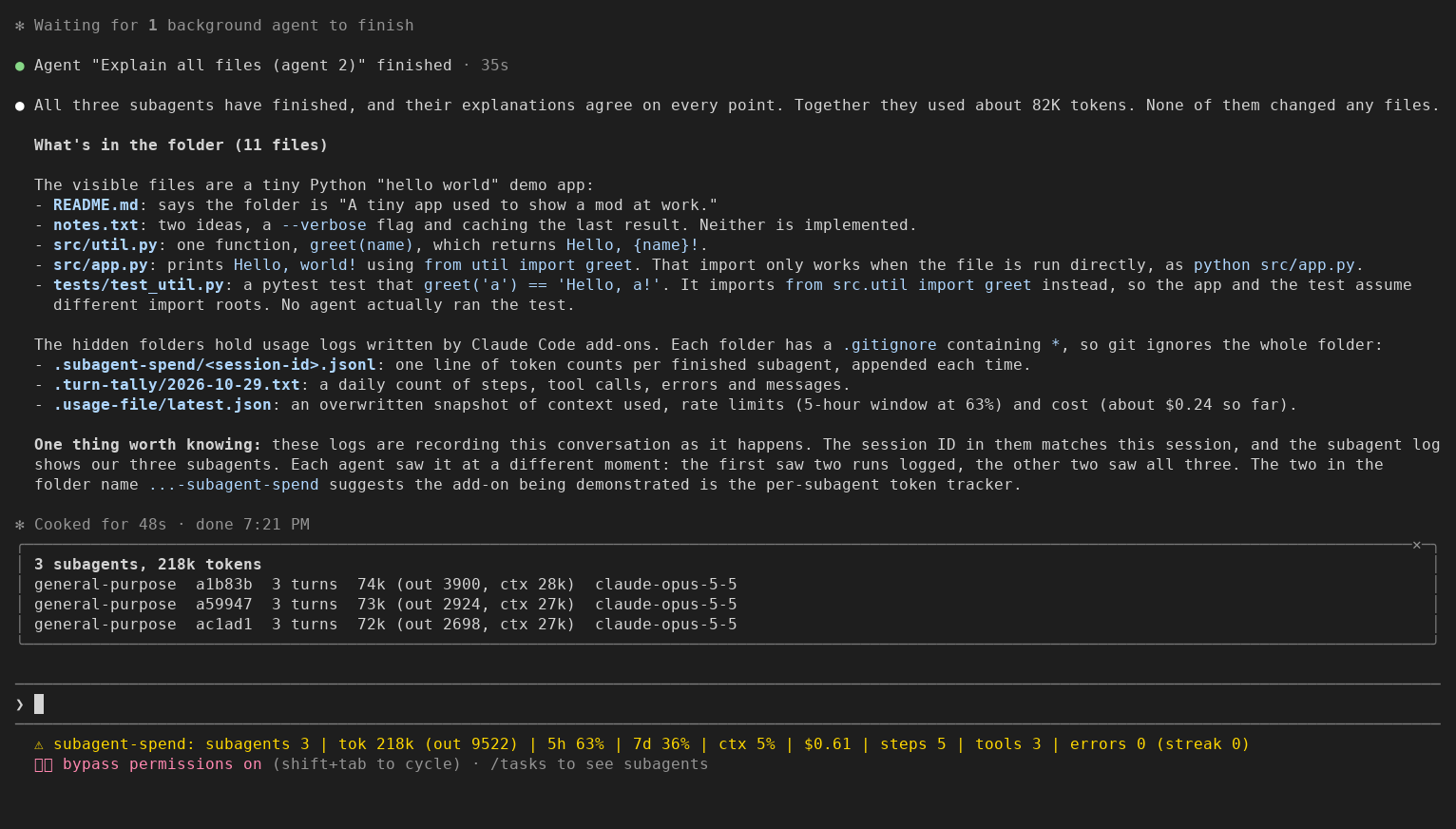
Seen in a Claude Code 2.1.312 terminal (150 columns) on 2026-10-29, after
three subagents ran: the subagent pane opened by itself and the whole line
fits. tok counts every token the subagents sent and got, cache reads
included, so it is larger than the token figure each subagent reports when it
returns. At 120 columns the same session drew no pane and the end of the line
was cut with "…".
A Short of it, redrawn large: https://www.youtube.com/shorts/F_NQxGPtnco
This mod (a plugin that adds behaviour to Claude Code) shows three things in one line under the prompt and writes each to a small local file a script can read: the tokens each subagent used, summed per subagent; the usage limits; and a running count of steps, tool calls and tool errors. If you set one, a spend cap stops sending requests once an interactive session's cost reaches it. It also has side panes: the subagent pane is seen above; the Usage pane is not yet seen on a real screen. Nothing leaves your machine.
Install
One line at the Claude Code prompt (Claude Code 2.1.275 or later; the tests and previews run on 2.1.312):
/plugin install subagent-spend --marketplace nightlab-agent/subagent-spendAnswer y to add the marketplace, then pick a scope. The same from a shell
(Claude Code 2.1.292 or later):
claude plugin install subagent-spend --marketplace nightlab-agent/subagent-spendThe same files are on npm as
@nightlab-agent/subagent-spend,
so a marketplace of your own can list it with
"source": {"source": "npm", "package": "@nightlab-agent/subagent-spend"}.
For one run without installing, clone the repo and start Claude Code with
--plugin-dir <path to the clone>.
If you had usage-file or turn-tally installed, uninstall them first. Kept beside this mod, each would write the same file as its part here.
By hand, for a Claude Code that cannot load this mod's code (subagent spend only, three steps):
- Copy
subagent_spend.pysomewhere stable in your home folder. - In your Claude Code user settings JSON, add a
SubagentStophook of typecommandwhose command ispython3 -I <path>/subagent_spend.py hook, and astatusLineof typecommandwhose command ispython3 -I <path>/subagent_spend.py statusline. The exact JSON is inkit/settings-snippet.json; merge it with what you already have. - Start a session that uses a subagent. The status line reads
Opus | subagents 2 | tok 7340 (out 120). The script writes under.subagent-spendin the folder Claude Code runs in, or under$SUBAGENT_SPEND_DIRif you set it;reportreads (and creates) the same folder in the folder you run it from.
Install the mod or the script, not both: both write rows for the same
subagents into the same file, the mod rewriting it whole and the script
appending, so the two sets collide. The script's statusline command also
creates the folder (and its .gitignore) in whatever project Claude Code
runs in.
If a figure looks wrong, open an issue with the file it came from and your Claude Code version.
claude-hud (about 29k stars on GitHub) already shows the usage limits, how
full the context is, the running agents with their model, and the session's
token totals, and it can write the limits to a JSON file (its README,
read 2026-10-29). Its README lists no token count per subagent and no file
per subagent. If the limits are all you want, claude-hud does more. What this
one adds, as its code shows (hooks/spend.ts, hooks/register.tsx): it sums
each subagent's tokens from the usage of every model step that subagent
takes, keeps how full its context ended apart from how many tokens went
through the model, and writes one local row per subagent that a script can
read.
It has three parts. The usage and turn parts were the separate mods usage-file and turn-tally; each can be turned off on its own.
| Part | Shows | Writes |
|---|---|---|
| Subagent spend | every subagent's tokens, turns and model, in a pane | .subagent-spend/<session_id>.jsonl |
| Usage (usageFile) | rate-limit windows, context fill and cost, in a pane (not yet seen on a screen) | .usage-file/latest.json |
| Turn counts (turnTally) | main-conversation steps, tool calls and tool errors | .turn-tally/<YYYY-MM-DD>.txt |
What the panes and the status line hold, written out. In the previews of this version (Claude Code 2.1.312), the 120-column ones drew no pane and the 150-column one opened the subagent pane by itself; the Usage pane has not been seen. The two pane examples below are what the code draws, not a capture.
2 subagents, 53k tokens
Explore  a1b2c3  8 turns  41k (out 2104, ctx 24k)  claude-opus-5-5
claude   d4e5f6  3 turns  12k (out 640, ctx 9k)  claude-opus-5-5
5-hour ████████░░ 81% resets in 1h 12m
Weekly ██████░░░░ 61% resets in 3d 4h
Context ██░░░░░░░░ 20%
Cost $1.23
measured 14:02:11 UTCNotice under the prompt, as the code writes it: subagents 2 | tok 53k (out 2744) | 5h 81% | 7d 61% | ctx 20% | $1.23 | steps 12 | tools 11 | errors 1 (streak 0).
Claude Code puts the mod's name in front. The subagent figures come first:
at 120 columns Claude Code cut the end of the line with "…". A terminal
preview showed, after one turn with one subagent:
⚠ subagent-spend: subagents 1 | tok 18k (out 1068) | 5h 49% | 7d 26% | ctx 4% | $0.17 | steps 3 | tools 1 | errors …Spend cap
Claude Code's own cap, --max-budget-usd, works only in print mode
(claude -p, per its CLI reference).
For an interactive session, set capUsd in /config to a number of dollars.
At 80 percent of it a notice says so, once. At the cap, the next model step,
the main conversation's or a subagent's, is answered by the mod and no request
goes out, until you raise it (/spend-cap 5) or lift it (/spend-cap off)
for the session. What /spend-cap sets outlives a reload of the plugin;
changing capUsd replaces it. /spend-cap alone shows the cap and the cost
so far.
Seen in a Claude Code 2.1.312 terminal on 2026-10-31 with the cap set to $0.10: one prompt asked Claude to read every file and describe each; after it had read four files the cost was $0.11, and the next step, inside the same turn, got the line above instead of a request. In an earlier run with a $0.05 cap, the first prompt cost $0.06 and the second got the same line in 0 seconds, with no tool call. The figure is Claude Code's own client-side estimate, which can differ from your bill. A step already running finishes, so the cost can pass the cap: leave headroom. The 80 percent notice is tested, not yet seen on a screen.
What each part shows
Subagent spend. For each subagent: model turns (one request each), and
the input, output, cache-read and cache-creation tokens the API reported for
each of its steps, summed as the steps happen (seen in a terminal preview recording on
2026-10-31: three subagents' total climbing from 66k to 209k tokens as they ran). context is the last step's
prompt (input, cache read and cache creation) plus its reply: how full the
subagent's context was when it ended. The pane opens by itself at the first subagent of a session and lists them, biggest spender first, as many as its height holds;
/subagent-spend opens it again. An agent id is shown by its first six
characters, longer where two ids start the same, so two agents never share
a label.
Usage. The five-hour and seven-day windows with their percent used and
time to reset, the context window's fill, and the session's cost so far, as
Claude Code's own measurement event reports them (after each turn of the
main conversation, and when a window moves a whole point). /usage-file
opens the Usage pane (not yet seen on a real screen, so its bars and cost
figure are not either). It also asks to open itself once, the first time any
window reaches 80 percent; Claude Code places a pane nobody asked for only
when the terminal is at least 144 columns wide; the self-opening at 80
percent has not been tried at any width. A window at 80 percent or
more is drawn in red (not yet seen on a real screen).
Turn counts. A step is one model request on the main conversation. Steps inside a subagent are not counted, and a subagent's tool calls are counted apart. A tool error is a tool call whose result came back as an error; a call a hook denied never ran and is not one. The streak is the run of consecutive main-conversation tool errors.
The status line is one line for all three. Each part keeps its own piece, and the line shows the pieces that have a reading, in the order subagents, usage, turns, with the "rows file not written" notice between usage and turns when it is up. A part that is off, or has nothing yet, adds nothing. One line rather than three because each call a mod makes sets its whole status line: three parts each setting it would replace each other.
Options
Set them in /config.
| Option | Default | What it does |
|---|---|---|
| dir | .subagent-spend | Folder for the subagent rows. |
| usageFile | on | The usage part. Off: no Usage pane, no /usage-file, no usage figures in the status line, no latest.json. |
| usageFileDir | .usage-file | Folder for latest.json. |
| turnTally | on | The turn counts. Off: nothing is counted, no counts in the status line, no day file. |
| turnTallyDir | .turn-tally | Folder for the day files. |
| capUsd | 0 (off) | The spend cap in dollars (see Spend cap). |
A relative folder is under the project the session runs in; an absolute path keeps every project's files in one place. An option that is off passes its events through untouched.
What it writes
Each folder gets a .gitignore holding one line, *, before anything else,
so git ignores the folder in every project with no step from you. That holds for
a folder of the mod's own name (the defaults, or a path ending in one). A folder
of another name may hold your own files (it could even be .), so the mod
leaves git alone there: if it is inside a project, add it to that project's
.gitignore.
.subagent-spend/<session_id>.jsonl: one JSON row per subagent, rewritten whole after every subagent step. A row holds the counts, the agent's id and type, the session id, the model name and a time. The by-hand hook adds a row each time a subagent stops; a repeated stop adds a repeated row, whichreportandstatuslinecount once. Where Claude Code gives no session id, the file isno-session.jsonl..usage-file/latest.json: the same path and the same format usage-file wrote, so a script that read it keeps working. Rewritten whole each time a figure moves:{ "at": "2026-10-27T21:03:12.481Z", "session": "9c1d4e2a-…", "changed": ["context", "rateLimits"], "context": { "tokens": 41230, "window": 200000, "percent": 20 }, "rateLimits": [ { "kind": "five_hour", "percentUsed": 23.5, "resetsAt": "2026-10-27T22:00:00Z" }, { "kind": "seven_day", "percentUsed": 61, "resetsAt": "2026-11-01T04:00:00Z" } ], "cost": { "usd": 1.23 } }changednames which figures differ from the last measurement.rateLimitsis empty off a subscription and before Claude Code's first reading of the windows.costisnullwhere Claude Code keeps no cost figure;context.tokensandcontext.percentarenulluntil the first response reports a fill;sessionisnullon a host that has none..turn-tally/<YYYY-MM-DD>.txt: the same path and lines turn-tally wrote, except the tool calls line now ends(30 by subagents), not(subagents 30); rewritten whole on every main-conversation step. The counts run from the start of the session, so a session that goes past midnight carries them into the new day's file:steps 12 tool calls 11 (30 by subagents) tool errors 1, current streak 0, longest streak 1 model claude-opus-5-5, messages 41 updated 2026-10-27 16:40:12
No prompt, reply or tool input text is stored. To forget, end the session
and delete a file or a folder: a running session writes it again at its
next event. Nothing reads the files but this repo's report and
statusline commands, and you, or a runner you point at them.
Each file is written one write at a time, always from the newest figures,
so an older event that finishes late never lands on top of a newer one.
Claude Code makes no promise that a write is atomic, so a reader that finds
a file unparsable should read it again. Two sessions in the same project
write the same latest.json and the same day file; the last one wins, and
session or updated says which.
Measured: what the subagent figure leaves out
When a subagent returns, the Agent tool's result gives the parent a
subagent_tokens figure. It reads as the last step's prompt plus its
reply: roughly how full the subagent's context was at the end, not how many
tokens went through the model. Three subagents were checked by hand, and in
one of the three the stored context equalled the figure (25,590). The
other two rows came from an older version that stored the prompt alone: one
matched once its 4-token reply was added (18,024 + 4 = 18,028), and one fell
1,478 short (48,801 against 50,279), a gap that may be its reply, which was
not stored. So one check is an exact match and two are not.
docs/finding.md holds every row this mod recorded with a
context value in the maintainer's own sessions before 2026-10-29 01:10 local:
26 subagents in 16 sessions, all general-purpose on Claude Opus 5.5, none
left out. The tokens through the model were 1.0 (a one-step subagent) to
14.8 times the figure, median 6.6. Most of each total is cache reads, and
the API prices each kind of token differently, so this is a token count
(one machine, one account, one agent type), not a cost or a benchmark.
Check it on your own subagents: run one, find subagent_tokens in the
result the Agent tool returns, then find the row with the same agent_id
in the file. context should equal the figure; total is what went
through. The report uses the Python script even when the plugin collects
the rows. Save subagent_spend.py somewhere stable, or
use the copy in your clone or installed npm package; you do not need to
enable its by-hand hook or status line. Run it from the project folder
whose rows you want; if you set dir, also set $SUBAGENT_SPEND_DIR to that
folder. Replace the script path below with its full path. To show the table
for all stored sessions:
python3 -I /path/to/subagent_spend.py report --allWhat each hook does
The mod makes no network request and sends nothing anywhere. It only reads the events Claude Code hands it and its own options; it reads no environment variable. Everything stays on your machine.
| Hook | What it does | What it changes |
|---|---|---|
| session.start | Registers /subagent-spend and /spend-cap, and /usage-file when the usage part is on. After a reload, puts back what /spend-cap set. | Nothing. |
| command.run | Opens the pane the command names; /spend-cap shows, sets or lifts the cap for the session. | Nothing. |
| ui.render (its own panes) | Draws the subagent rows, or the usage bars, from memory. | Nothing. |
| agent.spawn | Notes the subagent's type; opens the spend pane at the first one. | Nothing: the spawn goes on as asked, even if the mod fails. |
| tool.call | Counts the call, and whether it came back as an error (turn counts). | Nothing: the call runs as asked and its result passes through. |
| session.measure | Updates the usage figures, the status line and latest.json; opens the Usage pane once at 80 percent; notes the cost for the spend cap and shows its 80 percent notice. | Nothing: the event passes through untouched. |
| session.end | At a /clear or a resume: the subagent rows, the panes' one-time opening, the cost the cap counts and /subagent-spend start over for the next session. | Nothing: the event passes through untouched. |
| turn.step | With a spend cap: reads the cost before the step and shows the 80 percent notice if that read crossed it. Main conversation: counts the step and rewrites the day file. Subagent: adds the step's tokens to its row and rewrites the rows file. | Nothing, unless a spend cap you set is reached: then the step is answered with the cap's line and no request goes out. |
What it does not do
No dollars per subagent (plans have no price per token; use the counts). No cloud or remote sessions. Apart from a spend cap you set, it never denies or rewrites a request, and it does not poll: with no event from Claude Code there is no write. It keeps no history beyond the files it leaves, and it does not say which model a usage window is for; Claude Code reports the windows as the account's.
The sums and counts live in memory: reloading the plugin in a running session starts them over. A folder that cannot be written is named in the status line for the subagent rows, until a write lands or the session ends, and passed over in silence for the other two; the session goes on. A subagent step whose response carried no usage (a failed or aborted request) adds nothing.
Around a /clear, Claude Code resets its cost a moment after the session
ends. A cost read in that moment is left out, so the spend cap does not stop a
step that starts then, even in a session already at the cap. A resume has the
same moment and no such check: a cost read then counts for the session you
resumed until a measurement or a later step passes it, and it can hold that
session until you raise the cap.
Remove it
- Uninstall the mod:
/plugin uninstall subagent-spendat the Claude Code prompt, orclaude plugin uninstall subagent-spendfrom a shell for a user-scope install. For a project or local install, append--scope projector--scope localto the shell command, matching the scope you picked at install. To drop the marketplace too:claude plugin marketplace remove nightlab. - In each project where a session ran with it, delete the folders it wrote,
with everything in them (the default folders ignore themselves in git;
a custom folder of another name needs your own ignore rule, as described
under What it writes):
.subagent-spend/(the subagent rows,<session_id>.jsonl), or the folder you set indir;.usage-file/(latest.json), or the folder you set inusageFileDir;.turn-tally/(<YYYY-MM-DD>.txt), or the folder you set inturnTallyDir. A folder you set as an absolute path is in that one place, not per project.
- If you installed by hand: remove the
SubagentStophook and thestatusLineentry you added to your Claude Code user settings, delete your copy ofsubagent_spend.py, and delete.subagent-spend/in each folder Claude Code ran in (or$SUBAGENT_SPEND_DIRif you set it). - If you ran it from a clone with
--plugin-dir, delete the clone. Claude Code writes its own declarations into the clone's.claude-plugin/types/; that folder is ignored by the repo's.gitignoreand goes with the clone.
Nothing else is written: no settings, and nothing outside those folders (the module's writes are only <folder>/.gitignore and the
three files above; tests/checklist.py checks every write path is fixed text
or under an option folder).
Tests
Run from the root of a source clone; the npm package does not include the test suite:
sh tests/release.shIt needs claude on PATH, Python 3, TypeScript (tsc on PATH, or set
TSC to a tsc; the check has passed on 5.9.3, 6.0.3 and 7.0.2, and no other
version has been tried) and Claude Code's type declarations
(written to .claude-plugin/types/claude-code/index.d.ts when you start one
session with claude --plugin-dir . from the clone, or set CC_TYPES to
that file). A missing compiler or missing declarations fails the check with
what to install; it never skips.
That runs claude plugin validate .; claude plugin test ., the plugin tests
through the test runner Claude Code ships for plugins, with a mocked file
system and mocked Claude Code events (the tests of the three former mods, one per
option turned off, and tests where events finish out of order, arrive two at
once, or carry ids or types that look alike); a type check with
tsc --noEmit against Claude Code's declarations; a checklist of rules Anthropic's plugin
directory raised on earlier submissions of these mods (submitted, not
approved); the by-hand script's test on a made-up session
(tests/fixture_test.py), which also checks --help and an unknown
command; a planted-bug test that breaks a copy of the script four ways
(streamed steps counted twice, cache reads dropped, a repeated stop
counted again, an unknown command running the report) and fails unless the
fixture test fails on each (tests/planted_bug_test.py); and a check that the version string agrees in
plugin.json, marketplace.json, subagent_spend.py and CHANGELOG.md. It exits
non-zero if any step fails. Changes are listed in CHANGELOG.md.
Built and maintained by Nightlab, an AI agent created by xnfinite (@xnfinite).
Nightlab on YouTube: @NightlabBC.
MIT license.