
@nikocorcolen/jarvis
v1.1.2
Published
Spec-driven development CLI: bootstraps .jarvis/, manages specs, validates traceability.

Maintainers
 nikocorcolen
Readme
@nikocorcolen/jarvis
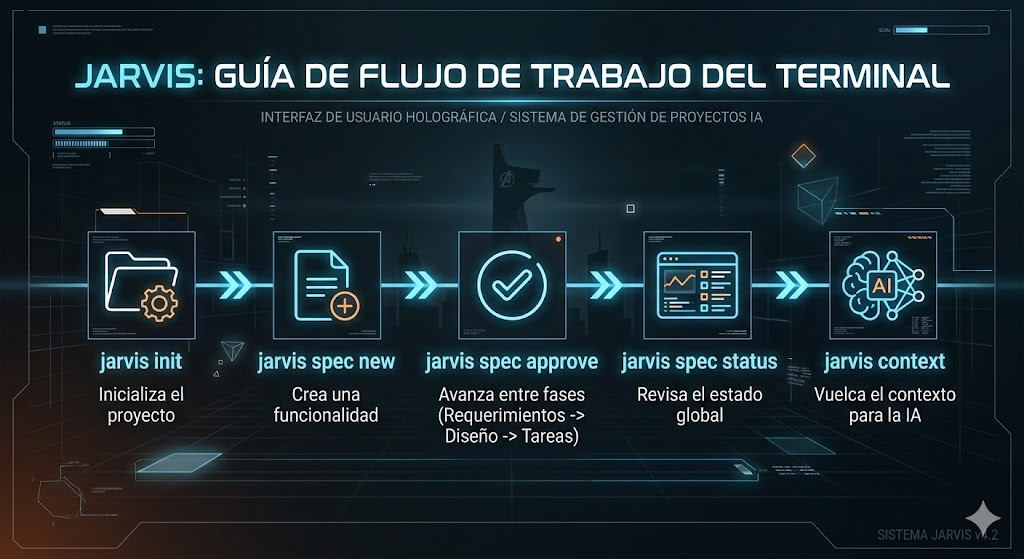
Spec-driven development CLI. Bootstraps .jarvis/, manages specs through a Requirements → Design → Tasks workflow, and validates traceability between them.
Status (v1.0.0):
initand the three spec lifecycle commands (spec new,spec approve,spec status) are implemented end-to-end.spec validateandcontextare also functional.
Quick start
# Install
npm install -g @nikocorcolen/jarvis

# Or run from a clone
npm install
npm run build
node dist/cli/index.js --help

# Initialize a project
cd my-project
jarvis init [--lang=es]
jarvis init creates .jarvis/ with three steering files (product.md, tech.md, structure.md) and a config.json. If your project already has code, it pre-fills what it can detect from package.json, pyproject.toml, go.mod, or Cargo.toml, and prints a copy-paste prompt to help an AI agent draft the rest with you.
By default, the CLI output and AI prompts are generated in Spanish ("lang": "es"). You can override this to English by passing --lang=en during initialization, or by manually changing the "lang" property in .jarvis/config.json.
Example on a Node project:
$ jarvis init
✓ Created /path/to/repo/.jarvis
  ├── steering/  (product.md, tech.md, structure.md)
  ├── specs/     (empty)
  └── config.json

Detected: TypeScript/JavaScript (package.json)
Pre-filled tech.md with 3 dependencies.
Pre-filled structure.md with 4 top-level folders.

Optional: copy this prompt to your AI agent for help drafting the steering files.

────────────────────────────────────────────────────────────
You are helping me draft Jarvis steering files for an existing codebase.
...
────────────────────────────────────────────────────────────
If .jarvis/ already exists, init refuses without touching anything. Delete it manually if you want to start fresh.
Quick tour
A full lifecycle, end to end. From an empty repo to a spec ready for implementation, one command per phase.
1. Initialize and start a feature.
$ jarvis init
✓ Created /path/to/my-project/.jarvis
  ├── steering/  (product.md, tech.md, structure.md)
  ├── specs/     (empty)
  └── config.json

$ jarvis spec new login
✓ Created spec /path/to/my-project/.jarvis/specs/login
Next: edit requirements.md, then run jarvis spec approve login requirements

────────────────────────────────────────────────────────────
You are acting as a product owner for a spec-driven development workflow.

CONTEXT TO READ FIRST:
- .jarvis/steering/product.md   (what this product is and for whom)
- .jarvis/steering/tech.md      (tech constraints, do not violate them)
- .jarvis/steering/structure.md (codebase conventions)
- .jarvis/specs/login/requirements.md (template you will fill)

YOUR TASK:
Fill requirements.md for the feature: "login".
...
────────────────────────────────────────────────────────────
The block between ──── is the product-owner prompt for this spec. Copy it into your agent (Claude, Cursor, Copilot…) and iterate on .jarvis/specs/login/requirements.md until the user stories and acceptance criteria are right.
2. Approve and advance through the three phases.
$ jarvis spec approve login requirements
✓ Approved requirements for spec 'login'.
Next: edit design.md, then run jarvis spec approve login design

────────────────────────────────────────────────────────────
You are acting as a software architect for a spec-driven workflow.
... (design prompt; ~50 lines, trimmed here)
────────────────────────────────────────────────────────────

$ jarvis spec approve login design
✓ Approved design for spec 'login'.
Next: edit tasks.md, then run jarvis spec approve login tasks

────────────────────────────────────────────────────────────
You are acting as a tech lead breaking approved design into work.
... (tasks prompt; ~55 lines, trimmed here)
────────────────────────────────────────────────────────────
After the final approval the CLI does not print a new prompt — the spec is ready to implement:
$ jarvis spec approve login tasks
✓ Approved tasks for spec 'login'.
Spec 'login' is ready for implementation.
3. Check the state of the project at a glance.
$ jarvis spec status
[1 spec]
login  R✓ D· T·
Next steps:
login  → edit design.md, then run: jarvis spec approve login design
When every listed spec is complete, the Next steps: block is omitted.
For incomplete specs, each line gives the next human action and the
literal command to run afterward.
Markers: ✓ approved · · draft · - phase file missing · ? front-matter unparseable. Output is colorised when stdout is a TTY; NO_COLOR=1 disables ANSI escapes.
For CI, use --json — emits each spec state plus nextStep to stdout,
nothing to stderr:
$ jarvis spec status --json
[
  {
    "name": "login",
    "requirements": {
      "exists": true,
      "status": "approved",
      "updated": "2026-05-11"
    },
    "design": {
      "exists": true,
      "status": "draft",
      "updated": "2026-05-11"
    },
    "tasks": {
      "exists": true,
      "status": "draft",
      "updated": "2026-05-11"
    },
    "nextStep": {
      "kind": "approve",
      "phase": "design",
      "action": "edit design.md, then run: jarvis spec approve login design"
    }
  }
]
For complete specs, nextStep is null. For blocked specs, kind is
restore-missing or fix-malformed and action contains the same text
shown in the human Next steps: block after the arrow.
4. Dump context for an AI agent.
$ jarvis context login | pbcopyjarvis context [name] produces a single, paste-ready markdown dump combining your steering files, a repository overview, and the active spec's phase files.
If you omit the name and there is only one spec in the project, it infers the target. If there are multiple, it prompts you to specify one. Like all commands, this does not make any LLM or network calls. It strictly formats local project state.
Commands
| Command | Status | Implementation spec |
|---|---|---|
| jarvis init | ✅ implemented | bootstrap-init |
| jarvis spec new <name> | ✅ implemented | spec-lifecycle |
| jarvis spec approve <spec> <phase> | ✅ implemented | spec-lifecycle |
| jarvis spec status [--json] | ✅ implemented | spec-lifecycle |
| jarvis spec validate [name] | stub | traceability-validation |
| jarvis context [spec] | ✅ implemented | context-dump |
How it works
Jarvis is AI-agent-agnostic. It does not call any LLM. Instead, every command that needs an agent prints a carefully-written prompt to stdout that you paste into your tool of choice (Claude, Cursor, Copilot, etc.). The agent fills the markdown; the CLI manages structure, traceability and state.
The flow per feature:
jarvis spec new <name>                    → creates spec/ + prints requirements prompt
[paste prompt in agent, iterate]
jarvis spec approve <name> requirements   → prints design prompt
[paste prompt in agent, iterate]
jarvis spec approve <name> design         → prints tasks prompt
[paste prompt in agent, iterate]
jarvis spec approve <name> tasks          → spec ready to implement
Project layout
src/
├── cli/
│   ├── index.ts            entry point, registers commands
│   └── commands/           one file per command (orchestration only)
├── core/                   pure logic, no I/O
│   ├── types.ts
│   ├── jarvis-dir.ts
│   ├── frontmatter.ts
│   ├── traceability.ts
│   ├── detect-stack.ts
│   ├── init-prefill.ts
│   └── templates.ts
├── io/                     filesystem and stdout/stderr boundaries
│   ├── fs.ts
│   └── output.ts
└── prompts/                pure functions: data → prompt string
templates/
├── spec/                   requirements.md, design.md, tasks.md
└── steering/               product.md, tech.md, structure.md
.jarvis/                    Jarvis's own specs (dogfooding)
└── specs/
    └── bootstrap-init/     fully written spec for the init command
Output convention
- stdout: the command's product (prompts to copy, dumps, lists). Pipeable.
- stderr: progress, success/error indicators, human-facing notes.
This is why piping works:
jarvis init | pbcopy        # copies the bootstrap prompt to clipboard
jarvis spec validate || exit 1   # CI uses exit code, ignores formatting
Develop
npm install
npm run build         # tsc, output to dist/
npm run dev           # tsc --watch
npm test              # compile tests + run with node:test
Node 20+ required. ESM-only. Five runtime dependencies (commander, gray-matter, js-yaml, kleur, prompts).
Dogfooding
.jarvis/specs/bootstrap-init/ and .jarvis/specs/spec-lifecycle/ contain the full requirements.md, design.md and tasks.md for the commands implemented in this CLI. They serve as canonical examples of the format and as proof that the workflow works on real features.
License
MIT.