
@nis3soft/ng-avatar
v0.0.4
Published
Simple Angular Avatar component for use with Material UI.


Readme
NG Avatar <ng-avatar>
Simple Angular Avatar component for use with Material UI.
Installation
To install this library, run:
$ npm install @nis3soft/ng-avatar --saveConsuming your library
After instalation import module into your Angular AppModule:
import { BrowserModule } from '@angular/platform-browser';
import { NgModule } from '@angular/core';

import { AppComponent } from './app.component';

// Import your library
import { NgAvatarModule } from '@nis3soft/ng-avatar';

@NgModule({
  declarations: [
    AppComponent
  ],
  imports: [
    BrowserModule,
    // Specify NgAvatarModule as an import
    NgAvatarModule
  ],
  providers: [],
  bootstrap: [AppComponent]
})
export class AppModule { }
Once your library is imported, you can use its components, directives and pipes in your Angular application:
<!-- You can now use ng-avatar component in app.component.html -->
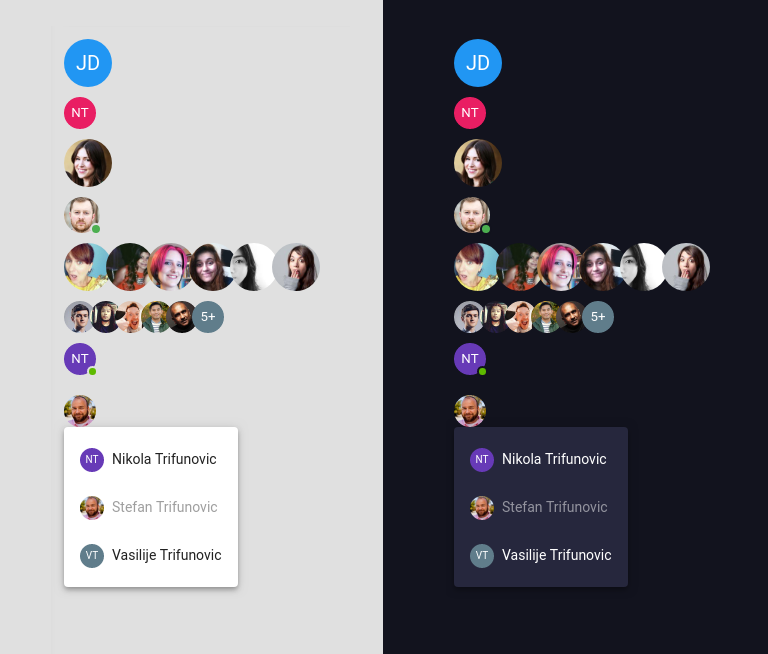
<div fxLayout="column" fxLayoutGap="10px">

  <ng-avatar size="48" name="John Doe" color="#2196f3"></ng-avatar>

  <ng-avatar text="NT" color="#e91e63"></ng-avatar>

  <ng-avatar size="48" photo="https://randomuser.me/api/portraits/women/79.jpg"></ng-avatar>

  <ng-avatar status="#4caf50" size="36" photo="https://randomuser.me/api/portraits/men/79.jpg"></ng-avatar>

  <ng-avatar-group>
    <ng-avatar size="48" photo="https://randomuser.me/api/portraits/women/7.jpg"></ng-avatar>
    <ng-avatar size="48" photo="https://randomuser.me/api/portraits/women/15.jpg"></ng-avatar>
    <ng-avatar size="48" photo="https://randomuser.me/api/portraits/women/9.jpg"></ng-avatar>
    <ng-avatar size="48" photo="https://randomuser.me/api/portraits/women/13.jpg"></ng-avatar>
    <ng-avatar size="48" photo="https://randomuser.me/api/portraits/women/18.jpg"></ng-avatar>
    <ng-avatar size="48" photo="https://randomuser.me/api/portraits/women/21.jpg"></ng-avatar>
  </ng-avatar-group>

  <ng-avatar-group [plus]="5">
    <ng-avatar photo="https://randomuser.me/api/portraits/men/1.jpg"></ng-avatar>
    <ng-avatar photo="https://randomuser.me/api/portraits/men/2.jpg"></ng-avatar>
    <ng-avatar photo="https://randomuser.me/api/portraits/men/3.jpg"></ng-avatar>
    <ng-avatar photo="https://randomuser.me/api/portraits/men/4.jpg"></ng-avatar>
    <ng-avatar photo="https://randomuser.me/api/portraits/men/5.jpg"></ng-avatar>
  </ng-avatar-group>


  <ng-avatar
  size="32"
  name="Nikola Trifunovic"
  status="#5eba00"
  [matMenuTriggerFor]="changeStatus">
</ng-avatar>
<mat-menu #changeStatus="matMenu">
  <button mat-menu-item disabled>
    <span>Online</span>
  </button>
  <button mat-menu-item>
    <span>Offline</span>
  </button>
</mat-menu>


<ng-avatar
size="32"
photo="https://randomuser.me/api/portraits/men/31.jpg"
name="Stefan Trifunovic"
[matMenuTriggerFor]="userPicker">
</ng-avatar>
<mat-menu #userPicker="matMenu">
  <button mat-menu-item>
    <ng-avatar size="24" name="Nikola Trifunovic" class="m-r-8"></ng-avatar>
    <span>Nikola Trifunovic</span>
  </button>
  <button mat-menu-item disabled>
    <ng-avatar size="24" photo="https://randomuser.me/api/portraits/men/31.jpg" class="m-r-8"></ng-avatar>
    <span>Stefan Trifunovic</span>
  </button>
  <button mat-menu-item>
    <ng-avatar size="24" name="Vasilije Trifunovic" class="m-r-8"></ng-avatar>
    <span>Vasilije Trifunovic</span>
  </button>
</mat-menu>

</div>
Options
| Attribute | Type | Default | Description |
| ------------------- | ----------------- | -------- |-----------------------------------------------|
| name | string | | Generate avatar usinginitials
| text | string | | Generate avatar using text value
| photo | string | | Generate avatar using image
| size | number | 32 | Size of avatar in pixels
| color | string | random | Background color of avatar (hex or name)
| status | string | null | Color of status indicator (hex or name)
Options
| Attribute | Type | Default | Description |
| ------------------- | ----------------- | -------- |-----------------------------------------------|
| plus | number | 0 | Number to be used as value in plus avatar
| plusSize | number | 32 | Size of avatar for plus in pixels
| color | string | random | Background color of avatar (hex or name)
History
- 0.0.1 : Initial experimental release
- 0.0.4 : Removed
console.logcall, addedplusSizeoption to<ng-avatar-group>
License
MIT © Nikola Trifunovic